Updated 1 November 2026guide
CRM for Consultants: A Practical Buying Guide
How to choose a CRM for consultants: map your sales workflow, set requirements, compare platforms, cost it fully and test one before you commit.
 Ashley Kemp14 min read
A CRM for consultants should keep leads moving without adding busywork to your client work. The right fit depends on how you sell, what you need clients to see, and whether you want one platform or a focused sales tool.
Step 1: Map Your Consulting Sales and Client-Management Workflow
Start with the work you already do, not a feature list. Write down what happens from the first enquiry through the sale, delivery, renewal, and referral. Include the handoffs that happen in email or a quick message, because those are easy to forget when you plan a new system.
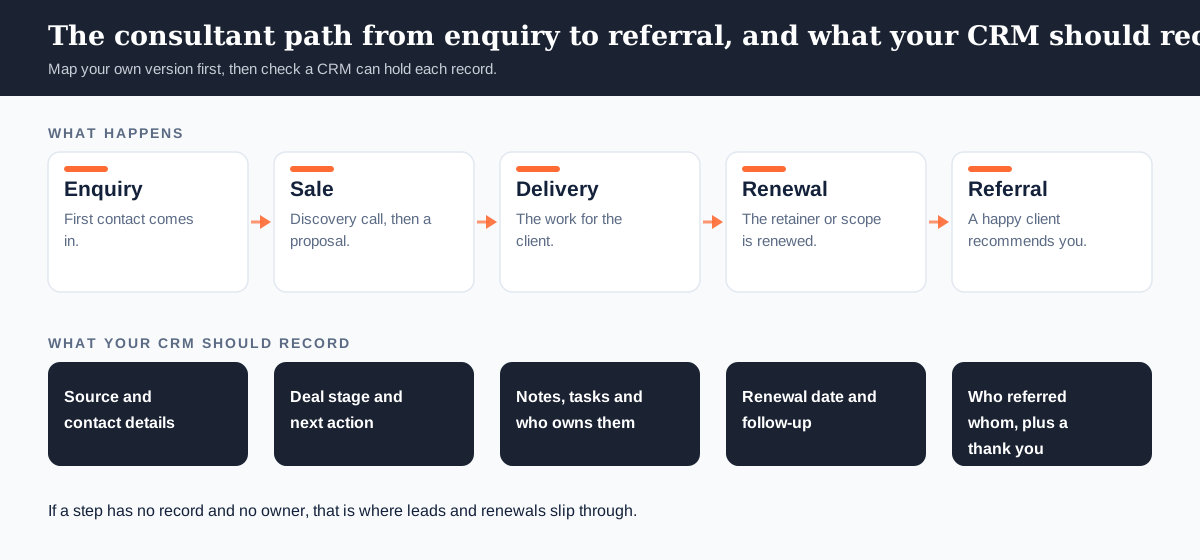
For each stage, note who does the work and what must happen next. A solo consultant may capture a referral, book a discovery call, send a proposal, then follow up. A small firm may add an associate who needs the call notes and the next task before speaking with the prospect.
Trace the full lead path. Where does a new contact come from? Where do you record the source? What happens after someone books a call, and who follows up if they miss it? The consultant workflow examples for GoHighLevel can help you think through lead capture, booking, proposal follow-up, and renewals.
Then map client communication and delivery. Decide which messages belong in a shared record, whether clients need a portal, and how you handle proposals or invoices. A CRM may help with contact history and sales follow-up, but it may not replace project tracking or time and expense tools. Mark those jobs separately.
Look for friction, not imagined features. If a proposal sits untouched for a week, note the follow-up gap. If you spend ten minutes finding the last meeting note, record where that information lives today. These details show which steps a CRM needs to support and which work should stay in another tool.
Keep the map to one page at first. Use a simple sequence such as enquiry, discovery, proposal, decision, active client, and renewal. Add a note wherever work changes hands or relies on someone remembering a task.
Key Takeaway: A useful CRM should support the steps and handoffs you have mapped, not force you to redesign your practice around a feature list.
Step 2: Turn Your Workflow Into a CRM Requirements Checklist
Translate each point on your workflow map into a requirement you can test. Avoid vague requests such as “better client management.” Say what should happen instead: a new enquiry is recorded with its source, a proposal gets a follow-up task, or a client conversation stays attached to the right contact.
Group requirements into must-haves and nice-to-haves. For a solo consultant, a clean contact record and reliable reminders may matter more than complex account controls. A boutique agency managing several client accounts may care more about separate workspaces, team access, and repeatable workflows.
For sales work, check that the system can show each deal’s stage and next action. Ask whether you can see proposals awaiting a reply without opening every contact record. The GoHighLevel CRM feature guide explains how its contact records, pipelines, conversations, and reporting fit together.
Next, list the communication tasks you want the CRM to handle. These may include email follow-up, appointment reminders, or two-way text messages. Be specific about the trigger. For example, a booking could start a confirmation message, while a proposal stage could set a reminder for the consultant to check in.
Think about client-facing work too. Do clients need a branded place to view information or submit requests? Do you need to send proposals and invoices from the same system? A CRM can help keep sales records and communication together, but don’t assume every platform includes a client portal, billing, or full project management.
List the tools the CRM must connect to. Include your calendar, email provider, payment process, file storage, and any project tool you plan to keep. Check how each connection works: a built-in link, an integration, or a manual export can lead to very different day-to-day work.
Finally, define what a good report needs to answer. You might want to see the number of open proposals, the value of active opportunities, or which lead sources bring qualified enquiries. Reporting only helps when someone can act on the result, so name the decision each report should support.
- Must-have: a contact record, a clear pipeline, and a way to set the next follow-up.
- Check before buying: client account setup, email and SMS use, integrations, mobile access, and reporting.
- Keep separate if needed: detailed project plans, billable time tracking, or specialist finance work.
Use this list to compare platforms on the same tasks. A long feature page can look impressive, but a short test of your real process will tell you more.
Step 3: Match CRM Platforms to Your Consulting Business
Choose a platform by the jobs it must handle and the size of your operation. A solo practice with a small number of active clients may need contact records and reminders. A growing consultancy may need automation that carries a lead from a form to a booked call and through proposal follow-up.
GoHighLevel bundles a CRM with funnels, email, two-way SMS, booking, and other marketing features in one account. The fit for your business depends on which parts you’ll use. We help consultants and small agencies assess those workflows and costs.
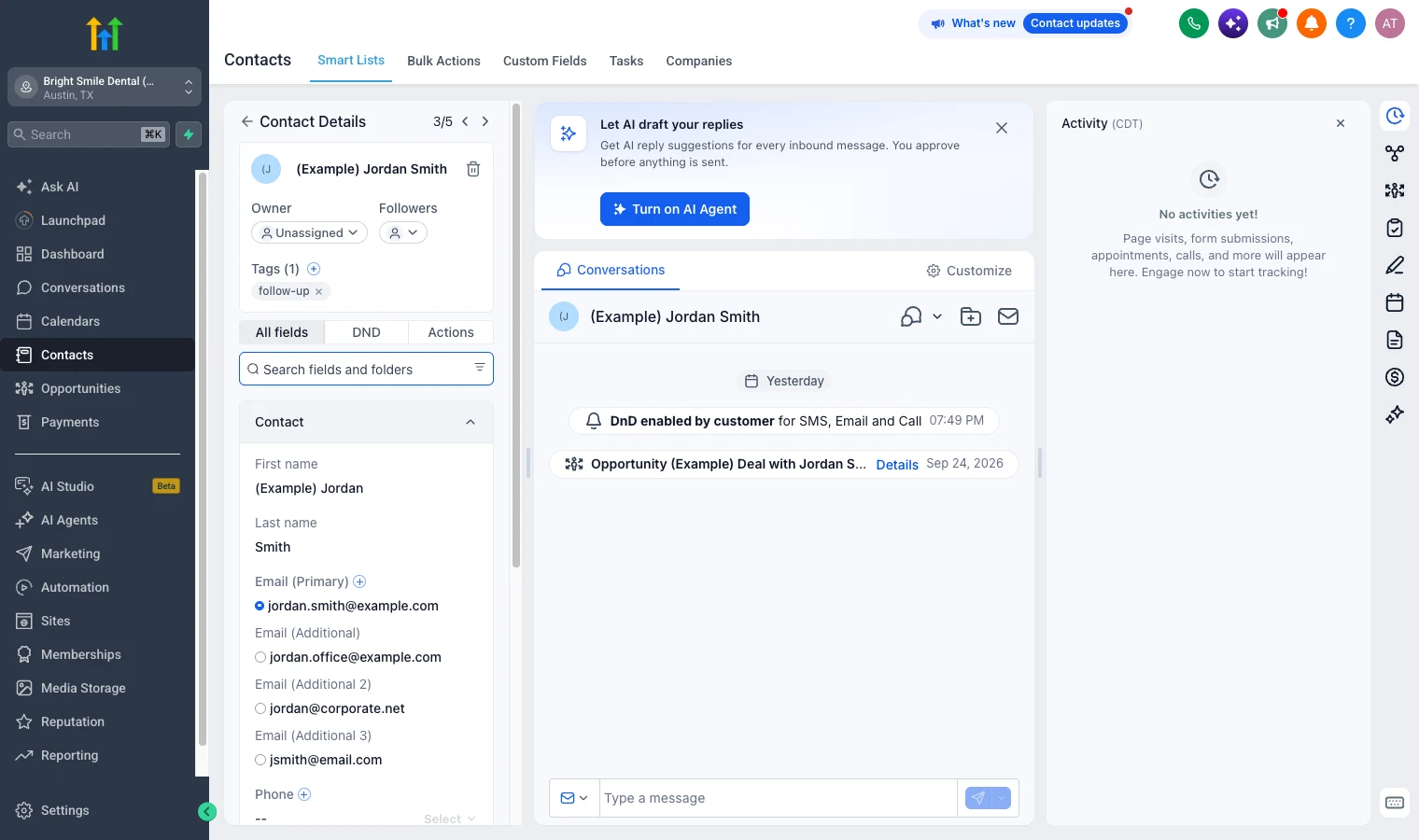
For a consultant who wants to run lead capture, appointment booking, and follow-up in one place, GHL may suit the workflow. A business that only needs an address book and a clear sales pipeline may prefer a more focused CRM. Pipedrive is a pipeline-focused option. HubSpot has a free CRM for basic contact management, while access to its comparable marketing automation tier can change the cost substantially.
That difference matters. HubSpot Marketing Hub Professional starts at $890 per month, or $800 per month billed annually, and has a mandatory $3,000 onboarding fee (checked on HubSpot’s pricing page on 1 November 2026). Its free CRM may still fit a consultant who needs basic contact management rather than those marketing features.
Keap is another option for small service businesses that want sales automation alongside invoicing and recurring billing. SuiteDash may be worth a look if branded client access is a key requirement. Its white-label approach includes options such as a custom domain, branded login screen, and transactional email.
White-label claims deserve a closer look. A branded login alone may not mean clients see your name across the full experience. Check the domain, emails, mobile app, and any customer-facing screens. Treat full white-label branding as a feature to verify rather than assume.
For an agency serving multiple clients, account separation and repeatable setup may matter more than an individual consultant’s contact view. GoHighLevel starts at $97 a month, and SaaS Mode, the feature for reselling GoHighLevel under your own brand, comes with the $497 Founder plan (previously Agency Pro). Verify current plan limits and usage costs before choosing a plan.
Pick a narrow use case before you trial anything. A consultant might test how a new lead gets from a landing page to a booked discovery call. An agency might test how a new client account receives its own pipeline and follow-up process. If you want to see whether GHL fits your own workflow, you can start the 30-day free trial through our link. A card is required at signup, and billing starts after the trial unless you cancel.
GoHighLevel isn’t the right buy for everyone. If email alone or simple appointment booking covers your needs, an all-in-one subscription may add cost and setup work without solving a real problem. Keep that distinction in view when you compare platforms.
Step 4: Calculate the Full Cost Before You Commit
Compare the full monthly cost, not just the plan price. Start with the CRM subscription, then add usage charges, any paid integrations, and the subscriptions you’ll keep. Include staff time for setup and upkeep if the change will take people away from billable work.
For GoHighLevel, the plan price is only one part of the bill. Texts, calls, email, and AI are charged based on use. As of 18 September 2026, GoHighLevel charges $0.00747 per SMS segment plus carrier fees, $0.0166 per minute for outbound calls, and $0.675 per 1,000 emails. AI Employee is priced at $50 or $97 a month per client account.
Estimate your use before you compare. Count monthly text segments, outbound call minutes, and email volume from a typical month. Add the amount for any AI feature you plan to use on each client account. These costs vary with activity, so a busy campaign and a quiet month may not produce the same bill.
Then note what stays. Many consultants still need a project management system or design software. Some need a separate reporting tool or an existing website. The aim is to count what the CRM replaces and what you’ll keep, rather than treating every bundled feature as a saving.
A simple comparison can use this formula: current subscriptions you can cancel, minus the CRM plan, usage fees, retained tools, and migration costs. If the result is a saving, check whether the platform can handle those tasks in a way your clients and team will use. A subscription you pay for but avoid using is not a useful replacement.
Our GoHighLevel review and pricing breakdown covers plan limits and charges, which can help you build a more complete estimate. In our pricing analysis, a three-person agency saves about $4,104 a year while keeping reporting, project management, and design tools. Treat any modelled saving as an example, not a promise for your own stack.
Before choosing a billing term, verify current plan limits and trial terms, and compare any annual commitment with your expected usage. GoHighLevel starts at $97 a month, but usage charges and retained subscriptions still affect the total.
Don’t treat a lower starting price as a lower total cost until you’ve checked user charges, usage fees, and the tools you’ll retain. For the same reason, don’t count the full cost of an existing tool as savings if you still need it for client delivery.
Pro Tip: Use a conservative estimate for messages and calls, then test the usage meter during a real workflow before moving every client.
Step 5: Test the CRM, Migrate Your Data, and Launch One Workflow
Run a small test before moving your whole practice. Pick one workflow with a clear start and finish, such as a new enquiry that becomes a booked discovery call. Use a test contact and check each action yourself, including the record created, the message sent, and the follow-up task.
Bring a few real records into the test environment only after you’ve checked what data you need. Review contact fields, deal stages, tags, and notes. Decide which old records should move and which should stay archived. Cleaning the data first makes it easier to spot mistakes later.
Write down where each important field will go. If your old system calls a field “Lead status” and the new one calls it “Opportunity stage,” make the mapping clear before import. Check custom values and pipeline stages too. A quick import can appear successful while quietly changing what a record means.
Inventory the workflows and integrations you rely on. Contact records may move, but automations often need to be rebuilt in the new system. List the trigger, condition, and action for each one. Reconnect integrations one at a time and test each connection before relying on it for live client work.
Move a small batch first. Compare the record count and inspect a sample field by field. Then test one lead through the full path, from first enquiry to the next sales stage. If messages, reminders, or reports don’t behave as expected, pause and correct the setup before moving more data.
Plan the change for the people who’ll use the system. Tell them what changes, where to record a client conversation, and how to raise a problem. Keep the old system accessible during the transition so you can check a record or restore a needed detail without rushing.
Set a clear launch point and assign one person to make decisions. For a small team, that could mean moving one consultant’s pipeline first, then adding the rest after the workflow works. A staged launch gives you a chance to fix issues while the number of affected records is still manageable.
After launch, review a few signals each week: open opportunities, overdue follow-ups, and whether new leads reach the right person. If the CRM’s report doesn’t match what you see in the records, fix the field or workflow behind it before using that number to make a sales decision.
Keep the first workflow small enough to understand. Once it runs as planned and the team can use it without workarounds, choose the next process to move.
Frequently Asked Questions
What should a CRM for consultants include?
Is GoHighLevel a good fit for a solo consultant?
How much does GoHighLevel cost each month?
Will a CRM replace my project management software?
How should I move client data to a new CRM?
Choose Your CRM and Test One Workflow
Choose the CRM that fits the workflow you mapped, then test one live process before committing to a full migration. For most consultants who want lead capture, booking and follow-up in one account, GoHighLevel is the first platform to test. Start the 30-day free trial, then compare the full bill with the tools you’ll keep.
We earn a commission if you start GoHighLevel through the links on this page, at no extra cost to you.
DO THIS NEXT, FREE FOR 30 DAYS
The quickest way to know is to try it on real work.
- STEP 1Claim your free month
- STEP 2Rebuild one thing from this guide
- STEP 3Decide before day 30
Free for 30 days from the day you start. Card required.
Featured in Forbes and Business Insider.
Ashley Kemp is a digital entrepreneur and perpetual traveller. Switched from ClickFunnels to GoHighLevel years ago and never looked back. Writing about what actually works.
Was this article helpful?