Updated 25 September 2026tutorial
GoHighLevel Voice AI: Setup, Cost & 2026 Guide
GoHighLevel Voice AI tested across 30 days of real calls: model choice, per-minute costs, agency deployment tips, and where it still falls short.
 Ashley Kemp18 min read
What is GoHighLevel's AI Voice Agent?
GoHighLevel's AI Voice Agent is an AI-powered system that handles real GoHighLevel phone system conversations. It can answer inbound calls, make outbound calls for appointment reminders, qualify leads through natural dialogue, book appointments, and transfer to human agents when needed. As of 2026 you pick the model per agent (GPT 4.1 by default, with GPT 5.x options) with sub-600ms response latency, and it supports existing business numbers. It integrates with GHL workflows and costs roughly $0.06 to $0.215 per minute on pay-per-use depending on the voice selected, plus LLM token charges, or comes unmetered on the $97/month AI Employee unlimited plan for inbound calls.
What is the GoHighLevel AI Voice Agent?
GoHighLevel's AI Voice Agent is an AI-powered phone system that handles real conversations with leads and customers. It goes beyond simple IVR menus. The AI understands context, responds naturally, and takes actions like booking appointments or updating CRM records during the call.
For agencies, this means leads get answered immediately at any hour, appointment no-shows drop because of automated reminder calls, and your team spends less time on repetitive phone tasks.
This is part of GoHighLevel's broader AI feature set. If you are new to GoHighLevel entirely, start with our platform review.
What changed in Voice AI for 2026
The Voice AI that ships today is materially different from the version that launched in late 2024. Six changes matter most for anyone deciding whether it is ready for real client calls.
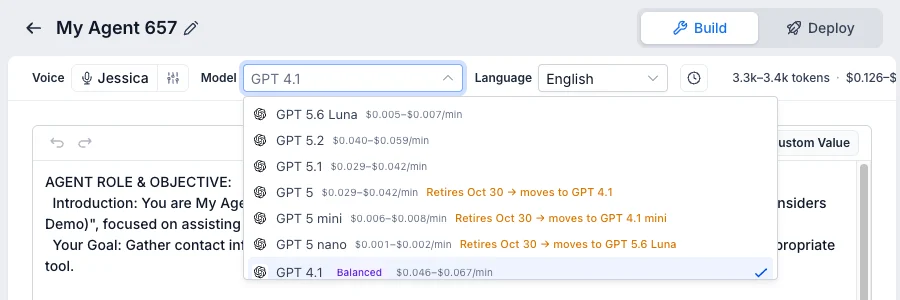
A model menu and sub-600ms latency. Each agent now has a model dropdown with its own per-minute price. In our builder it defaulted to GPT 4.1 ($0.046 to $0.067 a minute for the model), with GPT 5.6 Luna ($0.005 to $0.007), GPT 5.1 and GPT 5.2 also offered. The older GPT 5, GPT 5 mini and GPT 5 nano options are marked to retire on 30 October and move agents to their replacements automatically. The single most important improvement is still speed. The previous generation left a noticeable pause between the caller finishing a sentence and the agent responding, which is exactly the tell that gives away a bot. At sub-600ms the exchange sits inside the range of a natural human thinking pause, and in structured conversations most callers do not notice they are speaking to AI. Complex multi-turn calls, handling objections and interruptions, now hold together reliably rather than breaking down.
Existing business number support. Voice AI can be assigned to a business's existing published phone number rather than a separate AI-only line. This removed the largest deployment barrier: clients no longer have to change the number on their website, cards, and listings to route calls through the agent.
Custom voice profiles. The voice library now supports tone, speed, and accent adjustment, so each client can carry a distinct voice that matches their brand. A law firm and a dental practice do not have to sound the same.
Knowledge base integration. FAQs, service descriptions, pricing sheets, and policies connect directly to the agent, which then answers from the business's own data instead of improvising. This is the difference between an agent that sounds informed and one that hallucinates.
Voice AI Orb Widget. A clickable widget lets website visitors start a full voice conversation in the browser, not a text chat, straight from the page.
Performance reporting. Call volume, duration, booking rate, transfer rate, and caller sentiment are now tracked across all Voice AI interactions, available in Labs, which turns tuning from guesswork into something measurable.
Setting up your first Voice Agent
Step 1: Open Voice AI and create an agent
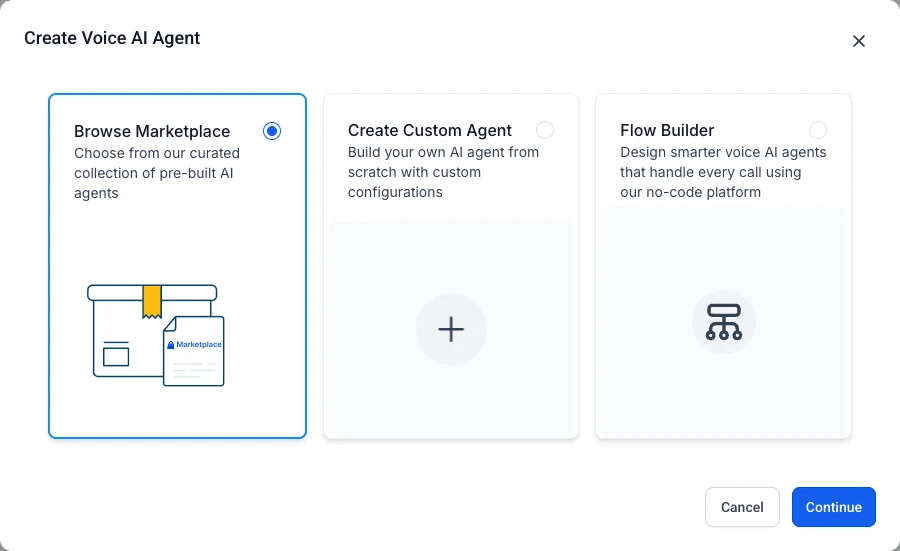
In the sub-account, go to AI Agents → Voice AI and click Create Agent. You get three starting points:
- Browse Marketplace: start from a pre-built agent (receptionists, sales agents, industry templates)
- Create Custom Agent: build your own from a prompt
- Flow Builder: design the call as a no-code flow with branches
The Agent Templates tab is worth a look first. It lists ready-made voice agents, many free, with ratings and install counts, so you can start from a proven receptionist instead of a blank prompt.
Step 2: Write the prompt, pick a voice and set the welcome message
The Build tab is where the agent comes together:
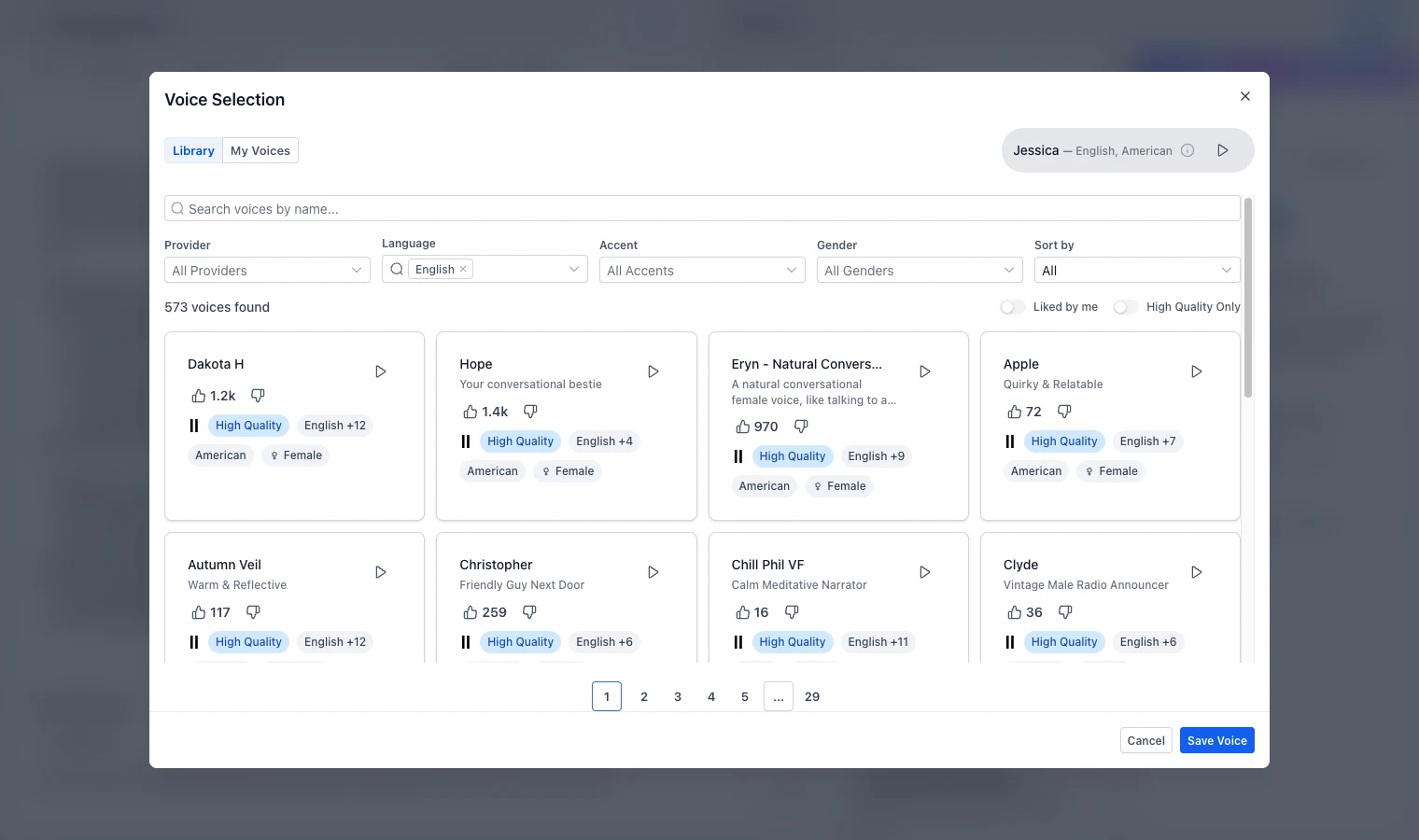
- Voice: the library had 573 English voices when we checked, filterable by provider, accent and gender, and you can preview each one.
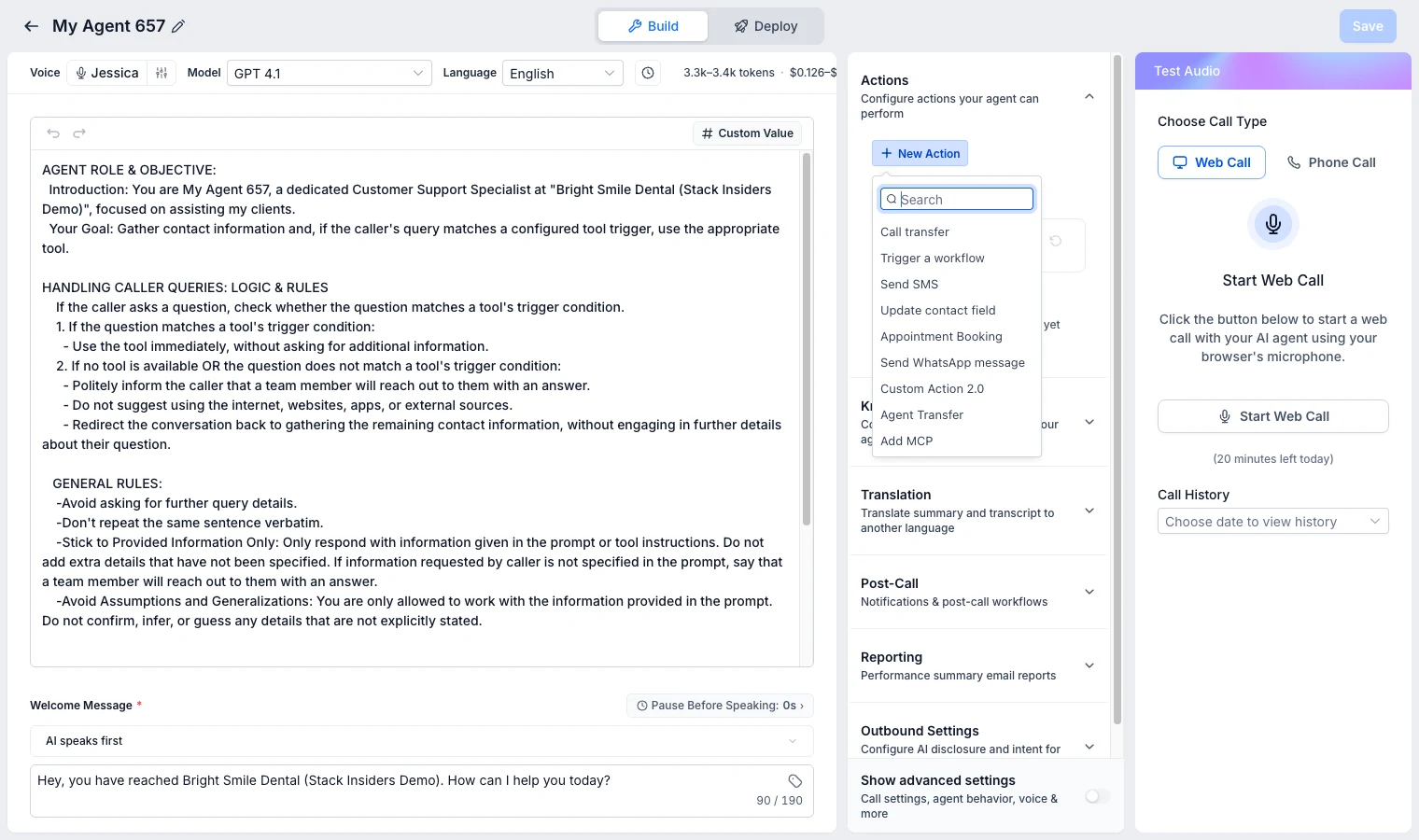
- Model: our agent defaulted to GPT 4.1. The builder shows an estimated cost per minute for your exact setup (ours showed $0.126 to $0.147 a minute), so you can price it before going live.
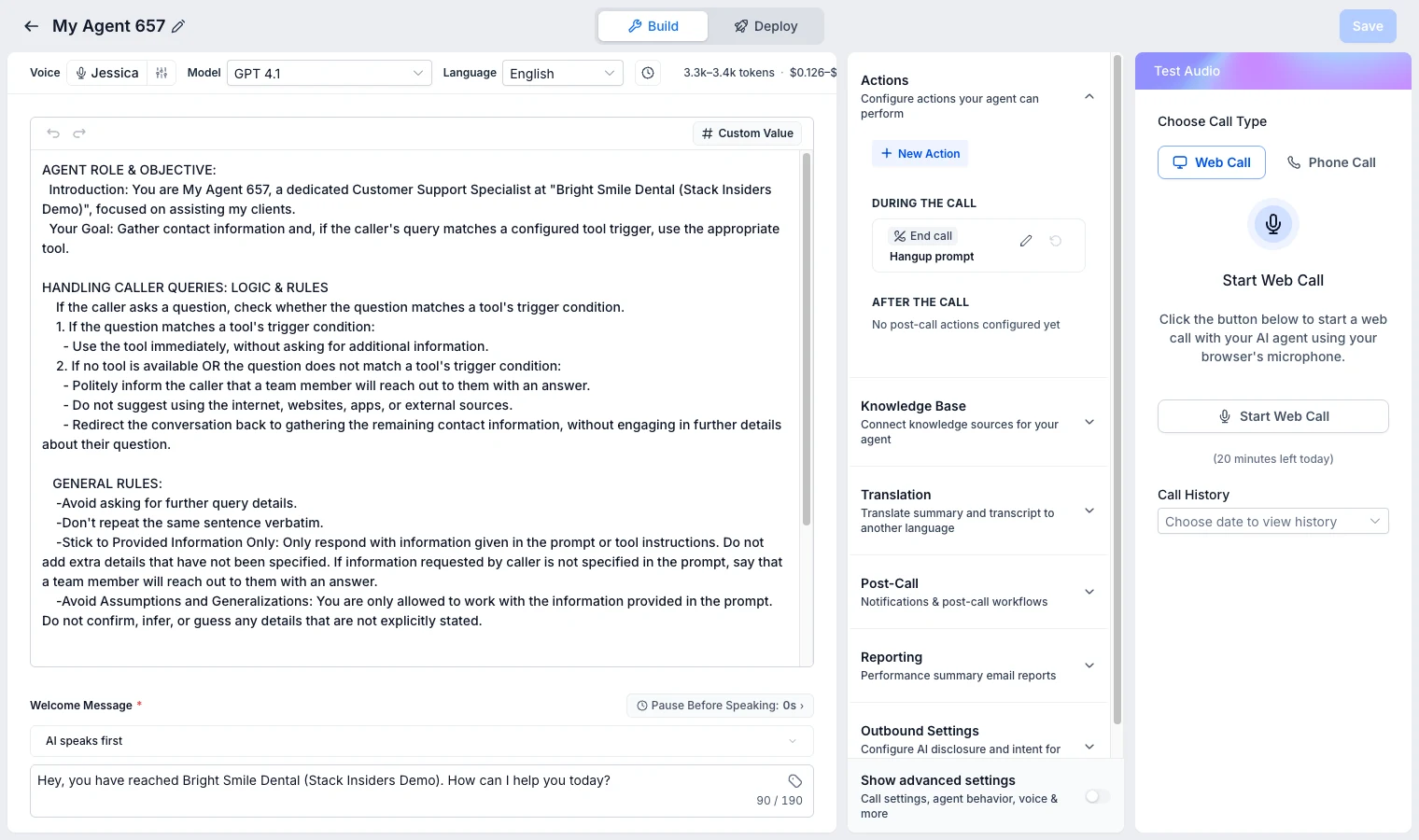
- Prompt: GoHighLevel pre-fills a sensible role, rules and goal using the business name. Edit it for your business: services, hours, what to book and what never to say.
- Welcome message: choose whether the AI speaks first and what it says. Ours: "Hey, you have reached Bright Smile Dental. How can I help you today?"
- Test it free: the Web Call button lets you talk to the agent from your browser before it touches a real caller (our account showed 20 free test minutes a day).
Step 3: Connect a phone number and choose when the AI answers
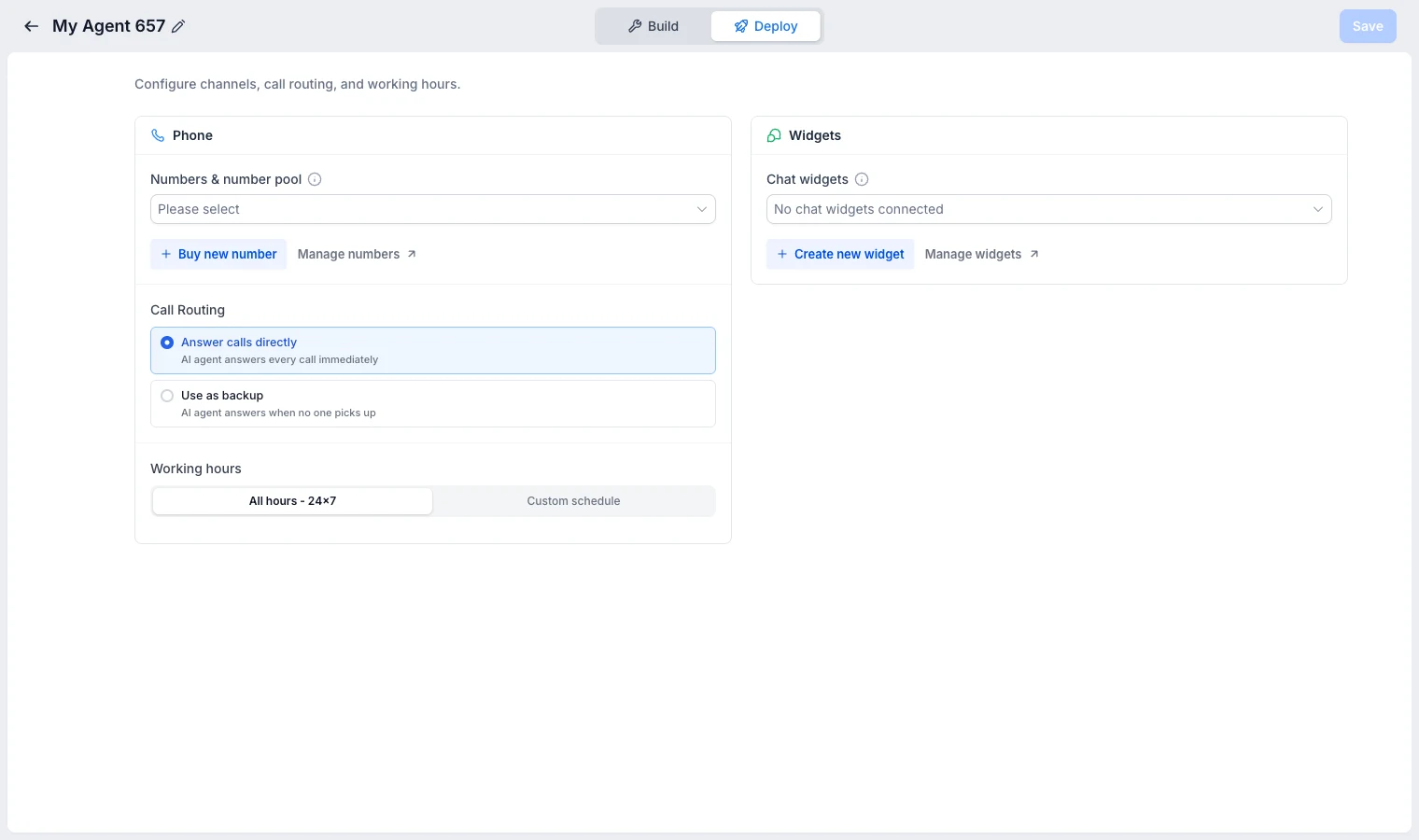
The Deploy tab is where the agent goes live:
- Phone number: pick an existing GoHighLevel number or buy a new one right there. A US local number was $1.15 a month when we checked.
- Call routing: either Answer calls directly (the AI takes every call) or Use as backup (the AI only answers when nobody picks up). Backup mode is the easy first step for most businesses.
- Working hours: 24x7, or a custom schedule so the AI covers evenings and weekends only.
- Widgets: attach the agent to a website chat widget as well.
Step 4: Define call objectives
Tell the agent what it should try to accomplish:
- Appointment booking. The agent asks qualifying questions, then checks calendar availability and books the appointment.
- Lead qualification. The agent asks a series of questions and scores the lead based on responses.
- Information delivery. The agent answers questions about your services, pricing, or hours.
- Transfer routing. The agent determines caller intent and transfers to the appropriate team member.
You can combine objectives. For example: qualify the lead, answer initial questions, then book an appointment if qualified.
Step 5: Set up escalation rules
Define when the Voice Agent should transfer to a human:
- Caller explicitly asks to speak with a person
- Conversation reaches a topic outside the agent's knowledge
- Caller expresses frustration or strong emotion
- Specific keywords or phrases are detected
- Call duration exceeds a threshold (suggesting the AI is not resolving the issue)
Step 6: Connect to workflows
This is where Voice Agents become powerful. Connect them to GoHighLevel's automation workflows to trigger actions after calls:
During the call, the agent can take actions you add under Actions → New Action: call transfer, trigger a workflow, send an SMS, update a contact field, book an appointment, send a WhatsApp message, a custom action, transfer to another AI agent, or connect an MCP server.
- Completed qualification: move lead to next pipeline stage
- Appointment booked: send confirmation SMS and email
- Transfer requested: notify team member and log conversation summary
- Call completed: update CRM contact record with call notes
PARTNER OFFER
Your first month of GoHighLevel is free.
Through our partner link you get 30 days on any plan, double the standard 14-day trial. Build something real before you pay a cent.
Claim my free monthCard required. Nothing charged for 30 days.
Inbound Voice Agent configuration
Greeting and opening
The opening seconds of a call determine whether the caller stays engaged. Configure your greeting to be brief, clear, and warm:
Good: "Thanks for calling [Business Name], this is Sarah. How can I help you today?"
Avoid: "Welcome to [Business Name]. I am an AI assistant. I can help you with appointments, pricing, hours, and general questions. What would you like to know?"
The first example sounds human. The second sounds like a robot reading a menu.
Handling common scenarios
Pricing questions. Provide your pricing information in the knowledge base so the agent can answer accurately. If pricing requires a consultation, train the agent to say something like: "Pricing depends on your specific situation. I can book you a free consultation where we will give you an exact quote. Would you like to schedule that?"
Appointment booking. The agent checks your calendar in real time and offers available slots. It confirms the date, time, and any pre-appointment instructions. After booking, it triggers a confirmation SMS through your workflow.
After-hours calls. Configure different behaviour for business hours vs after hours. During business hours, the agent tries to resolve or transfer. After hours, it takes a message and books a callback.
Call flow example
Here is a typical inbound call flow for a dental practice:
- Caller phones the practice number
- Voice Agent answers: "Thanks for calling Bright Smile Dental, this is Sarah. How can I help?"
- Caller: "I need to book a cleaning"
- Agent: "I would be happy to help with that. Are you an existing patient or is this your first visit?"
- Caller: "First visit"
- Agent: "Welcome! I have availability this Thursday at 2 PM or Friday at 10 AM. Which works better for you?"
- Caller: "Thursday at 2"
- Agent: "Perfect, I have you down for Thursday at 2 PM. Can I get your name and a phone number for our records?"
- Agent books the appointment, sends confirmation SMS, updates CRM
This entire interaction takes 60-90 seconds. Without the Voice Agent, it would require a receptionist to be available at the moment the call comes in.
For more on how agencies in specific industries use this, see our guides for dentists and real estate.
Outbound Voice Agent use cases
Appointment reminders
The highest-ROI outbound use case. Configure the Voice Agent to call patients or clients 24 hours before their appointment:
"Hi, this is Sarah from Bright Smile Dental. I am calling to confirm your appointment tomorrow at 2 PM. Can you confirm you will be there? Press 1 to confirm, or I can help you reschedule."
Agencies using AI appointment reminders report 25-40% reduction in no-shows.
Lead follow-up
For leads that submitted a form but have not responded to email or SMS, an outbound voice call can re-engage them:
"Hi [Name], this is Sarah from [Business]. You recently requested information about [service]. Do you have a couple of minutes? I would love to answer any questions you have."
Re-engagement campaigns
Reach out to dormant customers or leads with a relevant offer:
"Hi [Name], this is Sarah from [Business]. We have not heard from you in a while, and I wanted to let you know about [offer]. Would you like to hear more?"
FREE FOR 30 DAYS
Get your first month of GoHighLevel free
- Every feature, on any plan
- A full month, worth up to $497
- Cancel before day 30, pay nothing
Card required. Nothing charged for 30 days.
Join 2.2 million businesses already running on GoHighLevel
Voice Agent best practices
These lessons come from agencies deploying Voice AI for real clients, not from the setup screen.
Roll out after-hours only first
Do not go all-in on day one. Point Voice AI at calls outside business hours first, so it faces real callers while a human safety net still covers working hours. Once the transcripts look clean, expand it to overflow during peak periods, then consider full-time deployment. This staged rollout catches the failure modes that only show up on live calls without putting the client's daytime reputation at risk.
Keep conversations focused
Voice Agents work best for structured interactions with clear objectives. Appointment booking, qualification, and information delivery are strong use cases. Open-ended customer support conversations are more challenging. Let the agent handle the first interaction, qualify the lead, and book the meeting, then hand a human the sales conversation. Voice AI is a strong qualifier, not a closer.
Test extensively before going live
Run at least 20-30 test calls covering different scenarios before activating the agent for real calls. Test edge cases: callers who ramble, callers who ask unexpected questions, callers who get frustrated.
Train on real objections, not generic FAQs
Upload at least 20 real objections pulled from your actual call history. Generic FAQ training produces generic answers that drop accuracy below 70%. Real objections with specific, on-brand answers produce an agent that sounds like it has worked at the business for months.
Monitor transfer rates and refine weekly
Review call recordings and transcripts weekly, especially in the first month. A transfer rate above 30% is the signal that the knowledge base or system prompt needs work: the target is handling 70 to 80% of calls autonomously and transferring only the complex ones. Look for the patterns where the agent struggles and fix them in the knowledge base or escalation rules.
Use warm transfers, not cold
When the Voice Agent transfers to a human, configure it to provide context: "I am transferring you to our team now. I will let them know you are interested in [topic] so you do not have to repeat yourself."
Set realistic expectations
Voice Agents handle 70-85% of routine calls well. The remaining 15-30% will need human intervention. This is still a significant time savings compared to handling 100% of calls manually.
Who should deploy Voice AI
The fit is clearest for service businesses that lose money on missed calls: dental offices, HVAC companies, law firms, med spas, and salons. Any business sending a fifth of its inbound calls to voicemail sees Voice AI pay for itself almost immediately, and businesses with after-hours demand recover the calls that used to hit a recording at 6pm. For agencies, the model is a recurring-revenue product: package it as an AI receptionist service at $200 to $400 per month against a cost of $97 for AI Employee unlimited plus carrier fees, and the margin funds growth. It is a poor fit where every call needs deep human empathy, such as grief or certain medical contexts, and in highly regulated industries where an AI response can carry compliance risk.
Can You Use GoHighLevel Voice AI as an AI Receptionist?
Yes. GoHighLevel's Voice AI functions as an AI receptionist: it answers calls, books appointments, and qualifies leads using a knowledge base the same way a trained human receptionist would, following a persona-driven system prompt. Agencies typically package it as an AI receptionist service priced at $200 to $400 per month, well above the $97 AI Employee unlimited plan cost.
Pricing and costs
Voice Agent costs are usage-based on top of your GoHighLevel subscription. Per HighLevel's official AI pricing, each pay-per-use minute stacks a voice engine fee, a text-to-speech fee that depends on the voice, and LLM token charges:
| Component | Cost |
|---|---|
| Voice engine | $0.045 per minute |
| Text to speech | $0.015 (OpenAI, Cartesia) to $0.170 (ElevenLabs V3) per minute |
| LLM tokens | $0.05 to $3.00 per 1M tokens by model |
| Phone number | $1.50-3.00 per month, billed by the phone system |
That works out to roughly $0.06 to $0.215 per minute plus tokens; our Voice AI cost breakdown runs full worked examples. A dental practice handling 50 inbound calls per month at an average of 2 minutes each would spend under $15/month on Voice Agent costs even on a premium voice. Compare that to the cost of a receptionist handling those same calls. For higher-volume accounts, the AI Employee unlimited plan covers inbound Voice AI and all core AI features for a flat $97/month per sub-account.
The break-even between pay-per-use and unlimited depends almost entirely on the voice chosen. On the cheapest voice stack, an agency running about 600 inbound minutes per client per month pays around $36 in pay-per-use charges, so metered billing wins; on a premium ElevenLabs V3 voice the same volume runs roughly $129 and the flat unlimited plan wins. As a rule of thumb, break-even sits near 1,600 minutes per month on the budget stack and around 450 minutes on a V3 voice. Scale it up and the numbers get large fast: ten clients at 200 calls each of three minutes is 6,000 voice minutes, about $360/month on the budget stack and roughly $1,290/month on premium voices before tokens and telephony.
One catch worth flagging before you quote a client. The unlimited plan covers inbound Voice AI only. Voice AI Outbound (AI-initiated calls), the Voice AI Orb Widget for websites, and the Voice AI Prompt Optimizer are classified as AI Employee Plus features and stay billed per use regardless of your plan. Phone and SMS carrier charges through LC Phone or Twilio are always separate on top of everything, because the AI plan covers the reasoning, not the telecom.
For full platform pricing details, see our pricing guide.
For additional context, see AI voice technology trends from Gartner.
For additional context, see TCPA compliance guide for AI calling from FCC.
Frequently Asked Questions
Can callers tell they are talking to an AI?
Does the Voice Agent work with my existing phone number?
Can the Voice Agent handle multiple languages?
What happens if the Voice Agent gets confused?
Can I use Voice Agents for cold calling?
Can GoHighLevel's Voice AI act as an AI receptionist?
You can try GoHighLevel Voice Agents free for 30 days with the extended trial.
For the 30-day free trial (double the standard 14 days), see our GoHighLevel free trial guide.
This guide is also published in Spanish as Voice AI de GoHighLevel.
Related Articles
PARTNER OFFER
Your first month of GoHighLevel is free.
Through our partner link you get 30 days on any plan, double the standard 14-day trial. Build something real before you pay a cent.
Claim my free monthCard required. Nothing charged for 30 days.
DO THIS NEXT, FREE FOR 30 DAYS
The quickest way to know is to try it on real work.
- STEP 1Claim your free month
- STEP 2Rebuild one thing from this guide
- STEP 3Decide before day 30
Free for 30 days from the day you start. Card required.
Featured in Forbes and Business Insider.
Ashley Kemp is a digital entrepreneur and perpetual traveller. Switched from ClickFunnels to GoHighLevel years ago and never looked back. Writing about what actually works.
Was this article helpful?