Updated 27 July 2026tutorial
How to Fix a 404 Error in GoHighLevel (2026)
Fix a GoHighLevel 404 page, test its HTTP response, and understand the SEO catch behind HighLevel's custom error-page redirect.
 Ashley Kemp10 min read
To fix a 404 error in GoHighLevel, publish an error page, open Settings, then Domains, choose Manage, edit the domain, and select that page under “Set default 404/Error Page.” Save it, then test a random missing URL. The branded page improves the visitor experience, but its redirect may create a soft 404 for search engines.
GoHighLevel 404 errors have two separate fixes. The first gives visitors a useful page instead of a generic dead end. The second checks whether the server is still telling Google that the missing URL does not exist. HighLevel solves the visitor-facing problem, but its current custom-page behavior can leave an SEO problem behind.
How do you set a custom 404 page in GoHighLevel?
HighLevel's official custom 404 guide gives a short, domain-level setup process. The help article was last modified on May 14, 2025 and recommends creating a unique error page for each domain.
1. Build the page visitors should see
Create a normal page in Sites > Funnels or Sites > Websites. Keep it useful and light. A good error page should:
- Say clearly that the requested page could not be found.
- Link to the site's homepage or most important service page.
- Offer a search, contact, or booking route when that helps the visitor.
- Avoid pretending the missing page still exists.
Publish the page before assigning it. An unpublished draft cannot be selected as a working destination.
2. Open the domain settings
Go to Settings > Domains inside the relevant sub-account. Find the domain that needs the error page and choose Manage.
This setting is attached to the domain, not to every funnel step individually. Agencies managing several client domains need to repeat the setup for each domain that should use a branded error page.
3. Assign the default error page
Open the domain's three-dot menu, choose Edit, then find Set default 404/Error Page. Select the page created in step one and save the domain.
That completes HighLevel's published setup. A visitor who requests a missing path should now reach the selected page rather than the platform's generic error screen.
What is the SEO catch with GoHighLevel's custom 404 page?
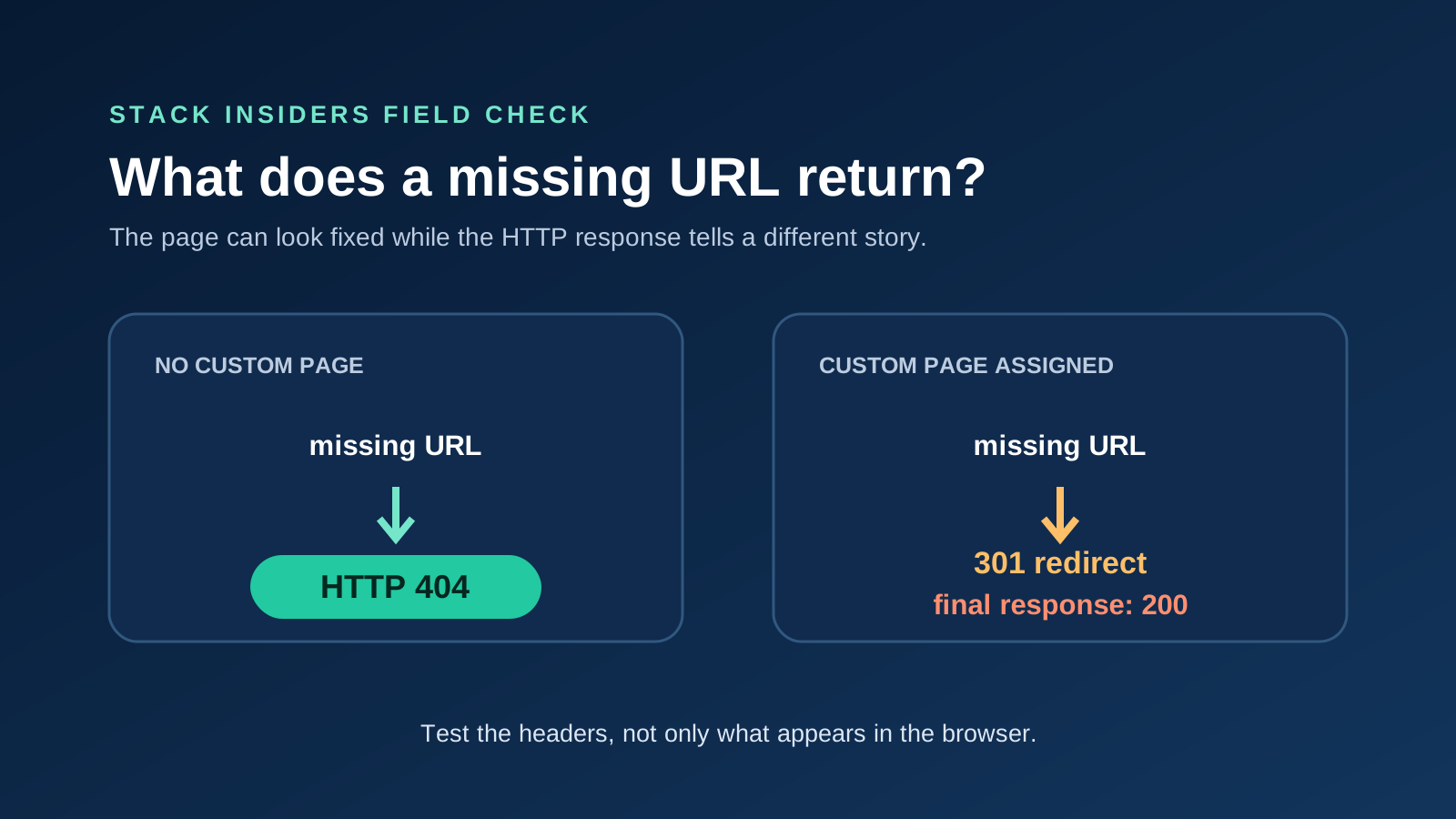
The custom page fixes the experience, but current evidence shows that it can change the server response from a real 404 into a redirect followed by a successful 200 response. Search engines call that mismatch a soft 404 when the content says “not found” but the HTTP response says “success.”
Google's HTTP status documentation explains the difference. Google does not index new URLs that return a 404, while content returned with a 200 response can move into its indexing pipeline. If the content looks like an error despite that 200 response, Search Console may report it as a soft 404.
What did Stack Insiders verify?
Stack Insiders checked six live domains whose DNS records confirmed that they used HighLevel's Funnels or Websites infrastructure. Each domain had no custom error page configured. Every random missing path returned a real, unredirected HTTP 404 and the same generic platform error page.
The configured case behaved differently. HighLevel's own marketing site, which carries the platform builder's Nuxt and LeadConnector fingerprints, redirected a random missing URL with a 301 to its branded /404 page. That destination returned HTTP 200.
The evidence has an important limit. The configured side rests on one directly measured domain, HighLevel's own site, plus an independent user report on HighLevel's ideas board. It is not a claim that every custom domain was tested or that every GoHighLevel 404 always returns 200.
The original insight is conditional: GoHighLevel's default missing-page response is a clean 404. The soft 404 appears after a custom error page is assigned because the feature redirects the request to a normal published page.
Has HighLevel acknowledged the soft 404 behavior?
A still-open request on the HighLevel ideas board is titled “Return Proper HTTP 404 Status for Custom 404 Pages.” Its author describes the same chain measured above: a missing URL redirects to the selected error page, and that page returns 200.
This request is separate from HighLevel's completed custom-page feature. The branded redirect is live. The request for a proper 404 status on that branded page remains open as of July 27, 2026.
Should you leave the custom 404 page disabled?
Not automatically. Leaving it disabled preserves a technically correct 404 response in the cases Stack Insiders measured, but visitors receive HighLevel's generic fallback. Turning it on gives agencies control over the message and onward links, but can create the soft-404 chain.
The right choice depends on the site:
| Priority | Better current option | Tradeoff |
|---|---|---|
| Correct missing-URL status | Leave the custom page unassigned | Generic visitor experience |
| Branded recovery path | Assign a custom error page | Test for a 301 followed by 200 |
| Both status and branded design | Use an external routing layer that can return the branded page with HTTP 404 | Requires control outside HighLevel |
For a small lead-generation site, a clear branded recovery page may be worth the Search Console warning. For a large site with many changing URLs, preserving a real 404 can matter more because crawlers need an unambiguous signal about which URLs are gone.
How do you test a GoHighLevel 404 response?
Do not test only by looking at the page in a browser. A branded error page can look correct while returning the wrong status.
Test the redirect chain with curl
Replace the example domain with the client's domain and use a random path that has never existed:
curl -sSIL https://example.com/missing-page-test-84729
Read every status line in order:
404with no redirect means the server is correctly marking the URL as missing.301followed by200means the missing URL redirects to a normal page.- A
200response at the first request means the server served an error-looking page as a successful URL.
Use a fresh random path for each test. Testing a deleted URL can produce a redirect rule or cached response that does not represent the default domain behavior.
Confirm the result in Google Search Console
Use Search Console's URL Inspection tool on a deliberately missing URL after Google has had a chance to crawl it. A soft 404 may appear in the page indexing report when Google receives a successful response but identifies the content as an error page.
Search Console is the outcome check. The header test is the immediate technical check. Running both avoids guessing from what the browser displays.
Can GoHighLevel return a branded page with a true 404 status?
HighLevel's published help article does not provide a control for the response status. It explains how to select a destination page, but does not document a way to serve that page's design while retaining HTTP 404.
An external proxy or edge layer can sometimes intercept missing requests, serve a branded response, and set the correct status. That is infrastructure work, not a native HighLevel setting, and it should only be used by someone who can test routing, caching, certificates, and real published paths. A broad catch-all rule can break valid funnel URLs.
Agencies without that infrastructure should choose the cleaner tradeoff for the site, document it, and retest after HighLevel changes the feature.
What should a useful GoHighLevel 404 page include?
A good error page helps the visitor recover without obscuring what happened. Keep the copy direct and give the page one or two strong onward routes.
- A plain “Page not found” heading.
- A short explanation without blaming the visitor.
- A link to the homepage or relevant service hub.
- A booking or contact link if the site is built for lead generation.
- The site's normal navigation and branding.
- No automatic redirect to an unrelated sales page.
For more on building the page itself, see the GoHighLevel landing page builder guide. The GoHighLevel SEO tools guide covers the platform's broader search controls, while the GoHighLevel review explains where its site builder fits in the full platform.
What should agencies do after fixing the page?
Retest one valid URL and one random missing URL after saving the setting. The valid page should still return 200. The missing path should show the intended design, and its headers should reveal whether the site now returns a 404 or the known redirect chain.
Then check internal links before treating the error page as the fix. A custom 404 page is a safety net, not a substitute for repairing broken navigation, outdated campaign links, or deleted funnel steps.
FREE FOR 30 DAYS
Get your first month of GoHighLevel free
- Every feature, on any plan
- A full month, worth up to $497
- Cancel before day 30, pay nothing
Card required. Nothing charged for 30 days.
Join 2.2 million businesses already running on GoHighLevel
Frequently Asked Questions
How do I create a custom 404 page in GoHighLevel?
Does GoHighLevel return a real 404 status?
What is a soft 404 in GoHighLevel?
How can I test a GoHighLevel 404 page?
Should a 404 page redirect to the homepage?
Can I change the HTTP status of a GoHighLevel custom 404 page?
DO THIS NEXT, FREE FOR 30 DAYS
The quickest way to know is to try it on real work.
- STEP 1Claim your free month
- STEP 2Rebuild one thing from this guide
- STEP 3Decide before day 30
Free for 30 days from the day you start. Card required.
Featured in Forbes and Business Insider.
Ashley Kemp is a digital entrepreneur and perpetual traveller. Switched from ClickFunnels to GoHighLevel years ago and never looked back. Writing about what actually works.
Was this article helpful?