Updated 1 November 2026comparison
Marketing Automation for Small Business: 7 Options
Seven marketing automation options for small business, from follow-up sequences to all-in-one platforms, and how to choose without overbuying.
 Ashley Kemp14 min read
Marketing automation for a small business can take routine lead follow-up off your plate, but the right tool depends on what you need it to do. These seven options start with GoHighLevel, plus six other platforms for email, CRM, funnels and contact management.
1. GoHighLevel: one account for CRM, email, SMS, funnels and booking
One GoHighLevel account replaces a separate CRM, email and SMS tool, funnel builder, booking tool and client portal, starting at $97 a month. A coach or service business can capture a lead, follow up automatically by text and email, and give the prospect a way to book, all from the same account.
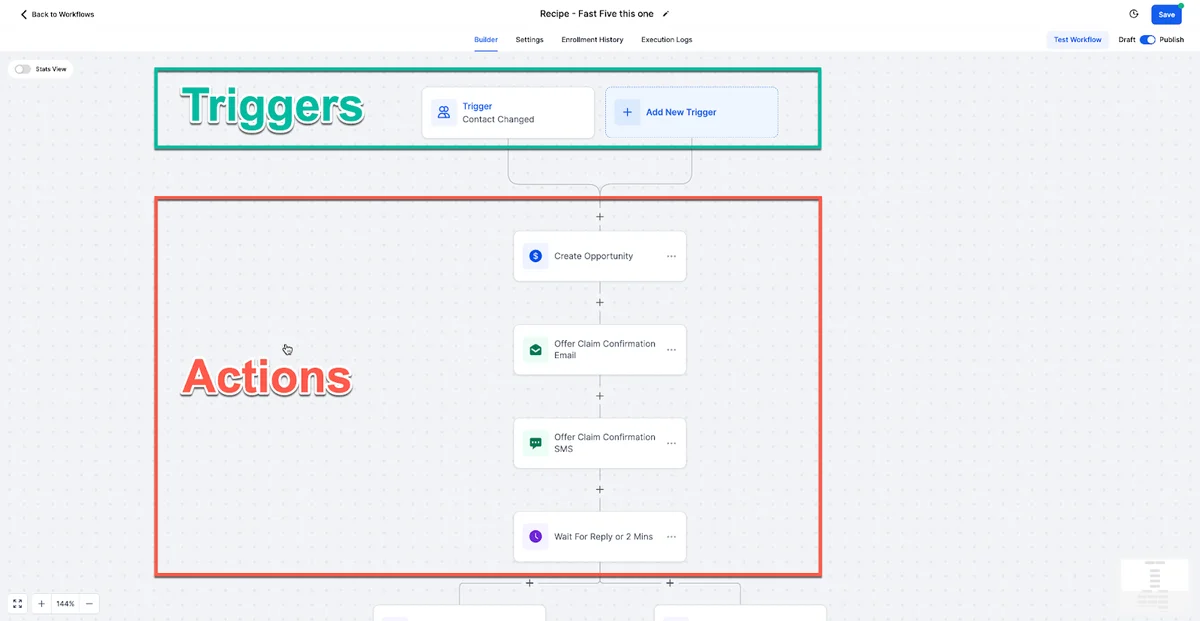
GoHighLevel brings CRM, email marketing, funnel building and SMS automation together. For agencies, that makes it all-in-one software for marketing agencies that can run client work from one system. A coach or service business can use the same core setup to capture a lead, follow up and give prospects a way to book.
Plan cost is only part of the decision. The Starter plan is $97 per month for up to three client accounts. Unlimited is $297 per month, and Founder (previously Agency Pro) is $497 per month for agencies that want to resell the software under their own brand. Each plan includes unlimited users. Texts, calls, email and AI have usage fees, so those should go into your budget too.
For context, text messages cost $0.00747 per segment plus carrier fees, outbound calls cost $0.0166 per minute, and email costs $0.675 per 1,000 sends, as of 18 September 2026. AI Employee costs $50 or $97 per month per client account. The total depends on your use and on the subscriptions you keep.
We publish platform pricing and cost guidance to help you check the maths against your own tools. In our pricing analysis, a three-person agency saves about $4,104 a year while keeping its reporting, project management and design tools. Your own figure depends on the tools you keep.
Pick this if: you manage several client accounts or want CRM, marketing and follow-up tools together. Skip it if you only need a basic email newsletter or booking link and don't expect to use the other features.
We earn a commission if you sign up through our link, at no extra cost to you. If you want to test the platform, start the 30-day free trial. A payment card is required at signup, and billing starts after the trial unless you cancel.
2. HubSpot: deeper reporting and a broad integration ecosystem
HubSpot combines CRM and marketing tools, with a free CRM as an entry point. It suits a small business that wants its contact records and marketing activity connected, especially if reporting and app connections matter to the team.
HubSpot offers reporting, automation and a broad marketplace of native integrations. That can help when a business already relies on several connected systems. Check the specific integration you need before choosing, since a large total does not confirm that every app or workflow is supported.
The cost can change sharply as your needs grow. HubSpot lists Marketing Hub Professional, the tier needed for comparable email marketing and automation, at $890 per month, or $800 per month with annual billing, plus a required $3,000 onboarding fee. That is a very different budget from a free CRM. Consider the paid tier only if its marketing tools and reporting justify that spend.
Marketing automation works best when messages follow a contact’s actions rather than arriving on a fixed schedule alone. For example, a business might send a welcome email after a form sign-up, then track whether the person clicks a link. In any system, use those signals to make the next message relevant instead of sending the same follow-up to every contact.
Commercial email also has rules. Make it easy for recipients to opt out, and honour those requests. Review applicable email marketing requirements when setting up campaigns.
Pick this if: you value a connected CRM and reporting, and your budget can support the marketing tier you need. The free CRM can be a place to start, but it is not the same as having the full marketing automation set.
3. NetHunt CRM: email sequences managed inside Gmail
NetHunt CRM is built inside Gmail, so a marketing or sales team can manage leads, track deals and run email sequences from its inbox workflow. It may suit a digital marketing agency that wants contact and deal work close to its everyday email.
The fit is about where the team works. If people already handle client messages in Gmail, keeping communication and lead records alongside that inbox can make routine follow-up easier to manage. NetHunt also logs client communication without requiring the team to leave the inbox.
Its listed messaging connections include WhatsApp, Instagram, Facebook Messenger and Telegram, alongside Gmail. That gives an agency several channels to work with in one CRM context. Before committing, map the channels your team actually uses and decide who will own each conversation. A tool can hold the activity, but the agency still needs a clear handoff when a lead replies or asks for a quote.
One possible workflow is a new enquiry entering the CRM, then receiving a relevant email sequence while the team keeps track of its deal. Keep the sequence focused. A short welcome note and a useful follow-up can be easier to maintain than a long campaign with branches that nobody reviews.
This is a CRM-led option, so compare it with a broader all-in-one platform if your main goal is consolidating funnels, booking and multiple marketing tools. For agencies, also check whether the way client work is organised matches your service model.
Pick this if: your team is Gmail-centred and wants sequences and client communication near its inbox. Make a short list of must-have channels before comparing it with tools built around funnels or a broader marketing stack.
4. Salesflare: hands-off contact updates and meeting logs
Salesflare is a CRM for small businesses and agencies that want less manual data entry. Its core idea is that the CRM should pick up useful contact details and activity rather than depend on staff to type in every update.
Salesflare can pull contact data from email signatures and log meetings from a calendar. It also tracks email opens and link clicks, then surfaces follow-up reminders. Those features can help a small team keep a clearer record of conversations when the same person handles sales and account management.
Imagine a founder who finishes a client call and moves straight to delivery work. A logged meeting and an automatic reminder can make the next sales task easier to spot. The contact record can also gain details from an email signature, reducing the need to copy and paste them by hand.
Activity tracking is useful only when it changes what the team does. A click on a link might signal interest, but it is not the same as a buying decision. Treat activity as a prompt to check in, not as a reason to send a string of automatic messages. Keep the follow-up human and relevant to the conversation.
Salesflare suits small businesses and agencies where a founder or small team handles both sales and account management. The main constraint it addresses is admin time. If your bigger need is building funnels or running a white-label client portal, compare those needs separately before choosing.
Pick this if: your sales process is held back by manual CRM updates and missed follow-ups. It is a focused choice for keeping relationship activity current, rather than a reason by itself to replace every marketing tool.
Key Takeaway: Choose around the work you need to automate first, then check whether the same tool can handle the rest of your customer journey.
5. Copper: straightforward CRM automation for Google Workspace
Copper is built for Google Workspace and is positioned as a straightforward CRM. It suits small teams that spend their day in Google Workspace and want contact records to sit close to those tools.
Copper can auto-populate contact data from Google Contacts. It also logs emails and meetings without manual input. For a small agency, that can help keep a contact history in view when the person handling a client relationship is also managing delivery.
Think about a lead who sends an email, then books a meeting. A CRM record that captures those interactions can help the team prepare for the conversation and remember what happened afterwards. It reduces the need to update a separate record by hand, though the team still has to decide what the next step should be.
Copper suits a small agency that uses Google Workspace and has straightforward needs. That is a narrower fit than an all-in-one marketing system. If you need broader automation across email marketing, SMS, funnels or client accounts, put those requirements on the table before you decide based on inbox convenience alone.
Pick this if: your team wants a simple CRM that works alongside Google Workspace. If the job is mainly nurturing leads across multiple channels, compare a wider marketing platform too.
6. Systeme.io: a free all-in-one starting point for funnels and courses
Systeme.io combines funnels, courses and automation rules, with Stripe and PayPal among its native integrations. Its free plan makes it an all-in-one starting point, which can suit a solo operator testing a course or funnel-based business.
The free plan covers 2,000 contacts, three sales funnels, one course and one automation rule, and paid plans start at $17 a month. That combination may help a creator connect a sign-up to a course-related follow-up without assembling separate tools for each part. Keep the first workflow small: one form, one clear welcome message and a next step that makes sense for the person who signed up.
There is a cost detail to check. Systeme.io says its free plan never expires and does not need a credit card. Confirm which plan includes the features your business needs before budgeting or moving existing contacts.
For a small business, free entry can lower the barrier to trying a basic funnel. But compare the job you need done, not only the plan label. A course creator may value funnels and courses more than agency client management. An agency that needs separate client spaces or white-label software should compare those needs with its current offer before choosing.
Systeme.io may also be a better fit than a broad agency platform when you do not need its additional CRM, messaging or account-management functions. A smaller toolset can be easier to run if it covers the business’s actual workflow. Before switching, write down the features you use today and note what would still need another subscription.
Pick this if: you are a solo creator or small business focused on funnels and courses, and the plan’s terms fit your budget. Check the plan details against your use case before moving a live campaign.
Pro Tip: Before you build a workflow, write down its trigger, the message it sends and the next action you want the contact to take. If you cannot explain those three parts in plain language, simplify it first.
7. ClickFunnels: funnel-first automation for conversion-focused businesses
ClickFunnels is a funnel-focused platform known for sales funnels. Its capabilities include an AI-driven Smart Funnel Builder and a library of conversion-tested templates. It is aimed at solo entrepreneurs, coaches and course creators whose main business model runs through one sales funnel.
That focus can be useful when the funnel is the main path from first visit to purchase. A coach might want a page sequence that guides a prospect towards a programme or call. The key is to keep the funnel connected to the business process that follows. If the lead needs ongoing CRM management or SMS follow-up, include those needs in your comparison.
ClickFunnels is primarily a funnel builder, and costs and included tools differ across platforms. For an agency, separate client tools can change the total cost as accounts grow. For a solo funnel operator, those added functions may not be needed.
ClickFunnels lists contact limits by plan: 10,000 on Launch, 75,000 on Scale and 150,000 on Optimize. Those caps matter if your audience is growing. Compare them with the number of contacts you expect to manage, not only your current list size.
| Decision point | ClickFunnels may fit | Compare another setup when |
|---|---|---|
| Main job | Your business centres on one sales funnel. | You need CRM and client account management to lead the workflow. |
| Audience size | Your expected contact count fits the chosen plan limit. | Your list is likely to reach the plan cap. |
| Agency delivery | You mainly sell through your own funnel. | You manage multiple clients and need their marketing work in one system. |
| Automation scope | Funnel building is the main need. | You also need broader email, SMS or booking workflows. |
Pick this if: your offer depends on a focused sales funnel and you do not need the wider agency workflow described above. Review your contact limit as part of the plan decision.
If you are weighing a broader system for lead capture and client work, the GoHighLevel beginner overview explains the main parts of that setup. You can also start the 30-day free trial and test one lead-to-booking workflow before moving your whole business.
Frequently Asked Questions
What is marketing automation for a small business?
Which marketing automation tool is best for a small business?
Can I start marketing automation for free?
What should I automate first?
How much should a small business budget for marketing automation?
Which Marketing Automation Tool Should You Choose?
If you manage several client accounts or need CRM, marketing and follow-up in one place, GoHighLevel is the first choice. We recommend testing one lead-to-booking path before you migrate anything. Start the 30-day free trial and check your expected usage charges.
We earn a commission if you start GoHighLevel through the links on this page, at no extra cost to you.
DO THIS NEXT, FREE FOR 30 DAYS
The quickest way to know is to try it on real work.
- STEP 1Claim your free month
- STEP 2Rebuild one thing from this guide
- STEP 3Decide before day 30
Free for 30 days from the day you start. Card required.
Featured in Forbes and Business Insider.
Ashley Kemp is a digital entrepreneur and perpetual traveller. Switched from ClickFunnels to GoHighLevel years ago and never looked back. Writing about what actually works.
Was this article helpful?