Updated 1 November 2026comparison
Best CRM for Small Business: 10 Top Picks
Ten small-business CRMs compared on user limits, automation caps and real cost, plus when an all-in-one GoHighLevel account is the better buy.
 Ashley Kemp12 min read
GoHighLevel is the best all-round pick for most small teams and agencies. It brings CRM, follow-up, booking, funnels, and automation together, and can replace several separate subscriptions. It is not right for everyone: if you only need simple contact management, email outreach, or booking, a more focused and budget-friendly CRM may be a better fit. Here are 10 options, with their strengths and limits to help you choose.
1. GoHighLevel: Best All-in-One CRM for Agencies and Service Businesses
One account replaces a separate CRM, email and SMS tool, funnel builder, booking tool, and client portal, starting at $97 a month. A business can capture a lead, follow up automatically by text and email, book the call, manage the pipeline, and give clients a white label portal. GoHighLevel brings these tools together for agencies and service businesses.
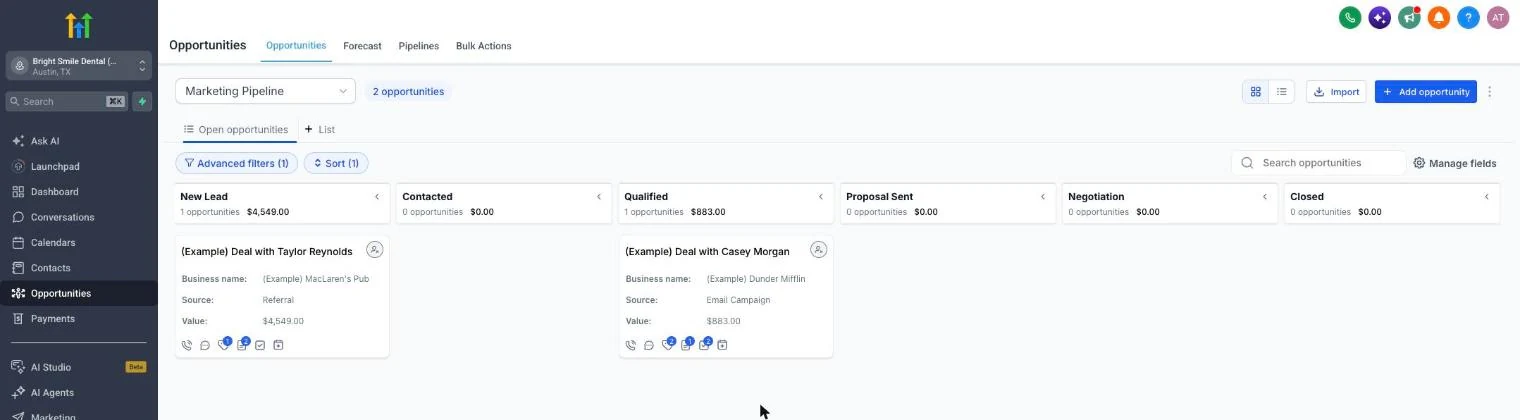
Plans cost Starter $97/month, Unlimited $297/month, and Founder (previously Agency Pro) $497/month. Texts, calls, email, and AI have usage charges, so include expected usage in your budget as well as the plan price.
Choose it if: you manage client accounts or want CRM, follow-up, booking, and automation together in one system.
Skip it if: you only need email outreach or simple booking.
Try the 30-day free trial to test your workflows and estimate usage before you commit.
2. Zoho CRM: Best for a Tight Budget
Zoho CRM fits small teams that want workflow automation without starting with an enterprise-style system. Blueprint, Zoho’s tool for setting rules around a sales process, is included from the Professional plan. The free edition covers up to three users, so check that against your team before you commit.
Zoho can work well when each lead should follow the same path, such as moving from enquiry to a booked sales call. Its built-in email and phone tools keep communication close to the contact record. The trade-off is fit: a small team should make sure the CRM’s process controls match how it sells, rather than setting up rules it won’t use.
If you also manage client accounts, compare your needs with this CRM shortlist for agencies. A multi-client setup can change which plan limits matter most.
3. monday CRM: Best for Project-Centric Teams
monday CRM is a fit for teams that want customer work and project work to sit close together. On the Standard plan, automation is capped at 250 custom automations a month. That cap matters if you plan to trigger a new task or follow-up each time a deal changes stage.
Before choosing it, write down the automations you expect to run in a typical month. A team with a handful of lead handoffs may be fine; a busy operation with many routine triggers should test its expected volume against the cap.
4. HubSpot: Best for Startups
HubSpot suits startups that want room to grow from a free CRM. The free CRM covers up to two users and 1,000 contacts, and built-in communication includes email, phone calls, live chat, and a meeting scheduler. HubSpot for Startups offers eligible Seed and Series A founders 90% off the first year.
Advanced workflow automation with a visual builder opens at the Professional tier. That step up can be expensive: HubSpot lists Marketing Hub Professional at $890 a month, or $800 a month with annual billing, with three seats and a required $3,000 onboarding fee. It’s a better fit when marketing automation is central to your work than when you only need a contact list.
For a closer look at the trade-off between a focused sales CRM and a broader marketing system, read our GoHighLevel versus HubSpot comparison. HubSpot’s free entry point is useful, but budget for the features you’ll need later.
5. Freshsales by Freshworks: Best Built-In Communication
Freshsales by Freshworks is worth a look if your sales team wants communication tools inside its CRM. Its Growth plan includes chat, email, and phone, and the Pro plan adds contact scoring. Freddy AI is sold as an add-on.
Lead scoring can help a team decide which prospects need attention first. This makes Freshsales a sensible option for a small sales group that wants AI support without treating AI as a substitute for human review.
Choose it when built-in communication matters more than managing a large roster of client accounts under one login.
6. Capsule CRM: Best for Simple Contact Management
Capsule CRM is a straightforward pick for contact management. Its free tier supports two users and 250 contacts, which can suit a solo consultant who wants a small, shared record of client relationships without a larger system.
That contact cap gives you a clear point to check before importing a list. Count active prospects and customers first, then decide whether the free tier has room for the contacts you’ll need to manage. Capsule’s appeal is a simple starting point, not a long list of automation claims.
If your business mostly needs a clear record of who you spoke with and what happens next, a compact CRM may be easier for a small team to keep up to date.
7. OnePageCRM: Best for Mobile Sales Work
OnePageCRM is a strong fit for people who manage sales while away from a desk. It has built-in email, calls, and notes. Plans are priced per user, and every plan includes unlimited contacts.
Its action-focused approach can help a solo seller keep the next follow-up visible after a call. Use it if you want a personal work queue tied to customer records, rather than a CRM built around several team members’ handoffs.
Check current plan details to see whether its setup fits your work.
8. Agile CRM: Best for a Free Plan
Agile CRM is a candidate for teams that need a free plan with room for several users. The free plan covers 10 users and 1,000 contacts and companies. It also includes email campaigns, a form builder, and a landing page builder.
That combination may suit a small team that wants to test a shared CRM before budgeting for a paid system. The contact ceiling is the detail to monitor: count the records you expect to add, including leads that are still open. If the team’s contact list is already close to the cap, plan for the next tier or another system before a migration becomes urgent.
9. Salesmate: Best for Customisation
Salesmate is a good match for teams that want to shape their sales process around automation. It includes marketing automation tools. Its communication features include email, SMS, and inbound and outbound calls.
Salesmate supports automation. A useful test is to sketch one real workflow, such as sending a follow-up after a lead moves to a new stage, then decide whether the tool’s automation model matches your process.
Calling and texting use credits, and local and toll-free number pricing varies. Include those usage costs in your estimate rather than treating the subscription as the full bill.
10. Salesforce: Best for Complex Growth Needs
Salesforce is a stronger fit for businesses with complex growth plans than for a team that only wants basic contact tracking. Its automation options include custom objects, predictive AI, and generative tools.
That depth can help when a company needs its CRM to reflect a process that doesn’t fit a basic pipeline. But the team must be ready to configure and manage that system. If nobody owns the setup, the extra choices can make day-to-day updates harder instead of easier.
Pick Salesforce when you have a clear need for custom processes and the people who can maintain them. For a small team with a simple sales path, start with a lighter CRM.
Small-Business CRM Comparison Table
Use this table to narrow your shortlist by workflow and plan limits. A contact or seat cap is worth checking before you move existing records into a new system.
| CRM | Best fit | Known limit or detail |
|---|---|---|
| GoHighLevel | Agencies and service businesses needing an all-in-one toolkit | Plans from $97/month; usage charges apply for texts, calls, email, and AI |
| Zoho CRM | Budget-minded teams needing workflow automation | Free for up to 3 users; Blueprint from Professional |
| monday CRM | Project-centric teams | 250 custom automations a month on Standard |
| HubSpot | Startups | Free CRM: 2 users and 1,000 contacts; advanced automation at Professional |
| Freshsales by Freshworks | Built-in communication | Chat, email, and phone on Growth; contact scoring on Pro |
| Capsule CRM | Simple contact management | Free tier: 2 users and 250 contacts |
| OnePageCRM | Mobile sales work | Per user plans; unlimited contacts |
| Agile CRM | Free plan for small teams | 10 users and 1,000 contacts |
| Salesmate | Customisation and automation | Calls and texts use credits |
| Salesforce | Complex growth needs | Custom objects and predictive AI |
The best CRM choice is the one your team will keep current. Features matter, but a pipeline with stale records won’t help you spot a stalled deal or plan follow-up.
What to Check Before You Commit to a CRM
Start with the work you need the CRM to handle. Most small teams need a reliable contact record, a pipeline that shows each deal’s stage, follow-up reminders, and enough reporting to see where prospects drop off. If your work also involves funnels, booking, communication, and client accounts, GoHighLevel brings more of those tasks into one account. If you only need a simple contact list or occasional outreach, a more focused CRM may be easier to manage.
Ease of use is part of the cost. If the team finds the layout hard to follow, records may stay in inboxes or spreadsheets. Test a real lead from first contact through the next action. Ask the people who will use the CRM to update the record and move the deal themselves. For GoHighLevel, test the complete workflow you expect to use, including follow-up and booking, rather than choosing it on the breadth of its feature list alone.
Then estimate the full cost. Include paid seats, onboarding, add-ons, integrations, and any usage fees for texts, calls, or email. GoHighLevel starts at $97 a month for Starter, $297 for Unlimited, and $497 for Founder. Texts, calls, email, and AI have usage costs, so compare your likely monthly use with the tools you’ll keep. If it seems like a fit, try the 30-day free trial and check your likely usage costs before billing begins. When it replaces tools your business would otherwise pay for, one all-in-one account is usually cheaper than separate tools.
For an agency, an all-in-one setup can reduce the number of separate subscriptions, but it may still have usage charges. Our GoHighLevel CRM and pipeline overview explains how its features fit an agency workflow.
Pro Tip: Before you sign up, write down your monthly software costs and the CRM tasks you’ll use each week. Compare the full bill, including usage charges and tools you plan to keep.
Frequently Asked Questions
What is the best CRM for a small business?
Can a small business use a free CRM?
What CRM features should a small business look for?
Is GoHighLevel a good CRM for a small business?
Which CRM Should You Choose?
GoHighLevel is the first choice for most small teams and agencies that need CRM, follow-up, booking, and automation in one place. A simpler tool is the better choice if you only need basic contact management or occasional outreach. Start the 30-day free trial to test your workflows and check likely usage costs.
We earn a commission if you start GoHighLevel through the links on this page, at no extra cost to you.
DO THIS NEXT, FREE FOR 30 DAYS
The quickest way to know is to try it on real work.
- STEP 1Claim your free month
- STEP 2Rebuild one thing from this guide
- STEP 3Decide before day 30
Free for 30 days from the day you start. Card required.
Featured in Forbes and Business Insider.
Ashley Kemp is a digital entrepreneur and perpetual traveller. Switched from ClickFunnels to GoHighLevel years ago and never looked back. Writing about what actually works.
Was this article helpful?