Updated 1 November 2026comparison
CRM for Service Businesses: 6 Options Compared
Six CRMs compared for service businesses: lead follow-up, booking and delivery, with honest notes on who each one suits.
 Ashley Kemp12 min read
A CRM for service businesses should help you catch new leads, keep follow-up moving and see what happens after a customer books. We recommend GoHighLevel when you want marketing and client communication in one account, while the other five options suit more focused sales or job workflows.
We are an independent GoHighLevel resource, and we earn a commission if you sign up through our links. Here are six options, with a clear look at what each one does and where it fits.
1. GoHighLevel: One account for lead capture and follow-up
GoHighLevel is a CRM and marketing platform with pipelines, email and SMS automation, funnels, appointment scheduling and separate sub-accounts for clients. It suits agencies and service businesses that want to connect lead capture with follow-up instead of managing each task in a different app.
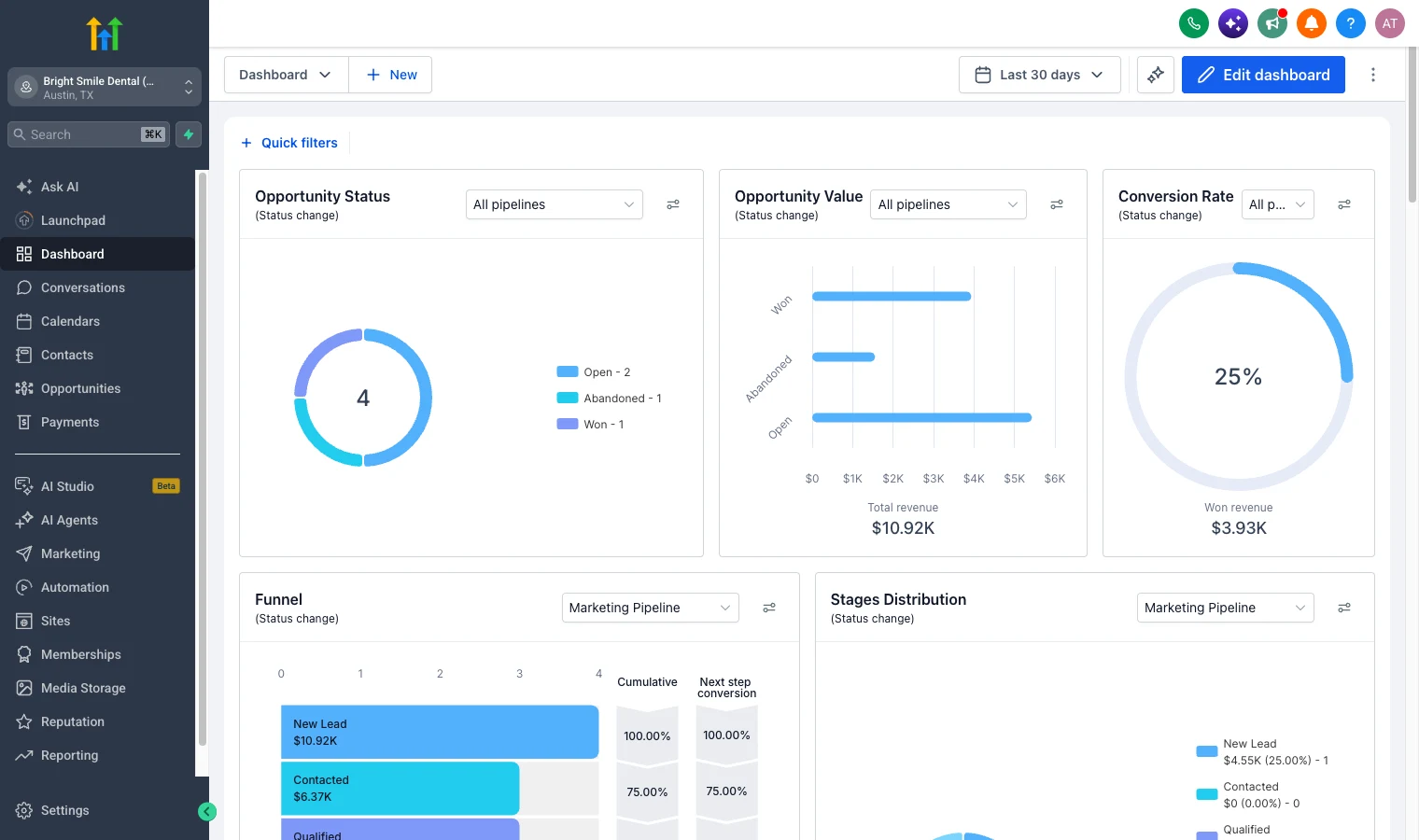
For an agency, a new prospect can enter a pipeline after filling in a form, then receive a follow-up email or text. The same account can handle the funnel and appointment booking. That gives your team one place to check whether a lead booked, replied or still needs attention.
Texts, calls, email and AI can add usage charges, so include them when you compare your current software bill.
As of 18 September 2026, GoHighLevel’s usage rates are $0.00747 per text segment plus carrier fees, $0.0166 per outbound call minute and $0.675 per 1,000 emails. Your actual total depends on use. We explain the GoHighLevel CRM and pipeline features in more detail, and our GoHighLevel review looks at the wider platform and costs.
We’d pick GHL when you need several client accounts and want one system for lead capture, marketing follow-up and booking. Skip it if you only need a basic calendar or email list. Variable usage fees can also make a busy texting or calling account harder to budget than a fixed subscription. You can test the workflow with the 30-day free trial.
Key Takeaway: GoHighLevel is strongest when consolidating several marketing and follow-up tools matters more than having a fixed monthly bill.
2. HubSpot CRM: Start with free CRM tools
HubSpot CRM has free tools for contact management, with a limit of two users and 1,000 contacts. It suits a small business that wants a place to organise prospects before paying for a wider marketing setup.
That free tier can work for a small team that mainly needs a shared contact list and a clear view of who has spoken with each prospect. A service firm could record a new enquiry, assign an owner and keep notes on the next conversation. HubSpot says its free CRM tools are free with no expiration date, which makes budgeting easier at the start.
There is a trade-off as the business grows. The free plan limit of two users and 1,000 contacts can be tight once several staff need access or a large prospect list starts to build.
HubSpot can also make more sense than GoHighLevel when a business wants to begin with contact records and keep its software costs free. HubSpot’s free CRM handles basic contact management, while HubSpot lists Marketing Hub Professional at $890 a month, or $800 a month with annual billing, plus a required $3,000 onboarding fee. That is a much larger commitment when you need comparable email marketing and automation.
Choose HubSpot if you have a small team and can stay within its free user and contact limits. If you expect to need multi-client accounts or a joined-up marketing workflow, compare the full cost before you build your process around the free tier.
3. Freshsales by Freshworks: Contact management with communication tools
Freshsales by Freshworks is a sales CRM with contact stages and several ways to communicate with leads. Its Growth plan includes a Kanban view, contact lifecycle stages, chat, email and phone, plus email templates, custom fields and basic workflows.
That mix fits a small agency that wants to manage its sales contacts and follow up without moving between separate chat, email and phone views. A team can use the Kanban board to see where prospects sit, then keep key details in custom fields. Freshsales is built for capturing, qualifying, routing and tracking leads.
Freshsales has basic workflows on Growth. That can support a short routine, such as assigning a new contact. Confirm which plan covers the workflow you need before settling on a tier.
The Freddy AI Agent add-on costs $49 per 100 sessions. If your team expects to use AI often, account for that usage alongside the base subscription. This is a different kind of cost from a flat CRM fee, though the cost depends on how many sessions you use.
Pro Tip: Write down one common lead path, such as enquiry, first reply, booked meeting and proposal follow-up. Then check whether the plan you’re considering can support each stage.
Choose Freshsales if your priority is contact management with chat, email and phone in the sales workflow. It’s a more focused choice than an all-in-one agency account, so compare the other tools you’d still need for funnels, scheduling or client accounts.
Key Takeaway: Freshsales suits teams that want sales communication and contact stages together, with workflow depth tied to the plan.
4. Close: Follow-up workflows for sales teams
Close is a sales CRM for teams that rely on regular calls and multi-channel follow-up. Its workflow triggers can start from lead, opportunity, contact, call, meeting, custom activity or form submission events.
A workflow can update a lead, send an email or text, create a task, assign that task or create an opportunity. For example, a form submission could add a new lead and set a follow-up task for the right team member. A completed call could trigger a next step, so the handoff is recorded in the sales process.
Close suits an agency whose main CRM job is to follow up with prospects, rather than run client marketing accounts. The activity based triggers give the team more than a simple reminder list. They can set different actions based on what happened, then see which lead or opportunity needs attention.
That focus has a boundary. If you also need funnels, appointment booking or multi-client sub-accounts, compare the added tools and work needed to connect them. A sales CRM can keep outreach organised, but it doesn’t automatically replace every part of a service business’s marketing setup.
Choose Close if your sales process depends on calls and timely follow-up across email and text. It’s a focused fit for outbound teams, while GoHighLevel is the broader option when client accounts and marketing tasks need to sit together.
5. Accelo: Time, capacity and retainer management
Accelo is professional services automation software, often shortened to PSA. It brings time tracking, capacity planning and retainer billing together for service firms that need to manage delivery as well as new business.
That makes it a different kind of fit from a lead-focused CRM. Those functions are useful when a team’s main concern is client work, not only whether a new lead has booked a call.
For a small agency, separate sales and delivery needs can make the choice less obvious. If you mainly need to catch leads and automate follow-up, a PSA may be more than you need. If you need time tracking, capacity planning and retainer billing in one suite, Accelo belongs on your shortlist.
Choose Accelo if your daily work centres on project delivery, staff capacity and billing. Keep a separate lead and marketing tool in the cost plan if those functions matter to your sales process.
6. Jobber: Job management for home and field service
Jobber is job management software for businesses that work in the field. Its tools cover job details, scheduling, time tracking, follow-up texts and customer updates such as an on-my-way message.
For a home service team, the day often starts with a booked job and a schedule that needs to stay current. Jobber can help the crew track time and view job details, while an on-my-way text keeps the customer informed.
Jobber lets you automate follow-ups. That can help a small team keep a customer informed after an estimate or prompt the next action without relying on someone to remember every message. The product is built around field work, so it’s a closer fit for job tracking than a general sales CRM.
For a service business comparing tools, separate the office pipeline from the field schedule. GoHighLevel can organise marketing leads and booking workflows. Jobber is the more direct fit when the team needs to manage jobs and customer updates while working on site. Check which quoting, invoicing and payment steps you need in the same system before deciding.
Choose Jobber if the core challenge is keeping jobs, staff time and customer updates in order. It’s a better match for a field schedule than for an agency that needs client marketing accounts and lead funnels.
CRM options compared for service businesses
The right choice depends on where work gets stuck. Use this table to match each tool to its main workflow, then check the costs and plan limits that matter to your team.
| Option | Best fit | Workflow focus | Cost point to check |
|---|---|---|---|
| GoHighLevel | Agencies and service firms | Lead capture, marketing follow-up, funnels, booking and client accounts | Check plan limits and any usage charges |
| HubSpot CRM | Small teams starting with free CRM tools | Contact management | Free tools cover up to two users and 1,000 contacts |
| Freshsales by Freshworks | Small agencies needing sales communication tools | Contact stages, chat, email, phone and workflows | Freddy AI Agent add-on: $49 per 100 sessions |
| Close | Sales teams with structured outreach | Event triggered follow-up by email, text and tasks | Review the plan against your workflow needs |
| Accelo | Professional service firms | Time, capacity, projects and retainer billing | Compare suite costs with your delivery needs |
| Jobber | Home and field service teams | Scheduling, job records, time and customer updates | Check the plan against your quoting and job process |
Integrations deserve a hands-on check. List the tools you already use for accounting, scheduling, lead capture or job photos, then confirm that your chosen CRM connects to them in the way your team needs. Don’t assume that every tool in a software category handles dispatch, photo records or accounting links in the same way.
For many small agencies, GoHighLevel is the clearest fit when replacing separate lead capture and follow-up tools is the goal. Check the Starter plan’s current cost and limits, and include expected text, call, email and AI usage in your estimate. You can compare your current stack with a GoHighLevel cost and plan breakdown from The Stack Insiders before you switch.
Pro Tip: Test one full lead path before moving your whole team. Start with a form or enquiry, follow it through to booking, then check where job details and payment work happen.
Key Takeaway: Match the CRM to the work that consumes the most admin time, then price any tools that still need to sit beside it.
Frequently Asked Questions
What CRM is good for a service business?
Can a CRM handle scheduling and job tracking?
Is a free CRM enough for a small service business?
What should I include when comparing CRM costs?
Our recommendation
For an agency or service business that wants lead capture, follow-up, funnels and booking together, start by testing GoHighLevel against your current stack and budget for usage. Start your 30-day free trial, then build one real lead workflow before moving more of your business.
We earn a commission if you start GoHighLevel through the links on this page, at no extra cost to you.
DO THIS NEXT, FREE FOR 30 DAYS
The quickest way to know is to try it on real work.
- STEP 1Claim your free month
- STEP 2Rebuild one thing from this guide
- STEP 3Decide before day 30
Free for 30 days from the day you start. Card required.
Featured in Forbes and Business Insider.
Ashley Kemp is a digital entrepreneur and perpetual traveller. Switched from ClickFunnels to GoHighLevel years ago and never looked back. Writing about what actually works.
Was this article helpful?