Updated 1 November 2026comparison
CRM With Email Marketing: 6 Platforms Compared
Six CRM platforms with email marketing built in, compared on fit and cost for agencies and service firms, with GoHighLevel first.
 Ashley Kemp12 min read
A CRM with email marketing keeps contact records and campaign follow-up connected, so your team can see who needs a reply and what they received. Here are six platforms for agencies and service businesses, including GoHighLevel, plus the trade-offs to weigh before you move your client work.
1. GoHighLevel
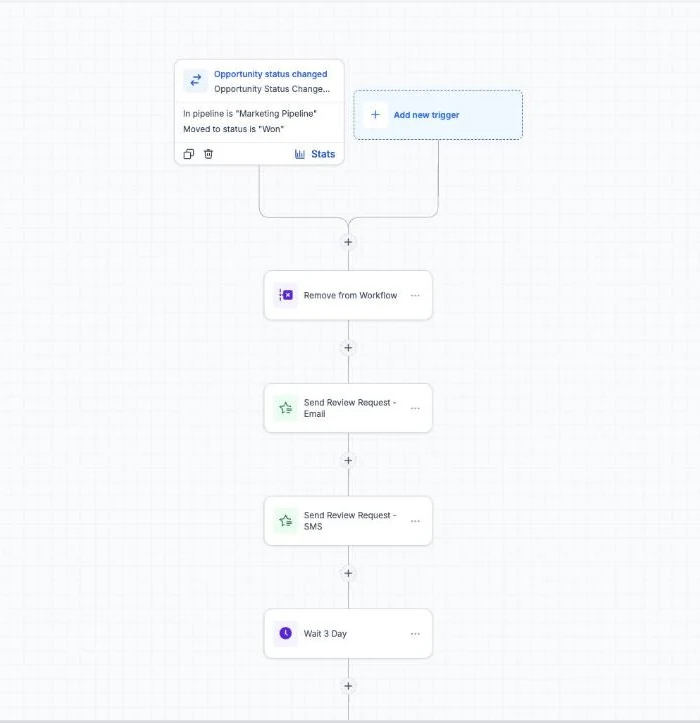
GoHighLevel, also called GHL, brings CRM, email and SMS, funnels, booking, and marketing automation into one account. Agencies that want to resell it under their own brand can use SaaS Mode on the Founder plan (previously Agency Pro). That mix suits teams trying to manage lead capture and follow-up for several client accounts without stitching each task into a separate system.
Plans cost $97, $297, or $497 a month. The Starter plan includes up to three client accounts; Unlimited includes unlimited client accounts; Founder is for agencies that want to resell the software. All plans include unlimited users. Texts, calls, email, and AI add usage charges, so the subscription price isn’t the full monthly cost.
As of 18 September 2026, GoHighLevel’s usage rates are email at $0.675 per 1,000 sends, outbound calls at $0.0166 per minute, and texts at $0.00747 per segment plus carrier fees. AI Employee is $50 or $97 per month per client account. Add these charges to your estimate, along with any subscriptions you plan to keep. Our GoHighLevel email marketing setup guide explains the email side in more detail.
Choose this if: You manage several client accounts and want marketing follow-up, booking, and client-facing branding under one roof. If you only need a newsletter tool or a simple booking calendar, the broader platform may be more than you need. Project management, design, and reporting tools may still belong in your stack.
We publish GoHighLevel cost breakdowns and comparisons for agency owners, and we earn an affiliate commission if you sign up through our link. If you want to test the workflow, start the 30-day free trial. A card is required at sign-up; billing starts after the trial unless you cancel.
2. HubSpot
HubSpot combines CRM with marketing, sales, and customer service tools. Its breadth makes it a fit for larger teams that want customer and campaign work in one ecosystem, especially when marketing operations need to work closely with sales and service staff.
The pricing tier relevant to more advanced email marketing and automation needs a close look. HubSpot lists Marketing Hub Professional at $890 a month, or $800 a month with annual billing, plus a required $3,000 onboarding fee. The free CRM can cover basic contact management, but those marketing needs sit at a much higher price point.
That price difference matters when you’re comparing a CRM subscription with a wider marketing suite. For a larger company, one shared system can suit existing teams and processes. For a small agency watching fixed costs, a high monthly commitment may be hard to justify unless the team will use the added marketing functions.
HubSpot is sold under its own brand. Agencies that want to present software under their own name should check how client facing screens are branded before they commit.
Choose this if: Your team needs broad CRM coverage and has the budget and people to use a larger marketing, sales, and service platform. If white-label client access is a must, compare that requirement before you commit.
3. WebinOne
WebinOne brings CMS, ecommerce, CRM, and email marketing together in one console. Agencies and teams managing several brands may value that shared setup, especially when site content, store activity, customer records, and marketing work need to sit close together.
The platform’s approach is to share data across CMS, ecommerce, CRM, automation, and governance. That can matter when a brand’s contact record and marketing activity need context from its site or shop. Instead of treating email as an isolated channel, a team can assess whether a unified system matches the way brand work is organised.
WebinOne offers more than 300 APIs, and plans start at $10 a month per site. For an agency, an integration count alone doesn’t answer whether a specific client workflow will work. Make a short list of the systems your accounts rely on, then confirm the connection details for each one before planning a move. A store, for example, may need product and customer information to pass into marketing activity.
There’s a useful distinction here. A CRM holds customer and prospect details; email marketing sends messages to chosen groups. When those systems share data, teams can use contact information and actions to decide who receives a message. A CRM can also keep the history available when a sales or service person follows up.
Choose this if: Your agency manages brands that need CMS, ecommerce, CRM, and email marketing in a common console. Check that the shared-data model fits the actual work across your client accounts.
4. Klaviyo
Klaviyo is aimed at ecommerce teams and agencies serving ecommerce brands. Product-level segmentation is a key email marketing capability, which can help a team shape messages around what customers browse or buy rather than sending the same campaign to every contact.
For a shop, behaviour-based messages might respond to a product view or an unfinished purchase. The exact trigger and message depend on the business’s setup and data. The important question is whether customer and product activity is available in a useful form, and whether the team can measure what happens after each campaign.
Choose this if: Your client roster centres on ecommerce and email needs to respond to product-level customer behaviour. A service business with no store data may have less use for that commerce focus.
5. Systeme.io
Systeme.io is a lower-cost option for basic funnels, email marketing, and simple automation. Systeme.io offers a free plan and paid plans starting at $17 a month. That can make it worth considering for a coach, course creator, or small business that wants to start with a modest set of marketing needs.
Think about the work the account must do. A course creator may need a way to collect interest, send email, and guide a subscriber through a simple funnel. If the main need is straightforward, paying for a larger agency-centred system could add cost without changing the day-to-day process.
For an agency, the decision changes when each client needs separate access, a sales pipeline, or a branded portal. Check how each of those needs is handled before you deliver work across multiple businesses rather than running one brand.
A low monthly fee doesn’t tell the whole story. Map the jobs you need the software to do, then mark which ones still require a separate tool. If the account only needs email and a simple funnel, the smaller setup may be enough. If your team needs client account controls, include that in the comparison.
Choose this if: You’re starting with budget funnels, courses, email, and simple automation. If client-level management or white-label delivery is central to your service, check those needs before choosing a low-cost plan.
Key Takeaway: Compare the cost of the full workflow, not just the software’s monthly subscription.
For agency-specific needs, our agency CRM comparison can help you think through client accounts and sales pipelines.
6. SuiteDash
SuiteDash is built for agencies, consultants, and professional-services firms that want a unified client-operations platform configured and white-labelled for each client. SuiteDash includes email marketing and drip sequences alongside trigger-based workflows.
The workflow options include multi-step sequences, conditional logic, and actions across modules. In a client operation, that can connect an event in one part of the system with a follow-up elsewhere. For example, a firm might use a trigger to start a sequence after a defined client action, then set a condition that changes what happens next.
Messaging and AI features can add costs outside the core SuiteDash subscription. Keep them separate from the core subscription in your budget, and check which parts of your planned workflow depend on an added service.
White-label delivery can matter when a client logs into a portal or works inside the system you provide. But that need differs from an agency that mainly sells lead generation and marketing automation. Decide whether client operations or campaign delivery sits at the centre of your offer.
Choose this if: You want to present a branded client-operations system and use email marketing with trigger-based workflows. If your main goal is to productise marketing automation for many client accounts, compare the account model with your delivery needs.
Pro Tip: Before moving a client, sketch one real lead journey from first form submission to booked appointment. Note where contact data enters, what message goes out, and which person must act next.
CRM With Email Marketing Comparison Table
These products cover different jobs, so a single feature count won’t tell you which one fits. Compare the work you need done, the teams that will use the system, and the costs that sit outside the base subscription. For more agency CRM criteria, consider who handles delivery after a lead becomes a client.
| Platform | Fits this work | What to weigh | Known cost detail |
|---|---|---|---|
| GoHighLevel | Agency marketing and client accounts | CRM, email, SMS, funnels, booking, automation, and SaaS Mode on the Founder plan | $97, $297, or $497 monthly, plus usage charges |
| HubSpot | Broad CRM needs across marketing, sales, and service | Enterprise-level breadth and the cost of advanced marketing | Marketing Hub Professional from $890 monthly, or $800 monthly billed annually, plus onboarding |
| WebinOne | Multi-brand work across CMS, ecommerce, CRM, and email | Shared data model and needed API connections | From $10 a month per site |
| Klaviyo | Ecommerce email and cross-channel marketing | Product-level segments and contact or channel-based plan growth | Free plan; paid plans scale with contacts and channel use |
| Systeme.io | Budget funnels, courses, and email | Whether simple automation covers the work | Free plan; paid plans start at $17 monthly |
| SuiteDash | White-label client operations | Workflow needs and related messaging or AI costs | From $19 a month, unlimited users |
For email, templates help a team keep a consistent layout. Sequences send planned messages over time; workflows can respond to a contact action. Performance tracking should tie opens or clicks to a useful next step, such as a booked call or a sale, rather than treating an email send as the outcome.
Segmentation divides contacts into groups using details such as location, customer status, or product activity. Personalisation uses those details to make a message more relevant. An ecommerce store could send a product-related follow-up after a customer views an item. A consultant might send a different next step after someone requests a call.
Some platforms include email inside the CRM. Others connect to an outside email service through an API or a middleware connection. A native setup can reduce the number of systems that need to share data. A connected setup may suit a team that already has a preferred email service, but check what fields sync and how quickly changes pass between systems.
Before sending campaigns, review consent and data handling. Collect permission and use personal data lawfully, including for contacts in the European Union.
Key Takeaway: A unified contact record is useful only when the team can act on the history, consent, and customer behaviour stored there.
Frequently Asked Questions
What does a CRM with email marketing do?
How is email marketing different from marketing automation?
Can a CRM send an abandoned-cart email?
Do I need a separate email marketing tool?
How should an agency compare platform costs?
Which Platform Should You Choose?
For an agency combining lead follow-up with client accounts, GoHighLevel is the clearest fit on this shortlist. Budget for usage and any tools you’ll retain, compare your current costs, then start the 30-day free trial and test one client workflow.
We earn a commission if you start GoHighLevel through the links on this page, at no extra cost to you.
DO THIS NEXT, FREE FOR 30 DAYS
The quickest way to know is to try it on real work.
- STEP 1Claim your free month
- STEP 2Rebuild one thing from this guide
- STEP 3Decide before day 30
Free for 30 days from the day you start. Card required.
Featured in Forbes and Business Insider.
Ashley Kemp is a digital entrepreneur and perpetual traveller. Switched from ClickFunnels to GoHighLevel years ago and never looked back. Writing about what actually works.
Was this article helpful?