Updated 10 October 2026comparison
GoHighLevel AI Studio vs Lovable, Replit and Base44 (2026)
We gave GoHighLevel AI Studio, Lovable and Replit the same app prompt, checked the maths, then followed the lead. Here is what each one built.
 Ashley Kemp27 min read
Is GoHighLevel AI Studio better than Lovable, Replit or Base44?
For an app that exists to win customers, yes. On 10 October 2026 we gave AI Studio, Lovable and Replit the same prompt for a lead capture calculator. All three did the maths correctly. AI Studio was the only one that put each lead straight into a CRM, within seconds of the form being sent, after one click to connect it. When we then asked all three to email each lead and text them two days later, Lovable listed GoHighLevel among the CRMs it could use and, once we picked it, had GoHighLevel send both the email and the text. Replit offered its GoHighLevel connection. Lovable and Replit saved leads on the server from the first build, which AI Studio does once you switch on Cloud with one click. Base44 was not tested hands-on; its documentation is summarised below.
People keep asking me whether GoHighLevel's AI Studio (GHL AI Studio for short) is as good as Lovable, Replit or Base44. Most comparisons answer that from the feature pages. I wanted to see it, so on 10 October 2026 I gave three of them the same prompt, in new projects, on the same afternoon, and recorded what happened.
Then I did the part the other comparisons skip. A business app is only worth building if it brings in customers, so I asked each builder to do what a business does next: put the lead in a CRM, email them, and text them two days later. That is where the results split.
PARTNER OFFER
Your first month of GoHighLevel is free.
Through our partner link you get 30 days on any plan, double the standard 14-day trial. Build something real before you pay a cent.
Claim my free monthCard required. Nothing charged for 30 days.
How did we test GoHighLevel AI Studio against Lovable and Replit?
Every tool got the same prompt, typed word for word into a new project:
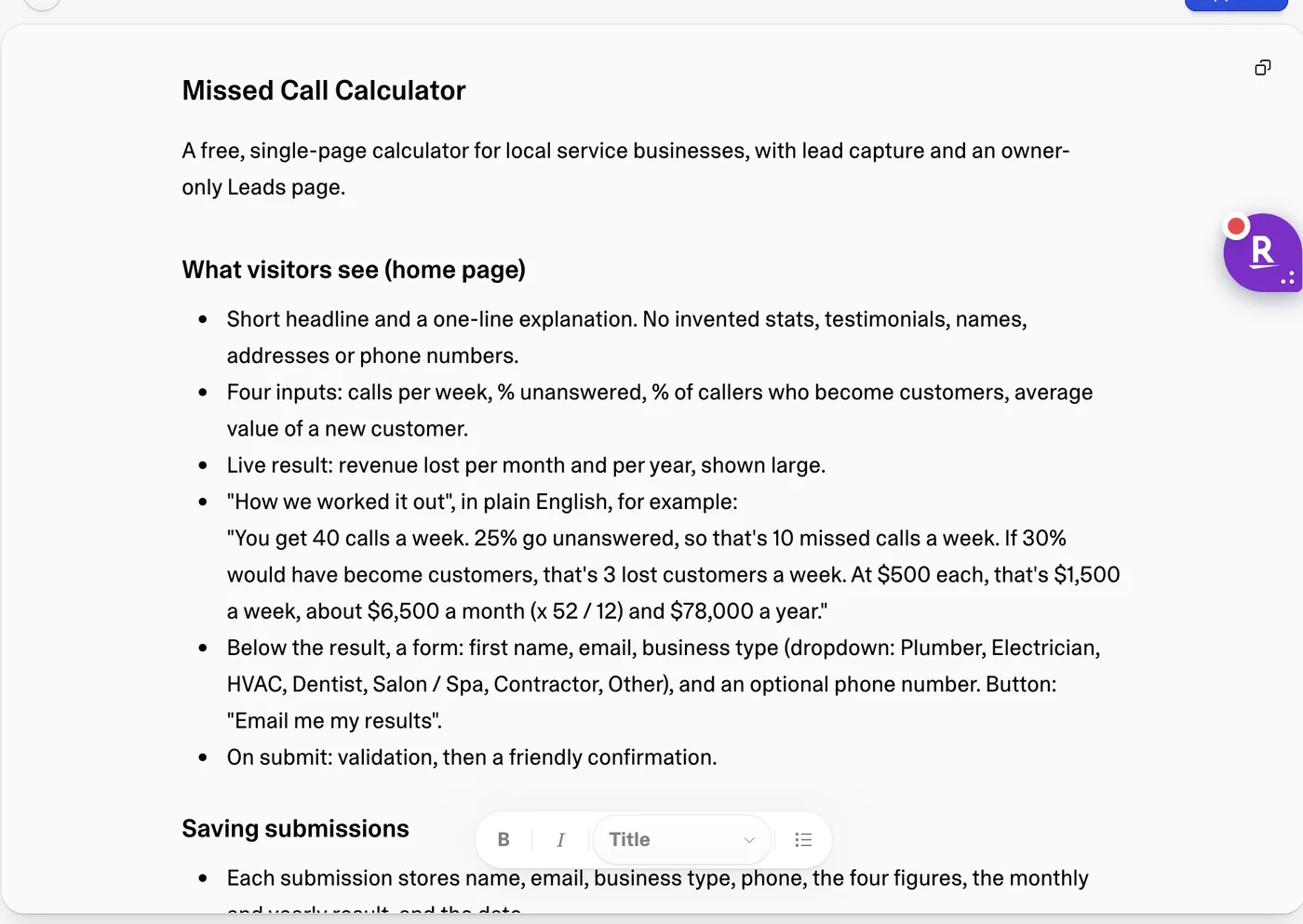
Build Missed Call Calculator, a free web tool for local service businesses such as plumbers, dentists, salons and contractors. A visitor enters four numbers: calls per week, the percentage of calls that go unanswered, the percentage of callers who become customers, and the average value of a new customer. Show the revenue lost to missed calls per month and per year, with the working shown in plain English. Under the result, a form asks for first name, email, business type and an optional phone number, with an Email me my results button. Save each submission with the figures they entered and their result. Add an owner-only Leads page, behind an email and password sign in, that lists every submission newest first and can export them to CSV. Keep the design clean and friendly: white, dark navy text and an orange accent. Do not invent statistics, testimonials, company names, addresses or phone numbers.
I picked a missed call calculator because it is the kind of app a local business or an agency would build for real: a free tool that earns a lead. It needs correct maths, a form, a database and a private page for the owner, which tests the builder rather than the template library.
The ground rules:
- New projects, default settings. AI Studio ran in our GoHighLevel demo sub-account, Bright Smile Dental. Lovable ran in a Pro workspace. Replit's home screen defaulted to its Free agent mode, which runs lightweight models, so I switched it to Power mode, its paid agent mode.
- Two more identical prompts afterwards. One asked for the CRM, email and text follow-up. The other asked for a $29 one-time purchase with a checkout page.
- I stopped wherever a builder asked for an API key, a third-party account or a card. The page records what each one asked for at that point, because that is the setup you would face.
- Base44 was not tested hands-on. I had no account and did not create one for this test. Its section below comes from Base44's own documentation and pricing page, read on 10 October 2026.
The scorecard
| Test | GoHighLevel AI Studio | Lovable | Replit |
|---|---|---|---|
| Time to a working app | About 11 minutes | About 8 minutes, including a plan we approved | About 23 minutes, including one question about email |
| What it did before building | Built straight away | Wrote a plan and waited for approval | Asked us to connect Resend for email |
| Maths for 50 calls, 20% missed, 30% booked, $400 | Correct: $5,200 a month, $62,400 a year | Correct | Correct |
| Typing 150% for missed calls | Accepted it ($39,000 a month) | Worked it out as 100% | Refused it: Must be between 0 and 100 |
| Where the lead was saved | The GoHighLevel CRM, plus browser storage until Cloud is on | Lovable Cloud database | Replit app database, Leads page protected on the server |
| Lead added to a CRM | Yes, automatically, within seconds | Not by itself; it offered HubSpot, Pipedrive or GoHighLevel | Not by itself; it offered its HighLevel connection |
| Email now, text in two days | A workflow in the same GoHighLevel account | Its plan: GoHighLevel sends the email and the text | First suggestion Resend plus Twilio, then GoHighLevel |
| $29 checkout | Your GoHighLevel product catalog and hosted checkout | Lovable-managed Stripe or Paddle | Connect Stripe, Whop or Shopify |
| Build cost we could see | Not shown in the project; HighLevel's examples run $0.60 to $1.30 a build | 8.5 credits for all three prompts, about $2.13 on Pro | $1.63 of Agent usage for all three prompts |
Round 1: what did each builder make from the same prompt?
GoHighLevel AI Studio
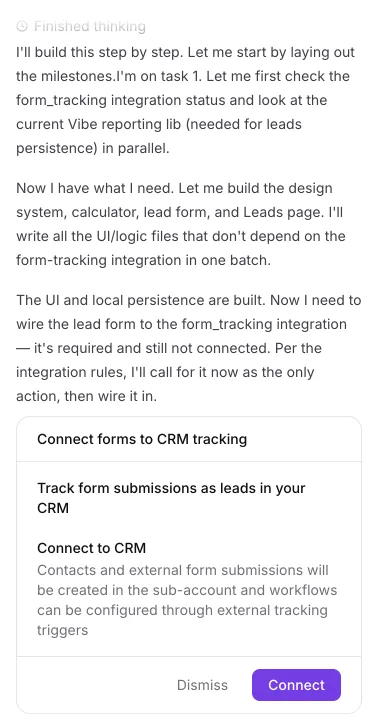
AI Studio named the project Revenue Rescue and finished in about 11 minutes. That included a pause while it waited for me to click Connect on a card titled "Connect forms to CRM tracking", which read: "Contacts and external form submissions will be created in the sub-account and workflows can be configured through external tracking triggers". The prompt never mentioned a CRM. AI Studio treats that connection as part of any lead form: its own note said the form tracking integration was "required and still not connected".
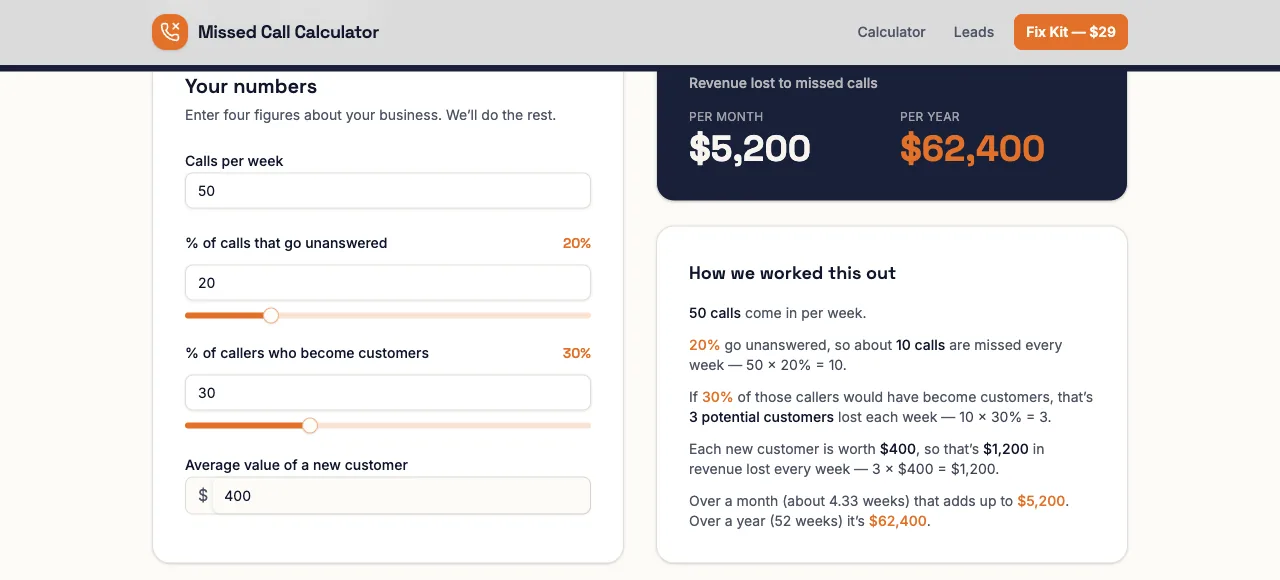
The app has a dark hero ("Every missed call is money walking out the door"), sliders for the two percentages and the working laid out line by line, using 52 weeks divided by 12 months.
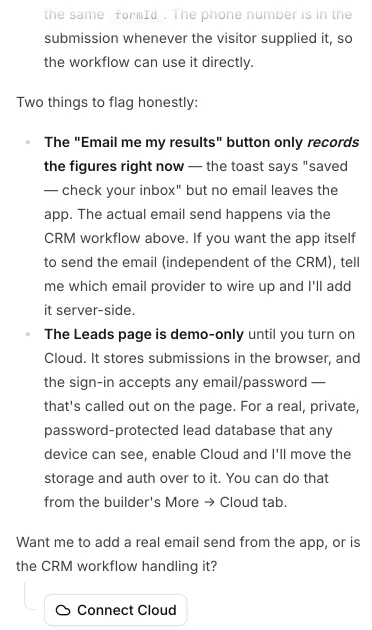
One thing to set before you publish. Cloud was not switched on in the project, so the owner's Leads page kept submissions in the visitor's browser. AI Studio said so itself when I asked about follow-up: "The Leads page is demo-only until you turn on Cloud. It stores submissions in the browser, and the sign-in accepts any email/password". The fix is the Connect Cloud button it offers, which gives the app a real database and logins. Our GoHighLevel AI Studio tutorial shows that switch taking under two minutes, with the agent moving the app across by itself. The leads were safe either way, because every submission was already going into the GoHighLevel CRM.
Lovable
Lovable's prompt box was set to Plan mode, so its first reply was a written plan: a Lovable Cloud table for submissions, a separate roles table so only the owner can read them, a server function to validate each submission, and the formula "Monthly = weekly x 52 / 12" with unit tests. I approved it and the build finished about eight minutes after I sent the prompt.
Lovable then sent a test entry through its own form, checked it saved, and deleted it. The Cloud database showed our later test lead as one row in a calculator_submissions table.
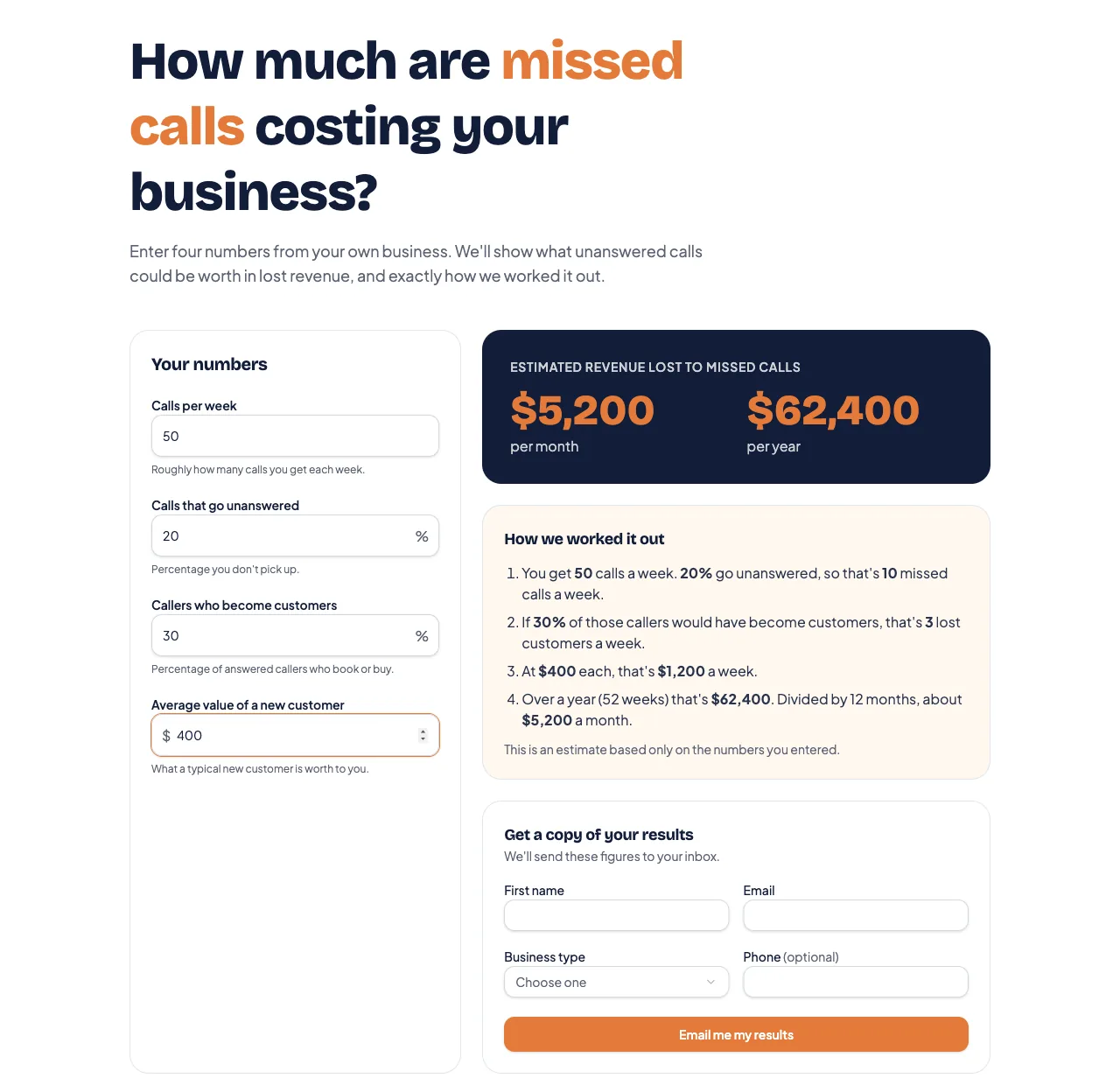
Owner access needed one more step: create the owner account on the app's sign in page, confirm the email, then tell Lovable which address to promote.
Replit
Replit took longest, about 23 minutes. It stopped after 56 seconds to ask me to connect Resend, a separate email service: "I'll use Resend to deliver the calculation emails; it's designed for transactional messages like these." I told it to skip email and carry on. When it finished it asked for the owner's email address so it could lock the Leads page to that account.
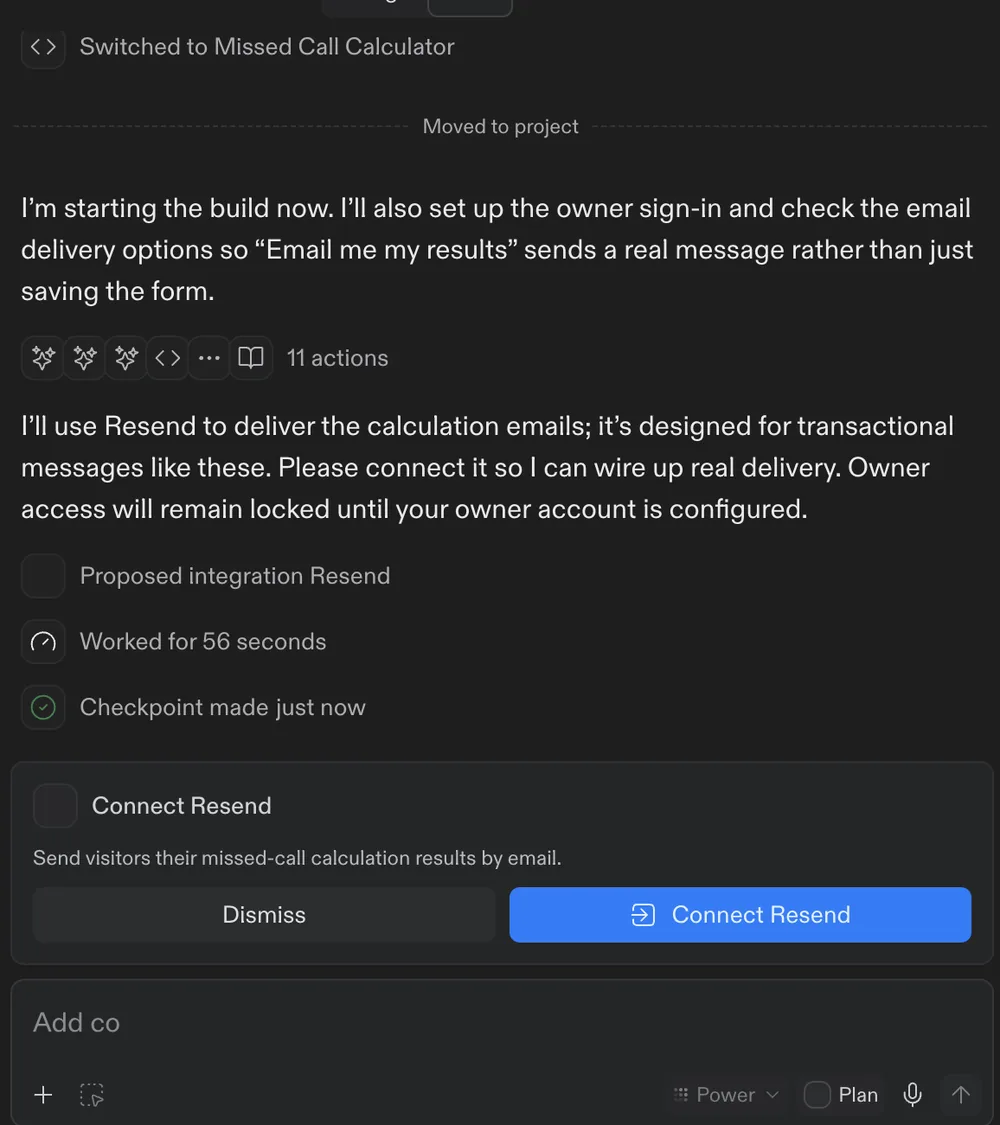
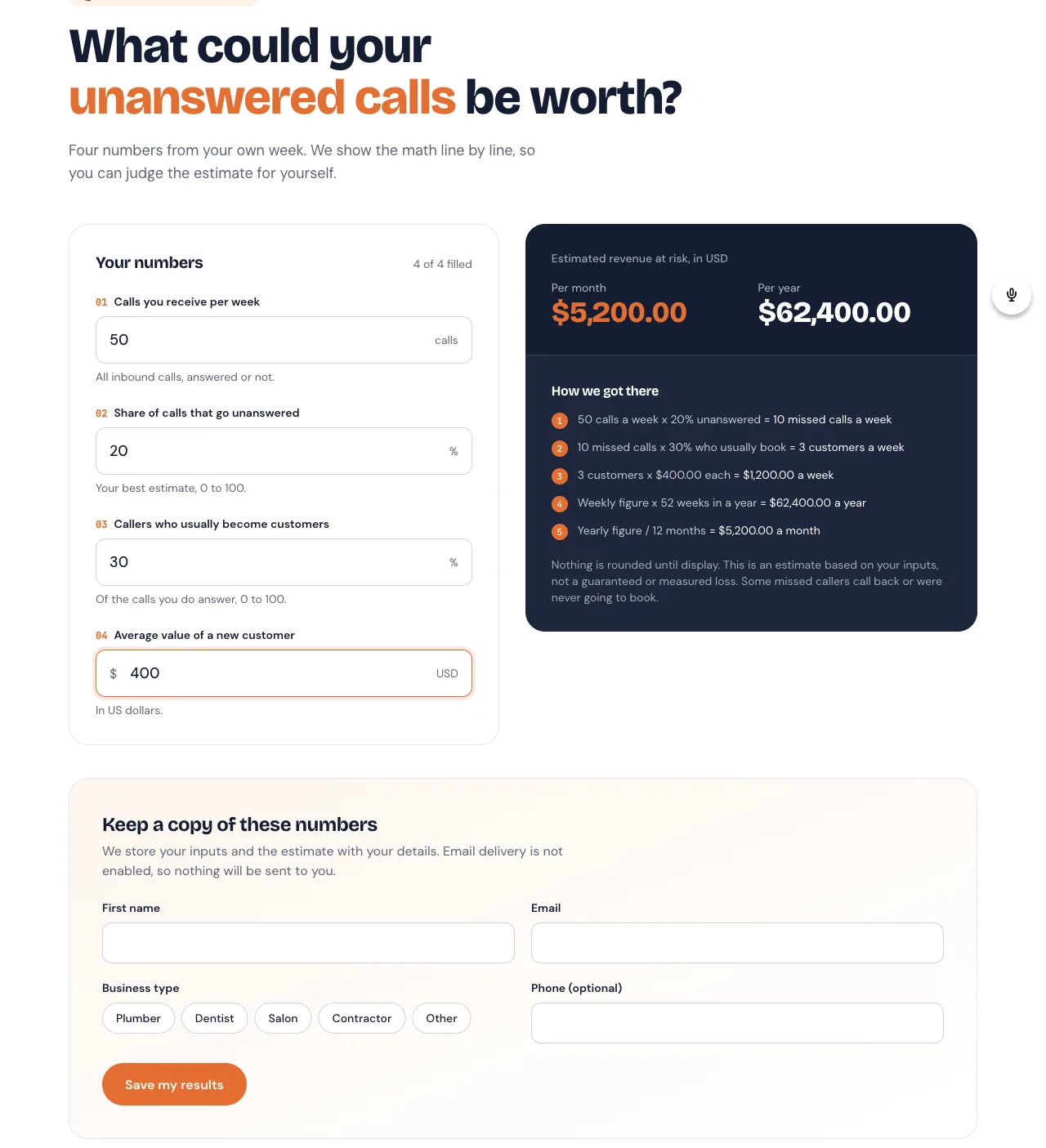
The result was careful work. It numbered the inputs, labelled the result "Estimated revenue at risk", added the line "Nothing is rounded until display", and renamed the button to "Save my results" because no email would be sent.
Our GoHighLevel vs Replit comparison covers Replit as a development platform. For this test, the relevant detail is that Replit's preview link is a temporary development URL. Its free Starter plan includes one published app, and Replit's documentation says that link "will automatically go down after 30 days".
Round 2: did they get the details right?
All three gave the right answer for sensible numbers. I then typed 150% into the missed calls box, a mistake a real visitor could make.

Replit refused it with "Must be between 0 and 100". Lovable quietly worked it out as 100%. AI Studio accepted it and reported 75 missed calls out of 50, or $39,000 a month. One follow-up prompt fixes that in AI Studio, and the improved prompt at the end of this page includes the line.
The second detail was honesty about email, since none of the apps had an email service connected:
- Replit said up front: "Email delivery is not enabled, so nothing will be sent to you."
- Lovable confirmed with "We've saved your results and will follow up at test@example.com", although its form heading still read "We'll send these figures to your inbox".
- AI Studio confirmed with "We've recorded your figures and sent a copy to test@example.com". No email was sent. AI Studio explained why when asked: sending the email is a job for a GoHighLevel workflow, which is how the follow-up below works.
The third detail was invented copy. When I asked for a $29 kit, Lovable replied "I won't invent the contents of the kit" and asked what buyers receive. AI Studio wrote the sales line for me:

None of these takes more than a minute to fix, and the same rule applies to every AI builder: read every line of copy before it goes live.
Round 3: where does the lead go?
GoHighLevel came up in all three builders' answers to this one.
GoHighLevel AI Studio: a contact in the CRM, within seconds
I submitted one test lead, "Test Lead" at test@example.com. Within seconds it appeared in the sub-account's Contacts, created by AI Studio, with a Form Submitted event naming the form and the page it came from.
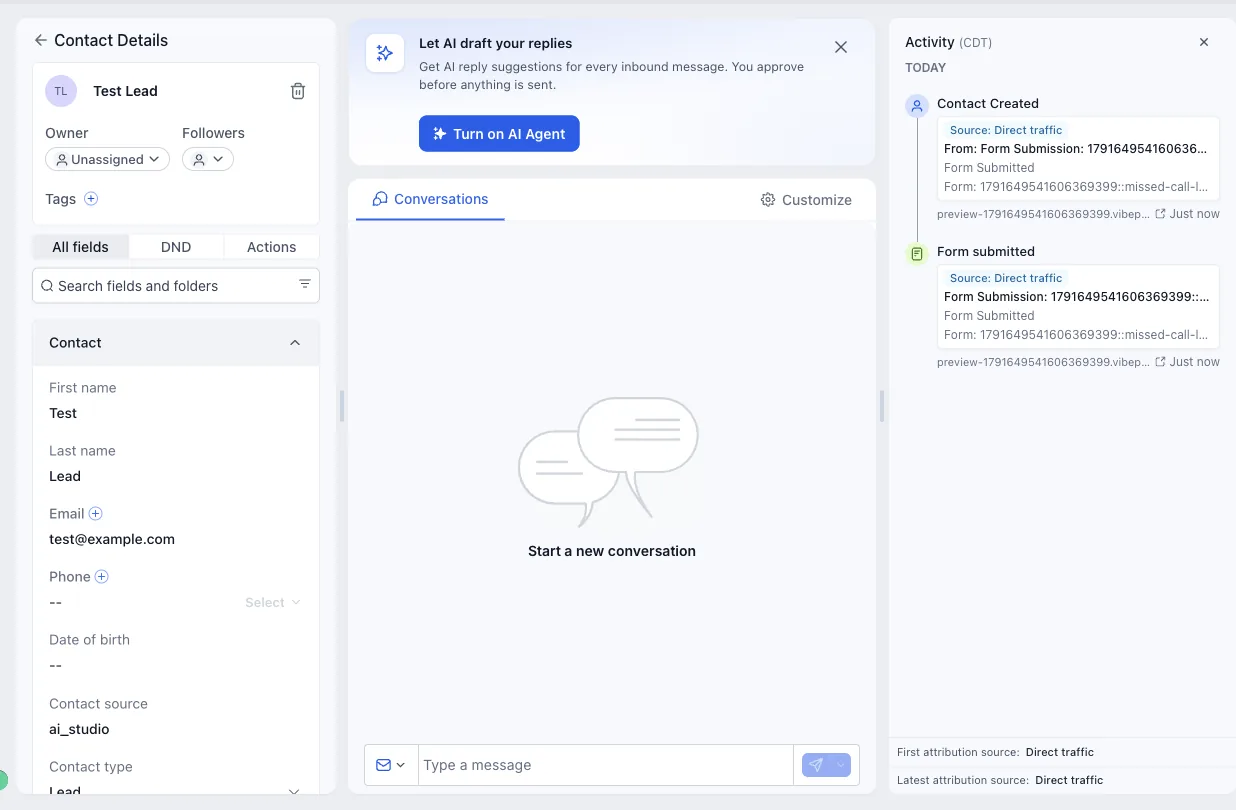
I then sent all three builders the same follow-up prompt:
When someone submits the form, add them to my CRM as a contact, email them their results straight away, and send them a text message two days later asking if they want help fixing their missed calls.
AI Studio reported the contact as done, and said it now sends every figure (business type, calls per week, the two percentages, the customer value and both results) to the contact as custom fields. On the email and the text it was clear: "That's a CRM automation, not something the app triggers directly." In GoHighLevel that is one workflow, in the same account, keyed to the calculator's form:
- Trigger: the calculator's form is submitted.
- Send email: the results, pulled from the custom fields.
- Wait: two days.
- Send SMS: only if the contact gave a phone number and agreed to texts.
Our GoHighLevel workflow guide covers the builder, and the missed call text back setup is the natural thing to sell the business owner once the calculator has shown them the number.
Lovable: "Here's the simplest way to set this up with GoHighLevel"
Lovable asked four questions before writing anything. The first was which CRM I use, with three named options: HubSpot, Pipedrive and GoHighLevel.
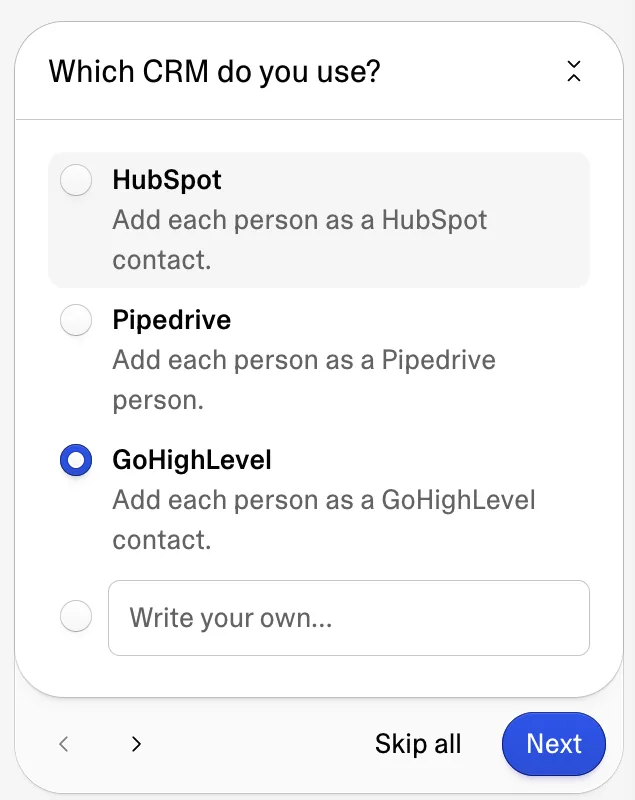
I picked GoHighLevel. For texts it offered Twilio ("Needs a Twilio account and a number to send from") or "My CRM", described as "Send through your CRM, if it can send texts (for example GoHighLevel)". It also recommended a consent tick box for texts and pointed out that its own results emails would need a domain I own.
Its plan, word for word: "Here's the simplest way to set this up with GoHighLevel. There's no ready-made link to GoHighLevel, so it connects with a private key from your account." The calculator would create a GoHighLevel contact with the figures in custom fields and a tag, and then: "In GoHighLevel, you set up one workflow that starts when a contact gets the 'missed-call-calculator' tag". Its reason: "This way you don't need your own email domain. GoHighLevel sends the email and the text, and you can change the wording any time in GoHighLevel."
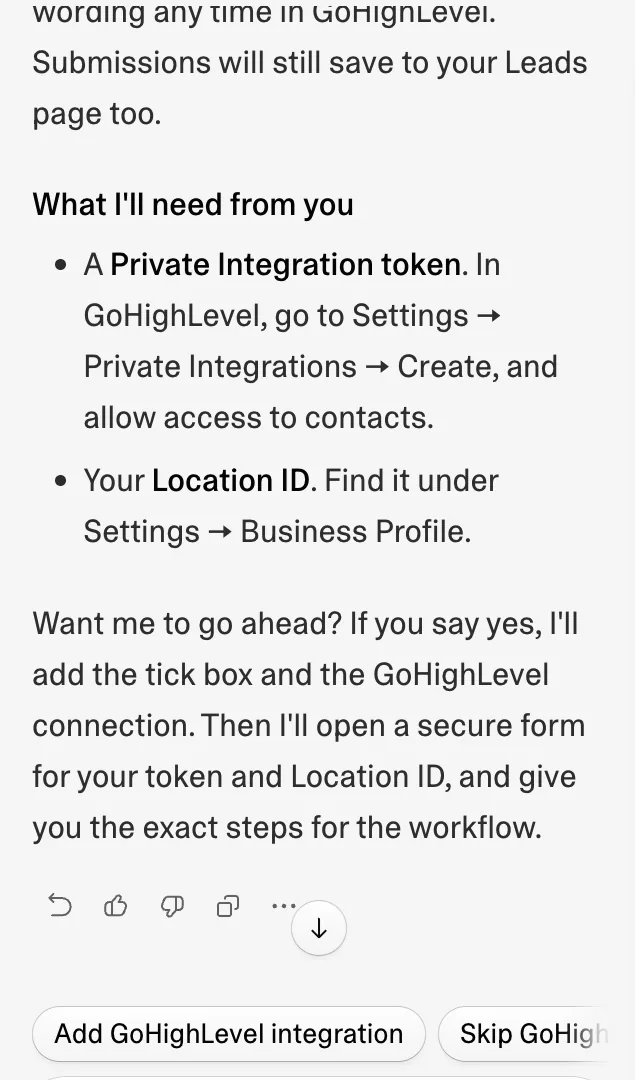
So Lovable's best route to a follow-up is a GoHighLevel account, a Private Integration token, a Location ID and a workflow built in GoHighLevel. AI Studio starts at the last step, because it already lives in that account.
Replit: two new accounts, then GoHighLevel
Replit's first answer: "No CRM, email, or SMS account is connected to this project yet. For sending, I recommend Resend for the results emails and Twilio for the delayed texts, unless you already use other services." That is two more accounts and two more bills before anything is sent.
When I told it my CRM is GoHighLevel and asked it to use my existing email and SMS, it checked its integrations and came back with: "GoHighLevel has an available connection for CRM and messaging."
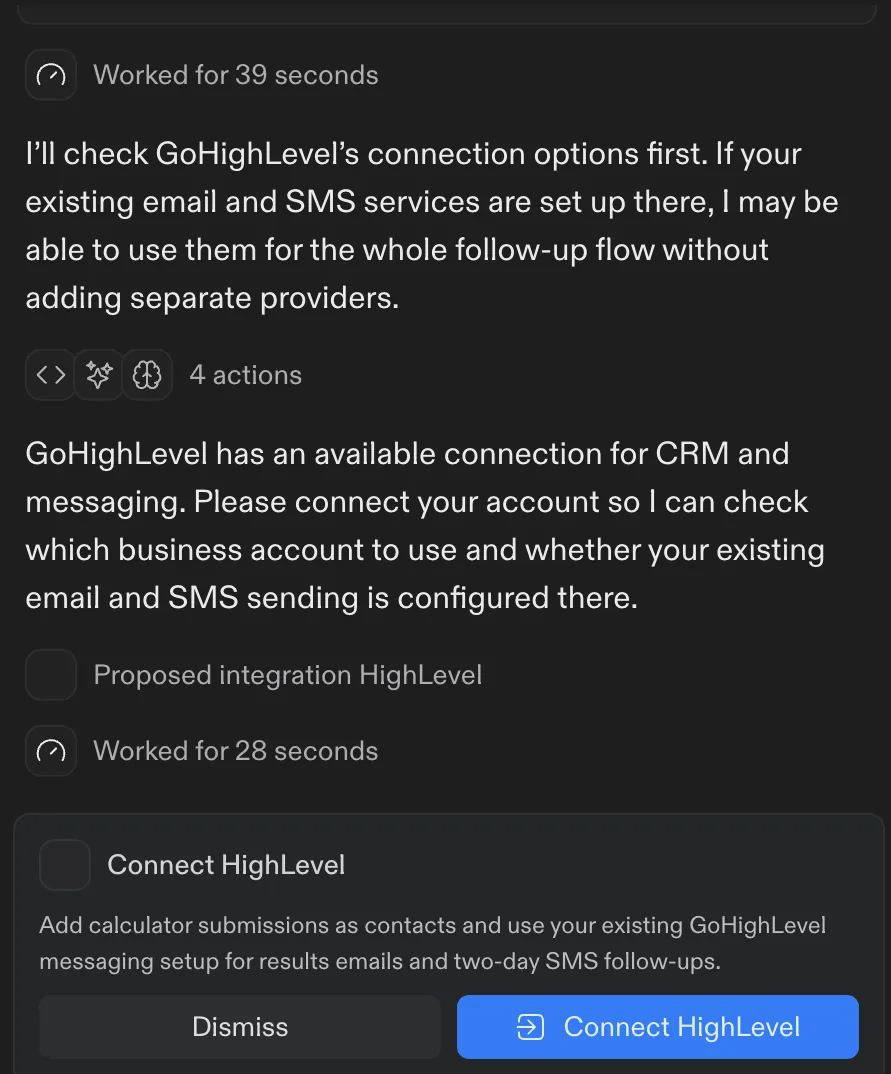
Once GoHighLevel was the CRM, all three builders handed it the follow-up. Lovable named it before I did, and Replit found its HighLevel connection as soon as I named it. However the app gets built, the contact record, the email, the text and the reminder end up running on GoHighLevel. AI Studio is the only one of the three where that was already true before I asked, and you can see it for yourself in a GoHighLevel free trial.
FREE FOR 30 DAYS
Get your first month of GoHighLevel free
- Every feature, on any plan
- A full month, worth up to $497
- Cancel before day 30, pay nothing
Card required. Nothing charged for 30 days.
Join 2.2 million businesses already running on GoHighLevel
Round 4: how does each one take a $29 payment?
The third identical prompt asked for "a $29 one-time purchase called Missed Call Fix Kit, with a checkout page".
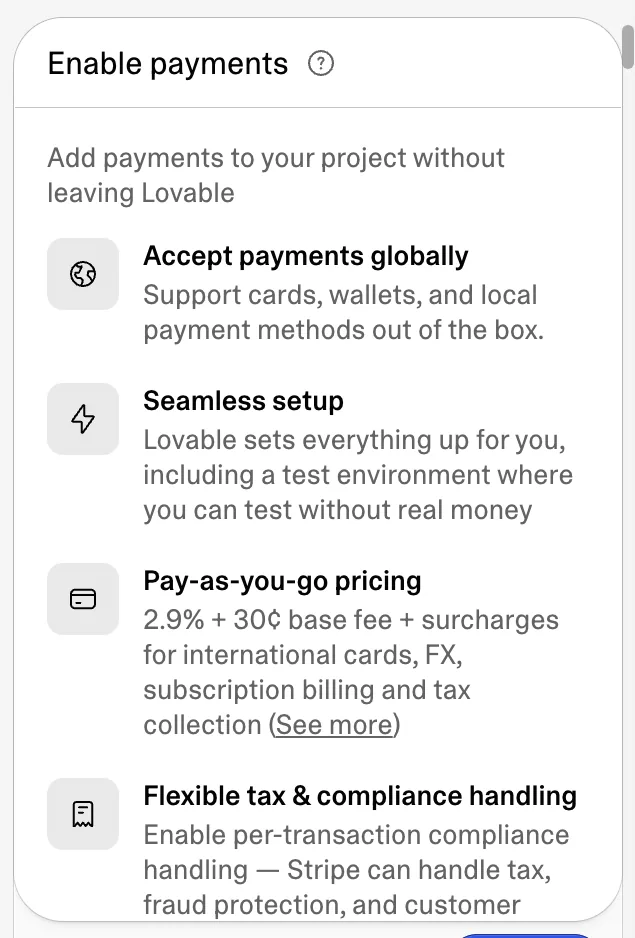
GoHighLevel AI Studio offered Enable Payments, then built a /checkout page using HighLevel's sealed checkout block, plus a header button and a banner. It does not create products itself; it told me to add the $29 product under More, Payments, after which the checkout fills in automatically. The products, orders and payment providers are the sub-account's own, and HighLevel's changelog lists PayPal, coupon codes, subscriptions and one-click upsells on that checkout. In our tutorial build a Stripe test order went through and landed in Payments, Orders like any other sale.
Lovable asked whether to use Paddle or Stripe. Paddle "handles tax for you" and may review your business first; Stripe is "built-in setup, tax collection only". Lovable's documentation says it creates and manages the payment account for you, charges no markup, and that Paddle costs 5.0% plus 50 cents a transaction. Built-in payments need a paid Lovable plan.
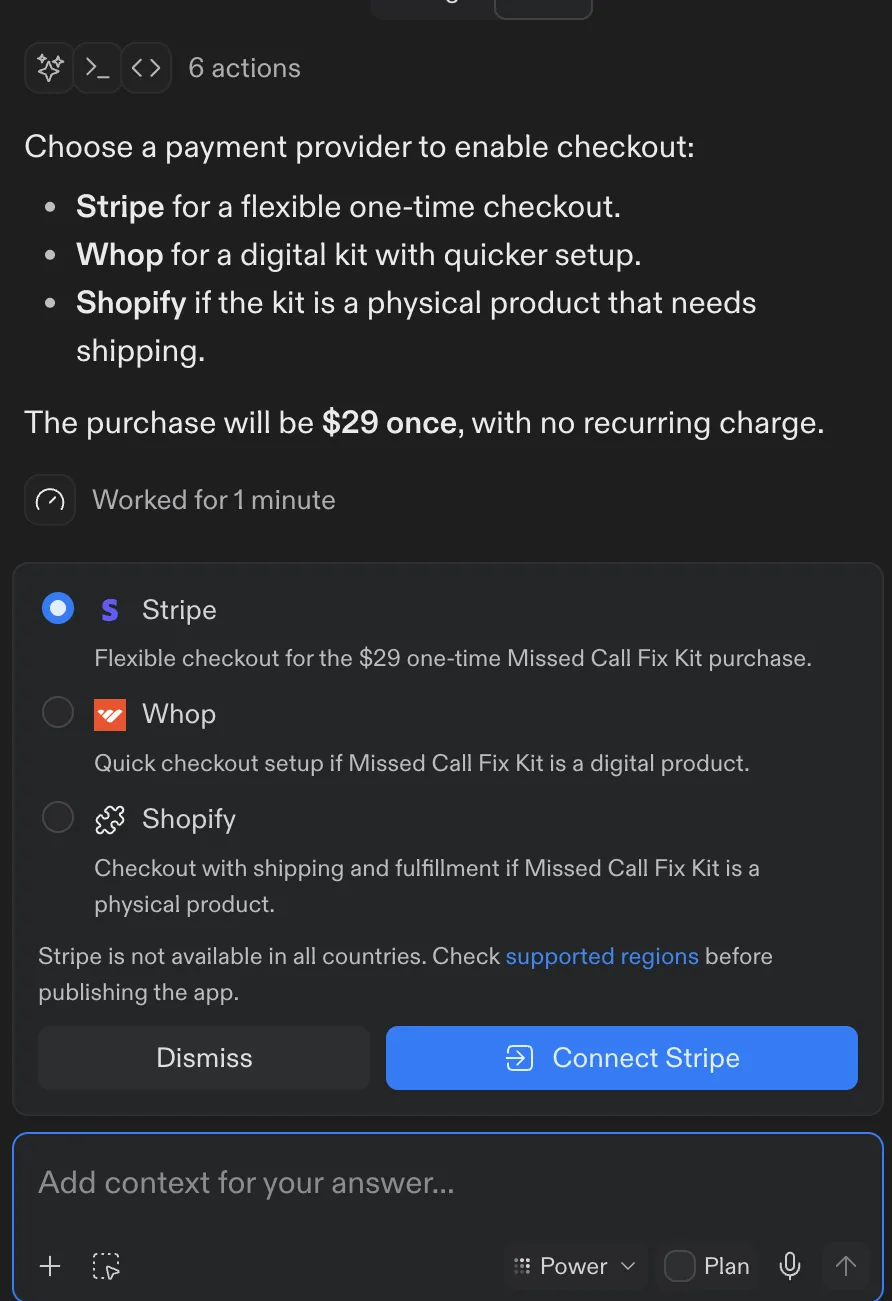
Replit offered Stripe, Whop or Shopify, with a Connect Stripe button. Its documentation adds that for Stripe you paste your secret keys into the app's settings when the agent asks.
Base44, from its docs, offers Base44 Payments powered by Wix or Stripe, both from the Builder plan up. Wix's service fees page lists US card payments at 2.9% plus 30 cents.
For a business, the difference is where the buyer ends up. In AI Studio the order belongs to a contact who is already in your CRM, so the receipt, the onboarding emails and the review request can all run from the same account.
What about Base44?
Base44 is the one we could not test, so this section sticks to what Base44 publishes. It is owned by Wix, and its pricing page lists these plans, billed annually (its FAQ says annual billing saves 20%):
| Base44 plan | Price, billed annually | Message credits a month | Integration credits a month |
|---|---|---|---|
| Free | $0 | 25 | 100 |
| Starter | $16/month | 100 | 2,000 |
| Builder | $40/month | 250 | 10,000 |
| Pro | $80/month | 500 | 20,000 |
| Elite | $160/month | 1,200 | 50,000 |
Message credits pay for building. Integration credits pay for what the finished app does: Base44's credits page lists about 1 credit per email sent (about 2 from a custom domain) and about 1 per AI call on the automatic model. A database, user logins and analytics come with every plan. Payments, connectors and GitHub sync start on Builder. The connectors page names Gmail, Outlook, Slack, Google Workspace, Google Calendar, GitHub, Snowflake and Databricks, and no CRM. Base44 apps run in the browser and serve search engines a rendered copy of each page.
If you build in Base44, pair it with GoHighLevel the way Lovable proposed: send each lead to GoHighLevel and let a workflow handle the email, the text and the booking.
What do they cost?
Prices below were read from each company's pricing page and documentation on 10 October 2026.
| Feature | GoHighLevel | Lovable | Replit | Base44 |
|---|---|---|---|---|
| Free option | 30-day trial | Free plan: 5 build credits a day, up to 30 a month | Starter: one published app, which goes down after 30 days | Free plan: 25 message credits a month |
| First paid plan | Starter $97/month | Pro $25/month for 100 credits | Core $20/month ($18 billed annually) | Starter $16/month billed annually |
| Building with AI | Pay per use, or AI Employee at $50 or $97 a month per sub-account | Credits: 1 per plan message, about 1.2 to add sign in | Credits by effort; Core includes $20 towards models | Message credits, about 0.5 to 4 per change |
| Database and hosting | Cloud Tiny free; larger sizes from $0.015456 an hour | 20 Cloud credits a month on every plan, then credits | Publishing and databases billed by usage | Included on every plan |
| CRM, email and SMS follow-up | Included: CRM and workflows, email and SMS at usage rates | Connect a CRM such as GoHighLevel, or add Twilio and a domain | Add Resend and Twilio, or connect GoHighLevel | Not covered by its connector list |
If the app is there to win customers, you will pay for a CRM with email and SMS whichever builder you use, and both Lovable and Replit could hand that job to GoHighLevel. On GoHighLevel's $97 Starter plan, AI Studio, the CRM, the workflows, the calendar and the checkout are in one account. Our stack calculator adds up what you would replace, and the GoHighLevel pricing guide breaks down the three plans.
If you know Lovable, you already know AI Studio
Spend ten minutes in both and the family resemblance is obvious:
- Same app framework. Lovable's docs say new apps have used TanStack Start with server-side rendering since 13 May 2026. HighLevel moved new AI Studio projects to TanStack Start on 8 September 2026.
- Same menu. Both put the backend under More, Cloud, split into Database, Users and Storage, with Payments and Analytics in the same menu.
- Same habits. Both build from a chat, show a live preview, keep a version history and add a Cloud backend when the app needs real data.
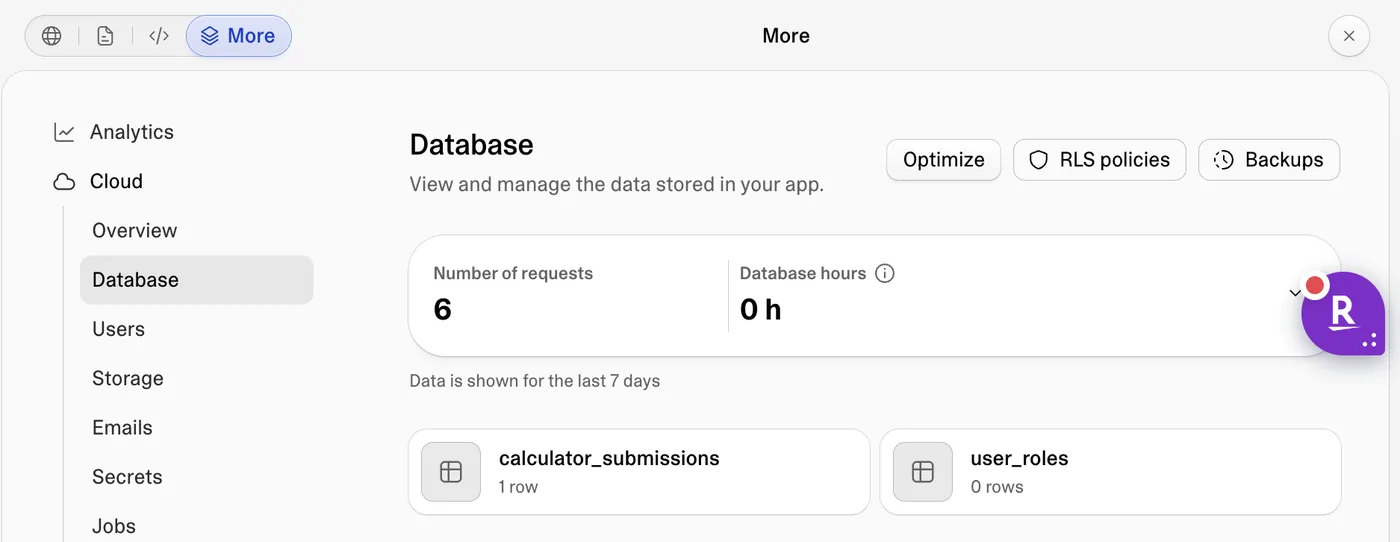
If you are switching from Lovable, you will find the same controls in the same places in AI Studio, with the CRM, calendars, payments and workflows already in the account.
Which one should you use?
| You are | Build in | Why |
|---|---|---|
| A local business that wants leads and bookings | GoHighLevel AI Studio | Each lead lands in your CRM and your follow-up runs in the same account |
| An agency building tools for clients | GoHighLevel AI Studio | Each client's app sits in their sub-account, and you can resell the whole thing under your brand with SaaS Mode |
| A founder or developer building standalone software | A code-first builder such as Lovable or Replit, paired with GoHighLevel | Send sign ups to GoHighLevel for onboarding emails, texts and sales follow-up, the setup both builders offered once GoHighLevel was the CRM |
Agencies weighing the wider field, including Bolt.new, can see our AI builders for agencies ranking.
For most people reading this, the first two rows are the answer. I would build lead tools in GHL's AI Studio, and I would start the GoHighLevel 30-day trial by pasting the prompt below into it.
Run the same test in your own account
Here is the prompt again with a consent tick box and three lines added, one for each thing we caught:
Build Missed Call Calculator, a free web tool for local service businesses such as plumbers, dentists, salons and contractors. A visitor enters four numbers: calls per week, the percentage of calls that go unanswered, the percentage of callers who become customers, and the average value of a new customer. Show the revenue lost to missed calls per month and per year, with the working shown in plain English. Under the result, a form asks for first name, email, business type and an optional phone number, with an Email me my results button and a tick box to agree to a follow-up text. Save each submission with the figures they entered and their result. Add an owner-only Leads page, behind an email and password sign in, that lists every submission newest first and can export them to CSV. Keep the design clean and friendly: white, dark navy text and an orange accent. Do not invent statistics, testimonials, company names, addresses or phone numbers.
Only accept percentages from 0 to 100 and show an error otherwise.
Do not tell the visitor an email was sent unless the app sends one.
Use Cloud for the submissions and the owner sign in.
Then:
- Open AI Studio in your sub-account and paste the prompt.
- Click Connect when it asks to connect forms to CRM tracking, and Connect Cloud when it offers.
- Submit a test lead and check it under Contacts.
- Build the follow-up workflow: form submitted, send email, wait two days, send SMS.
- Publish to your domain.
That is an afternoon's work for a lead magnet that feeds your CRM. If you sell to local businesses, the number it shows is a ready-made opening for a missed call text back offer.
PARTNER OFFER
Your first month of GoHighLevel is free.
Through our partner link you get 30 days on any plan, double the standard 14-day trial. Build something real before you pay a cent.
Claim my free monthCard required. Nothing charged for 30 days.
Frequently Asked Questions
Is GoHighLevel AI Studio as good as Lovable?
Can GoHighLevel AI Studio replace Lovable?
Does Lovable integrate with GoHighLevel?
Does Replit integrate with GoHighLevel?
Is GoHighLevel AI Studio free?
Lovable vs Replit vs Base44: which is cheapest to start?
Which AI app builder saves leads to a CRM automatically?
Can you take payments in a GoHighLevel AI Studio app?
Sources and References
- [1]Plans and credits: Credits and usage, Lovable Documentation, read 10 October 2026
- [2]Subscription plans, Lovable Documentation, read 10 October 2026
- [3]Payments, Lovable Documentation, read 10 October 2026
- [4]Cloud, Lovable Documentation, read 10 October 2026
- [5]SEO and AEO, Lovable Documentation, read 10 October 2026
- [6]Replit pricing, read 10 October 2026
- [7]Replit AI Billing, Replit Docs, read 10 October 2026
- [8]Starter plan, Replit Docs, read 10 October 2026
- [9]Add payments, Replit Docs, read 10 October 2026
- [10]Base44 pricing, read 10 October 2026
- [11]Credits, Base44 Documentation, read 10 October 2026
- [12]Setting up Base44 Payments powered by Wix, Base44 Documentation, read 10 October 2026
- [13]Connectors, Base44 Documentation, read 10 October 2026
- [14]Getting your app found in search, Base44 Documentation, read 10 October 2026
- [15]Wix Payments service fees, Wix Help Center, read 10 October 2026
- [16]AI Studio: Sell Products and Accept Payments, HighLevel Changelog
- [17]AI Studio Cloud: a built-in backend for your apps, HighLevel Changelog
- [18]AI Studio: Introducing SSR, server functions and secrets, HighLevel Changelog
- [19]AI Studio Pricing, HighLevel Support Portal
Info
Affiliate disclosure. This page contains affiliate links for GoHighLevel. If you sign up through them we may earn a commission at no cost to you. Every test on this page was run by us on 10 October 2026 in new projects: AI Studio in our GoHighLevel demo account, Lovable and Replit in our own paid workspaces. We used fake test details for every lead.
DO THIS NEXT, FREE FOR 30 DAYS
The quickest way to know is to try it on real work.
- STEP 1Claim your free month
- STEP 2Rebuild one thing from this guide
- STEP 3Decide before day 30
Free for 30 days from the day you start. Card required.
Featured in Forbes and Business Insider.
Ashley Kemp is a digital entrepreneur and perpetual traveller. Switched from ClickFunnels to GoHighLevel years ago and never looked back. Writing about what actually works.
Was this article helpful?