Updated 13 October 2026tutorial
GoHighLevel Meta Conversions API: Setup Guide (2026)
Set up the Meta Conversions API in GoHighLevel with the native workflow action. Send purchases with the real order value, plus leads and pipeline stages.
 Ashley Kemp22 min read
How do you set up the Meta Conversions API in GoHighLevel?
GoHighLevel has a native Meta Conversion API action in workflows, so you do not need Stape or Google Tag Manager when your forms, calendars and order forms run in GoHighLevel. Install the Meta Pixel in your funnel's head tracking code, then build a workflow with the trigger that matches the conversion, such as Order submitted for a sale. Add the Meta Conversion API action, set the event type to Funnel Event, paste your access token and Dataset ID, and pick the Facebook event name. For a purchase, choose Purchase and set Value to the Order Total custom value.
Info
Affiliate disclosure. This page contains affiliate links for GoHighLevel. If you sign up through them we may earn a commission at no cost to you. The screenshots come from our own GoHighLevel demo account, captured on 9 October 2026, and every setting described is linked to HighLevel's or Meta's documentation under Sources.
PARTNER OFFER
Your first month of GoHighLevel is free.
Through our partner link you get 30 days on any plan, double the standard 14-day trial. Build something real before you pay a cent.
Claim my free monthCard required. Nothing charged for 30 days.
GoHighLevel sends conversions to Meta's Conversions API from inside a workflow. The action is called Meta conversion API, and it posts the event from HighLevel's servers to Meta, so a sale still reaches your ad account when an ad blocker or a browser privacy setting stops the pixel from firing.
A common setup is Meta, Stape, Google Tag Manager and GoHighLevel all wired together, with a separate question about how to pass a purchase value that changes from order to order. If your funnels, forms, calendars and order forms live in GoHighLevel, the native action covers both jobs. You install the pixel once, build one workflow per conversion, and the order value comes from a custom value GoHighLevel fills in at checkout.
We built the workflow in our demo account, Bright Smile Dental, and screenshotted every field. Picture the practice selling a teeth whitening package on a GoHighLevel funnel with a Meta ad pointing at it. Each paid order should reach Meta as a Purchase with the amount the patient paid, so Meta can find more people who buy. That is the workflow this guide builds.
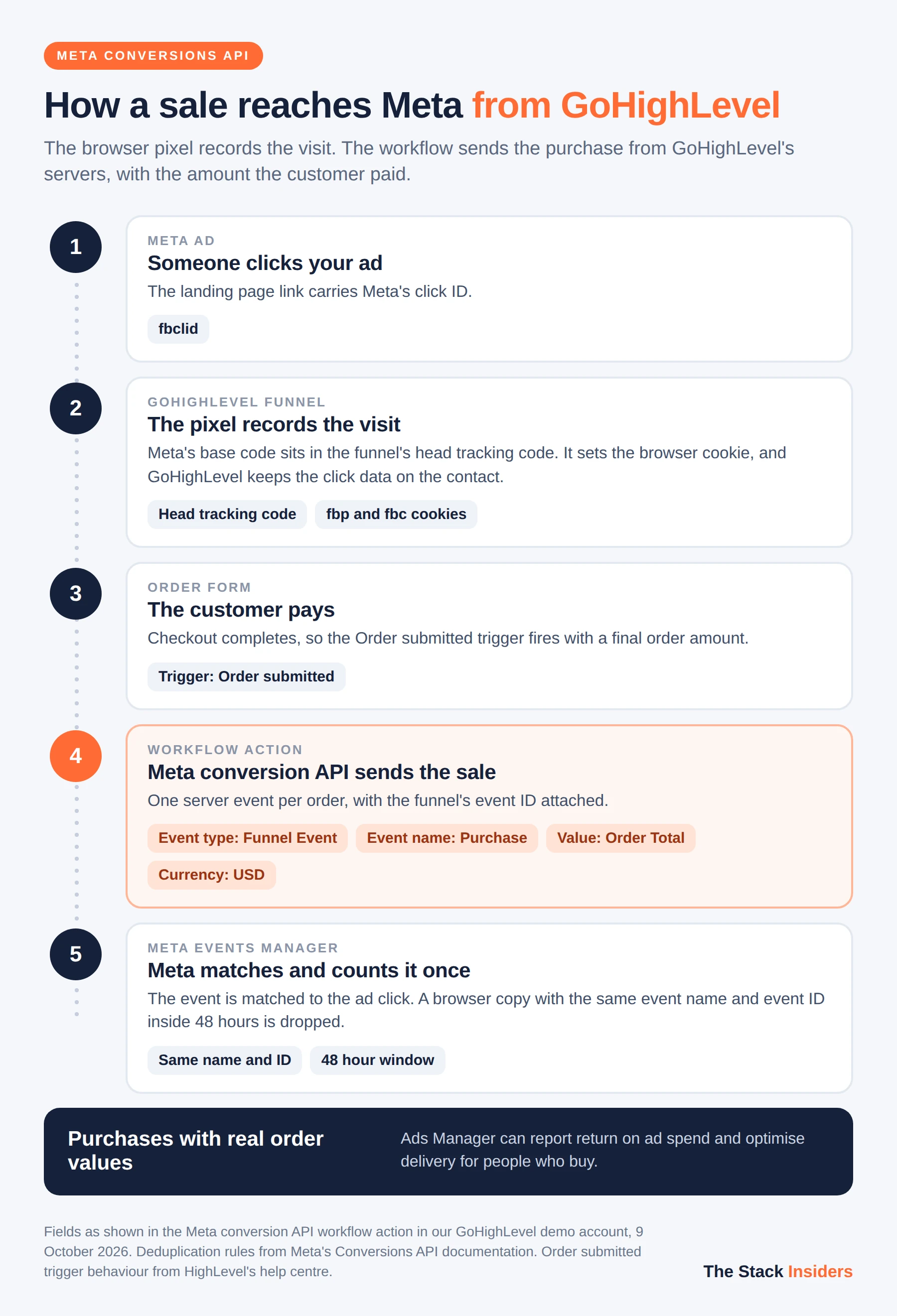
What does the Meta Conversion API action in GoHighLevel do?
The Meta Conversion API action sends one event to Meta each time a contact passes through that step of a workflow. In the builder it carries the description "The Conversions API allows advertisers to send web events from their servers directly to Meta."
It has these settings:
- Connection type. Integration, where you paste your own access token and Dataset ID, or Ad Manager, where you pick a dataset you created in GoHighLevel's Ad Manager.
- Event type. Funnel Event, Lead Event or Instagram DM.
- Facebook event name. One of 18 standard Meta events: AddPaymentInfo, AddToCart, AddToWishlist, CompleteRegistration, Contact, CustomizeProduct, Donate, FindLocation, InitiateCheckout, Lead, PageView, Purchase, Schedule, Search, StartTrial, SubmitApplication, Subscribe and ViewContent.
- Value and Currency. Currency defaults to USD.
- Test code. For Meta's Test events tab.
- Custom mapping. Lets you supply your own FBCLID, Facebook Lead ID or Instagram-scoped ID.
HighLevel's help article lists the customer details the action can pass to Meta: client IP address, user agent, email, first name, surname, and the fbp and fbc cookies. Meta uses these to match the event to the person who saw or clicked your ad.
HighLevel renamed the action from "Facebook Conversion API" to "Meta Conversion API" when it added Instagram DM events. Older tutorials use the old name.
What do you need before you start?
You need four things in place before the workflow will send anything Meta can use:
- A dataset in Meta Events Manager. Meta now calls the pixel a dataset. Under Data sources, open the dataset's Settings to find its Dataset ID.
- An access token. On the same Settings page, generate a Conversions API access token. If you use the Ad Manager connection type instead, GoHighLevel handles the token for you.
- The browser pixel on your pages. Paste Meta's base pixel code into the Head tracking code in your funnel or website settings. The pixel sets the fbp cookie and catches the fbclid from the ad click, which is the data the server event uses to match the visitor.
- Your domain allowed in Meta. HighLevel's FAQ names a blocked domain as a common reason test events never appear. Check the domain list in your Meta settings before you test.
How do you set up Meta Conversions API in GoHighLevel?
This is the purchase workflow for an order form in a GoHighLevel funnel. The same steps work for leads and bookings with a different trigger and event name, covered in the table further down.
Step 1. Create the workflow and add the Order submitted trigger
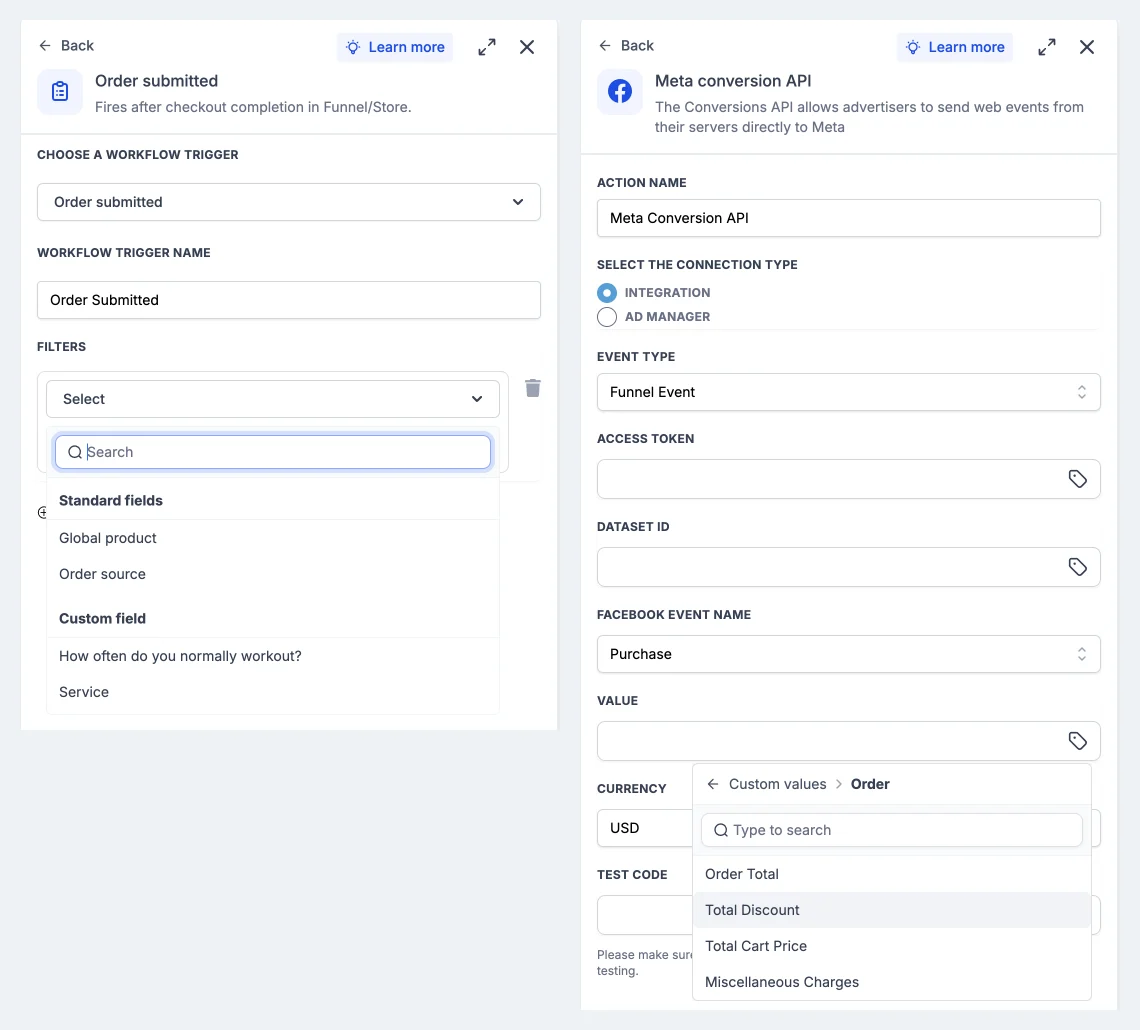
Go to Automation, then Workflows, click Create workflow and choose Start from Scratch. Click Add new trigger and search for "order". Two payment triggers appear, and the difference between them decides whether Meta gets a value:
- Order submitted, which GoHighLevel describes as "Fires after checkout completion in Funnel/Store."
- Order form submission, which "Runs when an order form is submitted."
Pick Order submitted. HighLevel's FAQ explains that the order amount is only final after payment completes, so the amount custom value works with Order submitted and not with Order form submission. You can add filters for Global product or Order source if you sell more than one thing and want a separate event per product.
Step 2. Add the Meta Conversion API action
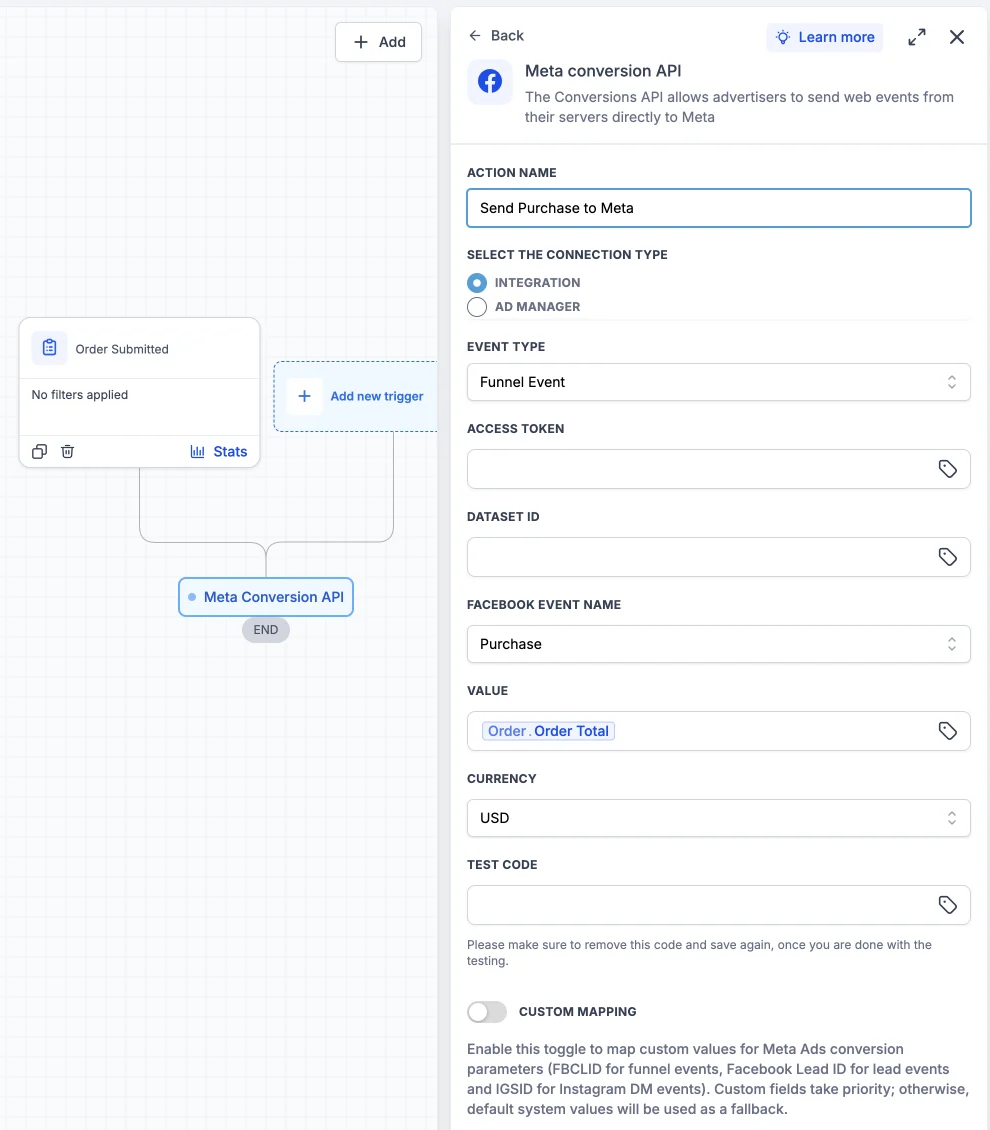
Click the plus under the trigger, search for "Meta" and choose Meta conversion API. Give the action a name you will recognise in the execution logs, such as "Send Purchase to Meta".
Step 3. Choose the connection type and event type
Leave the connection type on Integration if you are pasting your own access token, and set Event Type to Funnel Event. Funnel Event is the type for anything that happens in a GoHighLevel funnel, website, form, survey, calendar or order form.
Step 4. Paste the access token and Dataset ID
Paste the token and the Dataset ID from Events Manager. Both fields accept custom values. Agencies running many sub-accounts can store the token and ID as location custom values and drop them in with the tag icon, so a snapshot carries the workflow without anyone pasting credentials into each copy.
Step 5. Set the event name, value and currency
Set Facebook Event Name to Purchase. In Value, click the tag icon, open Order and choose Order Total. In our account that inserts the custom value {{order.total_price}}. Set Currency to the currency your checkout charges in.
Step 6. Add a test code and publish
In Events Manager, open the Test events tab and copy the test code. Paste it into Test Code, then save the action and publish the workflow. GoHighLevel shows a reminder under the field: "Please make sure to remove this code and save again, once you are done with the testing."
Step 7. Place a test order and check Events Manager
Run a real test checkout on the funnel. The Purchase event should appear in the Test events tab with its value and currency. When it does, delete the test code from the action and save again so live events count in your reporting.
How do you send a variable purchase value to Meta?
The Value field on the Meta Conversion API action takes a custom value, so the amount changes with every order. Use Order, Order Total on a workflow triggered by Order submitted.
The Order folder in the picker holds four values:
| Custom value | What to use it for |
|---|---|
| Order Total | The amount the customer paid. Use this for Purchase. |
| Total Cart Price | The cart before discounts and other charges. |
| Total Discount | The discount applied to the order. |
| Miscellaneous Charges | Extra charges on the order. |
HighLevel's help article refers to this value as {{Order.Amount}}. When we picked Order Total in the builder on 9 October 2026, the field held {{order.total_price}}. Use the picker rather than typing the tag, and GoHighLevel inserts whichever name your account uses.
Meta requires both a value and a currency on Purchase events, and the currency must be a three-letter ISO code such as USD, GBP or EUR. A fixed number also works in Value. Use it when every sale is the same price, or to give a lead an estimated worth.
Which trigger and event should you use for each conversion?
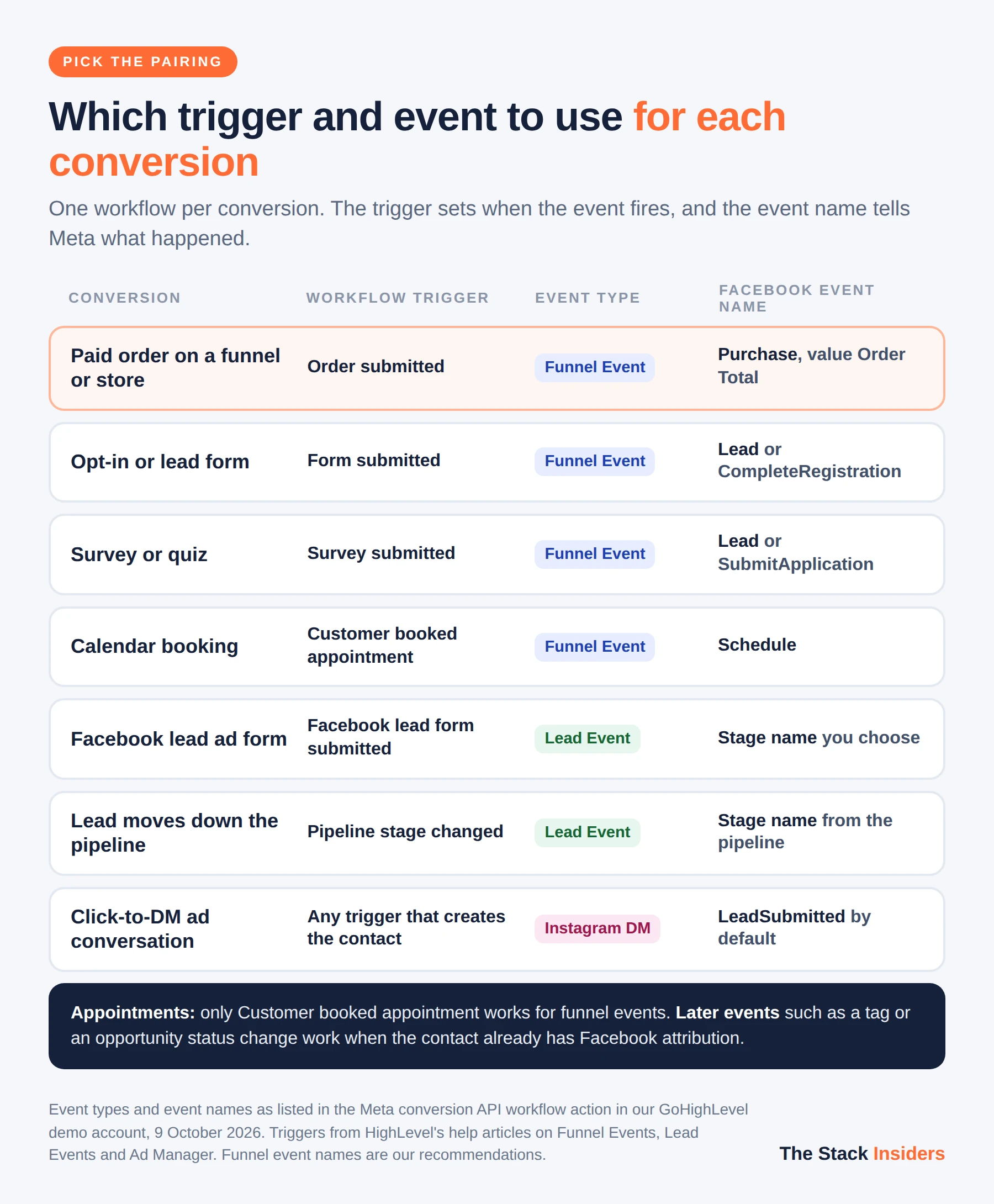
Match the trigger to the moment the conversion happens, and the event name to how Meta should read it. These are the pairings HighLevel's documentation supports for Funnel Events and Lead Events.
| Conversion | Workflow trigger | Event type | Facebook event name |
|---|---|---|---|
| Paid order on a funnel or store | Order submitted | Funnel Event | Purchase, with Value set to Order Total |
| Lead form or opt-in on a funnel | Form submitted | Funnel Event | Lead or CompleteRegistration |
| Survey or quiz | Survey submitted | Funnel Event | Lead or SubmitApplication |
| Booking from a calendar widget | Customer booked appointment | Funnel Event | Schedule |
| Facebook lead ad form | Facebook lead form submitted | Lead Event | Stage name of your choice |
| Lead moves through your pipeline | Pipeline stage changed | Lead Event | Stage name from the pipeline |
| Conversation started from a click-to-DM ad | Any trigger that creates the contact | Instagram DM | LeadSubmitted by default |
Two details catch people out:
- Appointments. HighLevel's documentation says only Customer booked appointment works for funnel events. The general appointment trigger does not.
- Later events. Triggers such as a tag being added or an opportunity status changing work too, but only when the contact already carries Facebook attribution from an earlier ad interaction. The trigger cannot create that attribution.
Integration or Ad Manager: which connection type should you use?
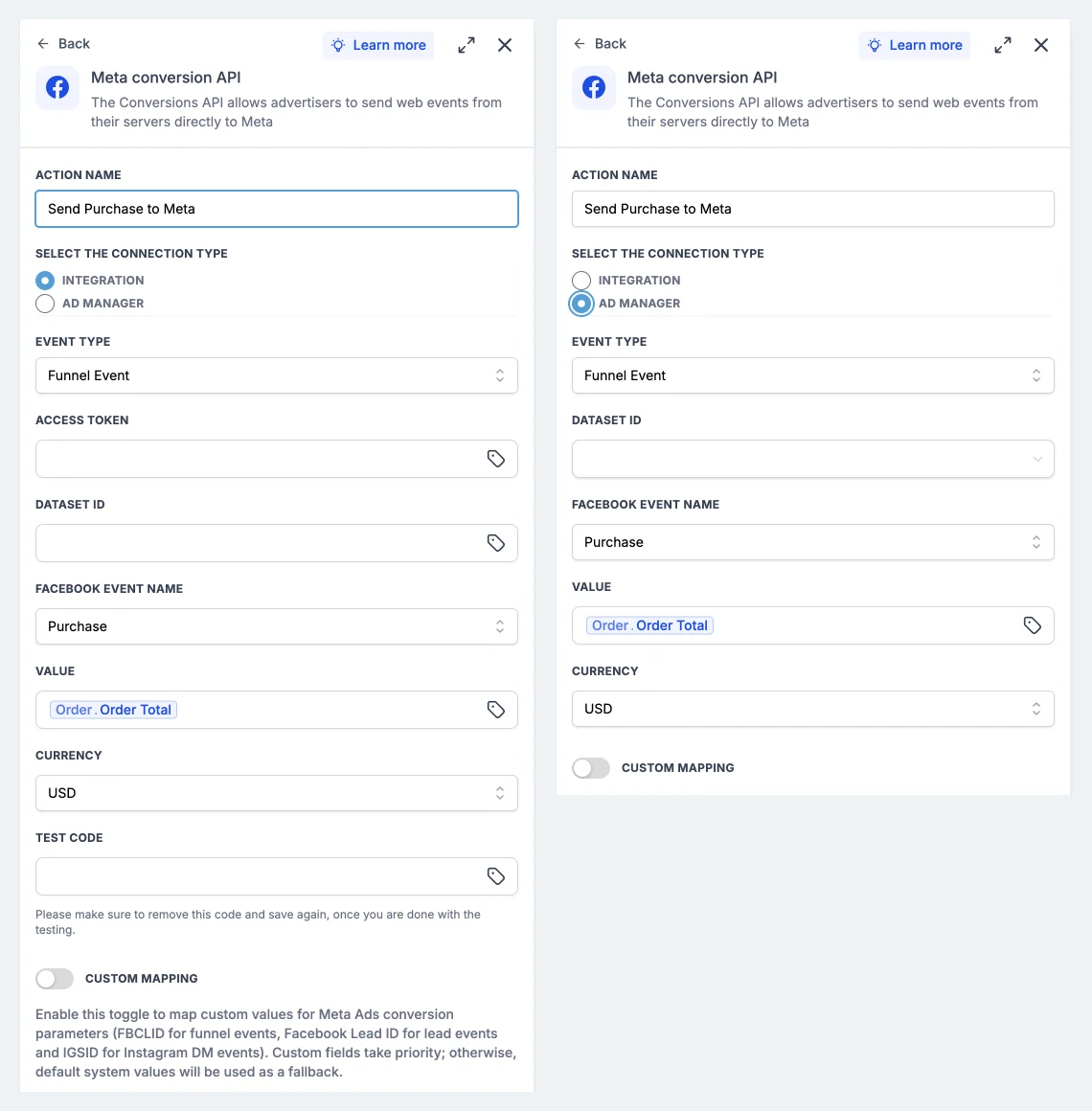
Use Ad Manager if you run your Meta ads from GoHighLevel's Ad Manager, and Integration if you manage ads in Meta Ads Manager and want to paste your own credentials.
With Ad Manager selected, the access token and test code fields disappear. The Dataset ID becomes a dropdown of datasets created in Ad Manager under Settings, Conversions, Create new conversion pixel, and HighLevel's article on the option says the system handles the token. With Integration you paste the token and Dataset ID yourself, and you keep the Test Code field.
How does GoHighLevel stop Meta counting a sale twice?
Meta removes a duplicate when the browser event and the server event share the same event name and the same event ID, and both arrive within 48 hours. HighLevel's FAQ says this happens automatically for funnels: the funnel generates an eventId, stores it with the contact's attribution data, and sends the same ID with the Conversions API event.
The cleanest setup lets each side do one job. The browser pixel in your head tracking code handles PageView and sets the cookies Meta uses for matching. The workflow sends the conversion events: Purchase, Lead, Schedule. If you also hard-code fbq('track', 'Purchase') on a thank-you page, that browser event will not carry the ID GoHighLevel sends, and Meta can count the sale twice. Remove it once the workflow is live.
Pixel update, 12 October 2026. The browser pixel's InitiateCheckout event now fires when a buyer reaches checkout (on page load for store checkout pages, or on the first interaction with an order form) instead of at payment, and AddPaymentInfo now carries order value, currency, product IDs and hashed customer details, per HighLevel's changelog. Expect InitiateCheckout counts to rise. With the Conversions API on, browser and server events are still sent together and deduplicated as before, and no settings need changing.
How do you send lead and pipeline events to Meta?
Choose Lead Event as the event type when the lead came from a Facebook or Instagram lead ad and you want Meta to learn which leads turn into customers. The Facebook event name field is replaced by Stage Name, which you fill with the pipeline and stage custom values from the tag icon.
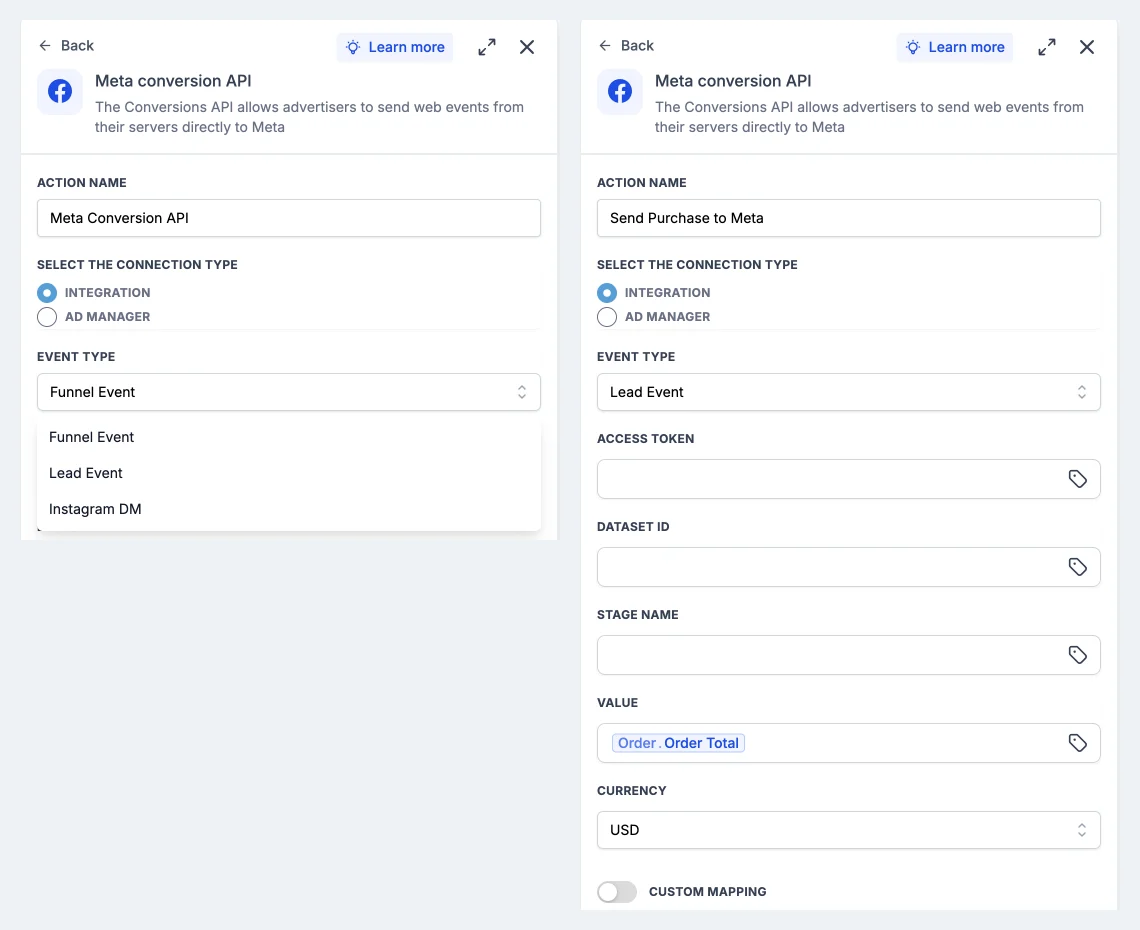
HighLevel's Conversion Leads walkthrough builds this with two workflows:
- A Facebook lead form submitted trigger that creates or updates the opportunity and sends the first event.
- A Pipeline stage changed trigger that sends a Lead Event with the stage name each time the lead moves.
Meta's Conversion Leads optimisation has entry requirements, which HighLevel's walkthrough lists:
- at least 250 leads a month;
- data uploaded at least once a day;
- the target stage reached within 28 days of the lead being created;
- a stage conversion rate between 1% and 40%.
Events from the Lead Ads Testing Tool do not count towards Meta's seven-day setup threshold.
When the stage name is Purchase, Value and Currency become required on a Lead Event. HighLevel added this so a lead that turns into a sale can report what it was worth.
Can you track Instagram DM conversions from click-to-DM ads?
Yes. Choose Instagram DM as the event type to send an event when someone starts a conversation from a click-to-direct ad. The action then asks for the Facebook Page, the linked Instagram account and the dataset. The event name defaults to LeadSubmitted, and custom mapping accepts the IGSID.
HighLevel's changelog says you need to reconnect your Meta account under Integrations and re-authorise it, because these events use new permissions. For the inbox side of Instagram, see our guide to GoHighLevel's Instagram direct connection.
How do you test that Meta is receiving your events?
Test with a real submission and Meta's Test events tab:
- Copy the test code from Test events in Events Manager into the action's Test Code field, then save and publish.
- Submit the real form, booking or checkout on your funnel. HighLevel's FAQ says the Test workflow button also works for this action. An older troubleshooting article recommends a real submission, which is the surer check.
- Watch for the event in Test events, with the value and currency on a Purchase.
- Remove the test code and save the action again.
If nothing arrives:
- Diagnostics tab. Open it in Events Manager and look for errors.
- Domain list. A blocked domain is the cause HighLevel's FAQ names first, so check your domain is allowed.
- Label on test leads. A test Lead can show in Meta as "Custom Event". HighLevel says live conversions show as Lead.
- Workflow history. The execution logs show whether the action ran for the contact.
Do you still need Stape or Google Tag Manager with GoHighLevel?
You do not need them for conversions that happen inside GoHighLevel. The native action covers forms, surveys, calendar bookings, order forms, pipeline stages and Instagram DMs.
Stape and server-side Google Tag Manager earn their place in three cases:
- Checkout outside GoHighLevel. The sale happens on Shopify, WooCommerce or an external Stripe page, so no GoHighLevel trigger sees it.
- More ad platforms. You want one server container feeding Meta, Google Ads, TikTok and others from the same data.
- CRM stages through Stape. You prefer Stape's free HighLevel app, which sends opportunity stage changes through a Stape account to Meta's Conversions API Gateway, Signals Gateway or your own server container.
If you keep Stape alongside the native action, decide which one sends each event. Two server events for the same sale with different event IDs are two purchases as far as Meta is concerned.
Running Google Ads as well? GoHighLevel's Add to Google Ads workflow action does the same job for Google's offline conversions, with its own Conversion Value and Currency fields. Our Google Ads dashboard widgets guide covers the reporting side, and the GoHighLevel workflow automation guide covers triggers and actions in more depth.
FREE FOR 30 DAYS
Get your first month of GoHighLevel free
- Every feature, on any plan
- A full month, worth up to $497
- Cancel before day 30, pay nothing
Card required. Nothing charged for 30 days.
Join 2.2 million businesses already running on GoHighLevel
A worked example: the dental practice's whitening offer
Here is how the pieces fit for the practice in our demo account. The setup is illustrative, with no live ad spend behind it.
- The offer. A teeth whitening package sells on a two-step order form in a GoHighLevel funnel, and a Meta ad sends traffic to it.
- The pixel. It sits in the funnel's head tracking code, so the visit records the click ID and the fbp cookie.
- The sale. When a patient pays, the Order submitted workflow sends a Purchase with Value set to Order Total and Currency set to USD.
- The bookings. A second workflow on Customer booked appointment sends Schedule for the free consultations booked from the same funnel.
- What Meta sees. Purchases with real amounts and bookings as separate events, both tied to the ad that brought the visitor in. Ads Manager can then report return on ad spend and optimise for buyers.
Building this in a fresh account takes two short workflows and one pixel install. If you sell more than one product, a filter on Global product in each trigger lets you send a separate Purchase workflow per product.
Frequently Asked Questions
Does GoHighLevel have a native Meta Conversions API integration?
How do I send the purchase value to Meta from GoHighLevel?
Why does the order amount not work with the Order form submission trigger?
Do I still need the Meta Pixel if I use the Conversions API in GoHighLevel?
Will Meta count my conversions twice?
Where do I find the access token and Dataset ID?
Which Meta events can GoHighLevel send?
Why are my test events not showing in Meta Events Manager?
PARTNER OFFER
Your first month of GoHighLevel is free.
Through our partner link you get 30 days on any plan, double the standard 14-day trial. Build something real before you pay a cent.
Claim my free monthCard required. Nothing charged for 30 days.
Sources and References
- [1]Facebook Conversions API Trigger in Workflows, HighLevel Support Portal, read 9 October 2026
- [2]How to set up a Funnel Event Pixel for Facebook Conversion API, HighLevel Support Portal, read 9 October 2026
- [3]Facebook Conversions API Lead Event Walkthrough, HighLevel Support Portal, read 9 October 2026
- [4]How to send a Meta Conversion API action for Ad Manager, HighLevel Support Portal, read 9 October 2026
- [5]How to Send Meta Conversion Data from HighLevel Ad Manager, HighLevel Support Portal, read 9 October 2026
- [6]Facebook Conversion API Workflow Trigger Not Working, HighLevel Support Portal, read 9 October 2026
- [7]Instagram DM Datasets + CTD CAPI in Workflows, HighLevel Changelog, read 9 October 2026
- [8]Value & Currency support for Lead Event with Purchase stage in CAPI action, HighLevel Changelog, read 9 October 2026
- [9]How to Use Add to Google Ads Action in HighLevel Workflows, HighLevel Support Portal, read 9 October 2026
- [10]Handling Duplicate Pixel and Conversions API Events, Meta for Developers, read 9 October 2026
- [11]Conversions API custom data parameters, Meta for Developers, read 9 October 2026
- [12]HighLevel CRM Stape conversion tracking app, Stape, read 9 October 2026
DO THIS NEXT, FREE FOR 30 DAYS
The quickest way to know is to try it on real work.
- STEP 1Claim your free month
- STEP 2Rebuild one thing from this guide
- STEP 3Decide before day 30
Free for 30 days from the day you start. Card required.
Featured in Forbes and Business Insider.
Ashley Kemp is a digital entrepreneur and perpetual traveller. Switched from ClickFunnels to GoHighLevel years ago and never looked back. Writing about what actually works.
Was this article helpful?