Updated 8 October 2026tutorial
GoHighLevel Reputation Management Guide (2026)
How to use GoHighLevel's reputation management features to automate Google review requests, monitor reviews, and build a 5-star online reputation.
 Ashley Kemp13 min read
Can GoHighLevel help get more Google reviews?
Yes. GoHighLevel includes built-in reputation management that automates review requests via GoHighLevel SMS campaigns and email after service delivery. Businesses using automated review workflows see 200-500% increases in review volume within 3-6 months. The platform also monitors new reviews and enables quick responses.
Online reviews are the most powerful trust signal for local businesses. A recent survey found that 87% of consumers read online reviews before choosing a local business, and 73% only consider businesses with an average rating of 4 stars or higher. GoHighLevel makes building and maintaining a stellar online reputation GoHighLevel automations.
Get your first month free through our partner linkClaim my free monthWhy Automated Review Requests Matter
Most businesses know reviews are important, but few collect them consistently. The reason is simple, asking for reviews manually is awkward and easy to forget.
Without automation, the review request process looks like this: remember to ask the client, find the right link, copy-paste it into a text or email, hope you do not forget this time, and hope the client follows through. Staff do this consistently for about two weeks before other priorities take over.
With GoHighLevel automation, the process looks like this: the GoHighLevel CRM stage changes to "Service Complete" and the system sends a perfectly timed, professionally written review request. No human effort required. Every single client receives the request. Consistently. Forever.
The results speak for themselves. Businesses that switch from manual to automated review requests typically see a 200-500% increase in review volume within three to six months.
Setting Up Reputation Management
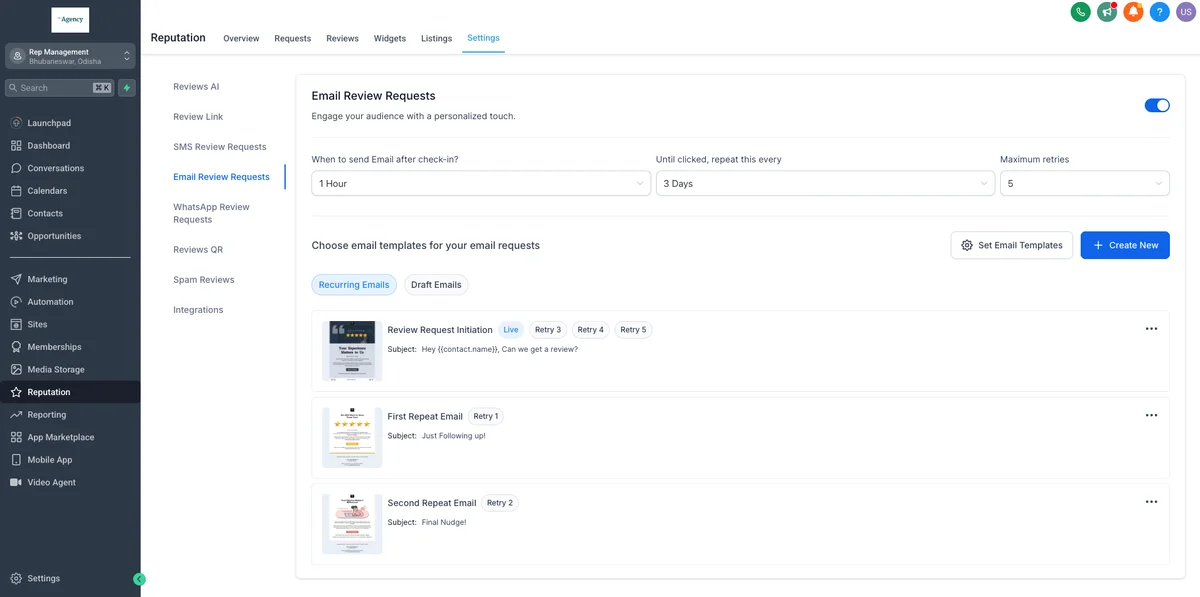
Connect Your Google Business Profile
In GoHighLevel, navigate to Settings → Integrations → Google. Connect your Google account and select your Google Business Profile. This connection enables:
- Direct review link generation for your specific business
- Review monitoring, see new reviews as they arrive
- Review response from within GoHighLevel
- Review widget for your website
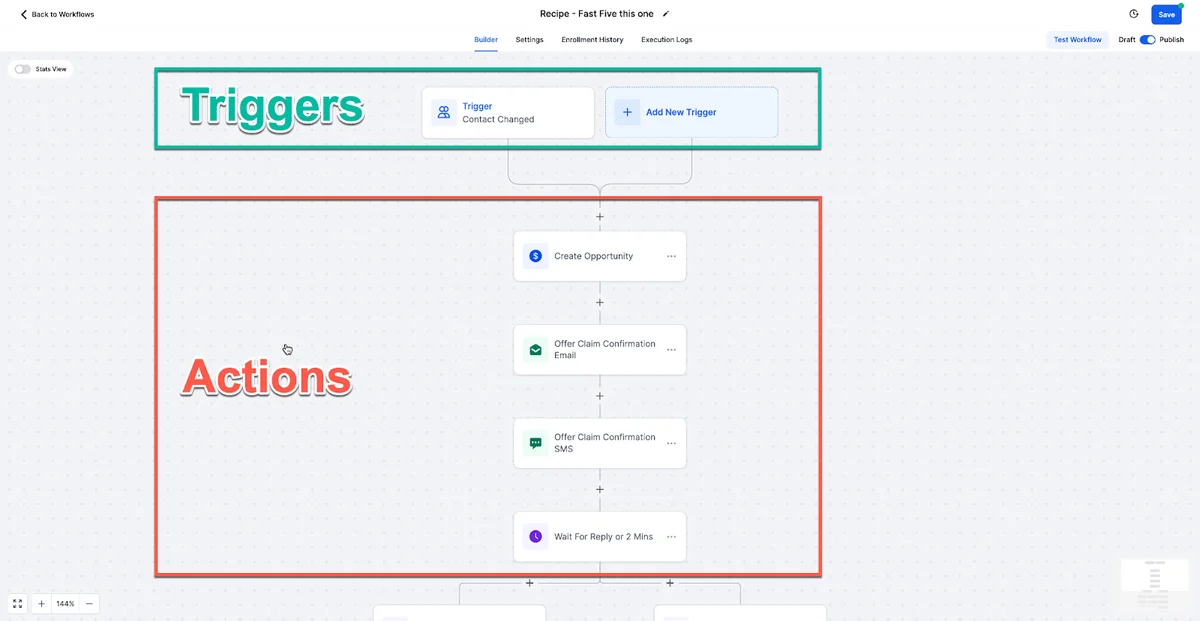
Build Your Review Request Workflow
The most effective review request workflow uses multiple channels and touchpoints without being pushy.
Trigger: Pipeline stage changed to "Service Complete" or "Job Finished"
Step 1, Wait 2 hours. Give the client time to experience the completed service before asking for feedback. For some businesses (restaurants, retail), 1 hour works. For others (home services, professional services), 2-4 hours is better.
Step 2, Send SMS: "Hi {contact.firstName}, thank you for choosing [Business Name]. We hope everything was great. If you have 30 seconds, a Google review would mean the world to us: {review.link}"
SMS first because text messages have 98% open rates. The message is short, personal, and includes a direct link. No friction.
Step 3, Wait 2 days.
Step 4, If No Review → Send Email: A longer, more detailed message thanking the client for their business, explaining how reviews help the business and other customers, with a prominently placed review button. Include a specific prompt: "What did you appreciate most about working with us?"
Giving a prompt helps clients overcome the blank page problem. They do not have to figure out what to write.
Step 5, Wait 4 days.
Step 6, If Still No Review → Send Final SMS: "Hi {contact.firstName}, just a gentle reminder. Your review helps other people find quality service. If you have a moment: {review.link} - Thank you."
Three touchpoints over eight days. Most reviews come from the first SMS. The email catches a second wave. The final SMS is a light nudge that some clients appreciate as a reminder.
FREE FOR 30 DAYS
Get your first month of GoHighLevel free
- Every feature, on any plan
- A full month, worth up to $497
- Cancel before day 30, pay nothing
Card required. Nothing charged for 30 days.
Join 2.2 million businesses already running on GoHighLevel
The "Review Gate" Approach
Some businesses use a review gate, a pre-screen that asks clients to rate their experience before directing them. Happy clients (4-5 stars) are sent to Google. Unhappy clients (1-3 stars) are directed to a private feedback form.
While this approach protects your rating, be aware that Google's policies discourage selectively soliciting positive reviews. The safest approach is to send all clients to Google and address negative feedback promptly and professionally.
GoHighLevel supports both approaches through conditional workflow logic, but we recommend the direct approach for ethical and policy compliance.
Responding to Reviews
Getting reviews is half the battle. Responding to them is equally important for SEO and customer trust.
Respond to every review - positive and negative. Google's algorithm favours businesses that engage with reviewers. Response time also matters: aim to respond within 24 hours.
For positive reviews: Thank the reviewer by name, reference something specific about their experience (if mentioned), and express real appreciation. "Thank you, Sarah. We are so glad the kitchen remodel exceeded your expectations. Working with you was a pleasure, and we love how the quartz countertops turned out."
For negative reviews: Respond calmly and professionally. Acknowledge the concern, apologise for the experience, and offer to resolve the issue offline. "We are sorry to hear about your experience, Mark. This is not the standard we hold ourselves to. Please call us at [phone] so we can make this right." Never argue publicly.
GoHighLevel's reputation management dashboard shows new reviews across platforms, allowing your team to respond quickly without monitoring Google manually.
Reviews AI: Automated Responses for Google and Facebook
As of May 2026, GoHighLevel's Reviews AI supports automated review responses on both Google and Facebook. Previously, AI-assisted replies only worked with Google reviews. Facebook was the most requested gap in the reputation module, and it is now closed.
Reviews AI is part of the AI Employee plan. You can use it on pay-per-use billing or as part of the $97/month Unlimited add-on per sub-account.
How Reviews AI Works
Reviews AI offers two modes for handling incoming reviews:
Suggestive mode. When a new Google or Facebook review comes in, Reviews AI generates a draft reply based on the review content, your business context, and your configured tone. You see the suggestion on the Reviews page, edit it if needed, and send it manually. This keeps a human in the loop while cutting response time from minutes to seconds.
Auto-response mode. Create a Reviews AI Agent and it handles matching reviews automatically. Once configured, the agent responds to reviews that match your rules without any manual effort. You set the guardrails, the AI handles the volume.
Page-Level Control for Agencies
For agencies managing reputation across multiple client locations, Reviews AI now lets you choose exactly which pages receive automated responses. When creating or editing an AI Agent, the source options include:
- All sources - covers every connected Google and Facebook page
- All Google pages - limits automation to Google reviews only
- All Facebook pages - limits automation to Facebook reviews only
This means you can run auto-responses on a client's Google reviews while keeping Facebook in suggestive mode, or vice versa. Different locations can have different automation levels based on the client's comfort with AI-generated responses.
Custom AI Agent Rules
Each Reviews AI Agent supports granular rules that now apply to both Google and Facebook:
- Review type or rating conditions - only respond to 4-star and above, or handle all ratings with different tones
- Tone selection - professional, friendly, empathetic, or custom
- Language preference - match the reviewer's language or respond in a specific language
- Review source selection - target specific platforms or pages
These rules let you build AI Agents that respond differently based on review sentiment. A 5-star review gets a warm thank-you. A 3-star review gets a more careful, empathetic response. A 1-star review can be excluded from automation entirely so a human handles it.
Why This Matters for Agencies
Before this update, agencies managing Facebook reputation had to respond manually or use third-party tools. Now the entire review response workflow for both major platforms lives inside GoHighLevel. One dashboard, one set of rules, one AI Agent per location.
For agencies selling reputation management packages, this strengthens the value proposition. You can offer automated review responses across Google and Facebook as a bundled service, managed from the same platform where you run the client's CRM, email, and SMS.
Displaying Reviews on Your Website
Social proof on your website increases conversion rates by 15-30%. GoHighLevel's review widget lets you display your best Google reviews directly on your site.
Options for displaying reviews:
- Review widget: Embed a GoHighLevel-generated widget that pulls your latest Google reviews. Customise the design to match your brand.
- Testimonial section: Collect written and video testimonials and show them on key pages (homepage, service pages, about page). See the next section for the fastest way to do this across every client.
- Star rating in header: Display your aggregate Google rating and review count in your site header for instant credibility.
Place reviews strategically, near calls-to-action, on service pages, and in your footer. Every page where a potential customer might decide to contact you should include social proof.
Testimonials Beyond Google Reviews
GoHighLevel's review tools are built around Google and Facebook reviews, and they do that job well. Testimonials are a different asset: longer written or video stories from happy customers, shown on the client's own website, landing pages and sales pages. A star rating tells a prospect a business is good. A testimonial tells them why.
GoHighLevel's Reputation section now includes native video testimonial requests, which is a solid starting point for a single business. If you run testimonials for a lot of client sites, a dedicated tool is faster to roll out and gives you far more display options.
The one I recommend for agencies is Famewall. Each client gets one collection link that their customers use to leave a text, video or audio testimonial, and you embed the results as a widget or a full Wall of Fame page on the client's site. It can also import existing Google reviews, so the social proof you already built in GoHighLevel shows up alongside the new testimonials. On the Agency plan every client gets a separate, fully white labelled workspace, so you manage every client's testimonials from one dashboard.
There is a free plan to test it on your own site first, and paid plans start at $12 a month. Try Famewall free.
The simple setup for every client: GoHighLevel sends the review request and handles Google reviews, and Famewall collects the testimonials and puts them on the website. Two tracks, one after each finished job.
Reputation Management for Agencies
For agencies managing client reputations, GoHighLevel's sub-account structure is ideal. Each client gets their own reputation management setup with dedicated review links, monitoring, and response workflows.
Common agency reputation management packages:
Basic ($99-$149/month): Automated review request workflow, monthly reporting on review volume and rating trends.
Growth ($199-$299/month): Automated requests, review response management, review widget on website, bi-weekly reporting.
Premium ($399-$499/month): Everything above plus social media review monitoring, competitive review analysis, and negative review crisis management.
Reputation management is one of the easiest services for agencies to sell because the ROI is visible and measurable, clients can literally count their new reviews.
Measuring Reputation Performance
Track these metrics monthly:
- New reviews this month: Total new reviews across all platforms
- Average rating: Current average and trend over time
- Review response rate: Percentage of reviews that received a response
- Response time: Average hours between review posted and response sent
- Review request conversion rate: Percentage of review requests that result in a published review (typically 10-25%)
- Sentiment trend: Are reviews getting more positive, more negative, or staying stable?
GoHighLevel's reporting dashboard provides most of these metrics automatically. For agencies, compile them into a monthly client report that demonstrates the value of your reputation management service.
Getting Started
Start your 30-day free trial, connect your Google Business Profile, and launch your review request workflow in the first week. Within 30 days, you will see a meaningful increase in review volume.
For the 30-day free trial (double the standard 14 days), see our GoHighLevel free trial guide. Reputation management is also scored as part of the complete GoHighLevel review.
Related Articles
PARTNER OFFER
Your first month of GoHighLevel is free.
Through our partner link you get 30 days on any plan, double the standard 14-day trial. Build something real before you pay a cent.
Claim my free monthCard required. Nothing charged for 30 days.
For additional context, see online review statistics from BrightLocal.
For additional context, see Google Business Profile best practices.
Frequently Asked Questions
Is reputation management included in GoHighLevel?
Can GoHighLevel monitor reviews on multiple platforms?
How many more reviews can I expect?
Can I respond to Google reviews from GoHighLevel?
Is review gating against Google's policies?
What is a good review request conversion rate?
Can I automate review responses?
Does GoHighLevel Reviews AI work with Facebook reviews?
How does reputation management help with SEO?
DO THIS NEXT, FREE FOR 30 DAYS
The quickest way to know is to try it on real work.
- STEP 1Claim your free month
- STEP 2Rebuild one thing from this guide
- STEP 3Decide before day 30
Free for 30 days from the day you start. Card required.
Featured in Forbes and Business Insider.
Ashley Kemp is a digital entrepreneur and perpetual traveller. Switched from ClickFunnels to GoHighLevel years ago and never looked back. Writing about what actually works.
Was this article helpful?