Updated 8 October 2026industry
GoHighLevel for Contractors & Home Services (2026)
How contractors and home service businesses use GoHighLevel to capture leads, book estimates, automate follow-up, and collect reviews on autopilot.
 Ashley Kemp10 min read
Is GoHighLevel good for contractors?
Yes. GoHighLevel is excellent for contractors and home service businesses. It automates lead follow-up (responding to inquiries within seconds), sends appointment reminders for estimates, collects Google reviews after jobs, and manages all customer communication from one dashboard. Most contractors see 30-50% more booked jobs within the first 90 days.
In the contracting and home services industry, the business does not always go to the best craftsman, it goes to the fastest responder. Homeowners requesting quotes typically contact three to five contractors, and the contractor who responds first and most professionally wins the job far more often than the one with the best reviews or the lowest bid.
GoHighLevel ensures you are always the first responder, even when you are on a roof, under a sink, or in the middle of a job. This guide shows exactly how contractors set up the platform for maximum impact.
Get your first month free through our partner linkClaim my free monthThe Contractor's Lead Problem
Every contractor knows the frustration: a potential customer calls while you are on a job site. You cannot answer. They call the next contractor on their list. By the time you call back at 6 PM, they have already booked someone else.
This pattern repeats daily. Industry estimates suggest contractors lose 40-60% of potential leads due to slow or missed responses. That is thousands of dollars in revenue walking out the door every month.
GoHighLevel solves this with three key automations:
- Missed call text-back - instantly texts anyone you cannot answer
- Speed-to-lead follow-up - automatically responds to web and ad leads within seconds
- Automated estimate reminders - reduces no-shows for scheduled estimates
These three workflows alone can transform a contractor's lead conversion rate.
Setting Up Your Job Pipeline
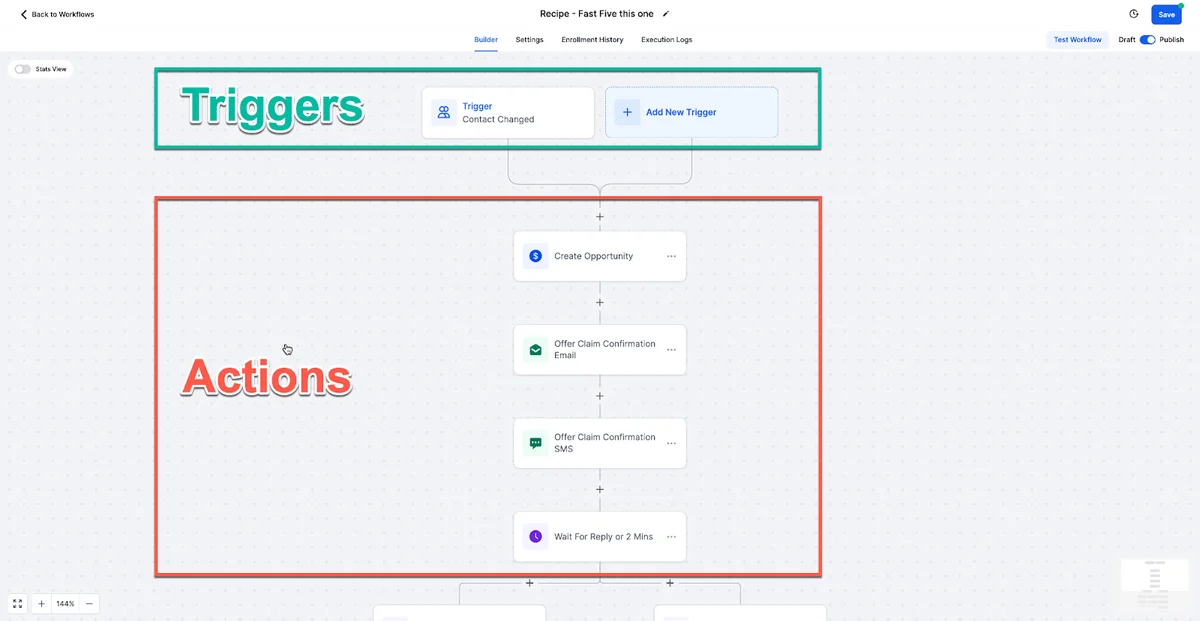
Your pipeline in GoHighLevel should mirror your actual workflow:
- New Lead - inquiry received but not contacted
- Contacted - had initial conversation
- Estimate Scheduled - on-site visit booked
- Estimate Given - provided a quote
- Follow-Up - quote sent, waiting for decision
- Job Booked - customer accepted, job scheduled
- In Progress - job underway
- Job Complete - work finished
- Review Requested - asked for Google review
- Closed/Lost - did not win the job
Create custom fields for job-specific data: service type, property address, estimated job value, estimated start date, referral source, and any notes from the site visit.
The Missed Call Text-Back Workflow
This single automation is worth the entire GoHighLevel subscription for most contractors.
Trigger: Missed phone call
Workflow:
- Wait 30 seconds - in case they call right back
- Send SMS: "Hey, this is [Your Name] from [Business Name]. Sorry I missed your call, I am on a job site right now. I will call you back within the hour. In the meantime, can you tell me briefly what you need help with?"
- Create Task: "Return call to
{contact.firstName}- missed call" - Wait 30 minutes
- If No Reply → Send SMS: "Still planning to call you back shortly. If it is easier, you can book a time for me to come take a look here: [calendar link]"
Most homeowners are pleasantly surprised to receive an instant text. They know contractors are busy. The text shows professionalism, responsiveness, and respect for their time. Contractors report capturing 30-50% of previously lost missed-call leads with this workflow alone.
Speed-to-Lead for Web and Ad Leads
When someone fills out a "Get a Free Quote" form on your website or clicks your Facebook ad, every minute counts.
Trigger: Form submitted (website or Facebook lead form)
Workflow:
- Wait 10 seconds
- Send SMS: "Hi
{contact.firstName}, thanks for reaching out to [Business Name]. I got your request for [service type if collected]. I can usually come out within a day or two to take a look. When works best for you?" - Send Email: Professional email confirming receipt of their inquiry with your services overview, licence/insurance info, and a calendar booking link
- Create Task: "Call
{contact.firstName}- new web lead for{service type}" - Wait 24 hours
- If No Reply → Send SMS: "Hi
{contact.firstName}, just following up on your quote request. Are you still looking for help with [service type]? I am available this week for a free estimate." - Wait 48 hours
- If Still No Reply → Send Voicemail Drop: Brief, friendly voicemail introducing yourself and offering to schedule an estimate
This multi-touch approach across SMS, email, and voicemail ensures you reach the homeowner on whichever channel they prefer. For more workflow examples, see our automation guide.
FREE FOR 30 DAYS
Get your first month of GoHighLevel free
- Every feature, on any plan
- A full month, worth up to $497
- Cancel before day 30, pay nothing
Card required. Nothing charged for 30 days.
Join 2.2 million businesses already running on GoHighLevel
Estimate Scheduling and Reminders
Once a lead is ready for an on-site estimate, GoHighLevel's calendar system handles the booking and reminders.
Set up a calendar type specifically for estimates with appropriate settings:
- Duration: 30-60 minutes depending on job type
- Buffer time: 30 minutes travel between estimates
- Available hours: Your preferred estimate windows
- Calendar sync: Connect Google Calendar so personal and business schedules stay aligned
Estimate reminder workflow:
- Immediately after booking: Confirmation SMS with date, time, and your photo so they recognise you
- Evening before: SMS: "Quick reminder, I will be at [address] tomorrow at [time] for your estimate. See you then."
- 1 hour before: SMS: "On my way. Should be there around [time]. If anything changed, text me back."
These reminders reduce estimate no-shows from the industry average of 20-30% down to 5-10%. For a contractor doing five estimates per week, that is one to two additional opportunities every week.
Post-Estimate Follow-Up
Not every estimate converts immediately. Homeowners often get multiple quotes and take days or weeks to decide. Automated follow-up keeps you top of mind without requiring manual effort.
Post-estimate follow-up workflow:
- Day 1: Email with a summary of what you discussed, your recommendations, and the quote attached (PDF or link)
- Day 3: SMS: "Hi
{contact.firstName}, just checking if you had any questions about the estimate I left for [project]. Happy to discuss." - Day 7: Email with relevant testimonials from similar projects and before/after photos
- Day 14: SMS: "Hi
{contact.firstName}, wanted to follow up one last time on your [project]. I have some availability opening up this month if you'd like to move forward. No pressure either way." - Day 21: Final email with a gentle note that you are available whenever they are ready
This sequence is professional, helpful, and not pushy. Contractors using post-estimate follow-up workflows report converting 15-25% more estimates into booked jobs.
Automated Review Collection
After completing a job, Google reviews should be your priority. Every 5-star review improves your local search visibility and builds trust with future customers.
Post-job review workflow:
- 2 hours after marking "Job Complete": SMS: "Hi
{contact.firstName}, thanks for letting us handle your [project]. If you are happy with the work, a quick Google review would help other homeowners find quality service: [review link]" - Day 3: Email with before/after photos of their project (if applicable) and a review link
- Day 7: Final SMS: "Just a gentle reminder, your review helps our small business more than you might think. Thank you either way: [review link]"
For detailed reputation management strategies, see our reputation management guide.
Seasonal Marketing Campaigns
Contractors can use GoHighLevel for proactive outreach during seasonal peaks:
Spring: "Time for a Spring AC Tune-Up, Book Before the Rush." Target previous HVAC customers who have not scheduled maintenance.
Pre-storm season: "Hurricane/Storm Season Prep, Free Roof Inspection." Target all past roofing customers in your area.
Winter prep: "Prevent Frozen Pipes, Schedule Your Winterisation." Target previous plumbing customers.
End of year: "Year-End Home Improvement Tax Benefits, Schedule Your Project Now." Target past customers who may have deferred projects.
Smart lists make targeting easy. Filter by service type, last service date, and area to send relevant campaigns to the right customers at the right time.
For Home Service Marketing Agencies
If you run a marketing agency specialising in contractors and home service businesses, GoHighLevel's sub-account and white-label features make it ideal for scaling.
Create a contractor-specific snapshot with pre-built:
- Job pipeline with standard stages
- Missed call text-back workflow
- Speed-to-lead follow-up sequence
- Estimate reminder workflow
- Post-job review request workflow
- Seasonal campaign templates
Deploy this snapshot to each new contractor client and have them operational within 48 hours. Charge $197-$397 per month for the platform plus managed services.
Read our white-label guide and SaaS Mode guide for building this into a recurring revenue business.
Getting Started
Start your 30-day free trial and set up the missed call text-back workflow on day one. It takes 15 minutes and will immediately start capturing leads you have been losing. Add the speed-to-lead and review request workflows in week one, and you will have a complete lead-to-review system running before your trial ends.
Related Articles
PARTNER OFFER
Your first month of GoHighLevel is free.
Through our partner link you get 30 days on any plan, double the standard 14-day trial. Build something real before you pay a cent.
Claim my free monthCard required. Nothing charged for 30 days.
For additional context, see contractor marketing trends from ServiceTitan.
For additional context, see local SEO guide from Moz.
Frequently Asked Questions
How much does GoHighLevel cost for a contractor?
Can GoHighLevel work on mobile from job sites?
Does GoHighLevel integrate with QuickBooks?
Can I use GoHighLevel for multiple service areas?
Will GoHighLevel help me get more Google reviews?
Can my office staff use GoHighLevel to manage leads?
Is GoHighLevel worth it for a one-person operation?
How long does it take to see results?
DO THIS NEXT, FREE FOR 30 DAYS
The quickest way to know is to try it on real work.
- STEP 1Claim your free month
- STEP 2Rebuild one thing from this guide
- STEP 3Decide before day 30
Free for 30 days from the day you start. Card required.
Featured in Forbes and Business Insider.
Ashley Kemp is a digital entrepreneur and perpetual traveller. Switched from ClickFunnels to GoHighLevel years ago and never looked back. Writing about what actually works.
Was this article helpful?