Updated 1 November 2026tutorial
How to Create a Sales Funnel in GoHighLevel
How to create a sales funnel in GoHighLevel: choose the offer, map the stages, build the pages, connect booking and follow-up, then test it.
 Ashley Kemp15 min read
A sales funnel gives each new prospect a clear next step, instead of leaving growth to chance. If you’re working out how to create a sales funnel in GoHighLevel, start with one audience and one offer, then build the pages and follow-up around that goal.
Step 1: Choose Your Audience, Offer and Funnel Goal
Begin with a clear answer to three questions: who do you want to reach, what problem do you solve, and what should a prospect do next? A funnel built for everyone usually speaks clearly to no one.
For example, a consultant might focus on owners of small service firms who need a steadier flow of qualified enquiries. A coach could focus on people who want help with one defined goal. That detail shapes the page headline, the lead magnet and the follow-up messages.
Pick one main action
Choose one primary goal for this funnel. It could be a booked discovery call, a request for an estimate, or a sale through a checkout page. Keep other actions out of the way. A page that asks visitors to book, read a blog, follow social accounts and buy at once makes the next step harder to spot.
Match the action to the price and the level of trust needed. A lower priced service may be ready for a direct offer page. A larger coaching or agency package usually needs a conversation first, so ask prospects to book a call rather than pushing them straight to checkout.
Make the first offer useful
A lead magnet gives someone a reason to share an email address. Keep the promise narrow and useful. A short checklist, a focused guide or a brief training can help solve one early problem. If your paid offer helps agency owners improve lead follow-up, a lead magnet about writing a first response is a closer fit than a broad business planning workbook.
Make sure the free offer points naturally towards your paid service. Someone who downloads a guide about a specific challenge should receive follow-up about that challenge, not a string of unrelated promotions.
Write down the audience, the offer and the one action you want. We cover GoHighLevel buying decisions for agencies and service businesses, and we recommend setting the funnel goal before choosing software features.
Key Takeaway: One audience, one offer and one main action give every page and message a job.
Step 2: Map the Funnel Stages and Decide What Happens Next
A sales funnel describes the path from first contact to purchase, then the work that keeps a customer engaged. Before building pages, draw that path on paper or in a basic spreadsheet. Name each stage and write the action that moves a person forward.
Use four simple stages
- Awareness: Someone finds your business through a referral, search result, social post or advert.
- Interest and consideration: They read your offer or resource, compare options and decide whether your service fits.
- Decision: They book, apply, request a quote or buy.
- Advocacy: After a good experience, they may leave a review or refer someone. Keep this stage in view after the sale.
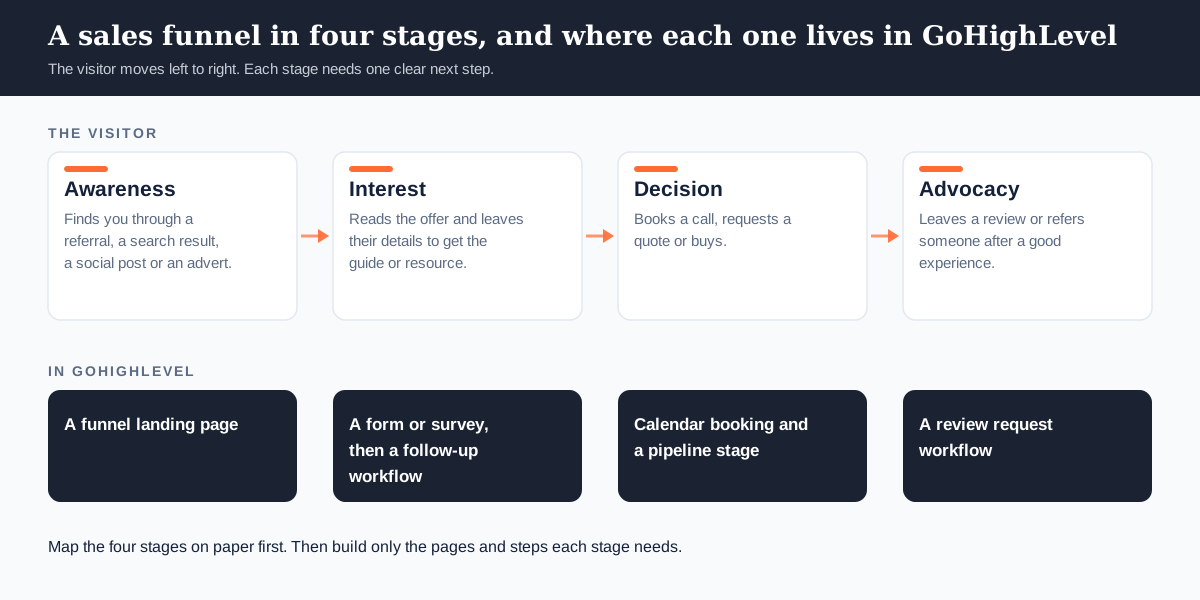
For each stage, note the visitor’s likely question. A person who has just found your site may ask, “Can this business help with my problem?” Someone who has booked a call may want to know what the meeting will cover. Your content should answer the question at that point, not repeat the same pitch everywhere.
Next, write the handoff. A new lead might receive the promised guide and an introduction email. A person who clicks the booking link could be invited to schedule a call. Once a meeting is booked, stop the general booking prompts and send confirmation details instead.
Keep the first map small. If the journey has a dozen branches before you have tested the basic route, remove the branches that do not change what you do next. A service business could start with one resource page, one thank you page and one booking step.
Use a spreadsheet if that feels easier than drawing. Put each stage in a row, then add the visitor’s question, the page or message they see, the next action and the number you’ll track. This simple chart exposes gaps before you build them into the software.
For each handoff, name who owns it. An automated email can deliver a resource, but a team member may need to review a high value enquiry. Decide what qualifies as a fast response and who gets notified when a prospect asks for help.
By now, you should have a one page funnel map with a clear next step at every stage. If a step has no purpose, remove it or give it one.
Step 3: Build the Funnel Pages in GoHighLevel
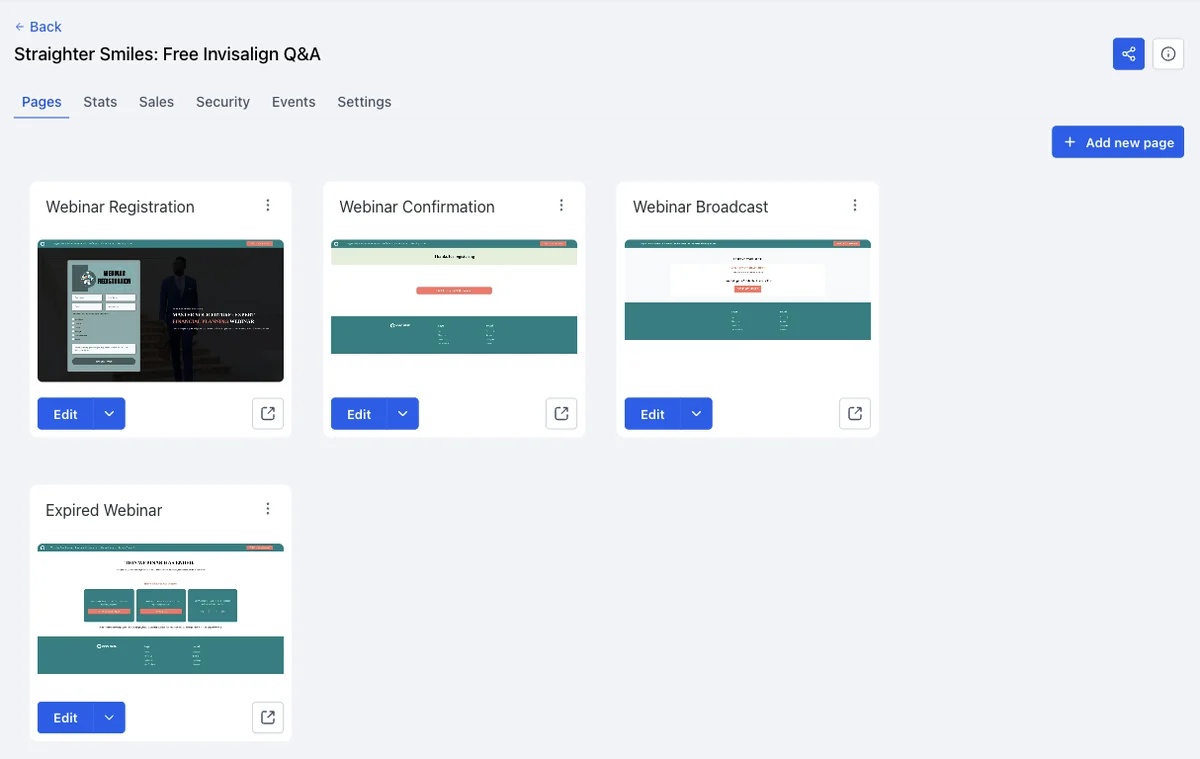
Build only the pages your mapped journey needs. A lead capture funnel often starts with an opt-in page, then a thank you page. A booking funnel adds a calendar page and a confirmation page. A direct sale can use a sales page followed by checkout and purchase confirmation.
Create the funnel structure
In GoHighLevel, open Sites and then Funnels. Create a funnel, name it so your team can recognise its purpose, and add the first page. Choose a template if its structure is close to your goal. Start from a blank page when the offer needs a different layout or a short path.
On the opt-in page, write a headline that names the audience and the result of the free offer. Explain what someone gets after submitting the form. Keep the form focused on the details you need for the next step. Asking for a long list of information before sharing a simple checklist can add needless friction.
Write the page before polishing it
Use a simple page order: clear headline, short explanation, offer details, form or call to action, then a brief note about what happens next. Make the main button easy to find. Remove menu links that send visitors away from the goal.
On the thank you page, confirm the form went through and explain how the resource will arrive. If a call is the next step, include the booking option there. For a paid offer, make the post-purchase message clear so customers know what to expect.
Use the same words across the advert, page and follow-up. If an advert promises a checklist, the page should offer that checklist, and the first email should deliver it. A mismatch makes people wonder whether they signed up in the right place.
Before publishing, check each page on a phone-sized screen. Read the headline aloud and test every button. Connect a domain when the page is ready for public use, then confirm the live link opens the right funnel step.
A more detailed GoHighLevel funnel building walkthrough can help when you’re ready to connect page design with forms and workflows. Keep this first build focused on the offer you chose, not every service your business sells.
Step 4: Connect Lead Capture, Booking and Pipeline Tracking
A page is only the front of the process. Connect the form to the CRM, then make sure every new enquiry appears in the right place. That lets you see who has asked for help and what should happen next.
Set up contact fields for the information your team uses. A consultant might need the prospect’s service type and timeline. An agency could ask which service the person wants to discuss. Keep the first form short, then ask more during a call if needed.
In the form settings, map each answer to the matching contact field. Add a source tag that identifies the funnel or campaign. This gives you a way to tell whether a lead came from a webinar page, a checklist or another route.
Build a pipeline that mirrors your sales process
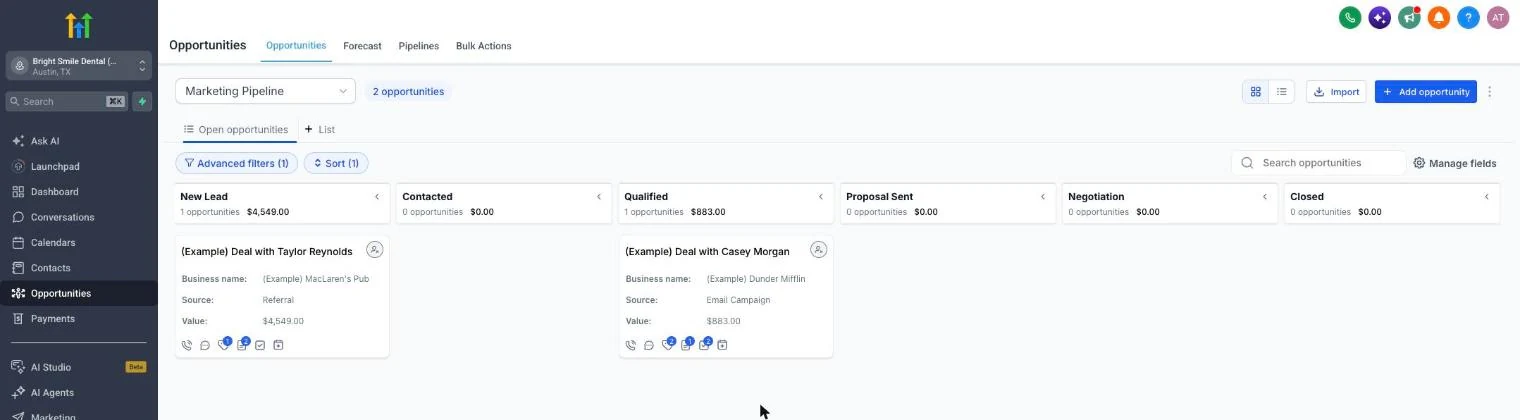
Create stages that show meaningful progress, such as New Lead, Qualified, Call Booked, Proposal Sent and Won or Lost. Use names your team will understand at a glance. A lead should move when a real event happens, not because someone wants the pipeline to look busy.
Set the form submission to create or update a contact and add an opportunity to the first stage. When a prospect books, move the opportunity to Call Booked. After the conversation, record the outcome and set a task or next follow-up date.
GoHighLevel includes appointment scheduling and pipeline tracking alongside its CRM. That means the booking can sit beside the contact and opportunity, rather than in a separate calendar that your team has to check by hand.
Set up the calendar’s meeting type, availability and time zone. Add a confirmation message, then schedule reminders that help prospects arrive prepared. If the meeting is cancelled or moved, check that the contact record and next action reflect the change.
The form and survey choices affect what the CRM receives. Our guide to GoHighLevel forms and surveys explains how fields and submission actions fit into the setup. Use only the questions that help you qualify or serve the lead.
By this point, a test form submission should create a contact, add the opportunity and make the next action clear. If a booking does not update the pipeline, fix that handoff before sending traffic to the page.
Step 5: Automate Follow Up Without Losing the Personal Touch
Use automation for routine work, then bring a person in when a lead needs advice. A useful follow-up flow sends the promised resource, explains what happens next and gives the prospect a simple way to book or reply.
Start with a short welcome sequence. The first email should deliver the lead magnet. The next messages can answer common questions, share a useful tip or explain how your service works. Each message should earn its place and point to one next action.
For a coach offering a discovery call, the sequence might begin with the requested guide. A later message could explain who the call suits and what the prospect should bring. If someone books, stop the booking reminders and switch to meeting preparation.
Set clear rules for each workflow
In a GoHighLevel workflow, choose a trigger such as a form submission. Add the messages or tasks that follow. Then add conditions that change the path when someone replies, books, opts out or buys. A customer should not keep receiving messages that ask them to become a customer.
Use email for helpful detail. Use SMS sparingly for time-sensitive updates, such as a booking confirmation or a reminder. Before sending texts, make sure the person has agreed to receive them and provide a clear way to opt out.
Write messages as if one person is reading them. Use the lead’s chosen service or resource when relevant. Avoid pretending a message is personal if it is a generic blast, and do not send repeated nudges just because the system allows them.
Build a human handoff for questions the workflow cannot answer. For example, a lead who replies with a detailed pricing question can create a task for the right team member. The automation should support the conversation, not pretend to close a complex sale on its own.
Start with one workflow and test each branch. Confirm the lead gets the right resource. Then reply to a test message and book a test appointment to make sure the old sequence stops. Add more branches only when a real need appears.
We recommend that agency owners keep the first nurture series short and useful. We focus on GHL setup for small teams, where a clear handoff often beats a maze of messages.
Step 6: Test the Funnel, Track Results and Check the Real Cost
Test the complete journey as a prospect would experience it. Use a test contact and start at the first page. Submit the form, check the contact record, open the delivered email and book a test appointment. Then review the pipeline and confirm the next action appears.
Check each stage, not just sales
Track a small set of measures that show where people stop moving:
- Awareness: page visits or visits from the campaign you are testing.
- Capture: completed forms compared with page visits.
- Consideration: email clicks, replies or booking page visits.
- Decision: booked calls, attended calls, proposals accepted or purchases.
- After the sale: review requests sent and customer referrals received.
Look for the weak handoff. If visitors reach the page but few complete the form, review the offer and the form length. If leads submit but do not book, check the follow-up and the booking page. If calls happen but sales do not, review the offer, qualification and sales conversation before changing the advert.
Change one element at a time. You could test a clearer headline against the current one, then wait for enough traffic to make the result useful. Keep the version that brings more of the right leads, not simply more form fills.
Work out the full monthly cost
GoHighLevel plan prices are $97 per month for Starter, $297 for Unlimited and $497 for Founder (previously Agency Pro). Starter includes up to three client accounts; Unlimited is for unlimited client accounts. Founder is the plan for agencies that want to resell the platform. Check that the account limit and plan fit the way you serve clients.
Texts, calls, email and AI have usage charges. As of 18 September 2026, GoHighLevel charges SMS at $0.00747 per segment plus carrier fees, outbound calls at $0.0166 per minute and email at $0.675 per 1,000 messages. AI Employee is $50 or $97 a month per client account. Your final bill depends on use.
Include the subscriptions you will keep. You may still need a dedicated email service or calendar if your current setup depends on one. Add those costs to your GHL plan and expected usage, then compare the total with your existing stack. Our GoHighLevel trial guide explains the offer, and you can build this funnel during the 30-day free trial before you pay for a plan.
Skip GoHighLevel if you only need email or a basic booking page and do not need a CRM, funnel builder or client accounts. A smaller tool may be a better fit for that narrow job.
If the pages, messages and pipeline all pass your test, launch with one traffic source. Keep checking the same stage measures each week so you can spot a broken form or a drop in bookings early.
Frequently Asked Questions
How long does it take to build a sales funnel in GoHighLevel?
What pages do I need for a simple sales funnel?
Can I build a sales funnel in GoHighLevel without a lead magnet?
What should I track in a sales funnel?
How much does a GoHighLevel sales funnel cost?
Launch Your Funnel With a Clear Next Action
Build one focused funnel, test each handoff yourself and improve the stage where prospects stall. Start the 30-day free trial today and build your first opt-in page, booking step and follow-up workflow this week.
We earn a commission if you start GoHighLevel through the links on this page, at no extra cost to you.
DO THIS NEXT, FREE FOR 30 DAYS
The quickest way to know is to try it on real work.
- STEP 1Claim your free month
- STEP 2Rebuild one thing from this guide
- STEP 3Decide before day 30
Free for 30 days from the day you start. Card required.
Featured in Forbes and Business Insider.
Ashley Kemp is a digital entrepreneur and perpetual traveller. Switched from ClickFunnels to GoHighLevel years ago and never looked back. Writing about what actually works.
Was this article helpful?