Updated 1 November 2026comparison
Best Lead Capture Software: 7 Tools for 2026
Seven lead capture tools compared, from form builders to a CRM that follows up and books the call, with honest notes on who each one suits.
 Ashley Kemp15 min read
A lead can go cold while a spreadsheet waits for someone to sort it. The right lead capture software gets a prospect’s details to the people who need to follow up, so here are seven tools for different capture and sales workflows, starting with GoHighLevel, plus a quick way to compare them.
1. GoHighLevel: Lead capture, CRM, booking and follow-up in one account
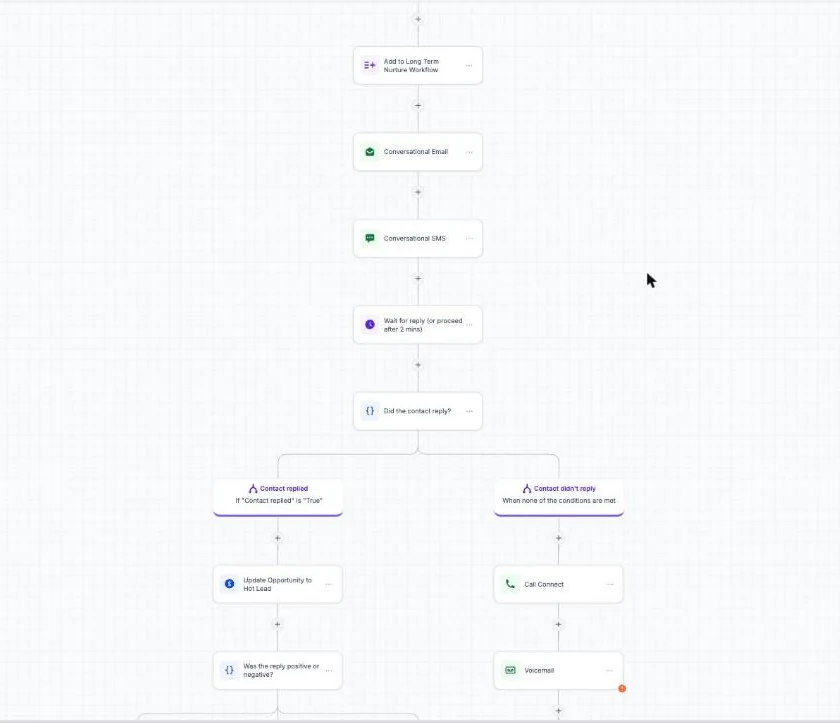
One GoHighLevel account replaces a separate CRM, email and SMS tool, funnel builder, booking tool and client portal, starting at $97 a month. A visitor can fill in a form or survey on a funnel page, land in your CRM, get an automatic text and email, and book a call on your calendar without anyone copying details between tools.
Plans cost $97 a month for Starter, $297 for Unlimited and $497 for Founder (previously Agency Pro). Starter includes three client accounts, and every plan includes unlimited contacts and users. Texts, calls, email and AI have usage charges, so add your expected volume to the plan price.
Choose it if: you want each new lead to flow straight into follow-up and booking, for your own business or for client accounts.
Skip it if: you only need a single form or an email sign-up box.
Try the 30-day free trial to build one capture page and test the follow-up before you commit.
2. HubSpot Marketing Hub: Free core lead capture with strong analytics
HubSpot Marketing Hub has a free plan with core lead capture tools, plus forms and landing pages. It’s a good fit for a small team that wants to start collecting contacts and reviewing marketing results before taking on a larger platform cost.
Its capture options include progressive profiling, smart fields, behavioural triggers, pop-ups, chatflows, and live chat. Progressive profiling lets a business gather more information over time instead of asking every new contact to fill out a long form at once. That can help when a visitor is ready to download a guide but not ready to answer a long set of qualification questions.
HubSpot also has email automation and analytics, including attribution reports. Those reports help teams see which marketing activity is connected to leads and customer actions. For an agency, that can make a client review more useful than a raw lead count: the team can discuss where contacts came from and what happened after capture.
The free starting point is appealing, but keep the job in view. HubSpot’s free plan is a reasonable place to test basic capture. Its more advanced marketing features sit in paid tiers, so check that the features your team needs fit the plan you’d actually use. HubSpot lists Marketing Hub Professional at $890 per month, or $800 per month with annual billing, plus a required $3,000 onboarding fee. Our GoHighLevel vs HubSpot comparison sets that against a GoHighLevel plan.
Pick HubSpot when reporting and marketing follow-up matter alongside form capture. If your team mainly needs a simple way to collect survey answers, a focused form builder may be easier to start with.
3. Jotform: Flexible form-based lead capture
Jotform is a cloud-based form automation tool for creating online forms and recording customer responses. It’s a sensible fit for businesses that need a form to collect details or survey answers, then need a clear place to review the submissions.
The main distinction is its form-first approach. A business can publish a form, ask visitors for the information it needs, and review what people send back. That keeps the capture task easy to understand: the visitor fills in a form, and the team checks the responses. For an agency, the same pattern can support different client questionnaires without turning a basic intake form into a full CRM project.
Forms work best when the questions match the next step. If you only need to send a useful email, asking for several extra details can add effort without helping the follow-up. If a sales rep needs to qualify a request before booking time, a few clear questions may help the team decide who should respond first.
For a coach, that might mean asking what a visitor wants help with before reviewing the response. A local service business may need only enough information to understand the request and contact the person. In either case, be clear about why you’re asking for the information and link to your privacy policy near the form.
Jotform’s strengths are form creation and response review. If you need a system that also manages lead stages and automated follow-up, decide how those responses will reach the people or tools that handle the next step. Jotform earns its place when forms are the main capture job, not when your team needs a broad sales workflow in the same product.
4. Wisepops: Behaviour-based pop-ups and forms
Wisepops uses onsite pop-ups and forms to turn website visits into subscribers or leads. It suits marketing teams that want to show different prompts based on visitor behaviour instead of putting the same form in front of every visitor.
Its capture formats include pop-ups, banners, and embedded forms. Teams can use A/B testing to compare versions, then review conversion analytics to see how a campaign performs. Targeting controls can also set when a message appears and how often a visitor sees it. For example, an ecommerce team might show an offer to someone who has spent time on a product page, while limiting repeat displays to avoid showing the same prompt again and again.
Wisepops offers behaviour-based pop-ups and forms, with integrations for CRM and email tools.
Wisepops plans start at $599 a month for sites with up to one million pageviews. That kind of pricing may make more sense for a brand running ongoing onsite campaigns than for a small business that needs one email sign-up form.
Targeting can also take time to learn. A team should decide which visitor actions deserve a prompt, then test one campaign before adding more rules. Too many overlapping messages can make a site feel pushy, even if each pop-up looks fine on its own. Choose Wisepops when targeted onsite campaigns and testing are a regular part of your marketing work.
5. EngageBay: All-in-one CRM for small businesses
EngageBay is an AI-powered all-in-one CRM for small businesses and startups. It brings marketing, sales, and customer service management together.
For lead handling, map how enquiries enter your business, who should own them, and what should happen next. A founder with a small sales team can use that workflow to decide what they need from a CRM before choosing a platform. Consider which steps should be handled by the team and which need to be supported by the software.
Before you move a whole team into any all-in-one CRM, map the work you already do. Write down where a lead enters, who owns it, and what should happen next. Then check whether the platform’s fields and routing rules match that path. A tool can hold a lot of customer information, but it only helps if staff know where to find the detail they need. EngageBay brings marketing, sales, and customer service management together, which may suit a growing small business looking to manage those functions in one platform.
Before adopting an all-in-one CRM, check whether its capabilities match your team's workflow and whether staff can find the information they need. If your agency manages many client accounts under its own brand, compare the account structure and resale needs before treating a general small-business CRM as an agency platform.
Pro Tip: Before importing contacts, agree on what counts as a qualified lead and who owns the first response. Clear rules make scoring and assignment more useful.
6. GetResponse: Lead capture with email automation and scoring
GetResponse is an all-in-one marketing and lead capture system with form and landing page builders, email automation, lead scoring, and integrated webinars. It’s a fit for a creator or service business that uses email as a key part of its follow-up and also runs webinars.
A landing page can give a campaign its own place to collect sign-ups. Email automation can then support follow-up after a person submits a form. For example, a consultant could use a landing page to collect interest in a webinar, then use an email sequence to share details with people who registered. The webinar feature gives the campaign a live session to point toward.
Lead scoring adds a way to sort contacts based on the scoring setup. That may help a team decide which people need a personal reply first, while others continue through the planned email follow-up. The useful question is whether the score reflects a real action your sales or coaching team cares about, rather than a number that no one checks.
For an agency, the key decision is how the tool fits with the client’s existing sales process. Decide who will review scored contacts and how a qualified person gets a timely next step. A score only helps if it changes what the team does. If no one owns the follow-up, more captured names can mean a longer queue rather than more booked conversations.
GetResponse may be a strong fit when email and webinars belong in the same marketing plan. If you only need to capture a name and send a simple reply, an all-in-one marketing system may be more than your team needs. Keep the setup tied to a real campaign, then expand only when the extra tools are part of the work you already do.
Key Takeaway: Choose a platform based on what happens after a form submission, not just how the form looks.
7. Kylas Sales CRM: Automatic lead capture and organisation
Kylas Sales CRM is designed to capture and organise leads from web forms, landing pages, email campaigns, and third-party apps. It’s suited to a growing business that needs incoming leads to reach a sales team and stay organised as they move through a pipeline.
The wider lead-management details include capturing contacts through forms or third-party portals, then assigning leads to teams. Kylas also supports custom fields and filters, which can help a team sort contacts by the information it uses to qualify a deal. The result is a cleaner handoff from capture to sales review, provided the team agrees on its fields and lead stages.
Its sales workflow can include pipeline stages and actions linked to those stages. Teams can also manage deals and contacts, create tasks, and use reminders. For a business with several sales reps, the shared pipeline gives people a way to see where leads sit and who needs to act next.
Kylas supports customer engagement through email, WhatsApp and SMS. That range may suit a sales operation that receives enquiries through several channels and wants a central place to organise those contacts.
Ease of adoption still matters. Before committing, have the people who will use the CRM try the lead entry and follow-up path. Can they find a new contact? Can they tell who owns it? Can they update its stage without asking an admin? Kylas is worth a closer look when sales organisation is as important as capturing the initial enquiry.
Pick it when your main problem is getting leads into a sales process and keeping them sorted. If you need a separate marketing system for a specific campaign, check how that system will pass information into the CRM before launch.
Lead capture software comparison: best fit by use case
These seven tools cover different parts of the capture path. A form builder can collect an answer; a CRM can help a team manage the next action. A website campaign tool can target its prompt, while an email-focused system can carry follow-up after someone signs up. Start with the handoff your team needs, then judge the software against it.
| Tool | Best fit | Capture and follow-up angle | Check before choosing |
|---|---|---|---|
| GoHighLevel | Agencies and service businesses wanting capture, CRM and follow-up together | Forms, surveys, funnels, booking, email and SMS automation | Which usage charges will your volume add? |
| HubSpot Marketing Hub | Teams wanting core capture with reporting | Forms, landing pages, pop-ups, chat, email automation | Which features fit the plan you’ll use? |
| Jotform | Form-led collection and survey responses | Publish forms, record and review responses | How will submissions reach the next owner? |
| Wisepops | Targeted website prompts and campaign tests | Pop-ups, banners, embedded forms, A/B testing | Does campaign volume justify the listed plan? |
| EngageBay | Small teams wanting a shared CRM | Lead routing, scoring, marketing, sales, service | Do your routing rules match your sales process? |
| GetResponse | Email-led campaigns and webinars | Forms, landing pages, email automation, scoring | Who reviews scored leads and follows up? |
| Kylas Sales CRM | Sales teams organising leads from several sources | Capture, assignment, pipeline, and follow-up | Can your team use its stages and fields? |
For event teams, the capture path may begin with a badge scan or QR code. A website lead may arrive through an embedded form, a pop-up, or a chat. Those are different jobs. Before you buy, ask the vendor to show the exact route from that source into the CRM, including any notes or qualification answers your sales team needs.
Also ask how consent is recorded, where contact data is stored, and how a person can change their preferences. For pop-ups, test timing and frequency controls on the pages where you plan to use them. A visitor should see a relevant prompt, not the same offer on every page.
If you’re comparing a capture tool with GoHighLevel, count the tools and usage charges you’d keep. The Stack Insiders covers how consultants use GoHighLevel for lead capture and follow-up, including workflows that connect a new enquiry to a discovery call. GoHighLevel starts at $97 per month for Starter, and usage charges for texting, calls, email, and AI can add to the monthly cost. That wider system may suit an agency consolidating several jobs. It may be too much if you only need a form or a calendar.
Key Takeaway: Match the tool to your full handoff, from the first contact detail to the person responsible for follow-up.Pro Tip: If you’re weighing GoHighLevel against separate tools, use The Stack Insiders’ GoHighLevel walkthrough to plan a small test before moving client work.
Frequently Asked Questions
What does lead capture software do?
What is the best lead capture software for a small business?
Can lead capture software automate follow-up?
Should I use a form builder or a CRM for lead capture?
Is GoHighLevel worth it for lead capture?
Which Lead Capture Tool Should You Choose?
Choose the tool that fits the handoff your team will use every day. If you want capture, CRM, booking and follow-up in one place, GoHighLevel is the first choice, and our GoHighLevel trial guide explains how the trial works. Start the 30-day free trial and test one lead path before you move more of your work.
We earn a commission if you start GoHighLevel through the links on this page, at no extra cost to you.
DO THIS NEXT, FREE FOR 30 DAYS
The quickest way to know is to try it on real work.
- STEP 1Claim your free month
- STEP 2Rebuild one thing from this guide
- STEP 3Decide before day 30
Free for 30 days from the day you start. Card required.
Featured in Forbes and Business Insider.
Ashley Kemp is a digital entrepreneur and perpetual traveller. Switched from ClickFunnels to GoHighLevel years ago and never looked back. Writing about what actually works.
Was this article helpful?