What is GoHighLevel AI Studio and how much does it cost?
AI Studio is GoHighLevel's prompt-based builder for websites, landing pages, forms, booking pages and full web apps. You describe what you want, paste a URL to rebuild or upload a screenshot, and it writes the layout, copy, images and code, then publishes to a preview link or your own domain. It came out of Labs for every account on 22 September 2026, and in October it gained a built-in backend (AI Studio Cloud), native payments, site analytics, built-in live chat and a two-way sync with GitHub. Usage is included in the AI Employee Growth plan ($50 a month per sub-account), AI Employee Unlimited ($97 a month) includes three times that usage, and pay-per-use is billed at token cost. It runs on top of a GoHighLevel plan, from $97 a month.
GoHighLevel (GHL) launched AI Studio on 2 April 2026 and spent the spring and summer in Labs, HighLevel's opt-in area for early features. HighLevel's launch post reported 22,000 projects from 7,500 early users in that first stretch. In September it gained a full server-side stack and came out of Labs for every location, so every agency on GHL now has it.
This guide covers what it builds, what it costs, how to switch it on for clients and how to get a first page live.
What AI Studio builds
HighLevel's AI Studio documentation describes it as a conversational workspace for websites, landing pages, forms, booking experiences and interactive web projects. It writes the layout, the copy, the images and the code, and you refine the result by chatting with it while a live preview updates next to the conversation.
There are three ways to start a project:
- Describe it. Type the brief in plain English: the business, the offer, the audience and what the page should get people to do.
- Clone from a URL. Paste a live site and AI Studio recreates its structure and flow, ready for you to rewrite for the client.
- Work from an image. Upload a screenshot or design reference and it uses that as the visual direction.
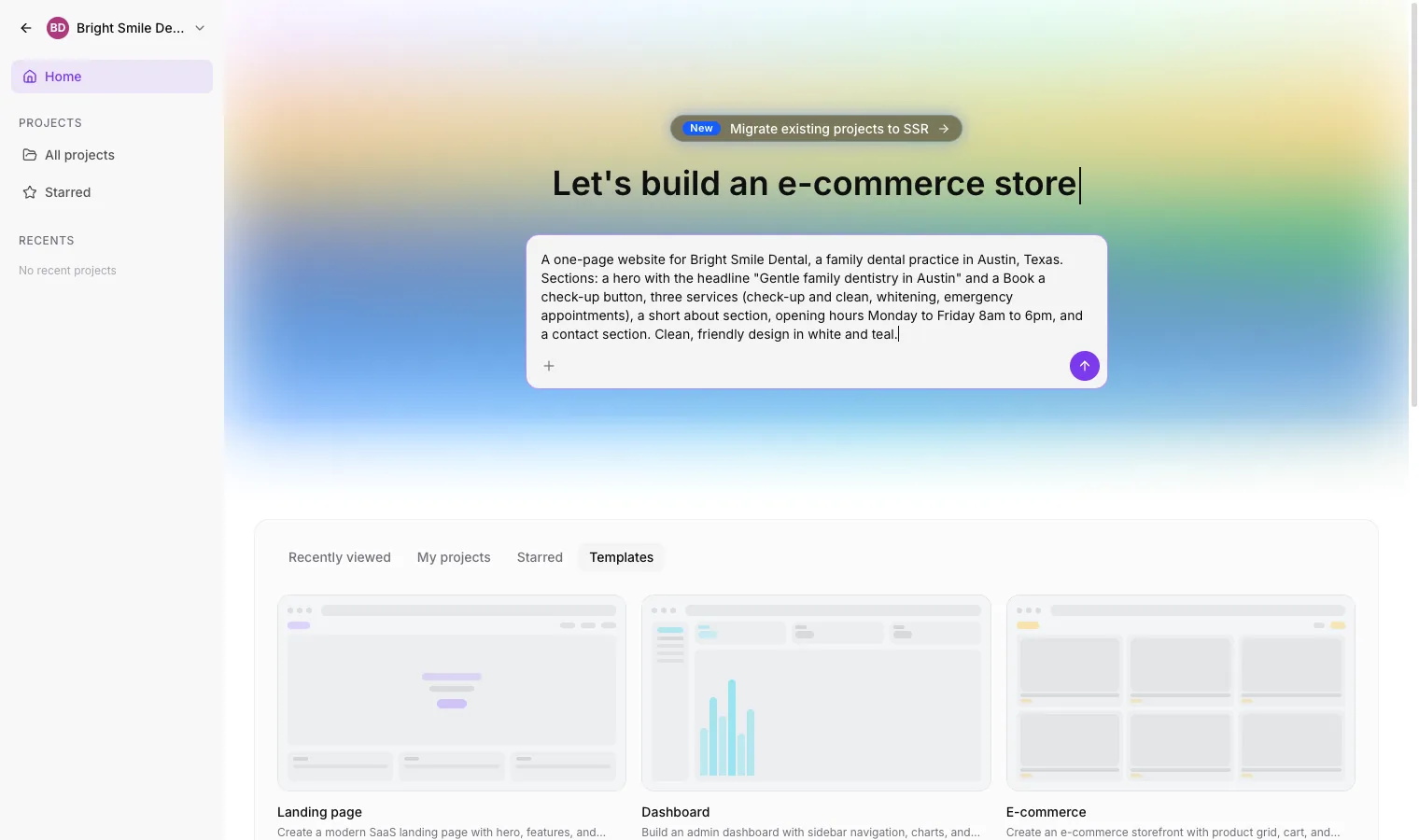
Every change goes into version history, so you can roll back to any earlier version. Images and other assets generate in the background while you keep working. When the page is ready, you publish to a preview link or connect the client's own domain.
What changed in September 2026
Three releases in one month turned AI Studio from a page builder into a web app builder.
Full-stack projects (8 September)
New AI Studio projects now run on TanStack Start, per the SSR and server functions changelog entry. In practice that gives every new project four things:
| Feature | What it means for you |
|---|---|
| Server-side rendering | Every page is rendered on the server, so Google, LinkedIn and Slack previews read the real titles, headings and copy |
| Server functions | Logic and API calls run on the server, and the browser never sees how they work |
| REST endpoints | A project can publish its own API routes for webhooks and other apps to call |
| Secrets | API keys and tokens sit in a vault, out of the page code and out of the chat |
Server rendering matters for SEO. A page that search engines can read without running JavaScript is a page they can index properly, which makes AI Studio a sensible home for client sites that need to rank.
Existing projects can move across (22 September)
Projects built before 8 September stay on their original React setup until you choose to upgrade them. Under Project Settings, Migrate to SSR creates a copy of the project in the same sub-account and rebuilds that copy on the new stack, according to the migration changelog entry. The live site and its domain stay on the original, so nothing changes for visitors until you publish the copy. The migration is charged like a normal build, and any workflow triggers keep listening to the original project until you point them at the new one.
Live for every account (22 September)
The AI Studio Live for All release took AI Studio out of Labs for every location. Sub-account users and admins start with access switched off, unless they already had AI Studio enabled in Labs, and agency owners, admins and agency users with write access see a banner on Home asking them to configure access.
What changed in October 2026
Three more releases on 8 and 9 October gave AI Studio projects a backend, a checkout and their own analytics. We built a members app with all three on 9 October, and the GoHighLevel AI Studio tutorial shows every screen. On 10 October we gave AI Studio, Lovable and Replit the same app prompt, and our same-prompt test shows what each built and where each one sent the lead.
AI Studio Cloud: a built-in backend (9 October)
Cloud gives a project its own private backend with a database, user accounts and file storage, per the AI Studio Cloud changelog entry. Open More, then Cloud, and turn it on from Overview. Setup takes about a minute, you can keep building while it runs, and AI Studio checks with you before it builds anything against Cloud.
| Part | What you get |
|---|---|
| Database | Tables you can browse and edit by hand, row-level security, daily backups of the schema and rows, and a restore option. Ask in the chat for a new table or policy and AI Studio writes the schema |
| Users | Sign-up and sign-in by email and password, invitations by email, a signups chart, your own password rules and a check against passwords found in public breaches |
| Storage | Public and private buckets for uploads, with folders and an upload size limit (2 GB by default, 5 GB at most) |
| Sizes | Six database sizes, from Tiny (shared CPU, up to 0.5 GB RAM) to X-Large (4-core dedicated, 16 GB RAM), which you can change once an hour |
Sign-in is by email and password in this first version, and HighLevel says more sign-in methods will follow. Sign-up, invitation and password reset emails go out through the account's own email. A security advisor flags problems on the Overview tab and AI Studio can try the fix for you; HighLevel's advice is to fix critical issues before you publish.
Cloud needs a project built on TanStack Start. For an older React project, run Migrate to SSR first, then switch Cloud on in the upgraded copy. Before you remove Cloud from a project, export the tables as CSV and download the files, because removing it deletes that project's database, users and files for good.
Payments: sell from an AI Studio app (8 October)
AI Studio apps can now take payments through HighLevel's native payments, per the payments changelog entry. The products, orders, payment providers and subscriptions are the ones already set up in the sub-account, so there is nothing extra to connect.
- Open More, then Payments, and turn Payments on. Start in test mode.
- Choose which catalog products the app can sell, and how each is priced: one fixed price, a selected set of variations, or the product's full catalog.
- Ask the agent to "add payments". It asks you to approve the connection, then builds a storefront and checkout into the app.
- Switch to live mode when your test order has gone through.
Buyers enter card details in HighLevel's hosted checkout, so card data never sits in the app's code. The checkout supports PayPal express, coupon codes and subscriptions, takes on the site's colour scheme and runs bot protection on every purchase. After a purchase you can show a one-click upsell that charges the saved card, which works with Stripe (3D Secure included), Square, Authorize.net, NMI, Adyen and Mercado Pago. The platform manages the payment code, so neither you nor the agent can break it by accident. Payments also needs a TanStack Start project.
Analytics and form submissions (8 October)
Every published AI Studio site now measures itself with no tracking code, per the analytics changelog entry. There are four places to look:
- Project, More, Analytics, Overview: page views, unique visitors, opt-ins and opt-in rate, with the change from the previous period, plus top pages, time on page, traffic sources, devices, browsers and locations.
- Project, More, Analytics, Form Submissions: every lead the site's forms collected, with a link to the contact, filters by form and date, and a button to create a workflow from there.
- Sites, Analytics, AI Studio: every AI Studio site next to your funnels and websites.
- Contacts, Contact details, Activity: the pages a contact viewed, where they came from and the form they submitted.
Forms you connected before 8 October keep counting opt-ins. To tie each submission to the pages that visitor viewed first, ask AI Studio to reconnect form tracking, then publish again.
Live chat widgets (14 October)
Ask AI Studio to "add a live chat" and it builds a HighLevel chat widget into the app's own code, in the site's colours and fonts, per the chat widgets changelog entry. Choose Live Chat or Email Chat, answer a few questions on greeting, placement and tone, and the widget is created in the account under the project's name. Messages land in Conversations, and business hours, chat ratings and spam settings work as they do on any HighLevel widget. More, then Chat Widgets manages each widget's messaging, contact form, consent notices and hours, and More, then Analytics, then Chat Widgets lists chat loads, opens, open rate and every lead with the page the chat started on. It works in TanStack Start and React projects.
Git Sync with GitHub (15 October)
Open More, then Git, to connect a GitHub account or organisation, per the Git Sync changelog entry. AI Studio creates a private repository for the project, pushes every saved version and pulls back commits made on the connected branch, so a developer can work in Claude Code, Codex, Cursor, Copilot or Gemini CLI and the change shows up in AI Studio with a fresh preview. Pushes containing secrets such as API keys or private keys are blocked. The new Manage Git & download code permission is on for every role by default, and agency admins can switch it off per user under Settings, Team, Permissions, AI Studio. Git Sync works with React (Vite) and TanStack Start projects.
Checkout upgrades (15 October)
The Payments checkout now lets you show, hide or require the phone number and each billing address field, take a two-step checkout that saves the buyer as a contact before payment, and show the order ID, items, taxes and total on the confirmation screen, per the checkout changelog entry. You can also send buyers to your own thank-you page. Two-step leads fire the Contact Created trigger, not Order Form Submission, so point your workflows at the right one. Projects already using Payments get these on their next prompt.
GoHighLevel AI Studio pricing
AI Studio runs on HighLevel's AI plans, which sit on top of your GHL subscription. The AI Studio documentation lists three ways to pay:
| Option | Price | AI Studio usage |
|---|---|---|
| Pay-per-use | Token cost | Billed as you build; HighLevel does not publish a separate per-token rate for AI Studio |
| AI Employee Growth | $50/month per sub-account | Included usage |
| AI Employee Unlimited | $97/month per sub-account | Three times the Growth usage |
The GHL plan underneath is the usual one: Starter at $97 a month, Unlimited at $297 or Agency Pro (previously SaaS Pro) at $497. Most agencies building for clients run Unlimited, because it gives you as many client sub-accounts as you need under your own brand. The GoHighLevel pricing guide breaks the three plans down, and our AI Employee pricing guide covers Growth and Unlimited in full, including Conversation AI and Voice AI.
Three pricing details worth knowing before you budget:
- Funnel and Website AI is a separate tool. It generates sections inside the classic funnel and website builder and is free, with a limit of 1,000 prompts a day per location. AI Studio is the bigger builder and draws on your AI plan.
- AI Studio was free during Summer of AI. HighLevel made it free for every sub-account from 1 June to 31 August 2026. That promotion has ended; the Summer of AI breakdown has the full history.
- AI Studio Cloud is billed by the hour, and the Tiny database size is free. The larger sizes each show an hourly price in the app, database storage is charged hourly for the space you set aside, and file storage is charged for what you store. HighLevel's AI Studio pricing article does not list the hourly rates, but the app does, under More, Cloud, Advanced settings. On 9 October 2026 our account showed $0.015456 an hour for Mini up to $0.330855 an hour for X-Large, about $11 to $242 a month if left running, and our AI Studio tutorial lists every size. Check the panel again before you quote a client. If the wallet runs short, Cloud pauses and nothing is deleted.
If you sell AI Studio builds to clients, price the finished page or site, and let the token cost per build sit inside a monthly retainer or a one-off build fee.
How to switch AI Studio on for clients
You control who can use AI Studio in each sub-account. In the sub-account sidebar it appears as AI Studio, still carrying a Beta tag at the start of October 2026. For one client at a time, use the Home banner: click Configure, search for or select the users, and confirm. You can give everyone access or pick named people, and HighLevel says setup usually finishes within a few minutes.
For many clients at once, HighLevel's bulk setup guide gives this path:
- Open the Agency dashboard and go to AI Suite, then AI setup.
- Tick the sub-accounts you want to change.
- Click Manage AI.
- Choose a level: enable for sub-account admins only, enable for all sub-account admins and users, or disable.
For a single sub-account, the AI Setup tab also has a Manage Ask AI & AI Studio button. The drawer it opens spells out how access works: Conversation AI is switched on for the whole sub-account, while Ask AI and AI Studio are granted to individual users.
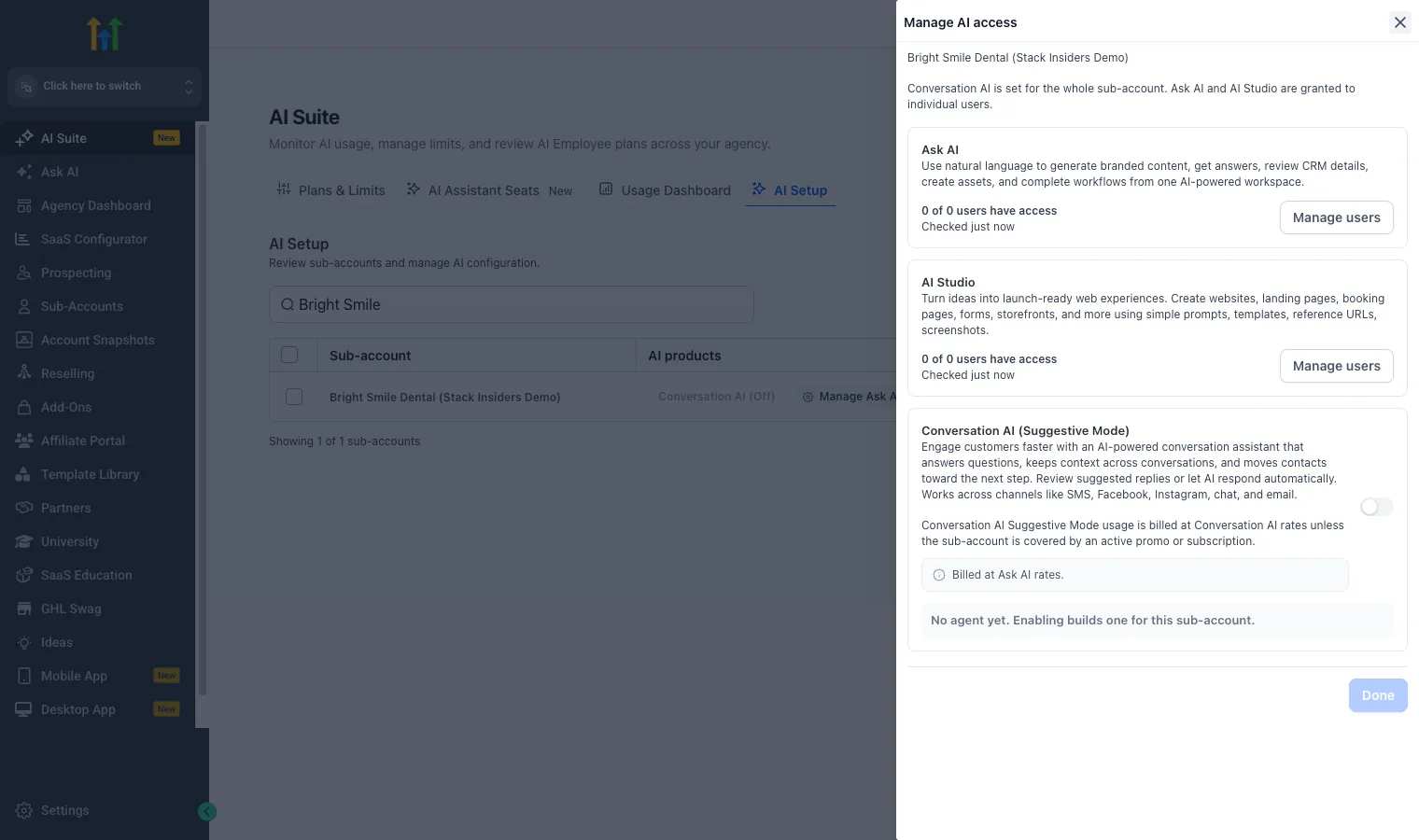
Inside a sub-account, two permission levels split viewing from building: View AI Studio for read-only access and View and Manage AI Studio for creating, editing and publishing. Start your own team on View and Manage, and give client staff View access until they've had a walkthrough.
How to build your first AI Studio page
- Pick one real client job. A landing page for a single offer is the best first test: one goal, one form or booking link, one audience.
- Write a proper brief. Give AI Studio the business name, location, offer, price if it's public, the audience, the call to action and the tone. The more specific the brief, the less you rewrite afterwards.
- Refine in the chat. Ask for changes in plain English ("tighten the headline", "move the reviews above the pricing") and watch the live preview.
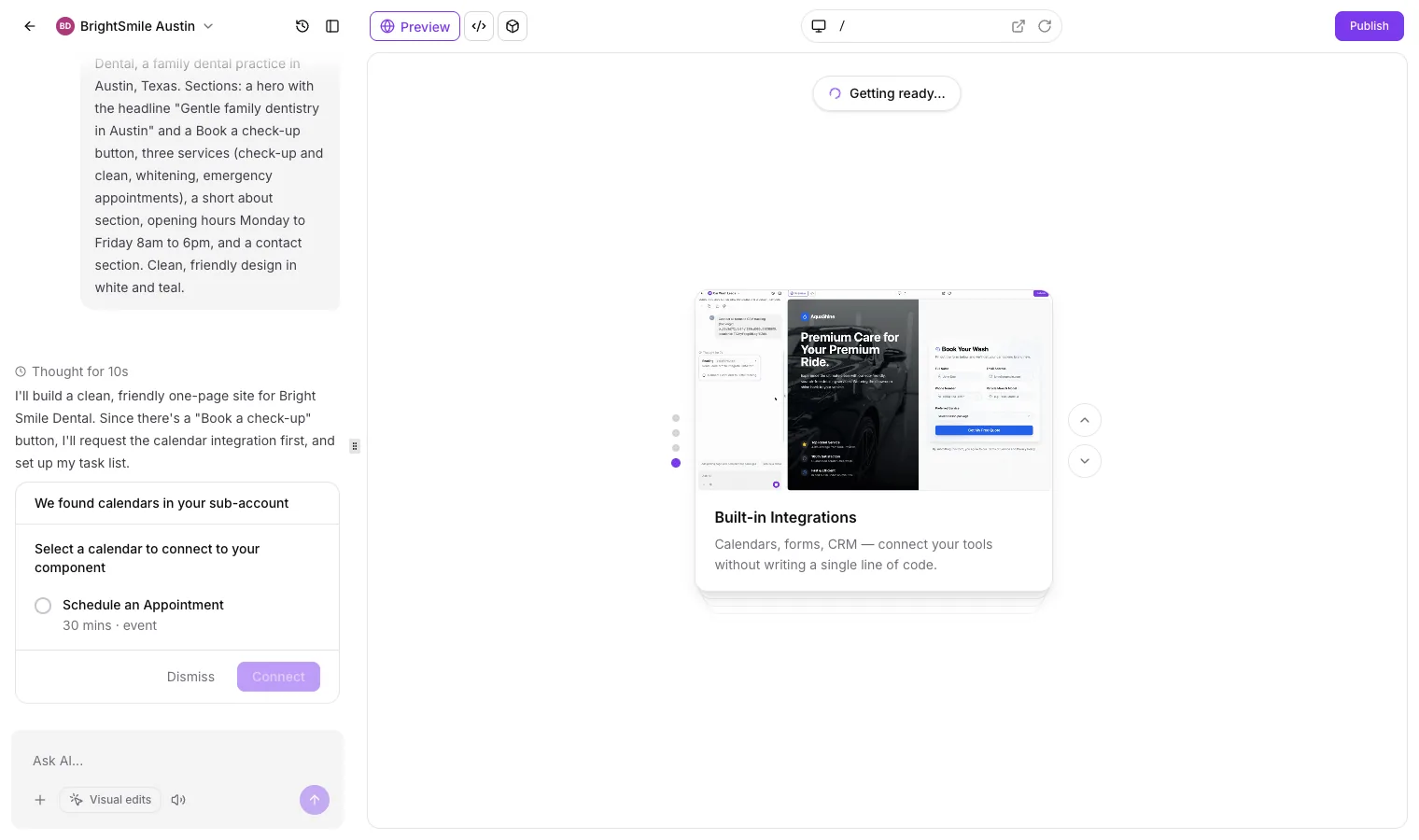
- Connect the form or calendar. When the brief mentions booking, AI Studio looks for calendars in the sub-account and asks which one to connect. Pick the right one, so bookings land in the client's CRM and start their follow-up workflow. For forms, tell it which GHL form to use.
- Use version history. If a change goes wrong, roll back to the last good version instead of asking it to undo.
- Test, then publish. Submit the form yourself, book a test appointment, check the contact appears in the CRM, then publish to the preview link and finally the client's domain.
Read every headline and claim before a page goes live. AI Studio writes a strong first draft fast, and a five-minute human check keeps the client's facts, prices and promises right.
What happened when we built a dental site with it
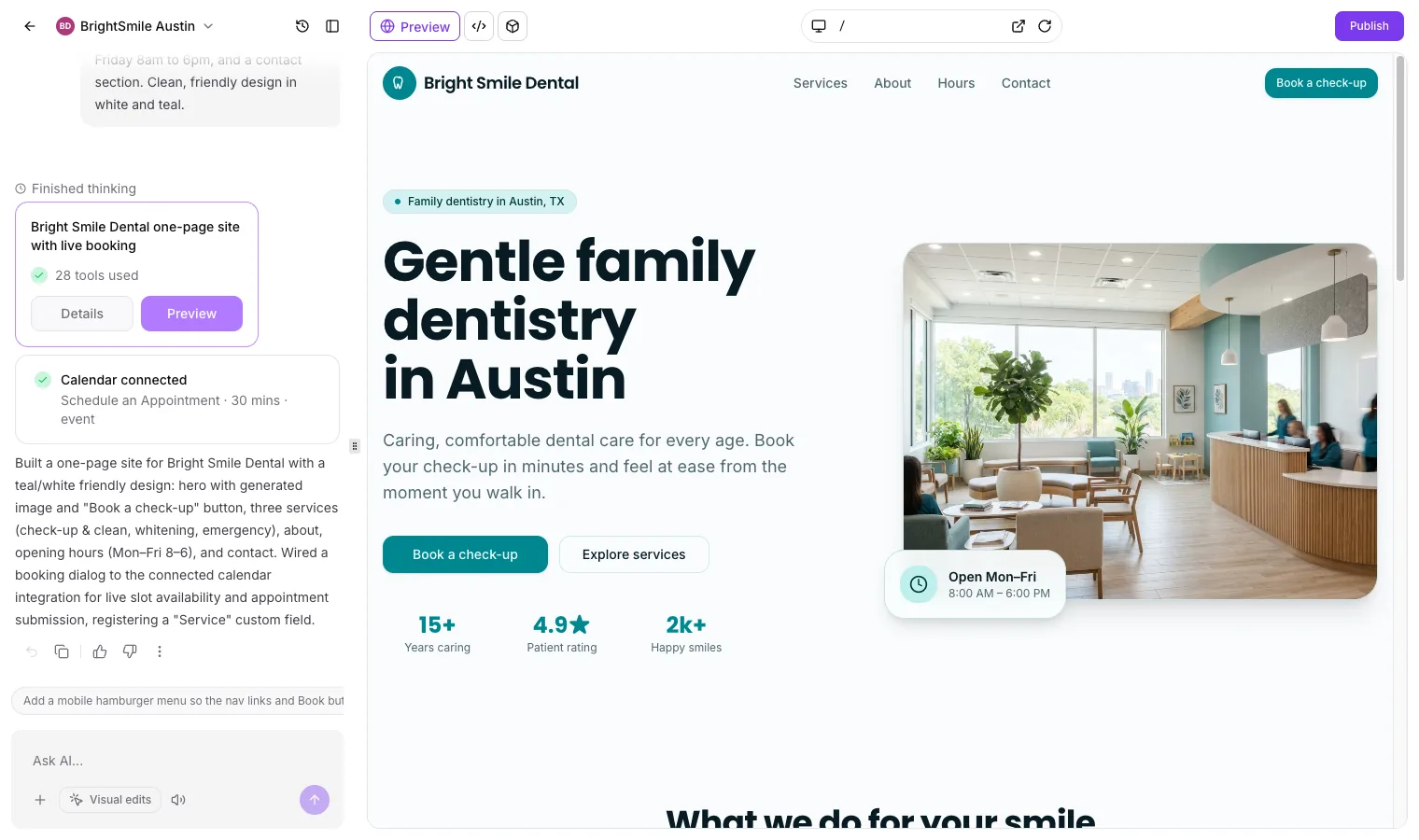
We tested AI Studio in our demo sub-account, Bright Smile Dental, on 1 October 2026, with one prompt: a one-page site for a family dental practice in Austin with a hero headline, a Book a check-up button, three services, a short about section, opening hours of Monday to Friday 8am to 6pm and a contact section, in white and teal.
It asked about the calendar first. Before writing any code, AI Studio found the calendar in the sub-account and asked which one the Book a check-up button should use. One click connected it.
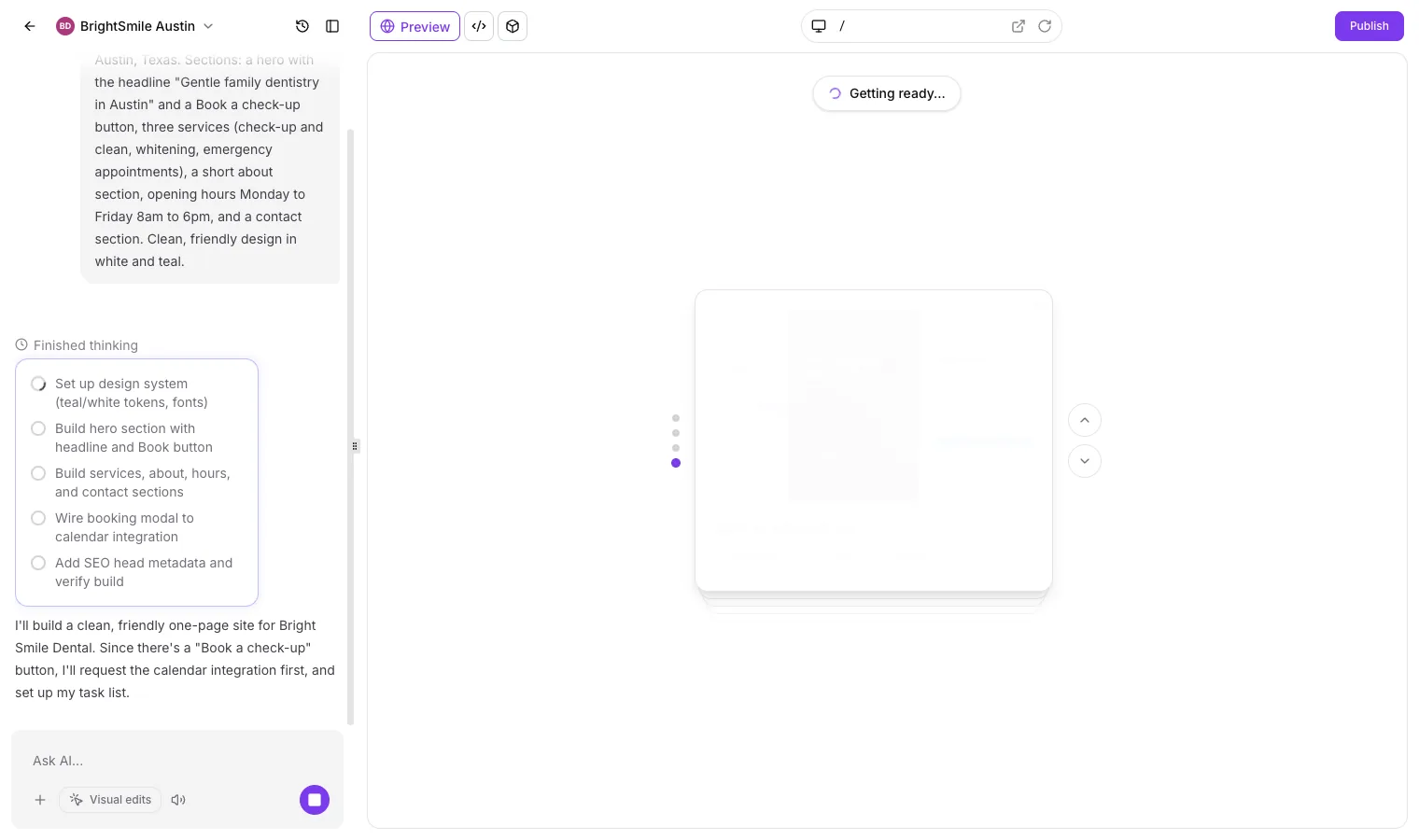
Then it wrote a plan. The task list covered a design system, the hero, the other sections, a booking dialog wired to the calendar, SEO metadata and a final build check.
About nine minutes later the site was ready. The summary reported 28 tools used, a generated hero image, all five sections and a booking dialog with live slots. It also registered a Service custom field in the sub-account so each booking records what the patient asked for.
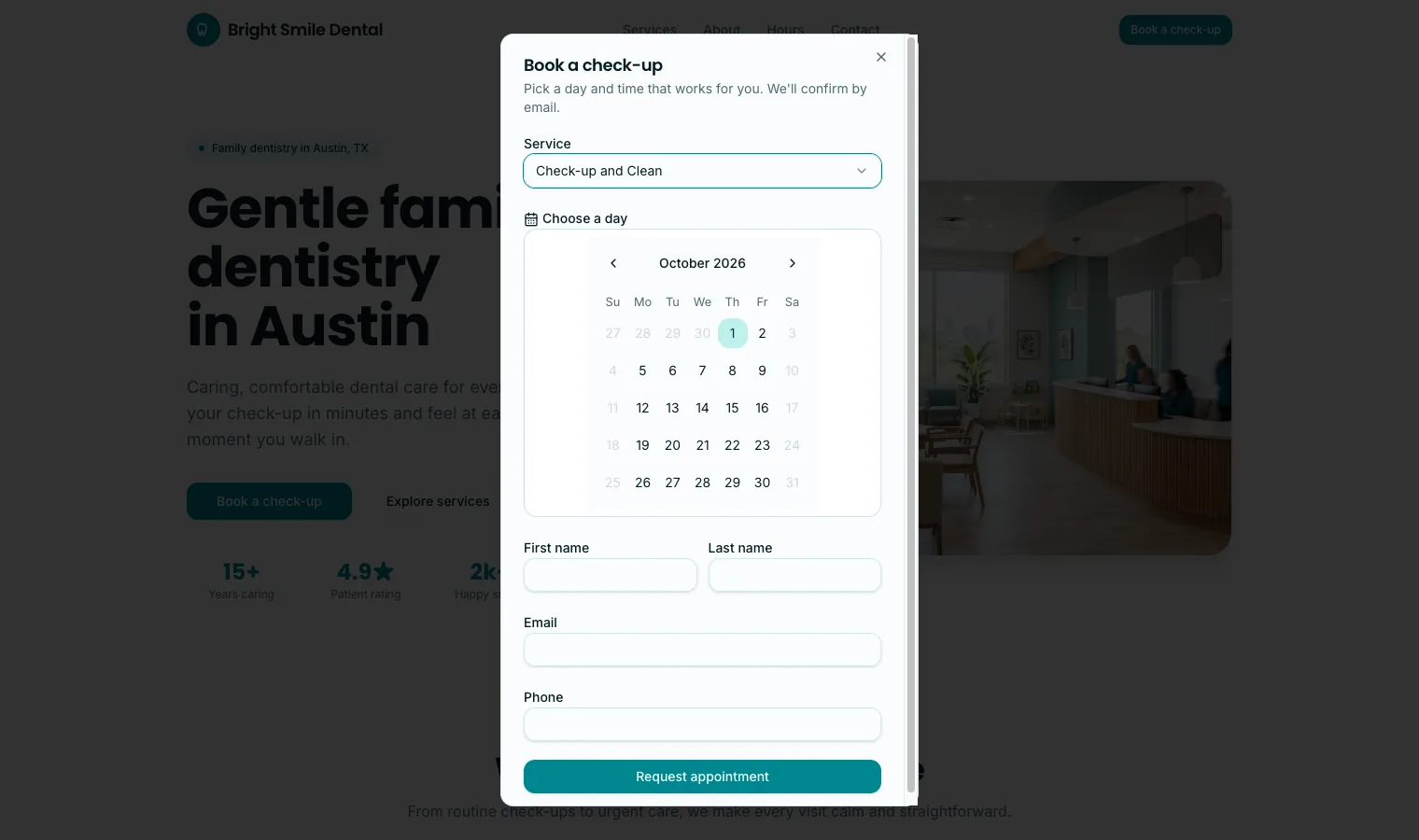
The Book a check-up button opens a booking dialog with a service dropdown, the live calendar and name, email and phone fields, so a visitor books without leaving the page.
It was server-rendered and cheap. Fetching the preview's raw HTML returned the headline and copy without running any JavaScript, which is what search engines see. The sub-account's AI spend in the agency AI Suite went from $0.01 to $0.50 on pay-per-use, so the whole build cost about 49 cents.
What we'd change before publishing. AI Studio filled gaps in the brief with details of its own: "15+ years caring", a 4.9 star patient rating, "2k+ happy smiles", a street address, a phone number and a line about evening appointments that contradicts the Monday to Friday 8am to 6pm hours we gave it. None of that came from us. On a client site, swap in the client's real numbers, reviews, address and photos, or delete the lines, and ask for the change in the chat ("remove the stats under the hero"). That edit took less time than writing the brief.
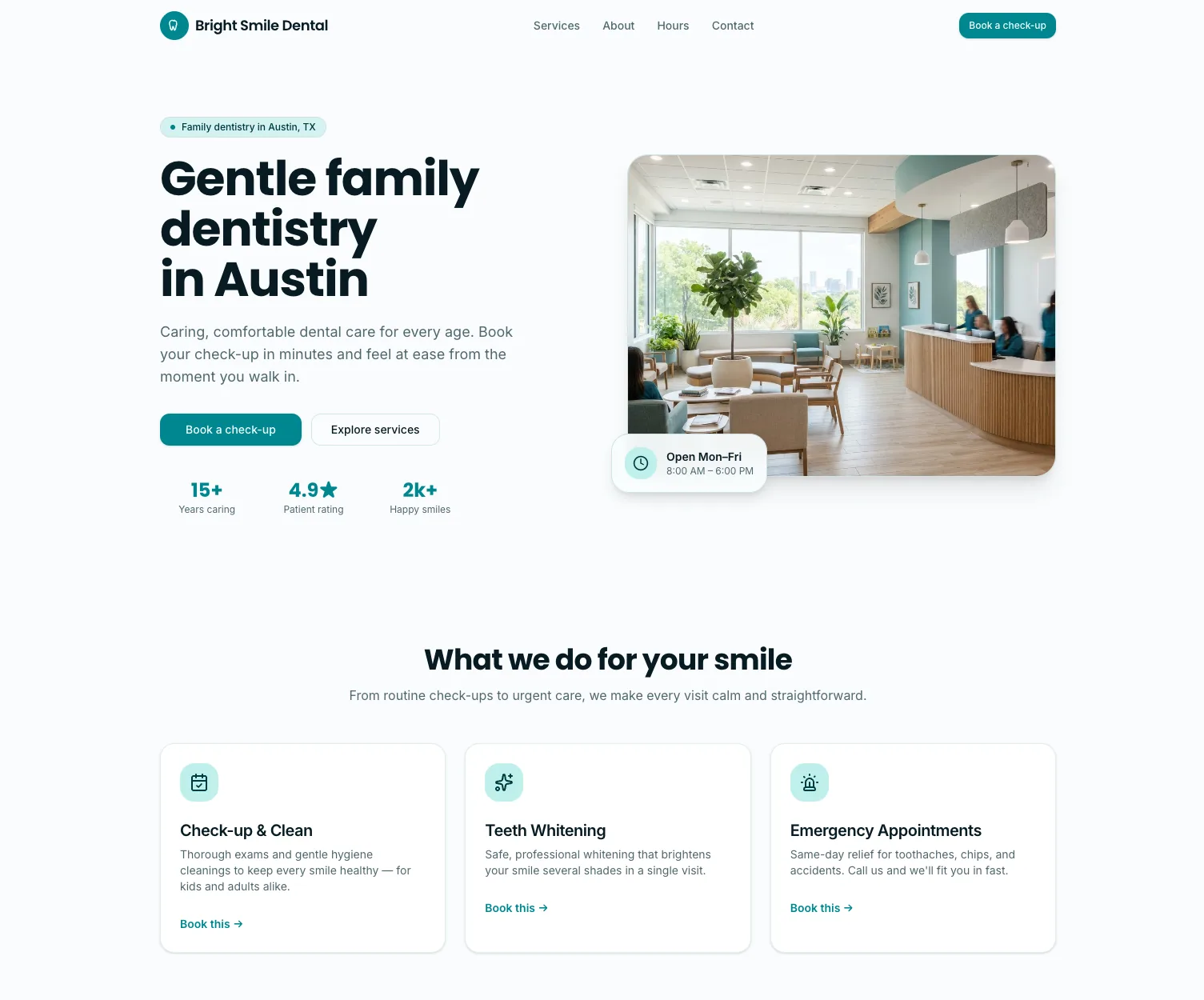
The full walkthrough, with a copy-paste brief, the edits, the mobile check and the final cost, is in our guide to building a dental website with online booking.
What agencies build with AI Studio
- Site refreshes. Paste a client's current URL, ask for a cleaner, faster version with their offer and booking link, and present the new version next to the old one.
- Lead magnet pages. Quote calculators, quizzes and single-service booking pages, each tied to a calendar and a follow-up workflow in the same sub-account.
- Small web apps. With server functions, REST endpoints and secrets, a project can call a client's own systems or other services without exposing the keys. HighLevel's own description covers multi-page sites with unique URLs, server-backed data, public APIs and private integrations. Since October 2026, Cloud adds a database, user accounts and file storage, and Payments adds a hosted checkout.
- Prospecting pitches. Since 6 August, HighLevel's Marketing Audit Reports detect which platform a prospect's site runs on, including WordPress, Wix, Webflow, Squarespace, Framer and AI Studio itself, which gives you an easy opening for a rebuild conversation.
Package it as an outcome. "New landing page live in 48 hours" is an easy line to add to a monthly retainer, and if you resell GHL under your own brand, our SaaS Mode guide covers billing clients for what you build. AI Studio Cloud now covers projects that need their own database and logged-in user accounts, and our ranking of the best AI builders for agencies shows how AI Studio compares with dedicated app builders.
AI Studio vs Agent Studio vs Funnel AI
The names overlap, so here is how the three tools split:
| Tool | What it builds | How it's paid for |
|---|---|---|
| AI Studio | Websites, landing pages, forms, booking pages and web apps from a prompt | Pay-per-use, or included in AI Employee Growth and Unlimited |
| Agent Studio | The logic behind AI agents and AI-driven workflows | Per-response billing |
| Funnel and Website AI | Sections and pages inside the classic funnel and website builder | Free, up to 1,000 prompts a day per location |
AI Studio builds the page. Agent Studio decides what happens after someone fills it in. Funnel and Website AI speeds up pages you build in the classic builder. For the whole AI line-up, see the GoHighLevel AI hub.
PARTNER OFFER
Build your first AI Studio page this month
Our partner link gives you a 30-day GoHighLevel trial. Set up a sub-account, switch on AI Studio and put a real client page live before you pay.
Start Your Free 30-Day Trial →Card required. Nothing charged for 30 days.
Frequently Asked Questions
How much does GoHighLevel AI Studio cost?
Is GoHighLevel AI Studio free?
Is GoHighLevel AI Studio still in Labs?
Can GoHighLevel AI Studio build full web apps?
Are AI Studio sites good for SEO?
What is the difference between AI Studio and Agent Studio?
DO THIS NEXT, FREE FOR 30 DAYS
The quickest way to know is to try it on real work.
- STEP 1Claim your free month
- STEP 2Rebuild one thing from this guide
- STEP 3Decide before day 30
Free for 30 days from the day you start. Card required.

Featured in Forbes and Business Insider.
Ashley Kemp is a digital entrepreneur and perpetual traveller. Switched from ClickFunnels to GoHighLevel years ago and never looked back. Writing about what actually works.