Updated 1 October 2026tutorial
How to Build a Dental Website With Online Booking (2026)
How to build a dental website with online booking, step by step. We built one for a demo practice in about nine minutes. Screenshots, prompts and costs.
 Ashley Kemp19 min read
How do you build a dental website with online booking?
Set up the practice's booking calendar first, then give an AI website builder a specific brief: practice name, town, services, opening hours, the booking button and the look you want. Connect the calendar so the button books real appointments, check every claim the AI writes, test a booking end to end and check the site on a phone before you publish to the practice's domain. We built a one-page dental site with a working booking dialog in GoHighLevel's AI Studio in about nine minutes, for about $0.49 of AI usage.
PARTNER OFFER
Your first month of GoHighLevel is free.
Through our partner link you get 30 days on any plan, double the standard 14-day trial. Build something real before you pay a cent.
Claim my free monthCard required. Nothing charged for 30 days.
Most dental websites have one job: turn a search like "dentist near me" or "emergency dentist Austin" into a booked appointment. A pretty homepage that makes patients phone during office hours misses that job. The site needs online booking on every screen, the right treatments, real hours and contact details, and reviews patients trust.
This guide walks through building exactly that, step by step, using a real build. On 1 October 2026 we built a site for Bright Smile Dental, the demo dental practice in our GoHighLevel (GHL) account, with GoHighLevel's AI Studio. Every screenshot below comes from that build. If you're a practice owner, you can follow it for your own site. If you run an agency, it's a repeatable build you can sell to every dentist in town.
What does a dental website need?
Before you build anything, agree what the site must do. This is the checklist we built against, and how the first draft did.
| Element | Why patients need it | In our build |
|---|---|---|
| Online booking on every screen | Patients book in the evening and at weekends, when the front desk is closed | Book a check-up button in the header, the hero and the contact section, all opening one booking dialog |
| Your main treatments | Patients search for the treatment, not the practice | Check-up and clean, teeth whitening and emergency appointments, each with its own Book this link |
| Opening hours | The first thing a new patient checks | A full hours table, Monday to Friday 8am to 6pm |
| Address, phone and map | Needed to find you, and should match your Google Business Profile exactly | Contact section (we swapped the AI's made-up details for placeholders) |
| Emergency appointments | Urgent searches turn into same-day bookings | An emergency card with its own booking link |
| Real reviews | Trust, for a service people are nervous about | Not in the first draft; add your real Google reviews |
| Insurance and payment options | One of the most common phone questions | Not in the first draft; add it as its own section or page |
| Fast, mobile-friendly and readable by Google | Most local searches happen on phones | Server-rendered page; mobile menu added in step 7 |
What you need before you start
- A GoHighLevel account. The Starter plan at $97 a month covers one practice. Agencies building for several practices use Unlimited at $297, which allows unlimited sub-accounts. Start a 30-day GoHighLevel trial if you're not on it yet.
- A sub-account for the practice. Ours was created from HighLevel's Dental snapshot template, which gave us a pipeline and ready-made appointment reminder, no-show and review request workflows. Our demo account also had a booking calendar called Schedule an Appointment.
- AI Studio access. It's switched on per user. The AI Studio guide shows where to grant it and how its pricing works.
- The practice's real details. Name, address, phone, hours, treatments, insurance accepted, a few photos and the Google reviews you want to show. The AI fills any gap with something plausible, so the more you give it, the less you fix.
Step 1: Set up the booking calendar first
AI Studio connects the site's booking button to a calendar that already exists in the sub-account, so build the calendar before the website. In Calendars, set the appointment types (a new patient exam, a check-up and clean, an emergency slot), their lengths, the practice's opening hours and any buffer between appointments.
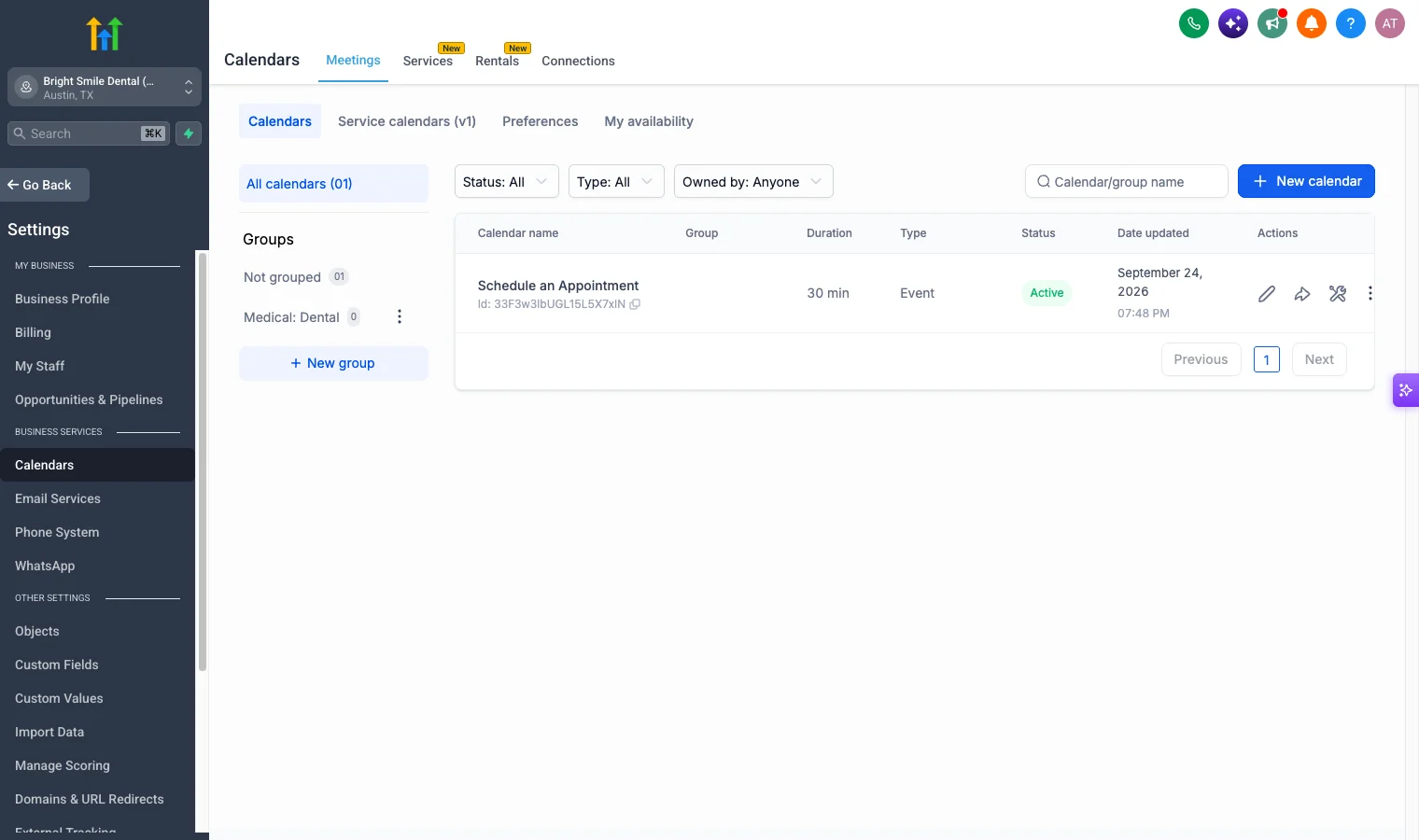
If the practice uses separate calendars per dentist or per treatment, set them all up now. Our GoHighLevel calendar booking guide covers calendar types, round robin and buffers in detail.
Step 2: Write a specific brief
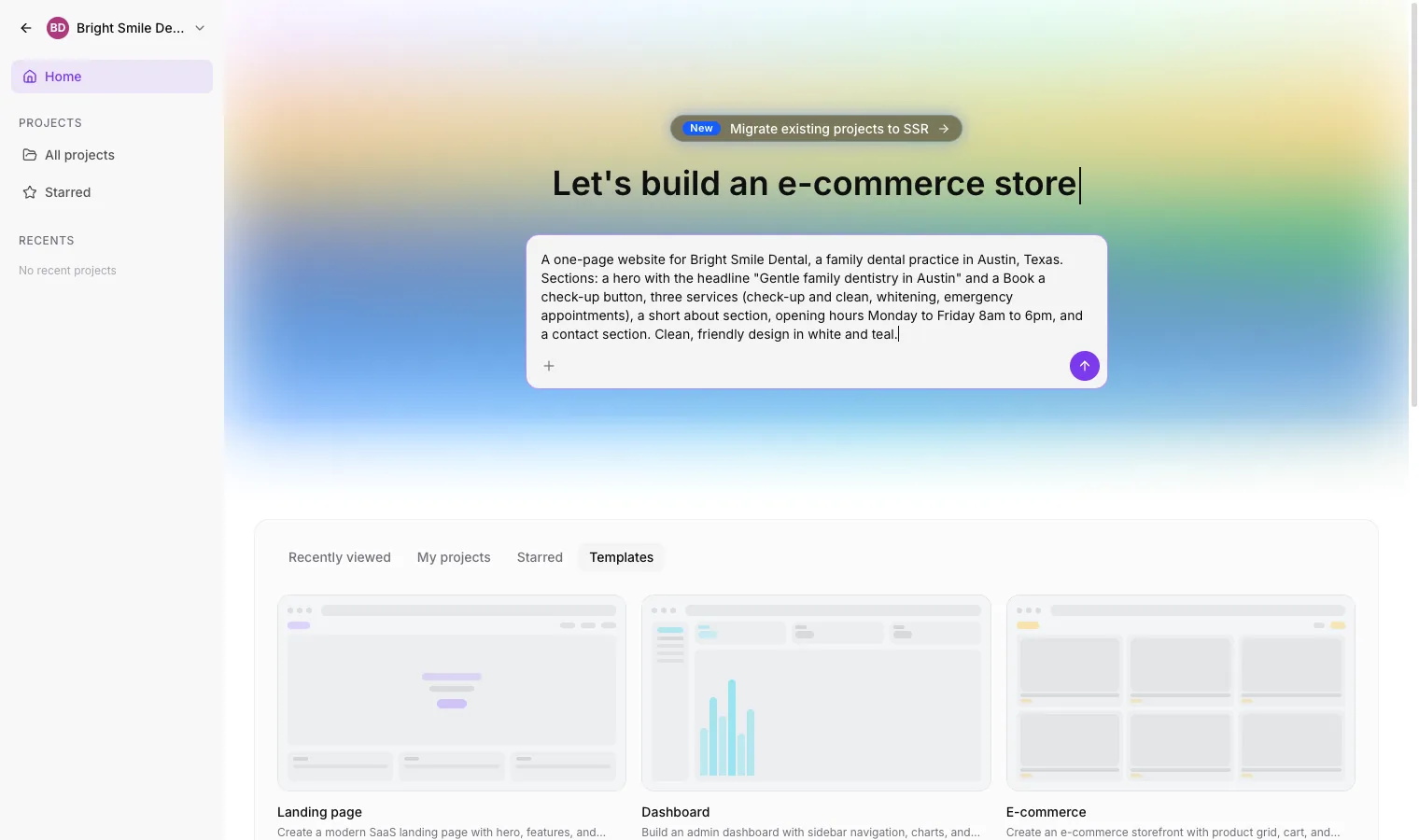
Open AI Studio from the sub-account sidebar and describe the site. A vague prompt gets a generic dental site full of invented details. A specific one gets something close to finished. This is the exact brief we used:
A one-page website for Bright Smile Dental, a family dental practice in Austin, Texas. Sections: a hero with the headline "Gentle family dentistry in Austin" and a Book a check-up button, three services (check-up and clean, whitening, emergency appointments), a short about section, opening hours Monday to Friday 8am to 6pm, and a contact section. Clean, friendly design in white and teal.
For a real practice, add what we left out, so the AI has no gaps to fill:
Practice name: [name]. Town: [town]. Address: [address]. Phone: [phone].
Opening hours: [hours, including any late or weekend sessions].
Treatments: [list, with one line on each].
Insurance and payment: [plans accepted, payment options].
Dentists: [names and one line each]. Use only these facts and do not invent statistics, reviews or awards.
Booking: a Book an appointment button in the header, hero and contact section.
Style: [colours], friendly, calm, plenty of white space.
The last line of that template matters most. Tell the builder not to invent anything, and you'll spend less time on step 5.
Step 3: Connect the booking calendar when AI Studio asks
Because our brief mentioned a booking button, AI Studio looked for calendars in the sub-account before writing any code and asked which one to connect. We picked "Schedule an Appointment" and clicked Connect.
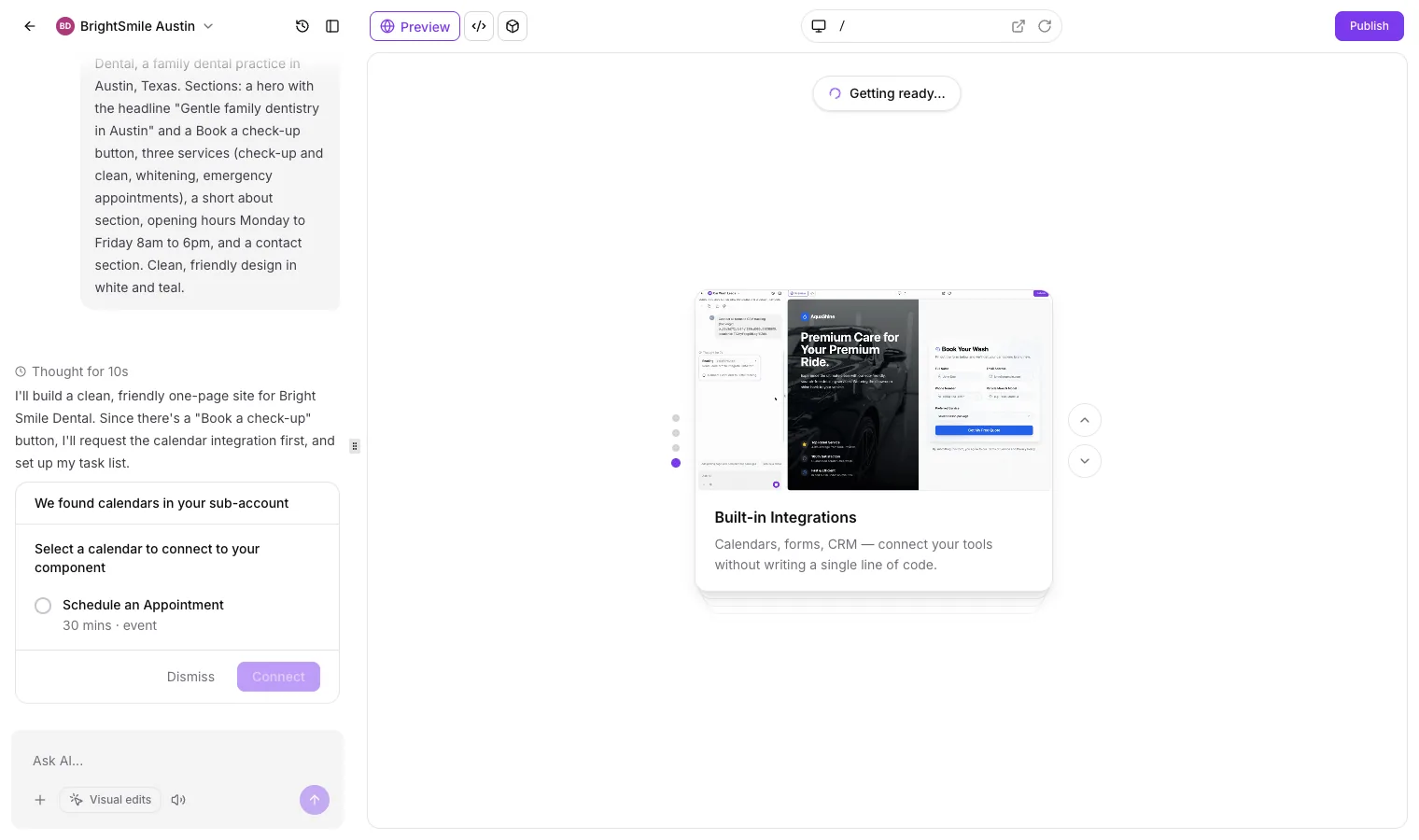
This is the step that separates a GHL-built dental site from a site built in a standalone AI tool. Bookings go into the same calendar the practice already uses, the patient becomes a contact in the CRM, and the reminder and review workflows in step 10 can start on their own.
Step 4: Let it build
AI Studio wrote itself a plan before building: a design system, the hero, the other sections, a booking dialog wired to the calendar, SEO metadata and a final build check.
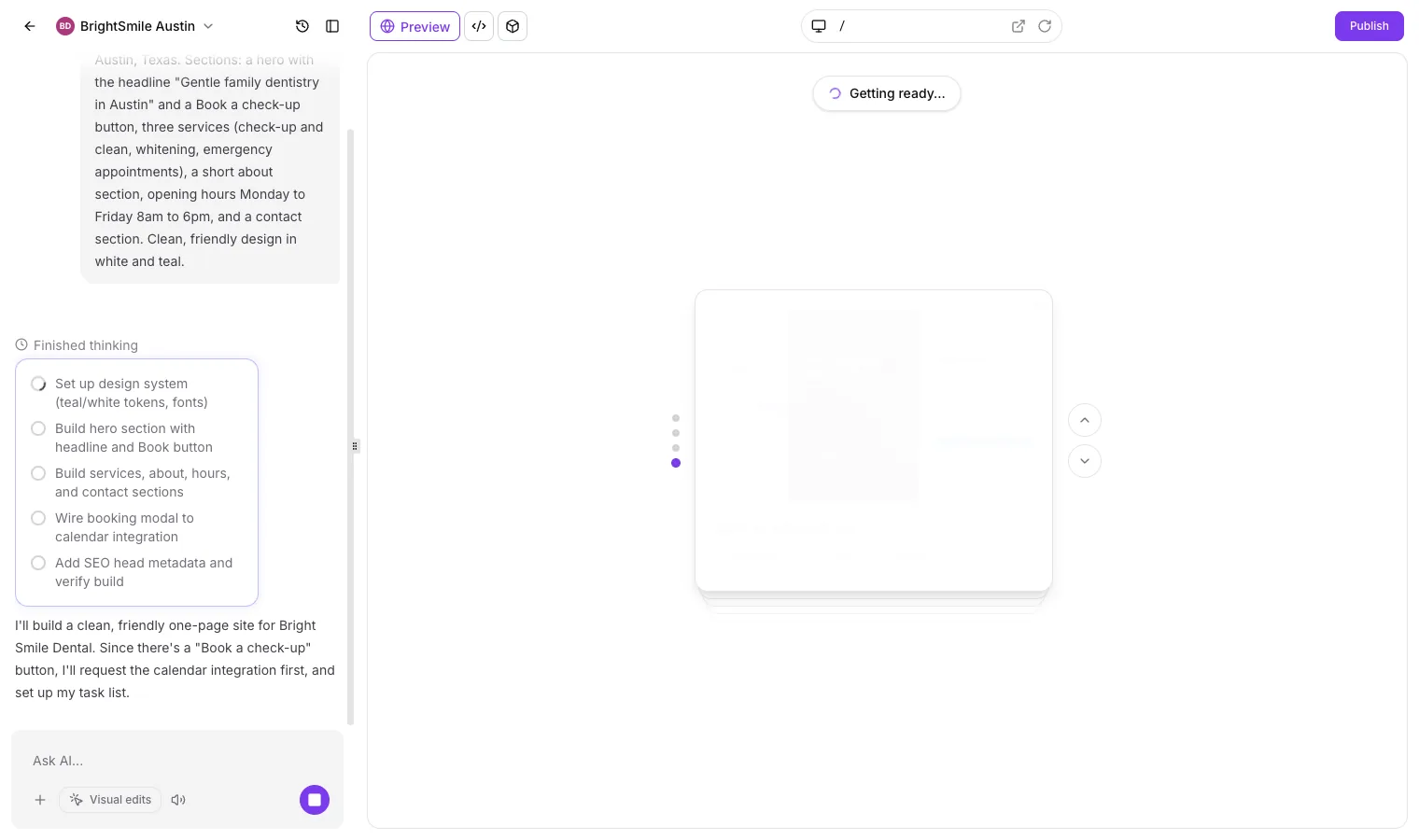
About nine minutes later the site was ready. The summary reported 28 tools used, a generated hero image and all five sections. It also registered a Service custom field in the sub-account, so each booking records which treatment the patient chose.
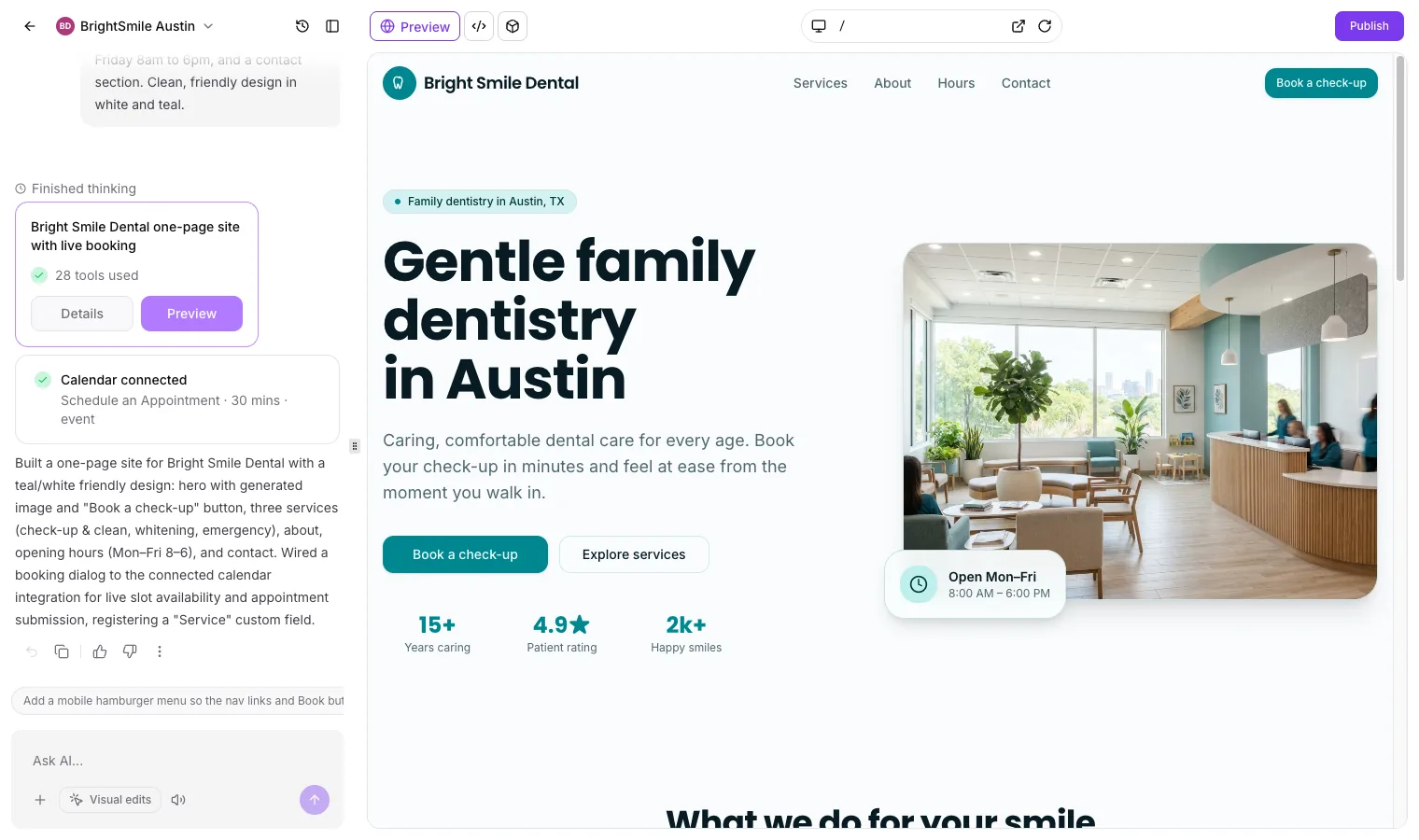
On cost: the sub-account's AI spend in the agency's AI Suite went from $0.01 to $0.50 on pay-per-use, so the first build cost about 49 cents. After the two rounds of edits in steps 5 and 7 it stood at $0.78, so the whole site came to $0.77 of AI usage.
Step 5: Check every claim, then fix it in the chat
This is the step you can't skip. AI Studio filled the gaps in our brief with details of its own:
- three stats under the hero: "15+ years caring", a 4.9 star patient rating and "2k+ happy smiles";
- "caring for Austin families for over 15 years" in the about section;
- a street address and a phone number in the contact section;
- "Evening times available", which contradicts the Monday to Friday 8am to 6pm hours we gave it;
- em dashes through the copy.
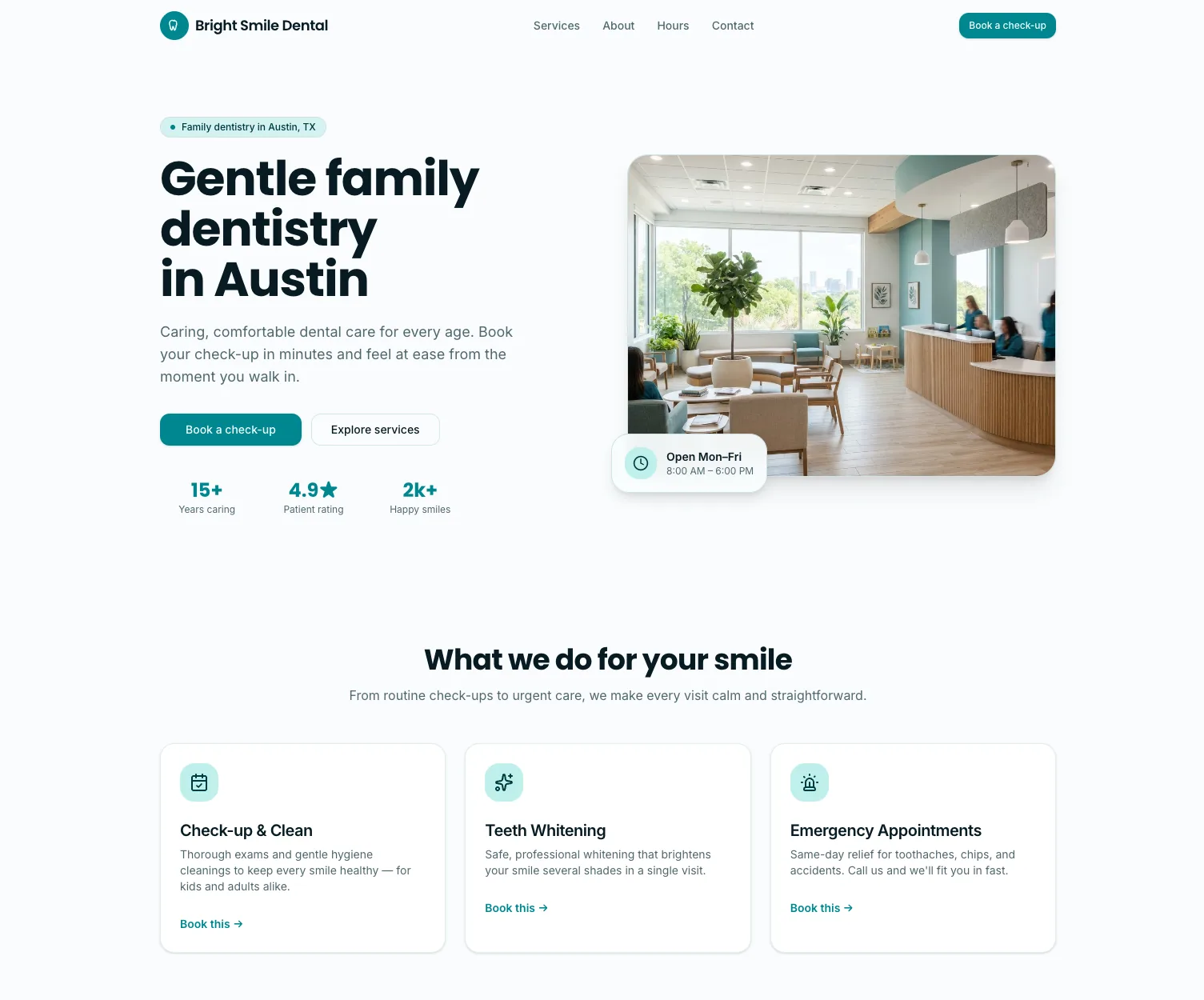
None of that came from us. On a real practice site, invented review scores and years in business are a trust problem and, in a regulated profession, potentially a compliance one. Fixing it took one chat message:
Please tidy the copy before this goes live: remove the three stats under the hero (15+, 4.9 and 2k+), remove the street address and phone number from the contact section and replace them with placeholders that say [Practice address] and [Practice phone], change "Evening times available" to "Online booking, day or night", change "for over 15 years" to "for Austin families", and replace every em dash on the page with a comma or full stop. Keep everything else the same.
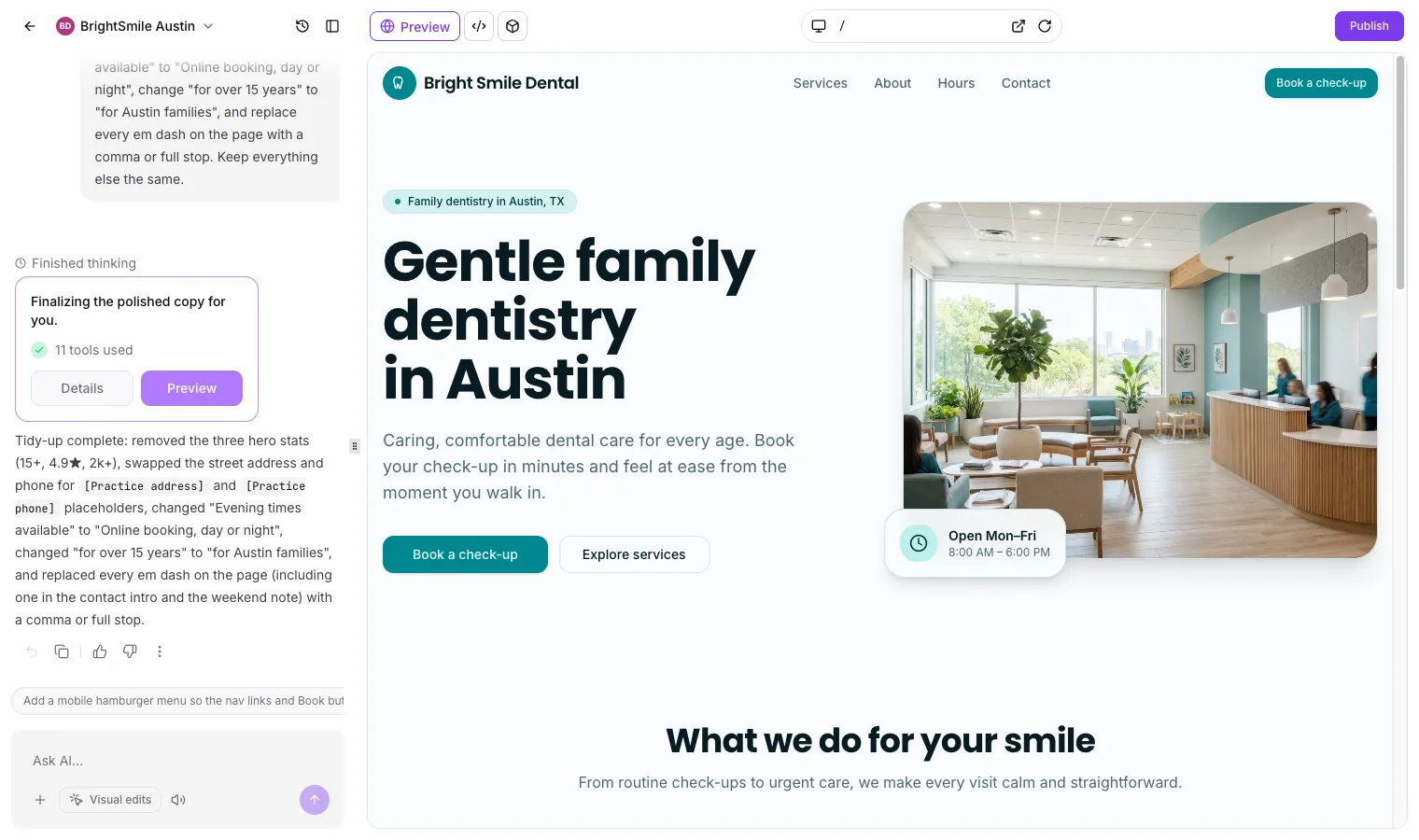
Every change is saved in version history, the history icon next to the project name, so if an edit goes wrong you can roll back instead of asking the AI to undo it.
One thing the edit missed: "every em dash on the page" fixed the visible copy but not the page title and meta description, which still had em dashes in them. Check those separately, because they're what Google shows in search results.
Step 6: Test the booking end to end
Click every booking button. In our build, each one opens the same dialog: a service dropdown with the three treatments, a live calendar showing only the days the practice is open, then name, email and phone fields and a Request appointment button.
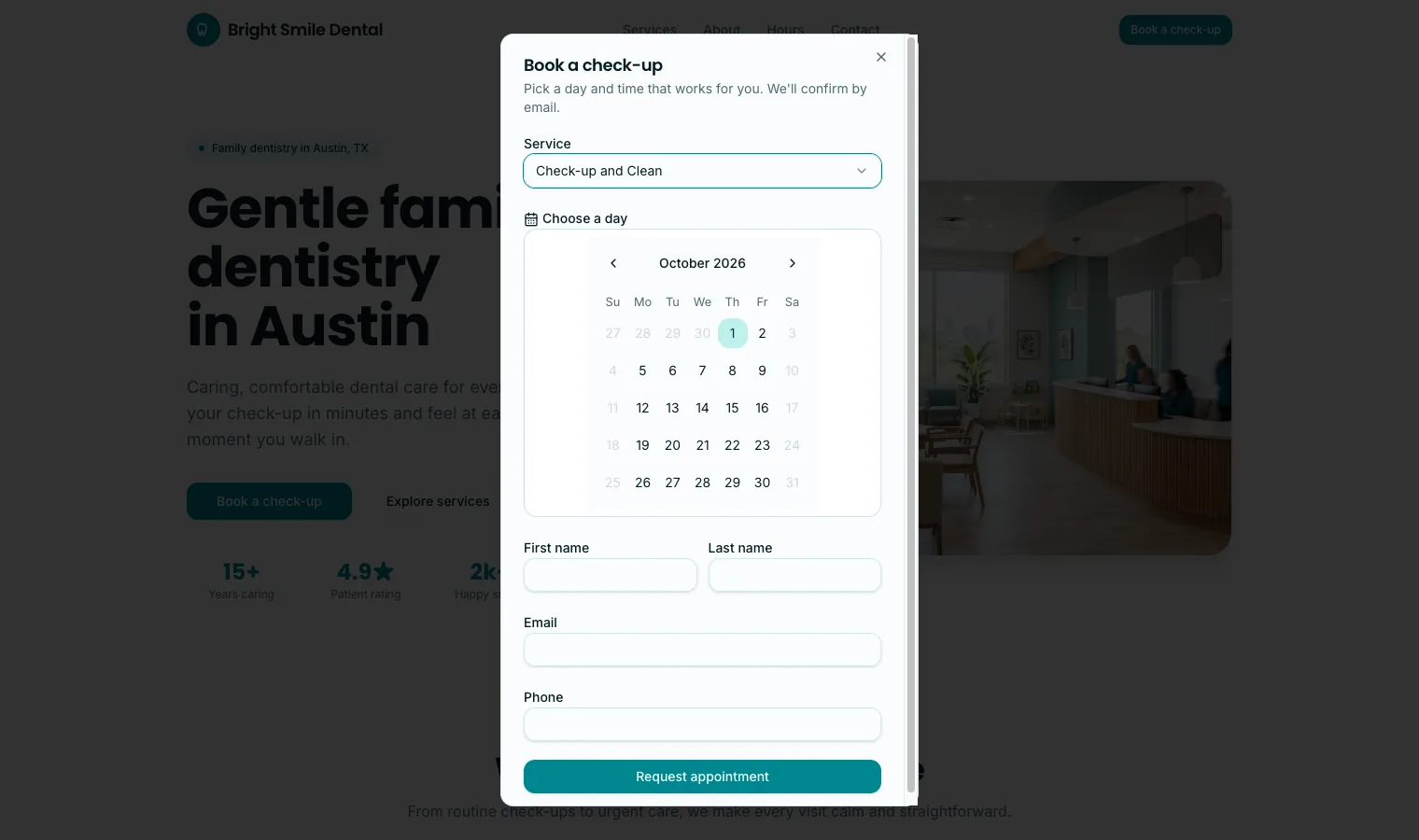
Then make a test booking with your own email address and check three things in GoHighLevel: the appointment is in the calendar, the contact was created with the service they chose, and the confirmation message arrived. If any of the three is missing, ask AI Studio to check the calendar connection before you go further.
Step 7: Check it on a phone
Plenty of patients will find the practice on a phone, so check the mobile view before anything goes live. AI Studio's first draft had no mobile menu, and the builder itself suggested adding one. We asked for it in the chat, along with a clean page title and meta description:
Add a mobile hamburger menu so the nav links and the Book a check-up button work on small screens, and rewrite the page title and meta description without any em dashes. Use the title "Bright Smile Dental | Family Dentist in Austin, TX" and a meta description under 155 characters that mentions online booking.
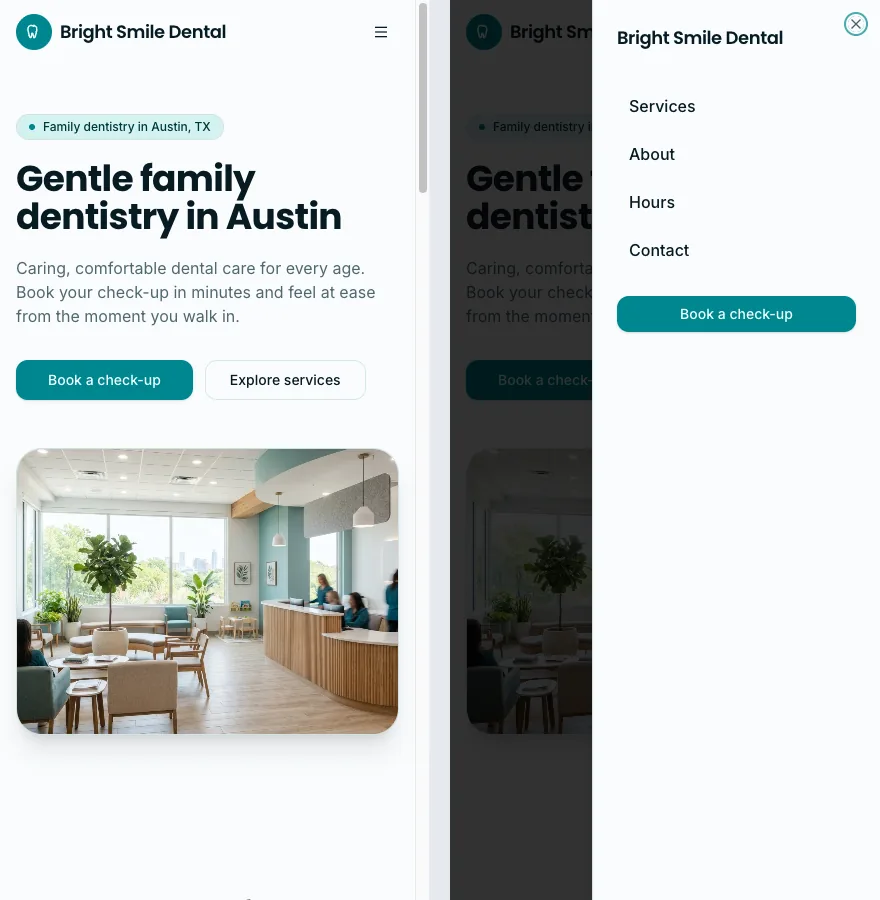
Check that the booking button is visible without scrolling, the phone number is tappable and the hours are readable without zooming.
Step 8: Get the SEO basics right
A dental website gets most of its patients from local search, so these are worth five minutes each:
- Server rendering. New AI Studio projects are rendered on the server. We fetched the raw HTML of our preview and the headline and copy were all there without JavaScript, which is what search engines read.
- Title and meta description. Use the pattern "Practice name | Family Dentist in Town, State", and write a description that mentions the town and online booking. After step 7 ours read "Bright Smile Dental | Family Dentist in Austin, TX", with the description "Friendly family dentistry in Austin, TX. Book check-ups, whitening, and emergency appointments online. Open Monday to Friday, 8am to 6pm."
- The same name, address and phone everywhere. They should match the practice's Google Business Profile exactly, character for character.
- One page per main treatment. Patients search "teeth whitening Austin" or "emergency dentist Austin", not "dentist". Once the homepage is right, add a page per treatment with the prompts further down.
- Real reviews. Show real Google reviews and keep new ones coming with an automated review request, covered in step 10.
Step 9: Publish to the practice's domain
When the page is right, click Publish. AI Studio publishes to a preview link or a custom domain, so connect the practice's own domain rather than sending patients to a preview address. Publish the preview first, send it to the dentist for a final read, then connect the domain.
Step 10: Turn bookings into patients with automations
The website books the appointment. GoHighLevel's workflows look after everything that happens next, and the Dental snapshot comes with the main ones already built.
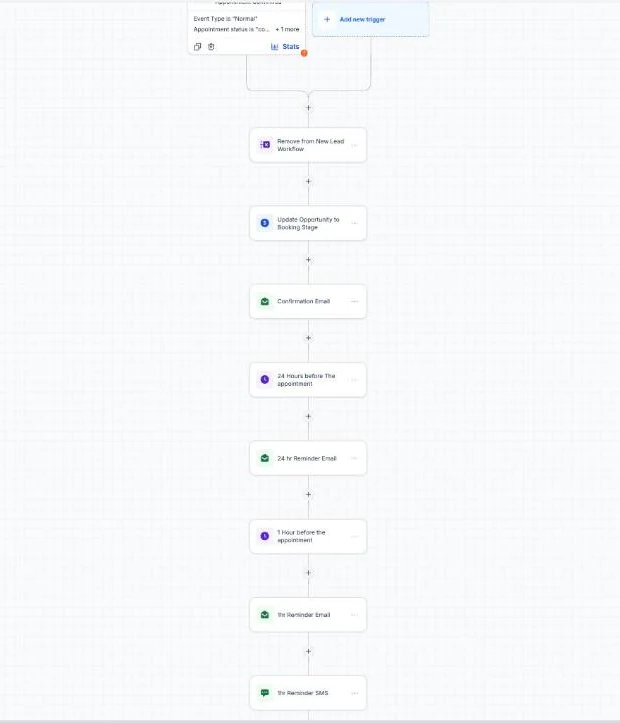
- Confirmations and reminders. An instant confirmation plus reminders 24 hours and 1 hour before the appointment. See how to cut no-shows with GoHighLevel reminders.
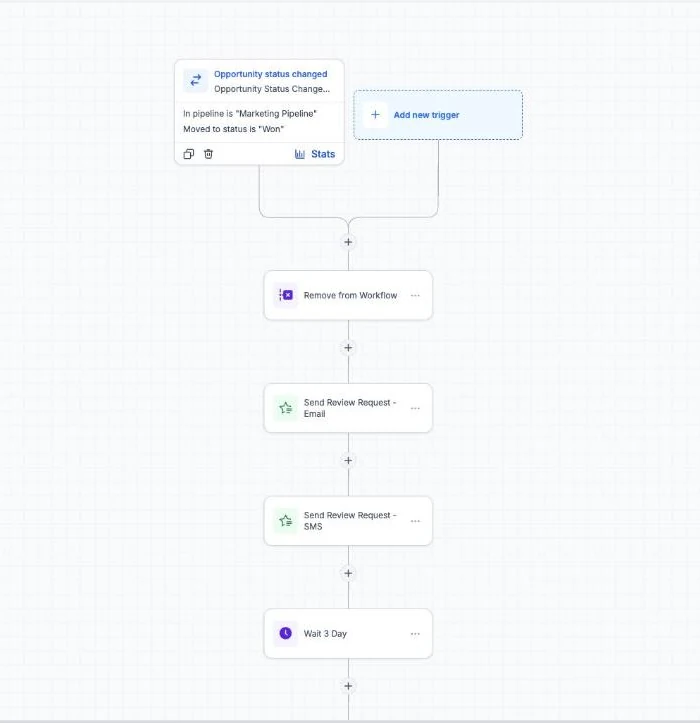
- Review requests. After a visit, patients get a short message asking for a Google review. See how to automate Google reviews in GoHighLevel.
- Missed call text back. When the front desk can't answer, the caller gets a text with the booking link. See missed call text back in GoHighLevel.
For the full picture of running a practice on GHL, from AI call answering to recall campaigns, see GoHighLevel for dentists.
FREE FOR 30 DAYS
Get your first month of GoHighLevel free
- Every feature, on any plan
- A full month, worth up to $497
- Cancel before day 30, pay nothing
Card required. Nothing charged for 30 days.
Join 2.2 million businesses already running on GoHighLevel
Is a GoHighLevel dental website HIPAA compliant?
HighLevel sells an optional HIPAA add-on at $297 a month. According to HighLevel's HIPAA documentation (updated 11 June 2026), it includes a signed Business Associate Agreement, encryption of protected health information, audit logging and enforced multi-factor authentication. It covers contacts, notes, custom fields, SMS, call recordings, emails, form and survey submissions and calendars. It's enabled per sub-account and can't be switched off once on.
The documentation doesn't say whether website pages are covered. Our booking dialog asks for a name, email, phone number and the treatment, and a treatment linked to a named patient can itself count as protected health information. Before a US practice takes bookings, check with its compliance adviser that the booking form, the booking data and the connected calendar are all covered by its HIPAA setup, and don't add fields for medical history or symptoms.
What does a dental website cost to build this way?
| Item | Cost |
|---|---|
| GoHighLevel plan | $97 a month (Starter, one practice) or $297 (Unlimited, for agencies) |
| AI Studio build | About $0.49 of pay-per-use AI usage for our first build, or included in the AI Employee Growth ($50) and Unlimited ($97) plans |
| Local phone number | From $1.15 a month |
| HIPAA add-on | $297 a month, only if the practice handles patient health information in GHL |
| Domain name | Whatever the practice already pays its domain registrar |
The GHL plan also covers the CRM, calendars, reminders, review requests and the rest of the practice's marketing. See the GoHighLevel pricing guide for what each plan includes.
Prompts for the next pages
Once the homepage is live, add pages for the searches patients actually make. Start each one in the same AI Studio project and keep the "use only these facts" line.
Emergency dentist page:
Add a page at /emergency-dentist for [practice] in [town]. Explain what counts as a dental emergency, how same-day appointments work, the practice's hours and what to do out of hours, with an emergency booking button at the top. Use only the facts I give you and do not invent statistics or reviews.
Treatment page (repeat per treatment):
Add a page at /teeth-whitening for [practice] in [town]. Cover who it suits, how the treatment works, how long it takes, aftercare and price guidance of [price or "ask at your consultation"], with a Book this treatment button that opens the booking dialog with Teeth Whitening selected.
New patients page:
Add a page at /new-patients covering what to bring to a first visit, insurance and payment options ([details]), what happens at the first appointment and a Book your first visit button.
For agencies: turn this into a dental package
Everything above lives in one sub-account, so you can save it as a snapshot once it's right. The next dental client gets the calendars, workflows and a website starting point in minutes, and you spend your time on their real details, photos and reviews. Our guide to GoHighLevel snapshots shows what copies across, and the AI Studio guide covers giving client staff access.
AI Studio can now go further than a website. Since 9 October 2026 it builds apps with patient logins, a database and a checkout, and our GoHighLevel AI Studio tutorial builds a private patient journal and a shop for the same demo practice.
A one-page site, booking, reminders and review requests is a monthly retainer most practices understand straight away. If you're not on GHL yet, the 30-day GoHighLevel trial is long enough to build the whole thing for your first dental client before you pay.
Frequently Asked Questions
How long does it take to build a dental website?
How much does it cost to build a dental website with GoHighLevel?
Can patients book appointments directly from the website?
Is a GoHighLevel dental website HIPAA compliant?
Do I need a developer to build a dental website?
Will an AI-built dental website rank on Google?
Can I use the practice's own domain?
PARTNER OFFER
Your first month of GoHighLevel is free.
Through our partner link you get 30 days on any plan, double the standard 14-day trial. Build something real before you pay a cent.
Claim my free monthCard required. Nothing charged for 30 days.
DO THIS NEXT, FREE FOR 30 DAYS
The quickest way to know is to try it on real work.
- STEP 1Claim your free month
- STEP 2Rebuild one thing from this guide
- STEP 3Decide before day 30
Free for 30 days from the day you start. Card required.
Featured in Forbes and Business Insider.
Ashley Kemp is a digital entrepreneur and perpetual traveller. Switched from ClickFunnels to GoHighLevel years ago and never looked back. Writing about what actually works.
Was this article helpful?