Updated 9 October 2026guide
Does GoHighLevel Do Webinars? Yes, Live and On-Demand (2026)
Yes. GoHighLevel runs live and on-demand webinars with registration, broadcast and replay pages built in. How it works, how to set it up, and what it replaces.
 Ashley Kemp16 min read
Does GoHighLevel do webinars?
Yes. GoHighLevel has a Webinars tool under Sites that runs two kinds of webinar: live webinars at a set date and time, and on-demand webinars that play a recorded video whenever someone registers. It builds the registration, confirmation, broadcast and expired pages from a template, adds every registrant to your CRM, and HighLevel's workflow recipe sends the email and text reminders. For a live session you paste your stream link, such as YouTube Live or Zoom, so you do not need WebinarJam or EverWebinar to run the funnel.
Info
How we tested this. I built both webinar types in our GoHighLevel demo account, Bright Smile Dental, on 9 October 2026, and every screenshot on this page comes from that account. Prices for other tools come from each vendor's own pricing page on the same day, linked under Sources.
PARTNER OFFER
Your first month of GoHighLevel is free.
Through our partner link you get 30 days on any plan, double the standard 14-day trial. Build something real before you pay a cent.
Claim my free monthCard required. Nothing charged for 30 days.
GoHighLevel does webinars, and it does both kinds most coaches, course creators and agencies run. A live webinar happens at a set time. An on-demand webinar plays a recording the moment someone registers, which is how evergreen webinar funnels sell around the clock.
The tool lives under Sites, next to Funnels and Websites, and it is called Webinars. You pick live or on-demand, give it a name and a time, choose a registration form, add your stream link or your video, and pick a template. GoHighLevel then builds the whole funnel: a registration page, a confirmation page, the broadcast page people watch on, and an expired page for latecomers.
So if you pay for WebinarJam or EverWebinar mainly to get the registration page, the reminders and the replay, GoHighLevel already covers that on the plan you are paying for.
What does GoHighLevel's webinar tool include?
Click Sites, then the Webinars tab, then New webinar funnel. GoHighLevel asks which type you want before anything else.
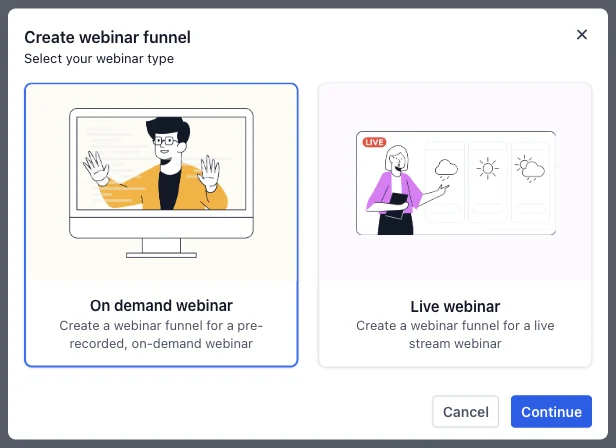
Here is how the two types differ:
| Item | Live webinar | On demand webinar |
|---|---|---|
| When people watch | At the date and time you set | Straight after they register, any time |
| What you add | A live webinar link (YouTube Live, Zoom or another stream) | A pre-recorded video, uploaded or picked from your media library |
| Repeats | Optional: daily, weekly, monthly or no fixed time | Always available |
| Best for | Launches, Q&As, client trainings | Evergreen sales webinars and lead magnets |
| Setup steps | Details, form, live link, template | Details, form, video, template |
Both types end with the same four pages and the same settings, so the rest of this guide applies to either.
How do you create a live webinar in GoHighLevel?
The live setup is four steps in one window. I built a weekly Q&A for our demo dental practice, "Straighter Smiles: Free Invisalign Q&A", to show each one.
Step 1. Webinar details
Enter the webinar name, timezone, date, start time and end time. All five are required.
Below them is Enable recurring webinar. Switch it on and a Recurrence menu appears with four choices: Daily, Weekly, Monthly and No fixed time. Weekly adds a "repeat every" number and the days it runs on. You then end the series either by a date or after a number of sessions, which defaults to 7.
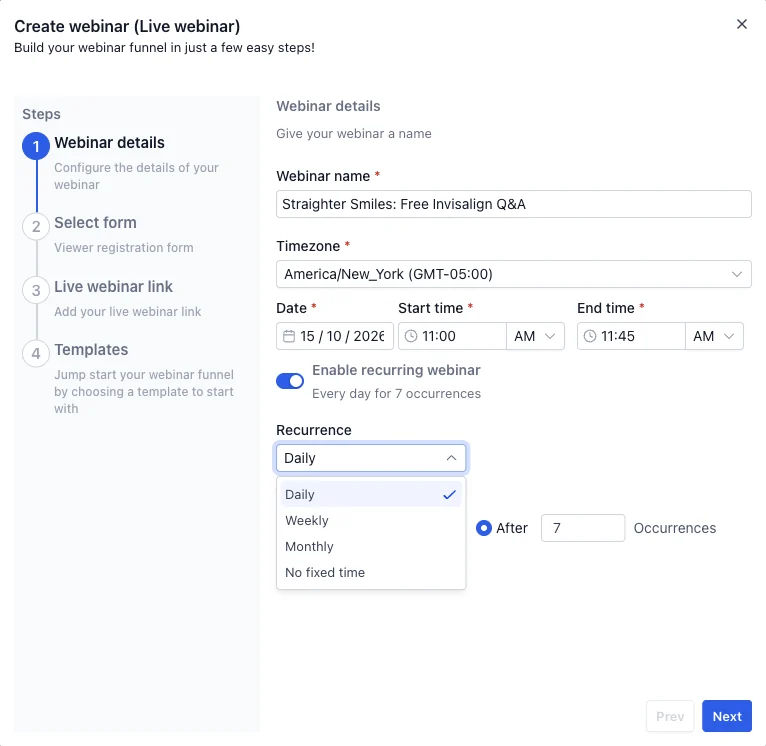
A weekly live Q&A is a good fit for recurring. You set it up once and the funnel keeps taking registrations for the next session.
Step 2. Select the registration form
Pick one of your GoHighLevel forms from the dropdown. This is the form people fill in on the registration page, so build it first under Sites, Forms if you have not already. Every person who registers becomes a contact in your CRM, which is what makes the follow up possible.
Step 3. Add your live webinar link
Paste the link where the live stream will run. The field asks for a full URL.
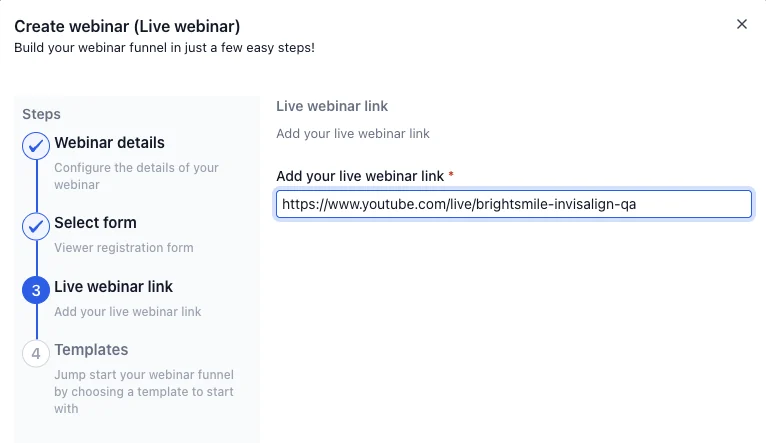
HighLevel's help article lists Zoom, YouTube Live, WebinarJam and custom links as supported. YouTube Live costs nothing to stream on, so a YouTube Live link plus GoHighLevel is a complete live webinar setup with no webinar subscription at all. If your team already pays for Zoom, use that instead.
Step 4. Choose a template
The template library opens on the Webinars category. Each template shows how many times it has been installed. When I looked, the three newest live templates were Financial Planning Live, E-Commerce Marketing Live and DIY Home Remodel Live, and there are blank defaults if you would rather design your own.
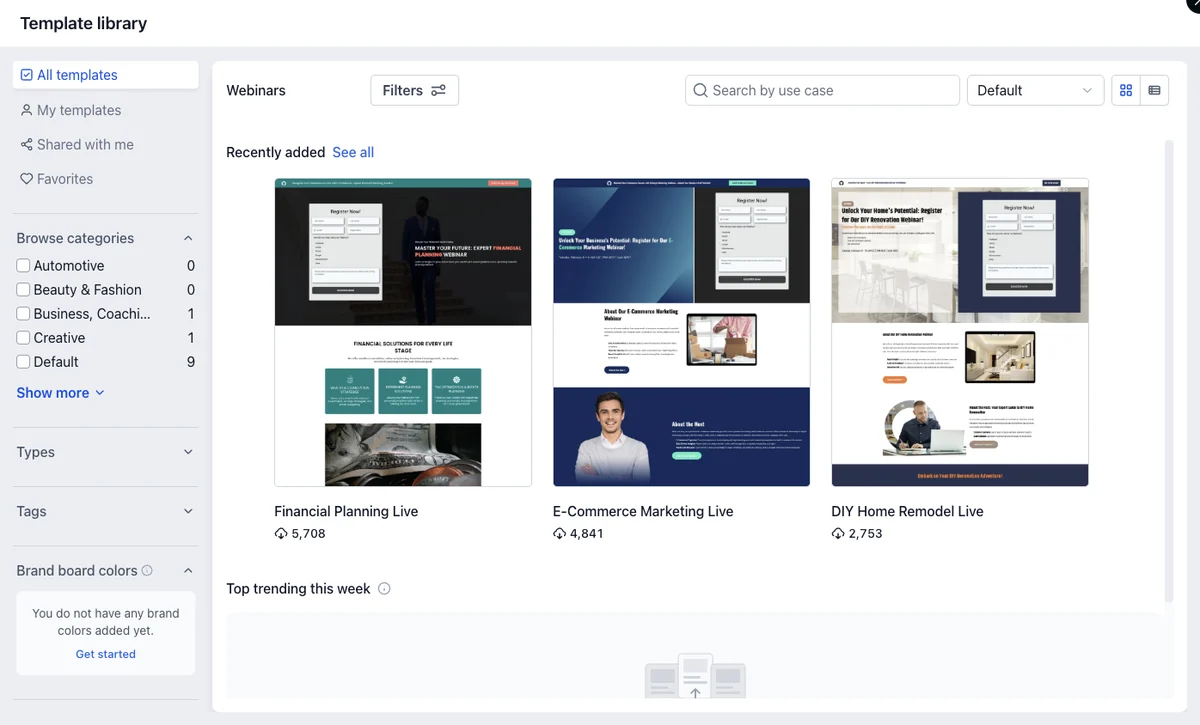
Click Choose and GoHighLevel creates the funnel and opens the first page in the builder.
How do you create an on-demand webinar in GoHighLevel?
Choose On demand webinar in the first window instead. The steps are shorter:
- Webinar details. Just a name. There is no date or time, because people watch straight after registering.
- Select form. The registration form, the same as for live.
- Select video. "Choose your pre-recorded webinar". HighLevel's help article says you can upload an MP4, MOV or AVI file or pick one from your media library.
- Templates. The same template library.
This is the evergreen funnel. Record your best live session once, load it as an on-demand webinar, and point your ads, emails and social posts at the registration page. Every registrant watches the same presentation, and your follow up runs the same way every time.
What pages does a GoHighLevel webinar funnel create?
Every webinar funnel comes with four pages. Ours appeared like this the moment I chose a template:
- Webinar Registration. The page with your form, where people sign up.
- Webinar Confirmation. The thank-you page after they register. Put the date, a calendar reminder and a short video here.
- Webinar Broadcast. The page people watch the webinar on.
- Expired Webinar. What latecomers see after the session has ended. Use it to offer the replay or the next date.
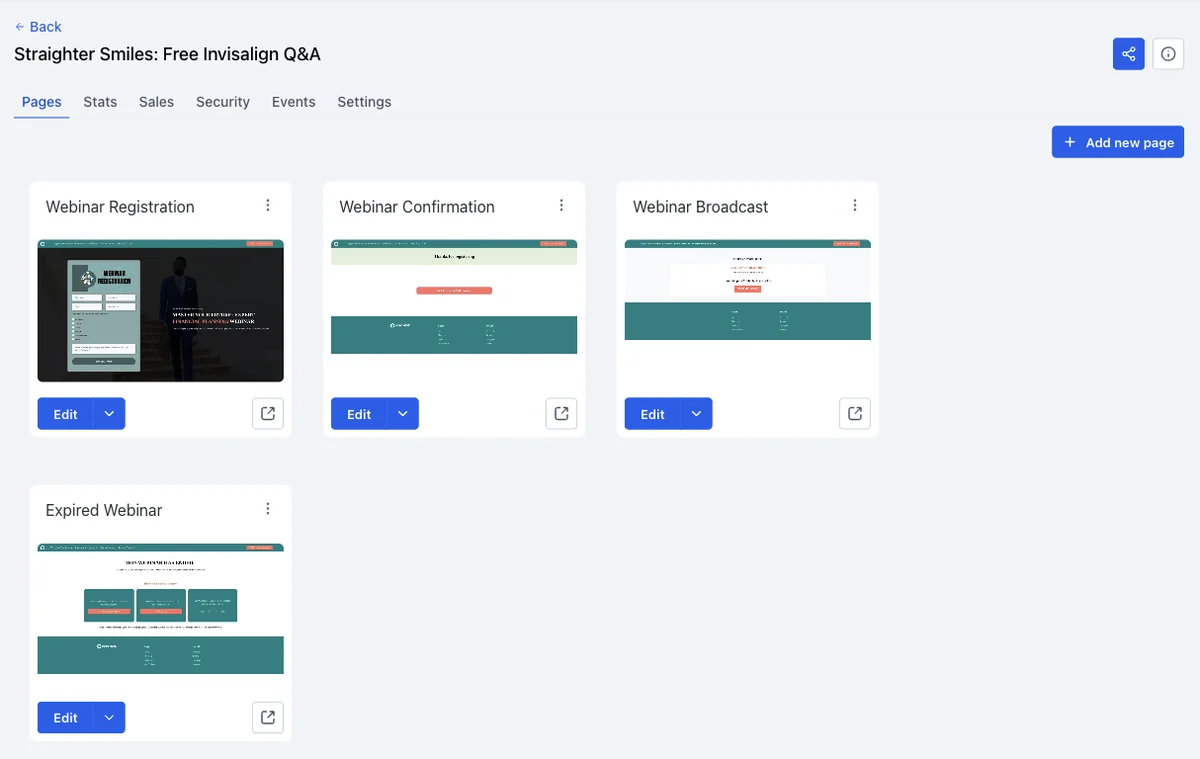
You edit each page in the same drag-and-drop builder as funnels and websites. If you have built a GoHighLevel funnel before, there is nothing new to learn. Our funnel building guide covers the builder itself.
Above the pages sit six tabs: Pages, Stats, Sales, Security, Events and Settings.
What can you change in a webinar's settings?
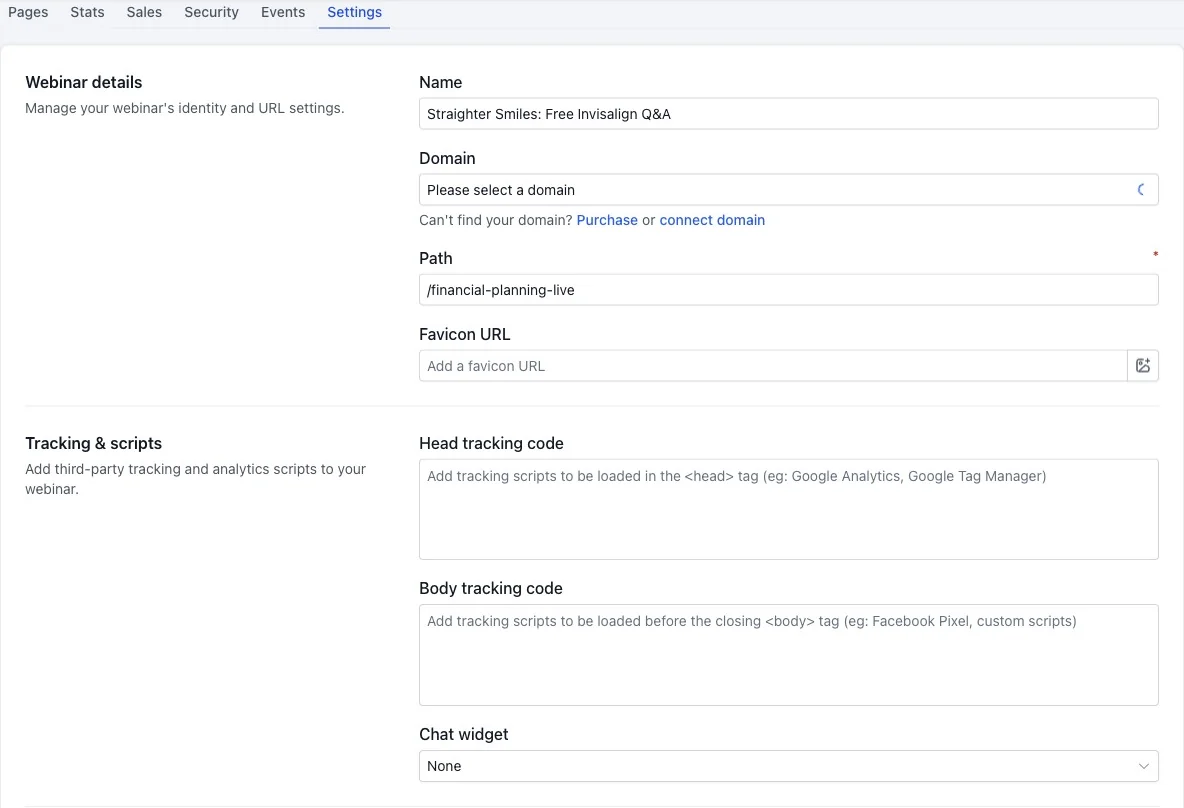
The Settings tab holds everything that is not page design:
- Webinar details. Name, domain, URL path and favicon. Connect your own domain here so the registration page sits on your brand.
- Tracking and scripts. Head and body tracking code, so your Meta Pixel and Google tags fire on webinar pages. Our Meta Conversions API guide covers sending registrations and sales to Meta.
- Chat widget. Add one of your GoHighLevel chat widgets to the pages.
- Payments and checkout. A live payment mode and an option to require a card even for $0 purchases. The Sales tab points you to Payments, Orders for anything sold through the funnel, so the offer at the end of the webinar can be paid for in the same place.
- Performance and compliance. Image optimisation, lazy-loaded custom code and GDPR-compliant fonts.
- SEO and AEO. Auto-generated schema markup on published pages.
How do webinar reminders and follow up work in GoHighLevel?
Registrants land in the same CRM as the rest of your leads, so the follow up uses the same workflows, phone number and email domain as everything else you run. A standalone webinar tool has to pass each registrant to your CRM through an integration first.
HighLevel's help articles describe a pre-built workflow recipe for each webinar funnel, triggered by registration, with:
- a registration confirmation by email and text;
- reminders, with 24 hours, 1 hour and 10 minutes before the start as the suggested timing;
- a replay link after the session;
- a follow up and nurture sequence for people who did not buy or book.
Because it is a normal GoHighLevel workflow, you can add anything else the workflow builder does: tag attendees, move them through a pipeline, send a booking link, or alert your team when someone registers. Our workflow automation guide covers the triggers and actions, and the calendar booking guide covers the booking side.
FREE FOR 30 DAYS
Get your first month of GoHighLevel free
- Every feature, on any plan
- A full month, worth up to $497
- Cancel before day 30, pay nothing
Card required. Nothing charged for 30 days.
Join 2.2 million businesses already running on GoHighLevel
How much does a webinar tool cost compared with GoHighLevel?
The webinar tool comes with your GoHighLevel subscription. HighLevel's pricing page lists Starter at $97 a month, Unlimited at $297 and SaaS Pro at $497, and it lists no webinar add-on.
Here is what the separate tools cost, from each vendor's pricing page on 9 October 2026:
| Tool | What it does | Price |
|---|---|---|
| WebinarJam Basic | Live webinars, up to 500 attendees | $79 a month billed annually, $99 monthly |
| EverWebinar | Automated (evergreen) webinars | $99 a month billed annually, $199 monthly |
| WebinarJam plus EverWebinar | Live and evergreen together | $178 a month billed annually |
| GoHighLevel Webinars | Live and on-demand webinar funnels, with your CRM, email, texts and workflows | Included from $97 a month |
If you run both live and evergreen webinars on WebinarJam and EverWebinar today, that is $2,136 a year for the webinar tools alone, before the CRM, email and booking tools they plug into. The Stack Audit adds up the rest of your stack, WebinarJam included, and shows what you would keep by moving it all to GoHighLevel.
When should you still use a dedicated webinar platform?
HighLevel's documentation describes the funnel, the pages, the stream link and the follow up. It does not describe live chat, polls or timed offer pop-ups inside the broadcast room. If those room features matter to how you sell, keep a dedicated webinar platform for the room and let GoHighLevel run everything around it.
There are two clean ways to do that:
- Keep your current platform as the stream. HighLevel's help article lists WebinarJam links as supported. Paste your WebinarJam room as the live webinar link, and GoHighLevel handles the registration, reminders, CRM and follow up.
- Use WebinarKit for automated webinars with a full room. I have used WebinarKit since 2022. It runs automated and live webinars with chat and AI tools that build the webinar for you, and it connects to GoHighLevel through Zapier or webhooks. Our WebinarKit review covers what it does and what it costs.
For most coaches, consultants and local businesses running a Q&A or a weekly training, GoHighLevel plus a free YouTube Live stream is enough. Compare all five options in our best webinar software roundup.
A worked example: the dental practice's Invisalign Q&A
Here is how our demo practice would run webinars on GoHighLevel. The setup is illustrative, with no live audience behind it.
- The live session. "Straighter Smiles: Free Invisalign Q&A" runs weekly at 11:00, streamed on the practice's YouTube channel. The YouTube Live link goes into step 3.
- Registration. A short form takes name, email and phone. Every registrant is tagged as a webinar lead in the CRM.
- Reminders. The workflow sends a confirmation straight away, then reminders 24 hours, 1 hour and 10 minutes before.
- The offer. The broadcast page carries a button to book a free consultation on the practice's GoHighLevel calendar.
- The evergreen version. The best session is recorded and loaded as an on-demand webinar, so ads can send people to a registration page that works any day of the week.
- Follow up. Anyone who watched but did not book gets a short email and text sequence with the booking link.
All of that runs in one account, on one bill, with the leads in the same pipeline as the practice's phone enquiries and website forms.
Frequently Asked Questions
Does GoHighLevel have a webinar feature?
Can GoHighLevel host live webinars?
Can GoHighLevel run evergreen or automated webinars?
Can a GoHighLevel webinar repeat every week?
Do I need WebinarJam if I have GoHighLevel?
Does the GoHighLevel webinar tool cost extra?
Where are webinars in GoHighLevel?
PARTNER OFFER
Your first month of GoHighLevel is free.
Through our partner link you get 30 days on any plan, double the standard 14-day trial. Build something real before you pay a cent.
Claim my free monthCard required. Nothing charged for 30 days.
Sources and References
- [1]Complete Guide to Creating Webinars in HighLevel, HighLevel Support Portal, read 9 October 2026
- [2]Create and Launch High-Converting Webinar Funnels in HighLevel, HighLevel Support Portal, read 9 October 2026
- [3]Template Library for Webinars, HighLevel Support Portal, read 9 October 2026
- [4]HighLevel pricing, gohighlevel.com, read 9 October 2026
- [5]WebinarJam pricing, read 9 October 2026
- [6]EverWebinar pricing, read 9 October 2026
- [7]Create a YouTube live stream, YouTube Help
Info
Affiliate disclosure. This page contains affiliate links for GoHighLevel and WebinarKit. If you sign up through them we may earn a commission at no cost to you.
DO THIS NEXT, FREE FOR 30 DAYS
The quickest way to know is to try it on real work.
- STEP 1Claim your free month
- STEP 2Rebuild one thing from this guide
- STEP 3Decide before day 30
Free for 30 days from the day you start. Card required.
Featured in Forbes and Business Insider.
Ashley Kemp is a digital entrepreneur and perpetual traveller. Switched from ClickFunnels to GoHighLevel years ago and never looked back. Writing about what actually works.
Was this article helpful?