Updated 23 October 2026guide
GoHighLevel Events: Sell Tickets and QR Check-In in GHL
GoHighLevel Events lets you sell tickets, take RSVPs and check guests in by QR code inside GHL. Setup steps, workflow ideas and how it compares to Eventbrite.
 Ashley Kemp15 min read
GoHighLevel Events is HighLevel's built-in ticketing and registration tool, and it is already live in Labs for every agency, so you can sell tickets, take RSVPs and check people in by QR code without leaving GHL. HighLevel's affiliate team also told me, ahead of LevelUp 2026, that HighLevel is pushing into the event space directly against Eventbrite, so this feature is about to get a lot more attention.
What is GoHighLevel Events?
GoHighLevel Events is a native ticketing and registration tool in HighLevel Labs. You can create free, paid and RSVP events (in person, online or hybrid), issue QR tickets automatically, check guests in with the HighLevel mobile app and trigger workflows on registration and check-in.
Last updated 23 October 2026. We are updating this guide live through LevelUp week (26 to 29 October), so anything new HighLevel announces for events will land here first.
Events is sitting in Labs in my own GHL account right now, which makes it the most practical of the LevelUp stories to write about: you can switch it on today. This guide covers how to turn it on and sell your first tickets, what you can build, how QR check-in works, how GHL compares to Eventbrite, and the workflow ideas I would start with.
PARTNER OFFER
Your first month of GoHighLevel is free.
Through our partner link you get 30 days on any plan, double the standard 14-day trial. Build something real before you pay a cent.
Claim my free monthCard required. Nothing charged for 30 days.
What is GoHighLevel Events?
GoHighLevel Events is HighLevel's native tool for selling tickets, collecting registrations and checking attendees in. It lives inside each sub-account under Memberships, and every registration becomes a contact in your CRM. It has been in Labs for all agencies since August 2026; before that, you had to ask HighLevel for access by Location ID.
The big idea is ownership. On a ticketing marketplace, your buyer's journey happens on someone else's platform. In GHL, the person who buys a ticket lands in the same CRM as your leads, clients and members, with SMS, email and workflows ready to go the second they register.
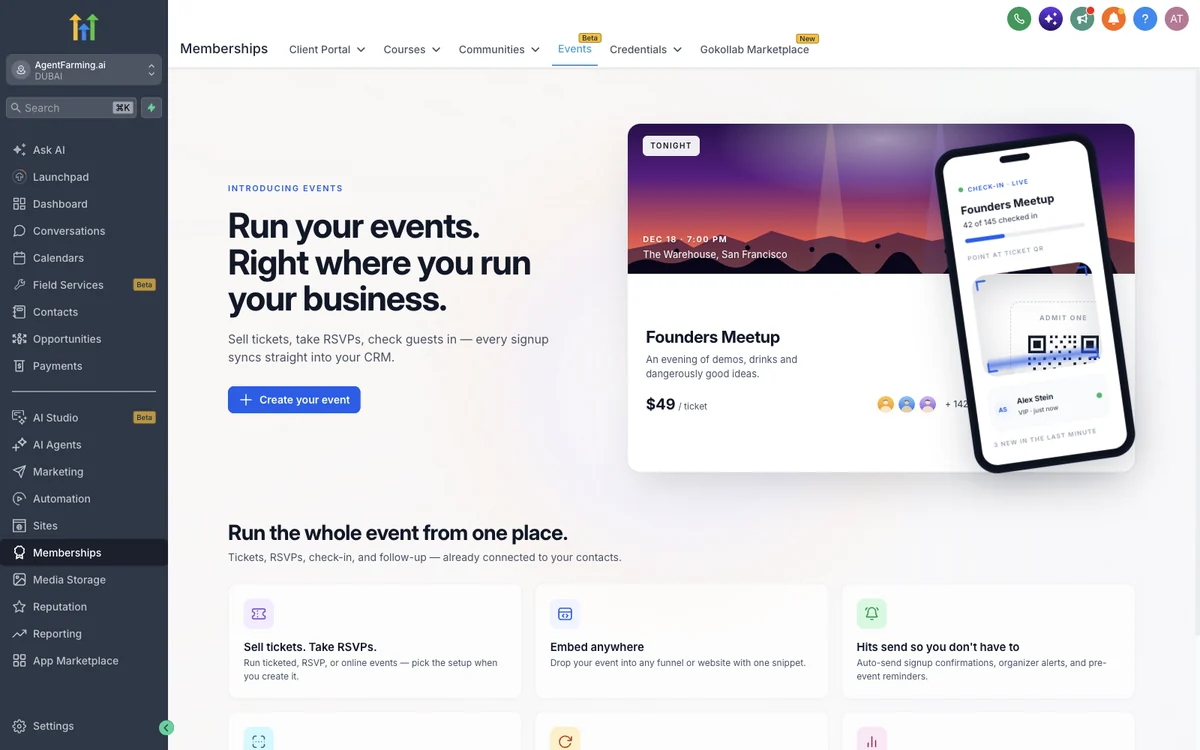
HighLevel's own Events start screen sums it up: sell tickets, take RSVPs and check guests in, with every signup syncing straight into your CRM.
For agencies, Events is a new service you can switch on for clients without adding another tool to the stack. You can roll it out to every sub-account or only to selected ones, so you can test it with one client before offering it more widely. If you already sell courses or communities in GHL, Events sits right alongside them under Memberships (our GoHighLevel membership site guide covers that side).
How do you sell event tickets in GoHighLevel?
To sell event tickets in GoHighLevel, enable Events in Labs at agency level, open Memberships > Events in the sub-account, create a paid event with your tickets, then publish the event page and share or embed it. Every buyer gets a QR ticket automatically after registering.
Here is the full setup, step by step.
- Switch Events on in Labs. From your agency view, go to Agency Settings > Labs > Sub-Account > Events. Enable it for all sub-accounts or pick the ones you want.
- Open Events in the sub-account. Once enabled, Events appears under Memberships > Events.
- Create your event. Choose free, paid or RSVP, and choose in person, online or hybrid.
- Set up tickets and coupons. Add your tickets and registration, then create ticket coupons for early birds, partners or past customers.
- Build the event page. Customise the event page to match the brand, then embed the event on your website or inside a GHL funnel. If you are new to the page builder, our GoHighLevel funnel guide walks through it.
- Add your workflows. Use the registration and check-in triggers so confirmations, reminders and follow-ups run on their own (ideas further down).
- Check people in on the day. Every registrant receives a QR-code ticket automatically. Your staff scan tickets with the HighLevel mobile app, and you watch attendance and live check-ins from the event dashboard.
Events is a Labs feature, so expect the screens to keep improving as HighLevel builds it out. Getting your first event set up now means you will be ready for whatever LevelUp adds.
What can you build with GHL Events?
GHL Events covers free, paid, RSVP, online and hybrid events, with pricing tiers, coupons and add-ons, branded event pages with custom CSS, QR tickets, phone check-in, schedules and speaker sessions, and CRM and workflow sync. That is enough to run most workshops, launches, open days, classes and conferences end to end inside GoHighLevel.
Here is HighLevel's full feature list from the Events card in Labs, which is switched on in my own account.
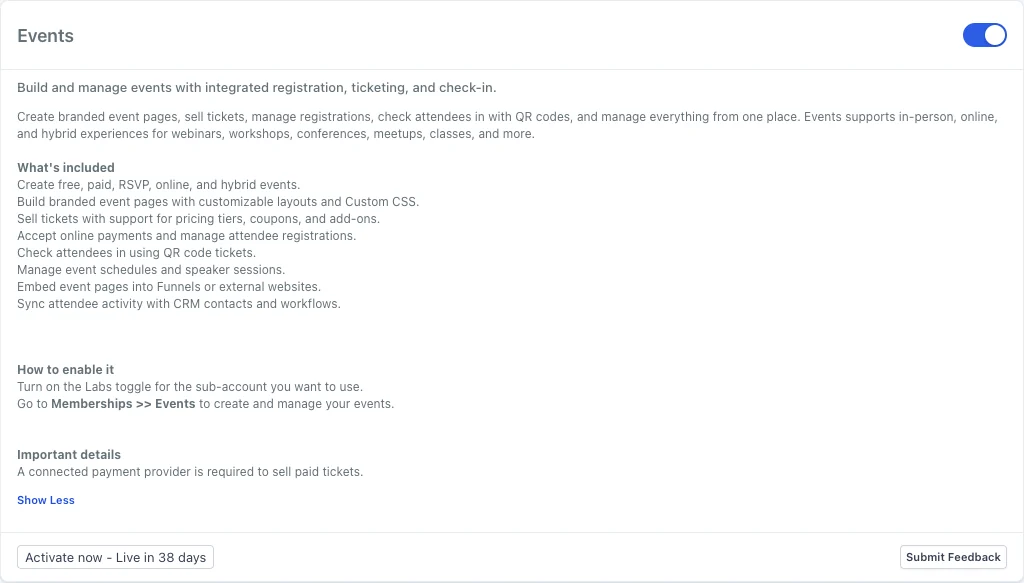
| Feature | What HighLevel says it does |
|---|---|
| Event types | Free, paid, RSVP, online and hybrid events |
| Event pages | Branded event pages with customisable layouts and custom CSS |
| Tickets | Pricing tiers, coupons and add-ons |
| Payments | Online payments and attendee registration management (a connected payment provider is required for paid tickets) |
| Check-in | QR code tickets, scanned from a phone on iOS or Android |
| Agenda | Event schedules and speaker sessions |
| Embedding | Event pages embed into GHL funnels or external websites |
| Automation | Signup confirmations, organiser alerts and pre-event reminders sent automatically |
| CRM | Every signup becomes a contact, tagged and ready for any workflow |
| Analytics | Live tracking of sales, attendance and no-shows, with export at any time |
A few ways to put each format to work:
| Event format | Example uses |
|---|---|
| Free RSVP, in person | Gym open day, showroom launch, community meetup |
| Paid, in person | Workshop, masterclass, tasting night, client summit |
| Paid, online | Virtual training day, paid live Q&A |
| Free, online | Product launch session or training (see our GoHighLevel webinars guide) |
| Hybrid | Conference with an in-room ticket and an online ticket |
The event dashboard is where you run the day. It tracks attendance, shows live check-in activity and reports on staff performance, so if you have several people working the door you can see how the team is doing in real time.
Because events can be embedded on a website or inside a funnel, you are not stuck with one generic listing page. A coach can put the ticket box at the bottom of a long-form sales page; a venue can drop its upcoming events onto its existing site.
How does GoHighLevel QR check-in work?
GoHighLevel QR check-in runs through the HighLevel mobile app. Every attendee gets a QR-code ticket automatically after they register, and your staff scan it at the door to check them in. Each check-in shows on the event dashboard straight away and can fire a workflow.
That last part is what makes GHL check-in more useful than a scanner that only says yes or no. Check-in data feeds your automations, so you know exactly who turned up and who did not, and each group can get its own follow-up. Someone who attended can get a thank-you and an offer the next morning. Someone who registered and never arrived can get a replay link or an invite to the next date.
Your staff check guests in with the HighLevel mobile app, so the door, the dashboard and the follow-up all run from the same GoHighLevel account.
Get your first month free through our partner linkClaim my free monthGoHighLevel vs Eventbrite: which is better for event ticketing?
For a business that already markets itself with GoHighLevel, GHL Events is the better home for ticketing, because every buyer lands in your own CRM with your workflows attached. Eventbrite is a ticketing marketplace that charges a service fee on each paid ticket.
According to Eventbrite's own organiser pricing page and its help article on ticketing fees, US organisers can publish free events at no cost, while paid tickets carry a 3.7% plus $1.79 service fee per ticket and a 2.9% payment processing fee per order. Buyers cover those fees by default, unless you choose to absorb them.
Picture a business coach selling 200 tickets at $50 each for a half-day workshop. On those published rates, the Eventbrite service fee alone works out at $3.64 per ticket, or $728 across the event, before processing and tax. Your buyers pay it at checkout or you absorb it, but either way it is money going somewhere other than your business. HighLevel's Events changelog does not list a per-ticket service fee.
| Feature | GoHighLevel | Eventbrite |
|---|---|---|
| Free events and RSVPs | Free, paid and RSVP events, in person, online or hybrid | Free events can be published at no cost |
| Fees on paid tickets (US) | No per-ticket service fee listed in HighLevel's Events changelog | 3.7% plus $1.79 service fee per ticket, plus 2.9% processing per order (paid by buyers by default) |
| Where buyers end up | As contacts in your own GoHighLevel CRM | On Eventbrite's platform and marketplace |
| Check-in | Automatic QR tickets, scanned with the HighLevel mobile app | Eventbrite's check-in app for organisers |
| Event pages | Custom event pages, embeddable on your website or inside a funnel | Event listings on Eventbrite |
| Email and SMS follow-up | Two-way SMS and email from the same CRM | Eventbrite Pro email tools start at $15 per month |
| Automation | Workflow triggers on registration and check-in, with branches on event, ticket and check-in data | Follow-up runs through Eventbrite's own marketing tools |
| Everything else | Funnels, calendars, reviews, invoices, courses and more in one account | Focused on events and ticketing |
Eventbrite's pricing page also says its marketplace connects local ticket buyers to events, and that its Pro email tools start at $15 per month. Check-in on Eventbrite runs through its check-in app for organisers. GHL Events works best when you bring the audience: your email list, your SMS contacts, your funnels, your ads and your client's social following. That is exactly the audience you want to own, and GoHighLevel already has the tools to reach it.
Why does selling tickets inside your CRM make more money?
Selling tickets inside your CRM makes more money because every buyer becomes a contact you can follow up with, segment and sell to again. With GHL Events, a ticket is the start of a customer relationship instead of a one-off transaction on someone else's platform.
Think about what happens after the event. In GoHighLevel the attendee list is already tagged, in your CRM, with phone numbers and emails you can use straight away. You can offer a VIP upgrade before the day, a coaching package or product the morning after, a discount on the next event, or a review request while the experience is fresh (our guide to automating Google reviews in GoHighLevel covers that last one).
For agencies, this is a straightforward upsell. Clients who run classes, launches or open days already need ticketing. Offering it inside the GHL account you manage for them means the event data feeds the same pipelines and reports you are already responsible for.
GoHighLevel Events workflow ideas
Workflows are where GHL Events pulls ahead. You can trigger a workflow when someone registers or checks in, then branch on event, ticket and check-in data, so different tickets and different attendees get different follow-up. These are ideas to build yourself, not templates HighLevel ships.
- Instant confirmation. On the registration trigger, send an SMS and email with the event details and a reminder that their QR ticket is on its way.
- Countdown reminders. Add wait steps before the event with reminders by text and email. Our guide to reducing no-shows in GoHighLevel has message ideas you can adapt.
- VIP branch. Branch on ticket type so VIP buyers get a personal welcome text and any extra details, while general admission gets the standard sequence.
- One workflow per series. Branch on event so a single workflow handles a whole run of monthly workshops.
- Attended follow-up. On check-in, tag the contact as attended, then send a thank-you and your next offer after the event.
- No-show rescue. After the event, branch on check-in data and send people who registered but never arrived a replay or an invite to the next date.
- Pipeline tracking. Move registrants into an opportunity stage so event leads show up in your sales pipeline.
For more building blocks, see our GoHighLevel workflow recipes and the full GoHighLevel automation workflows guide.
What is HighLevel launching for events at LevelUp 2026?
HighLevel told affiliates it is launching new tools at LevelUp 2026 to compete directly in the event space, naming Eventbrite as the comparison, alongside new tools for restaurants and home services. The detailed spec has not been published yet, so we will update this section live as HighLevel announces it.
LevelUp 2026 runs from 26 to 29 October at the Hilton Anatole in Dallas, with 1,500+ attendees. HighLevel says it will unveil 300+ product features and updates and give a first look at its 2027 roadmap. Our GoHighLevel LevelUp 2026 hub tracks every announcement.
The same briefing confirmed that HighLevel is rebranding its $497 plan as the Founder's Plan (previously SaaS Pro / Agency Pro), and that the plan includes a new Industries Mode. We cover what that could mean for venues, restaurants and trades in our GoHighLevel Industries Mode guide, and the plan itself in our GoHighLevel Founder's Plan breakdown. HighLevel also said the new launches go to Labs for all customers from LevelUp, with only AEO and Custom Nav following separately. Ticket support desks are a different launch again, covered in our GoHighLevel Ticketing guide.
The smart move is to get Events running now. Whatever HighLevel adds for the event space will build on the same contacts, pages and workflows you set up today.
FREE FOR 30 DAYS
Get your first month of GoHighLevel free
- Every feature, on any plan
- A full month, worth up to $497
- Cancel before day 30, pay nothing
Card required. Nothing charged for 30 days.
Join 2.2 million businesses already running on GoHighLevel
If you are not on GoHighLevel yet, you can start a 30-day GoHighLevel trial through my link (a card is required, but nothing is charged for 30 days) and switch Events on in Labs on day one. Join 2.2 million businesses already running on GoHighLevel. Compare plans on our GoHighLevel pricing page or read how the GoHighLevel free trial works first.
Frequently Asked Questions
Where do I find Events in GoHighLevel?
Can GoHighLevel sell paid event tickets?
Does GoHighLevel have QR code check-in?
Can I embed GoHighLevel events on my website?
Is GoHighLevel a good Eventbrite alternative?
Can I trigger workflows from GoHighLevel event registrations?
Will GoHighLevel Events change after LevelUp 2026?
Ashley earns a commission if you start GoHighLevel through the links on this page, at no extra cost to you.
DO THIS NEXT, FREE FOR 30 DAYS
The quickest way to know is to try it on real work.
- STEP 1Claim your free month
- STEP 2Rebuild one thing from this guide
- STEP 3Decide before day 30
Free for 30 days from the day you start. Card required.
Featured in Forbes and Business Insider.
Ashley Kemp is a digital entrepreneur and perpetual traveller. Switched from ClickFunnels to GoHighLevel years ago and never looked back. Writing about what actually works.
Was this article helpful?