Updated 16 October 2026guide
GoHighLevel Updates & Changelog 2026: Every New Feature
The 2026 GoHighLevel changelog in one place: AI Studio going full stack, GPT-6 in workflows, the WhatsApp fee cut, invoice layouts and more, dated.
 Ashley Kemp57 min read
What are the biggest GoHighLevel updates in 2026?
GoHighLevel's biggest 2026 updates include: AI Studio gaining server-side rendering and server functions and leaving Labs for every account (September); GPT-6 Sol and Luna in workflow AI actions at half the previous price; Anthropic and Google models in the AI Agent action; AI Studio Cloud, native payments, site analytics, live chat and GitHub sync in AI Studio, plus a schema dashboard for whole websites and funnels (October); the end of the 5% WhatsApp processing fee from October 1; the Summer of AI campaign (June 1 to August 31) with five AI tools free all summer; WhatsApp Calling; Email Sequences in Beta Labs; a rebuilt mobile Task Manager; review profile auto-detection across 52+ platforms; native Calendly and Housecall Pro workflow connectors; Python support in workflow custom code; Rentals going live for everyone; plus the earlier Ask AI wave with scheduled tasks, blog generation, voice mode, and persistent memory. GHL ships updates almost weekly.
PARTNER OFFER
Your first month of GoHighLevel is free.
Through our partner link you get 30 days on any plan, double the standard 14-day trial. Build something real before you pay a cent.
Claim my free monthCard required. Nothing charged for 30 days.
GoHighLevel ships updates at a pace that puts most SaaS companies to shame. In 2025 the team averaged roughly one major release per month, with smaller improvements and fixes dropping almost every week. In 2026, that cadence has continued and the focus has shifted heavily toward AI, smarter automation, and a more capable mobile experience. If you stepped away from the platform for even a few months, you have a lot to catch up on.
This post covers every significant GoHighLevel update through 15 October 2026, newest month first, so you can jump straight to what matters for your agency or business.
Last Updated: 16 October 2026 New GoHighLevel releases get added here every week, usually within a day or two of GHL shipping them.
October 2026: AI Studio Cloud, Payments and Pricing Changes
October's biggest releases are in AI Studio, which gained a built-in backend, native payments and site analytics inside two days, then live chat and a two-way GitHub sync the following week. The month opened with four pricing notices. One saves you money from the first day of the month and three were small increases on specific routes, and HighLevel has since cancelled one of those three, the international voice change. None needs any action to apply.
AI Studio Syncs Two Ways With GitHub (15 October)
Any AI Studio project can now connect to GitHub and stay in sync both ways, per the changelog. Open More, then Git, and connect a personal account or an organisation. AI Studio creates a private repository named after the project, pushes every version you save (AI prompts, code edits, visual edits and restores) and pulls back every commit made on the connected branch. A developer can work on the same project in Claude Code, Codex, Cursor, Copilot or Gemini CLI and see the change land in AI Studio with a fresh preview. Pushes are scanned for secrets such as AWS, GitHub, Stripe and OpenAI keys and blocked if one is found. When both sides have new commits you choose Force push or New branch, and a Sync History tab lists every commit that moved. A new permission, Manage Git & download code, is on for every role by default, and agency admins can turn it off per user under Settings, Team, Permissions, AI Studio. Git Sync works with React (Vite) and TanStack Start projects.
WhatsApp Templates: Countdown Offers and Per-Contact Media (15 October)
Two WhatsApp template releases landed on 15 October. The new limited time offer template puts a live countdown, drawn by WhatsApp, inside the message, with a copy-code button for the discount and a URL button beside it. The clock turns red in the final hour, and you set the expiry each time you send, so one approved template runs campaign after campaign with no new Meta approval in between. Build it under Settings, WhatsApp, Templates, with Category set to Marketing and Type set to Limited time offer, and send it from Conversations, bulk actions, workflows or calendar sends. Check the expiry before a bulk send, because a deadline already in the past still sends and the chat shows the offer as expired.
The same day HighLevel rebuilt the template builder with a live phone preview and made media headers dynamic. A header can now point at a custom field, so each contact receives their own invoice, ticket, certificate or personalised image from one approved template. The value must resolve to a public HTTPS URL that Meta can download. Dynamic media works in workflows, conversations, bulk actions, calendar appointments, review requests and missed call text back.
Live Chat Built Into AI Studio Apps (14 October)
Ask AI Studio to "add a live chat" and it now builds a real HighLevel chat widget into the app, styled with the site's own colours, fonts and layout, per the changelog. You choose Live Chat or Email Chat, answer a few design questions (greeting, placement, tone) and the widget is created in the account, named after the project. Every message lands in Conversations, and the widget follows its usual settings for business hours, out-of-hours messages, chat ratings and spam protection. Visitors can share files, pick up earlier conversations when they come back and see whether each message was sent. Under More, then Analytics, a Chat Widgets view shows chat loads, opens, open rate, ratings and every lead with the page the chat started on. A project can carry more than one widget, such as live chat on every page plus an after-hours chat. Live Chat and Email Chat work in TanStack Start and React projects.
Turn Features On or Off for Many Sub-Accounts at Once (14 October)
Agencies can now change feature access across many sub-accounts in one action. Select the sub-accounts on the Sub-Accounts page, click Update features, pick the features and set each to Enable or Disable, then click Apply changes. You can search features, select whole groups and use Enable all or Disable all. Changes take effect in about two to five minutes, and Bulk Actions History shows the status of each request. Rolling out a new feature to every client, or locking one down, no longer means opening each sub-account in turn. Our SaaS Mode guide covers the rest of running client sub-accounts.
Workflows Post Internal Comments in Conversations (14 October)
A new Add Internal Comment workflow action posts an internal comment to a contact's conversation when the workflow runs, per the changelog. You can @mention team members in the comment, and nothing is sent to the customer. When a high-priority lead enters a workflow, for example, the assigned rep can get a comment in that conversation with the next steps. Add it from Automation, then Workflows. The stale lead alert in our automation workflows guide can use it.
Schema for a Whole Website or Funnel on One Screen (12 October)
Every website and funnel now has an SEO & AEO tab with a schema markup dashboard, per the changelog. A Schema coverage card rates the site as Needs work, Getting there, Good or Excellent, and each page shows its schema types, its status (Up to date, Might be outdated, No schema, Unpublished or Unsaved) and when its schema was last updated. Select several pages and click Generate schema to have AI write it in bulk, or click + Add schema to write it by hand. Nothing goes live until you click Save and publish, and generating schema for a page that already has some replaces it, so review first. Pages edited and republished twice or more since their schema was created are flagged Might be outdated. Open it from Sites, then Websites or Funnels, pick one and choose SEO & AEO. Existing schema appears there automatically and stays in sync with the page builder. Our GoHighLevel schema markup guide covers the per-page generator.
Meta Pixel Shows Real Checkout Drop-Off (12 October)
The Meta Pixel's InitiateCheckout event now fires when a buyer reaches checkout rather than when they submit payment, per the changelog. On store checkout pages, and on any page where you added InitiateCheckout at page level, it fires when the page loads. Everywhere else it fires on the buyer's first click, tap or keystroke in an order form. It fires at most once per page visit, ignores browser autofill, and still counts buyers who go straight to an express wallet such as Apple Pay. AddPaymentInfo now sends order value, currency, product IDs and hashed customer details, which helps Meta match more events to real people. The gap between InitiateCheckout and Purchase now shows how many buyers reach checkout and leave, and Meta can build audiences around them. Expect InitiateCheckout counts to rise, so allow for that when you compare cost per InitiateCheckout before and after the change. No setup is needed. Our Meta Conversions API guide covers the server side.
AI Studio Cloud: Database, User Accounts and File Storage (9 October)
AI Studio apps can now have their own backend. Open More, then Cloud, and turn it on from Overview. In about a minute HighLevel creates a private backend for that project with a database, user accounts and file storage, per the changelog. You ask AI Studio in the chat for a new table or security policy and it writes the schema, and you can browse and edit rows by hand. Daily backups snapshot the schema and the rows. Users sign up with email and password in this first version, with invitations, your own password rules and a check against passwords found in public breaches. The database starts on the Tiny size, which is free, and moves up through Mini, Small, Medium, Large and X-Large as an app grows, each billed by the hour. Cloud works on projects built on TanStack Start, so an older React project needs Migrate to SSR first. An app that needs sign-ins and its own data, such as a members area, can now live in the same sub-account as the CRM it feeds. Our GoHighLevel AI Studio guide has the full breakdown.
AI Studio Takes Payments With a Hosted Checkout (8 October)
Apps built with AI Studio can now sell products and take payments, per the changelog. Turn Payments on under More, then Payments, choose which catalog products the app can sell, and ask the agent to "add payments". It builds a storefront and a hosted checkout into the app. Payments runs on HighLevel's native payments, so the products, orders, payment providers and subscriptions are the ones already set up in the account. The checkout supports PayPal express, coupon codes and subscriptions, picks up the site's colours and runs bot protection on every purchase. One-click post-purchase upsells work with saved cards from Stripe, Square, Authorize.net, NMI, Adyen and Mercado Pago. Card details are entered in the hosted checkout and never touch the app's code. Like Cloud, Payments needs a TanStack Start project.
AI Studio Sites Get Built-In Analytics (8 October)
Every published AI Studio site now reports page views, unique visitors, opt-ins and opt-in rate inside the project, with no tracking code to install, per the changelog. Open the project, then More, Analytics and Overview for trends, top pages, traffic sources, devices and locations. A Form Submissions tab lists every lead the site's forms collected, with a link to the contact. Under Sites, Analytics, AI Studio you can compare every AI Studio site next to your funnels and websites. Contacts created from a site keep their visit history, so you can see the pages they viewed, where they came from and the form they submitted. Forms connected before 8 October keep counting opt-ins. To link each submission to the pages that visitor viewed first, ask AI Studio to reconnect form tracking and publish again.
A2P Rejections Now Come With Fixes for Your Setup (8 October)
The "View required fixes" window on a rejected A2P campaign now gives guidance that matches how you registered, per the changelog. The most common rejection reasons have separate steps for campaigns set up through the Chat Widget (Quick Setup) and through Manual Setup, each with a plain-language explanation and the specific actions to take. Where carriers require exact wording, such as the privacy policy statement, the steps include it. When a rejection comes from something the platform generates, like the chat widget's consent wording, HighLevel says so and points you to support, so you don't spend a resubmission on something you can't change. Our A2P registration guide decodes the rejection reasons themselves.
WhatsApp: the 5% Processing Fee Is Gone (1 October)
From 1 October HighLevel bills WhatsApp messages at Meta's published rate with no processing fee, across every market and message category, per the changelog announcement. A marketing message to the US or Canada drops from $0.0263 to $0.0250, and one to the UK from $0.0667 to $0.0635. Because the rates now match Meta's rate card line for line, you can quote a client WhatsApp costs and show them exactly where the number comes from.
US Carrier Fees (1 October)
Carrier fees on texts to US numbers went up slightly on 1 October, per the carrier fee notice. Outbound SMS over Verizon moves from $0.0045 to $0.0050 per message, and the 'Other' carrier category from $0.0040 to $0.0042. On 10,000 Verizon texts a month that's an extra $5.
International Voice Rates Stay Put; SMS and Numbers Change (13 October)
Two notices were due to change list prices for selected countries from 13 October. On 12 October HighLevel cancelled the voice changes after its providers withdrew them, so international minute rates stay as they were. The voice pricing update would have taken local incoming minutes in Germany from $0.0100 to $0.0115, and they stay at $0.0100. The messaging and phone number update was not part of the cancellation. It changes outbound SMS to a short list of countries and the monthly rental on some international numbers, such as a Hong Kong local number moving from $6.00 to $14.70 a month. US and Canadian voice and SMS rates are not on either list. If you run sub-accounts outside North America, check the messaging list before your next rebilling cycle.
A2P Number Registration Status in Real Time (6 October)
Each phone number linked to an A2P campaign now shows a live status of Pending, Registered or Failed, and fully registered numbers carry an "A2P Verified" tag on the phone numbers page, per the changelog. Until now you could only see that a number had been submitted, and a text sent before carrier registration finished failed with error 30034. HighLevel says registration usually completes within 24 hours, so wait for the tag before your first campaign. Existing numbers were updated automatically. Our A2P registration guide covers the approval steps before this point.
Recurring Appointments Send One Confirmation per Series (6 October)
A recurring booking now sends a single confirmation that covers the whole series, where it used to send one for every occurrence, per the calendar changelog. Custom recurring appointments, which sent no notifications at all before, now get confirmations, reminders, follow-ups, and reschedule and cancellation notices. Reminders still go out for each session. Nothing needs switching on. The change covers calendar notifications only, so appointment workflows behave as before. If recurring clients are part of your no-show problem, pair this with the steps in our no-show reduction guide.
Lead Source Report Shows the Leads Behind Each Number (6 October)
The Lead Source Report widget now lets you click any count under Total leads, Open, Won, Lost or Abandoned and see the exact opportunities behind it, per the changelog. It also shows the monetary value for each status, so you can compare what each channel is worth in won and lost revenue. Opportunities with no source now appear as "N/A", and the Source filter accepts "Is empty", which makes gaps in your attribution easy to find and fix.
Everything Else From October
HighLevel published a new template pack on 5 October, with website, survey, blog, social, Facebook ad and Google ad templates. Developers can now schedule and publish Community posts through the Social Planner API and choose which Community member each post is published as (8 October). On 10 October the newer custom field types (URL, Date & Time, Rich text, Users, and images in Radio and Checkbox fields) gained snapshot and public API support, so they copy across sub-accounts in a snapshot and can be managed through the API. A second template pack followed on 12 October, with website, funnel, email, survey, social and ad templates and a Bookkeeper snapshot. On 15 October AI Studio checkouts gained field controls, a two-step checkout and a full order summary: you choose which phone and billing fields buyers fill in, step one saves the buyer as a contact before they pay, and the confirmation screen shows the order ID, items, taxes and total paid. New leads from a two-step checkout fire the Contact Created trigger rather than Order Form Submission, so check which one your workflows listen for. Also on 15 October, gift card purchase confirmations, recipient emails and SMS notifications became translated to the selected locale, and the send-flow previews show the translated text.
September 2026: AI Studio Goes Full Stack
September was a big month for AI. AI Studio gained a server-side stack and came out of Labs for everyone, the workflow AI actions moved to GPT-6, and Ask AI arrived inside WhatsApp. Alongside that came a long list of practical fixes for agencies running snapshots, payments and phones.
AI Studio Goes Full Stack and Leaves Labs (8 and 22 September)
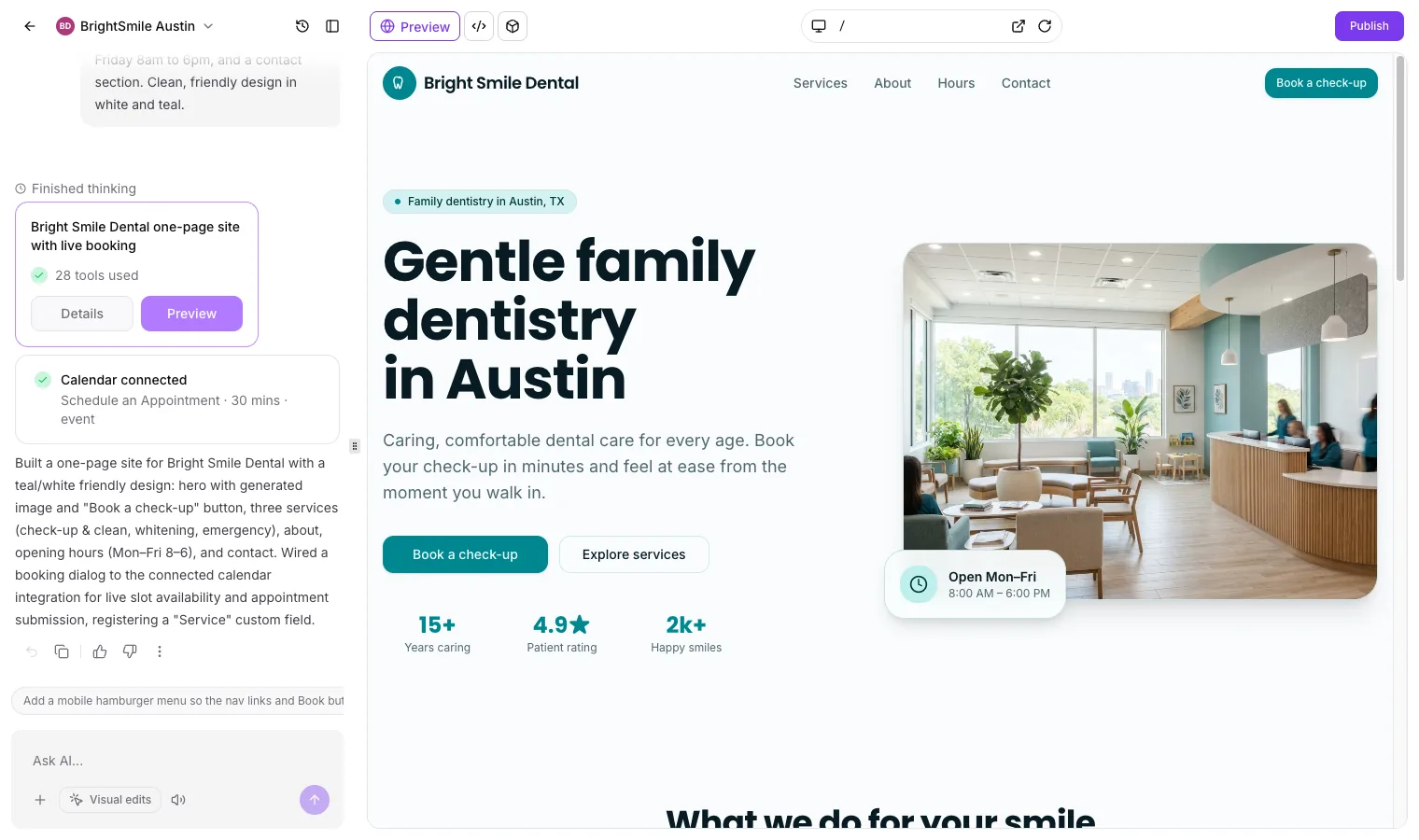
On 8 September new AI Studio projects moved onto TanStack Start, which brings server-side rendering, server functions, REST endpoints and a secrets vault, per the changelog. Server rendering means search engines and social previews read the full page without running JavaScript, which makes AI Studio a sensible home for client sites that need to rank. On 22 September HighLevel added Migrate to SSR for older projects, which builds an upgraded copy and leaves the live site alone, and the same day took AI Studio out of Labs for every location. Sub-account access starts switched off, so agency admins choose who gets it. Our GoHighLevel AI Studio guide covers pricing, access settings and the dental site we built with it in about nine minutes.
GPT-6 Sol and GPT-6 Luna in Workflow AI Actions (23 September)
The AI Agent action and the GPT action in workflows now run OpenAI's GPT-6 Sol and GPT-6 Luna, replacing the GPT-5.6 models at half the price. Sol is for multi-step agent work and decisions that need careful reasoning; Luna handles high-volume jobs such as tagging, classifying and summarising. Switching takes a minute per action: open it, pick the model from the dropdown, save and publish.
AI-Powered Invoice Layouts (28 September)
The new Layout AI Builder designs invoice layouts from a prompt, or rebuilds an invoice design you already use from an upload. You can then adjust any element by hand in a visual builder, and every AI change saves a restore point. Businesses that sent invoices from one fixed template can now send fully branded ones.
Ask AI Moves Into WhatsApp and Builds Workflows (17 to 25 September)
Three Ask AI releases landed in eight days. Ask AI can now call the Workflow AI agent, so you can describe a workflow in the Ask AI chat and get a working draft with a live preview (17 September). The full copilot became reachable from WhatsApp, so you can look up a contact, add a note or move a deal from a text message (18 September). And the mobile app gained two-way voice for Ask AI, with replies read aloud and the option to interrupt mid-answer (25 September).
SaaS Multi-Brands on Agency Pro (1 September)
Agencies on Agency Pro (previously SaaS Pro), at $497 a month, can now run two separate brands under one SaaS account, each with its own white label domain, API domain, logo, brand name, email, phone number, theme and legal URLs. You can map brands to individual sub-accounts or to SaaS plan categories. It's the cleanest way yet to launch a second niche brand without paying for a second agency account. Our SaaS Mode guide covers how the reselling side works.
Snapshots Protect Your Clients' Customisations (10 to 29 September)
When you enable SaaS for a sub-account and attach a snapshot, HighLevel now checks for conflicts first and asks whether to keep the sub-account's edited funnels and websites or overwrite them (10 September). Snapshots can now set the default dashboard a sub-account opens on (17 September), and they carry Company and Custom Object Smart Lists (29 September), so CRM segments you build once now copy to every client.
Workflows: Publish Gate, Default Builder and New Actions (7 to 20 September)
Workflows with unresolved errors now can't be published until they're fixed, while saving still works mid-build, and every error shows in one sidebar with a fix-with-AI option (11 September). Agencies can set Standard or Advanced as the default workflow builder for every sub-account from one Agency Settings page (9 September). New actions include AI Image Generation with GPT Image and Gemini models and AI Analyze Image for reading receipts, invoices and screenshots (both 7 September), with GPT Image 2.5 added on 10 September. Jotform gained native triggers and a Create Submission action on 20 September. For build guides, see our GoHighLevel automation workflows guide.
Conversation AI Working Hours (7 September)
Each Conversation AI agent can now follow its own working hours, by day and channel, in the business's time zone or the contact's, with an off-hours auto-reply. Conversations that start inside hours can carry on after closing until they go quiet. Useful for clients who want the AI covering evenings on chat but not on SMS, or the other way round.
Phones: Local Presence, Transfers and Missed Call Text Back (4 to 18 September)
Local presence dialling was rebuilt to match caller ID by the lead's postcode across the US, Canada, the UK and Australia, and it shows the same number on every repeat call. You can reserve up to 50 numbers per sub-account so they're never picked automatically (18 September). Mobile app users can transfer calls to staff who don't have a personal phone number (7 September). Missed Call Text Back now picks another eligible number when the one the customer called can't send texts (4 September).
Payments: Tax Zones and Manual Retries (11 and 22 September)
Tax Zones group countries and states under one name, with up to 10 manual tax rates each, so a business selling into several regions charges the right tax at checkout (22 September). Failed subscription payments on NMI, Authorize.Net, Square and Mercado Pago can now be retried by hand from the subscription page once automatic retries are used up (11 September).
Calendar AI Explains Unbookable Slots (22 September)
Ask Calendar AI a question like HighLevel's own example, "why isn't 5 PM on Aug 8 available on my Sales Call calendar?", and it names what's blocking the slot, for a calendar or for a named team member. That should cut a lot of "my calendar isn't showing times" tickets for agencies.
Chat Widget Spam Protection (18 September)
The chat widget now flags bot and high-volume submissions automatically, with no CAPTCHA for real visitors. Flagged contacts are kept and tagged for review, and SMS, email or both can be paused for them, which protects your sending reputation and your messaging spend.
Everything Else Worth Knowing From September
Ad Manager gained Meta's campaign budget optimiser, with campaign or ad set budgets and up to 20% budget sharing between ad sets (29 September). Video testimonials picked up a received trigger and approval controls (18 September). App QR Codes send iPhone users to the App Store and Android users to Google Play from one code (18 September). Services appointments can carry a custom price without changing the service's standard rate (22 September). Ask AI can now recommend Marketplace apps from a plain-English request (10 September). A refreshed user management screen is in Labs, renaming Team and My Staff to Users (9 September). Communities gained voice notes, content moderation, course filtering and per-community unsubscribe controls, and HighLevel shipped two more template packs. Mexico local numbers no longer support SMS after a carrier migration, and the phone numbers table now marks them (29 September); voice still works.
August 2026: AI Agents Get Cheaper and More Flexible
August was about choice and cost inside the AI Agent workflow action, plus a run of tools that make moving to GHL and running client accounts easier.
Anthropic and Google Models in the AI Agent Action (20 August)
The AI Agent action now offers models from three providers: Anthropic's Claude Opus 5, Claude Sonnet 5 and Claude Haiku 4.5, Google's Gemini 3.6 Flash and Gemini 3.1 Pro Preview, and OpenAI's models. A redesigned picker groups models by provider and lets you set reasoning effort to Low, Medium or High on models that support it, so you can match the model and the cost to each job.
AI Agent Runs Up to 50% Cheaper (10 August)
HighLevel cut the cost of every AI Agent execution through prompt caching, tighter system prompts and lighter models for supporting tasks, with no change to how agents behave. Internal testing showed runs 40 to 50 percent cheaper, and the heaviest, longest agents save the most. Combined with the half-price GPT-6 models in September, AI Agent steps now cost far less than they did in July.
Fixed Pricing for Client AI Usage (7 August)
Agencies can now bill sub-accounts a fixed rate for Conversation AI and Voice AI, such as $0.50 per Conversation AI message, instead of a markup on token costs. You choose markup or fixed rate per product and per sub-account. Clients get one simple price, which makes AI add-ons far easier to sell.
Import Straight From HubSpot (13 August)
The HubSpot Importer connects to a HubSpot account and brings across contacts, companies, deals as opportunities, pipelines and stages, custom properties, notes, emails and tasks, with an import history that shows every skipped or failed record. Moving a client off HubSpot no longer means a weekend of CSV exports. Our GoHighLevel vs HubSpot comparison covers the rest of the switch.
Calendar AI Sets Up Calendars (20 August)
New users can describe what they need and Calendar AI picks the calendar type, adds team members, sets availability and location, and offers a test booking at the end. On 25 August calendars also gained up to three meeting lengths on one booking page, so a 15, 30 and 60 minute call no longer need three calendars.
Events Beta Open to Everyone in Labs (11 August)
Events covers free, paid, in-person, online and hybrid events, with branded event pages, multiple ticket types, coupons, check-in and automations before and after the event. Agencies can now switch it on per sub-account from Labs without asking support. Meta Pixel tracking for Events followed on 18 August.
Ask AI Runs Ad Campaigns (4 August)
With Ad Manager and Ask AI connected, you can describe a Meta, Google or LinkedIn campaign and Ask AI drafts it, or ask it to list, pause, clone or edit live campaigns and build audiences. Campaigns are saved as drafts and only publish after you approve them.
Workflow AI Builder Keeps Every Version (3 August)
Every build or edit from the Workflow AI Builder now leaves a card in the chat that you can restore with one click, and restoring an older version keeps the newer ones available. AI edits and manual edits share one version history.
Client Portal Appointments (17 August)
Clients can now book, reschedule and cancel appointments inside the Client Portal, with today, upcoming and past views and a full calendar. You choose which calendars appear and whether rescheduling and cancelling are allowed.
Everything Else Worth Knowing From August
Workflows can now send from a chosen email domain, set once in workflow settings (28 August). Local SEO heatmaps in Marketing Audit Reports went up to three per report, each with its own keyword, grid and radius (17 August), and the same reports now detect sites built with AI Studio (6 August). Google Merchant Center syncs store products to Google Shopping (14 August). Native speech-to-speech Voice AI now works in the chat widget through Labs (10 August). The Ask AI mobile app can run saved prompts on a schedule (18 August). Certificate AI designs course certificates from a prompt (27 August). HighLevel also added support for WhatsApp usernames ahead of Meta's rollout, Threads post sync in Social Planner (Labs), QR codes that save to Apple and Google Wallet, and $0 checkout for product forms.
July 2026
The first week of July delivered practical upgrades aimed at Ad Manager and the newly launched Rentals product, and the second week turned to automation and AI: new workflow connectors, smarter AI Builder editing, a Conversation AI routing overhaul, and a steady drip of template packs.
Targeted Edits in AI Builder (Week of July 8)
AI Builder now takes targeted-edit instructions with real precision: tell it which actions or triggers to change and it leaves the rest of the workflow untouched, per the changelog entry. It also handles bulk edits, updating copy, pipeline stages, or sender identity across many actions at once. For anyone maintaining large workflows, this closes the gap between "AI built it" and "AI can safely maintain it."
Conversation AI: Per-Channel Bot Assignment (Week of July 8)
The old Primary Bot requirement is gone. Under the new Channel Management system, any bot can be assigned directly to specific channels and respond independently, with routing by channel, account, and contact tags. Agencies running different bots for SMS, web chat, and Instagram no longer have to funnel everything through one primary bot's config.
Prospect AI: Activity Center and Pipeline Integration (Week of July 8)
Prospect AI picked up an activity center and native pipeline integration: execution history and performance metrics in one view, and discovered prospects routed automatically into CRM pipelines instead of sitting in the prospecting tool waiting for manual triage.
Todoist and Jira Workflow Connectors (Week of July 8)
Two new native connectors landed in the Workflow Builder: Todoist with 3 triggers and 12 actions covering task lifecycle, comments, and project operations, and Jira with 2 triggers and 11 actions spanning issue creation, enrichment, linking, and sprints. Both are premium actions, so standard automation credits apply. Agencies whose delivery teams live in Jira can now sync client work without Zapier in the middle.
Services: Fully Edit Bookings After Payment (Week of July 8)
Service bookings can now be edited even after payment: add services, change staff, apply coupons, and the system recalculates totals, updates payment status, and processes refunds from the appointment view. No more cancel-and-recreate to fix a paid booking.
Goal Actions Now Trigger on User Replies (Week of July 8)
The workflow Goal action now supports "User Replied" as a goal event. When a team member responds to a conversation, the contact jumps straight to the goal step and intermediate automated messages stop. This is the clean fix for the awkward moment when a human takes over a conversation and the workflow keeps firing automated follow-ups anyway.
Expanded Permissions for Meetings, Services and Rentals (July 12)
The granular permission set that previously existed only for Meetings now extends to Services and Rentals: view access, setup management, appointment management, category management, plus new permissions for associated resources (staff, locations, add-ons) and module-level settings. Useful for agencies giving client staff scoped access to scheduling without the keys to the whole module.
Template Packs Keep Dropping (July 5, 11, and 16)
GHL shipped three "Introducing New Templates" drops in July so far. The latest pack adds 22 templates across websites, funnels, email, forms, surveys, social posts, and Google Ads plus a real estate snapshot, covering industries from beauty and automotive to travel, staffing, and restaurants. Individually minor, but the cumulative library is becoming a real onboarding accelerator for niche agencies.
Ad Manager: Opportunity Score for Meta Campaigns (Live)
Meta campaigns built in Ad Manager now get a pre-publish readiness score with specific improvement suggestions across audience, budget, creative, and tracking. Each suggestion links straight to the campaign section it refers to, so fixing a weak spot takes one click instead of a hunt through settings.
Ad Manager: Custom Values in Ad Copy (Live)
Custom Values can now be inserted into ad copy fields across Meta, Google, and LinkedIn campaigns. Ad Manager resolves the values in previews and validates missing values before publish. For agencies running the same campaign structure across many sub-accounts, this removes a whole category of copy-paste errors.
SMS and WhatsApp Notifications for Rentals (Live)
The Rentals product picked up both SMS and WhatsApp notification channels in the same week, covering unconfirmed, booked, canceled, rescheduled, reminder, and follow-up events with customizable recipients and templates. Rentals only reached general availability on June 30, so the notification stack filling out this quickly is a good sign for how seriously GHL is treating the product.
Prospecting: Smarter CRM Contact Creation (Live)
The Prospecting tool now enriches contact records from prospect websites, auto-populates CRM records on creation, optionally discovers Points of Contact, and prevents duplicates. There is also a new toggle to save prospects without immediately running a marketing audit report.
International SMS Price Changes (Effective July 6)
Outbound and inbound SMS rates changed for more than 60 international destinations, including Germany, Argentina, and China, due to carrier cost increases. If you message contacts outside the US, re-check your LC Phone rates before your next campaign.
Everything Else Worth Knowing From July
Three updates shipped on July 23: Client Portal gained in-app file upload notifications so your team is alerted the moment a contact uploads a document (manage preferences per staff member under Settings > My Staff); Forms and Surveys now support unified payment configuration with product price levels and variant selection, giving buyers more purchasing flexibility at checkout; and a new Generate Submission Documents toggle auto-creates a PDF for every form, survey, or quiz submission, stored under Contacts > Documents with submission date and contact metadata. The Course Progress Analytics dashboard was rebuilt (July 22) with faster load times and better engagement tracking, useful for agencies delivering courses through GHL Communities. Schema Markup editing picked up inline validation errors in the JSON view (July 22) so issues surface in the editor rather than after publish. GHL also published two workflow tutorial posts this week showing how to turn survey submissions into assigned tasks and how to build an automated client referral journey from positive survey feedback; both use existing survey triggers and task/contact actions, so no new setup is required if you already have those workflows.
July 24 brought six more releases across four product areas. The standout for anyone managing GHL websites or funnels is Schema Markup Auto-Generation: GoHighLevel now automatically creates structured data markup for any Website, Funnel, or Webinar page published without existing schema, running the generation in parallel with the publish step so there is no delay. New assets default to on; existing assets default to off, so pages you have already published are not modified unless you explicitly enable it. This removes a gap that has historically left most GHL-built pages unstructured for search engines and AI crawlers. Forms, Surveys, and Quizzes picked up a Save Progress option that lets respondents pause mid-submission and return later, with auto-saved state and a branded resume modal on both desktop and mobile, which should meaningfully reduce abandonment on longer intake or qualification forms. A new Associate Records workflow action (Labs-gated via Settings > Labs > "Associate Records, Workflow Action") automatically links records across Contacts, Companies, Opportunities, and Custom Objects using field-based filter matching, with options for earliest created, latest created, or all matching records. And GoHighLevel shipped three Certificate and Badge Builder improvements in a single day: separate customizable email templates for welcome badges versus other badge notifications, flexible credential expiration with never/fixed-date/relative-duration options (3, 6, 9, 12, 24, or 36 months from issue date) plus configurable reminder offsets, and a Layers panel in the builder that shows canvas stack order, supports drag-and-drop reordering, enables per-layer locking, and flags invalid custom-field placeholders before you publish.
On July 25, GoHighLevel expanded its template library with 22 new assets across five formats: two website templates, eight social media templates, two Facebook ad templates, five Google ad templates, and five LinkedIn ad templates, spanning health and wellness, home services, and real estate verticals. GoHighLevel also released a revamped Home Services, Plumber snapshot with a modernized website design, a matching high-converting funnel, updated intake forms, and professionally written email sequences, making it one of the more complete snapshot refreshes of the year for service businesses.
June 2026: Summer of AI and a Feature Flood
June opened with GoHighLevel's biggest promotional campaign of the year and closed with two months' worth of product releases compressed into four weeks. If you only read one monthly block on this page, make it this one.
Summer of AI Campaign (June 1 to August 31)
GoHighLevel made five AI tools free for all accounts all summer: Ask AI, AI Studio, Workflow AI, Funnel AI, and Email AI. Eligible sub-accounts also got 30-day promotional trials of the AI Agent products (Voice AI, Conversation AI, Reviews AI, Content AI), extendable to 60 days by selecting an AI Employee plan at trial's end. Trials auto-converted to paid billing unless canceled, and eligibility excluded sub-accounts that used the feature in the previous 90 days. The promotion ended August 31, 2026. Full breakdown in our Summer of AI guide.
WhatsApp Calling Reaches General Availability (June 25)
Real-time voice calls now happen inside the WhatsApp conversation thread with no external dialer, including call disposition logging, routing controls, and workflow automation. This had been in closed beta since April and is one of the more significant conversation features of the year. Note that WhatsApp per-message template pricing also changed effective July 2026, so re-check your rates if WhatsApp is a core channel.
Email Sequences Arrive in Beta Labs (June 11)
Single-threaded automated email conversations with conditional sending and per-step analytics, expanded from a private beta. This is GHL's answer to the sequence builders that email-first tools have had for years. Our Email Sequences tutorial covers setup step by step.
All New Task Manager on Mobile (June 11)
A ground-up rebuild of tasks in the mobile apps: recurring tasks, opportunity linking, multiple contacts per task, List and Board views, and automatic grouping into Overdue, Today, This Week, and Upcoming. Our Tasks V2 agency guide covers how agency teams should use it.
Reputation: Auto-Detect Review Profiles Across 52+ Platforms (June 15)
GHL now automatically detects a business's existing review profiles across more than 52 platforms with confidence-based matching and in-app notifications for newly discovered sites. Setup details in our Reputation Auto-Detection guide.
Instagram Direct Connection (Labs, June 16)
Instagram accounts can now connect directly without requiring a Facebook Page, supporting messaging, automations, and contact creation from IG conversations. For local businesses and creators who never wanted a Facebook Page in the first place, this removes a long-standing onboarding hurdle. Enable it under Settings, then Labs.
Native Calendly and Housecall Pro Workflow Connectors (June 18)
Calendly gets 5 triggers and 9 actions in the Workflow Builder, covering invitee events, no-shows, and routing form submissions. Housecall Pro expanded to 9 triggers and 14 actions across jobs, estimates, leads, and customers. Setup walkthrough in our Calendly integration guide.
Google Ads Widgets for Dashboards (June 18)
Eleven configurable widgets bring Google Ads conversions, cost, clicks, and impressions directly into GHL dashboards. Full widget-by-widget breakdown in our Google Ads dashboard widgets guide.
Python in the Custom Code Action (June 25)
The workflow Custom Code action now supports Python alongside JavaScript, selectable from the language dropdown. For teams whose data and API tooling lives in Python, this removes the awkward JavaScript translation step from advanced workflow logic.
Ask AI Expands on Mobile (June 25)
Three Ask AI releases landed the same day: interactive artifacts (charts, tables, code blocks, approval flows) now render natively on mobile, chat history is now private per user in shared sub-accounts, and per-user Ask AI access extends from web to mobile with granular permissions.
Transfer Calls to Web, Phone, and SIP (Labs, June 10)
Staff can now receive transferred calls on web, phone, or SIP devices without needing a personal phone number, and it works for both warm and blind transfers on inbound and outbound calls.
Rentals Goes Live for Everyone (June 30)
Rental management left limited release and joined the scheduling suite for all accounts: inventory tracking, flexible pricing models, multi-item bookings, and a dedicated rentals calendar view. This is a new product surface for GHL, and the July notification releases above suggest it will keep moving fast. Our full GoHighLevel Rentals guide breaks down the booking flow and the 2026 SMS and WhatsApp notification stack in detail.
Everything Else Worth Knowing From June
Spintax support for emails (June 8) randomizes word and phrase variants on send. Workflows picked up an SLA trigger for conversations (June 24), Opportunity Owner and Follower values in If/Else conditions (June 18), a Client Portal file-upload trigger (June 29), and load times GHL's changelog says are up to 4x faster after backend optimization (June 17). WhatsApp per-message pricing was adjusted across multiple markets effective July (June 11). Password requirements tightened to a 12-character minimum with complexity rules (effective June 4). The mobile Contacts screen was redesigned with swipe actions and smart list picker (June 30). And the Prospecting tool gained support for multiple AI prospecting agents with expanded lead capacity (June 2).
The June 26 announcement that matters most for technical users: GoHighLevel is deprecating the V1 API. New V1 API key generation is already disabled, and the V1 API no longer receives security patches or bug fixes. If you or your clients have any custom integrations or Zapier connections built on V1 endpoints, migration to V2 Private Integration Tokens or OAuth 2.0 is required before GHL forces a cutoff. GHL held an AMA session on July 9 and has full migration documentation available in their developer portal.
May 25 to 31, 2026
Communities: Studio-Quality Live Audio and Video (Live)
Communities now supports studio-quality live audio and video sessions. Admins can go live directly from within a Community group without leaving the platform. Sessions are powered by Media-Core for low-latency streaming on web and mobile. Replays are saved automatically as community posts.
Nested Channels in Communities (Live)
Community groups now support nested channels, letting admins organize discussions and content into a hierarchical structure within a single group. This is useful for communities with multiple topics or workstreams that were previously flattened into a single channel list.
Social Planner Video Preview Controls (Live)
The Social Planner now includes video preview controls, letting users preview how video content will appear before scheduling. This reduces the back-and-forth of posting, checking, and re-editing video content across social platforms.
Ask AI: Admin Access Controls and Pay-Per-Use Access (Live)
Ask AI is no longer exclusively behind the $97/month AI Employee paywall. Agency admins can now control which sub-account users have access to Ask AI through the user roles and permissions settings. Sub-account users can access Ask AI either through AI Employee Unlimited or on a pay-per-use basis where costs vary by session complexity. See the full breakdown in our Ask AI guide.
Countdown Timer: Custom Values and Trigger Link Support (Live)
Countdown timers now support custom values and trigger link integration. This means timers can be personalised per contact using custom field data, and trigger links can start or reset timers dynamically. Useful for building urgency in sales sequences where each contact has a unique deadline.
AI White Label Video Pack (Live)
GoHighLevel introduced an AI-generated video pack that agencies can fully white-label and rebrand as their own. The videos are produced by AI and designed for agencies to use in client onboarding, training, or marketing materials under their own brand. Read our full guide: GoHighLevel AI White Label Video Pack.
A2P Brand Verification Autofill (Live)
The A2P 10DLC brand registration form now autofills company details, reducing the manual data entry required during the verification process. This is a quality-of-life improvement for agencies registering multiple brands for SMS compliance.
Contact Smartlist Saved Preferences (Live)
Smartlist views now save user preferences including column selections, sort order, and filter configurations. Preferences persist across sessions so users do not need to reconfigure their view each time they return to a smartlist.
Polls (Coming Soon)
A native polling feature was previewed in the May 25 to 29 Release Radar but is not yet live. No confirmed launch date. When available, Polls will let community admins gather feedback and run votes directly within Communities.
May 2026: The Ask AI Era
May 2026 is the biggest single month of GoHighLevel releases in recent memory. The centerpiece is a wave of Ask AI features that turn the platform's built-in AI assistant into something closer to a full autonomous employee. On top of that, GoHighLevel shipped native integrations for HubSpot, Klaviyo, and Browse AI, a Shopify 1-click OAuth connection, AI Studio IAM V2 permissions, Voice AI analytics, a free AI Studio, and over a dozen other platform improvements.
Ask AI Scheduled Tasks (Live)
You can now set recurring AI prompts that run automatically on a schedule, whether daily, weekly, or on a custom interval. Each scheduled task includes an approval step before execution so nothing fires without a human sign-off. This eliminates the repetitive prompt typing that comes with content batching, lead summaries, and recurring reports. For a deeper look at how to set these up, see our guide to Ask AI Scheduled Tasks.
Ask AI Blog Generation (Live)
Ask AI can now generate full SEO-friendly blog post drafts directly from chat. It supports multi-language output, pulls context from the web for research, and can reference URLs and images you provide. You draft in the chat window, edit the output, and publish without leaving GoHighLevel.
Ask AI Course Management (Live)
Creating and managing courses is now possible through Ask AI chat. You can build course structures, set drip schedules, add custom headers and footers, and apply CSS styling, all through natural language commands rather than clicking through menus.
Ask AI Memory (Live)
Ask AI now remembers your preferences and strategies across conversations. Save the approaches that work and reuse them across clients without re-explaining context every time. This is a meaningful step toward persistent AI that improves as you use it.
Ask AI Voice Mode (Live)
Full two-way voice conversation with Ask AI is now live. Speak your prompts and get spoken responses back. Works on both desktop and mobile for hands-free interaction while you are on the move or multitasking.
Ask AI Mobile (Live)
The full Ask AI experience is now available on GoHighLevel's iOS and Android apps. Create content, review outputs, and manage scheduled tasks from your phone. This closes a major gap between the desktop and mobile experiences.
Ask AI File Attachments (Live)
You can upload images, PDFs, code files, and HTML documents directly into Ask AI prompts. Attachments persist with scheduled tasks so your AI has consistent context every time a recurring task runs.
Native HubSpot Integration (Live)
GoHighLevel now has a native HubSpot integration built into the Workflow Builder. It includes a real-time trigger when new contacts are created in HubSpot, plus actions to create and find HubSpot contacts. Authentication is handled via OAuth with no Zapier or middleware required. The current scope covers contacts only. Deal and ticket triggers are on the roadmap. Read our full breakdown in the GoHighLevel HubSpot Integration guide.
Cal.com Integration (Live)
A native calendar integration with Cal.com is now available. Sync bookings and availability between GoHighLevel and Cal.com without third-party connectors.
Google Drive for AI Knowledge Base (Live)
You can now connect Google Drive as a knowledge base source for AI agents. Select specific folders and your AI agents will reference those documents during conversations, giving them access to your actual business materials rather than generic training data.
Voice AI Performance Reports (Labs)
Track call volume, duration, booking rates, transfer rates, and caller sentiment across all Voice AI interactions. This is available through HighLevel Labs and gives agencies the analytics they need to prove ROI on voice automation.
Voice AI Orb Widget (Live)
A new visual widget that visitors can click to start a full voice conversation directly from your website. It runs a full voice conversation in the browser, giving site visitors an instant phone-like experience without dialling a number.
AI Studio Visual Editor (Live)
AI Studio now includes a click-to-edit visual editor for AI-generated websites and funnels. You no longer need to regenerate entire pages to change one section. Click the element, edit it, and move on.
AI Studio Free (Labs)
AI Studio became free through HighLevel Labs with no credit limits in May 2026. GoHighLevel included it as one of five AI tools free through August 31, 2026 under Summer of AI. That promotional window has ended, and AI Studio left Labs for every account on 22 September 2026; usage is now pay-per-use or included in AI Employee plans. Full mechanics in the Summer of AI breakdown, and current pricing in our AI Studio guide.
Reputation Management: 52 Platforms (Live)
The reputation management module now supports reviews from 52 platforms with multi-page integrations and no connection limit. This is a significant expansion from the previous handful of supported review sources.
Schema Generator: New Types (Live)
The built-in schema generator now supports additional structured data types including ImageObject for services. Better schema markup means better chances of rich results in Google search.
Conversation AI Sleep Controls (Live)
You can now set sleep periods for Conversation AI during manual interactions or workflow-triggered messages. This prevents the AI from responding when a human is actively handling a conversation, solving the common complaint of AI and humans talking over each other.
Messenger Marketing (Preview)
Facebook Messenger marketing is in preview. Early access is available for building Messenger-based lead capture and nurture flows. This opens up a channel that many agencies have been requesting.
Prospecting Agents (Preview)
AI-powered prospecting agents are in preview. These handle automated outbound lead identification and qualification, potentially removing the need for manual prospecting workflows.
Custom Metrics with Meta and Google Analytics (Live)
The dashboard now supports custom metrics with data pulled directly from Meta Ads and Google Analytics. Build the exact reporting views your clients need without exporting data to external tools.
Pinterest Multi-Board Publishing (Live)
The social planner now supports publishing to multiple Pinterest boards simultaneously. A small but welcome improvement for agencies managing content-heavy Pinterest strategies.
Community Comment Management (Live)
You can now manage and respond to community comments from within GoHighLevel rather than switching to separate platforms.
AI Employee Plan Update (Live, May 26)
Ask AI has moved to the AI Employee plan with unlimited usage. New lower-priced subscription tiers are confirmed as in development. This is the biggest pricing shift since the platform launched. For the full breakdown, read our GoHighLevel AI Employee guide.
Native Klaviyo Integration (Live)
GoHighLevel shipped a native Klaviyo integration inside the Workflow Builder with four polling triggers (New event, New profile, Profile added to list, Profile added to segment) and seventeen actions covering profile lifecycle, list management, segment lookups, tag management, and draft campaign sending. All triggers poll every five minutes. All triggers and actions are premium workflow components. OAuth authentication with no Zapier or middleware required. Read the full breakdown in our GoHighLevel Klaviyo Integration guide.
Ad Template Library: Multi-Level Campaign Previews (Live)
The Ad Template Library now supports multi-level campaign previews. You can navigate Campaign, then Ad Set or Ad Group, then individual Ads in a hierarchy view for Meta, Google, and LinkedIn ad campaigns. This makes it faster to preview and select templates when building campaigns across multiple ad platforms.
Calendly Reschedule Fix (Live)
Calendly reschedules now behave like native GoHighLevel reschedules. When a Calendly booking is rescheduled, the existing appointment is updated rather than recreated as a duplicate. The appointment is marked as "Rescheduled" and reschedule automations now fire correctly. This resolves a long-standing issue where Calendly reschedules created duplicate appointments in the calendar.
Native Browse AI Integration (Beta)
GoHighLevel shipped a native Browse AI integration inside the Workflow Builder. One instant trigger (New Completed Task, webhook-backed) fires the moment a Browse AI robot finishes a scraping task, plus four actions (Run Task, Bulk Run Tasks, Get Task, Get Bulk Run) let workflows trigger and retrieve scrapes on demand. Authentication uses an API key generated in the Browse AI dashboard. All trigger and actions are premium workflow components. Browse AI robot/task credits are billed separately. This is a beta release. Read the full breakdown in our GoHighLevel Browse AI Integration guide.
Shopify 1-Click OAuth Connection (Live)
You can now connect a Shopify store to GoHighLevel in one click with no API tokens or custom app creation needed. The new OAuth flow handles authentication automatically, making it significantly faster for e-commerce agencies to onboard Shopify clients into GoHighLevel's CRM and automation engine.
AI Studio User Permissions, IAM V2 (Live)
Two new permission levels for AI Studio: View AI Studio (read-only access to AI Studio configurations) and View and Manage AI Studio (full access to create, edit, and deploy AI agents). This gives agencies granular control over who on the team can view versus modify AI workflows, a key requirement for larger teams managing multiple client accounts.
Reviews AI: Facebook Review Replies (Live)
Reviews AI now supports Facebook review replies in both suggestive and auto-response modes. Previously, AI-generated review responses only worked with Google reviews. Agencies can now automate responses across both major review platforms from a single dashboard.
Key capabilities: page-level source control lets you choose which Facebook pages receive automated replies, and existing AI Agent rules (rating conditions, tone, language) carry over to Facebook reviews. This is part of the AI Employee plan. For the full setup, see our reputation management guide.
Q1 2026 Major GoHighLevel Updates
AI Conversation Bot Improvements
The GoHighLevel Conversation AI bot that launched in late 2024 has seen its most significant upgrade cycle yet in early 2026. Three changes stand out.
Faster response times. GoHighLevel reduced latency on AI-generated replies by roughly 40% compared to the Q4 2025 baseline. In practical terms, contacts in SMS and live chat conversations are getting responses in under two seconds on average. For agencies running automated lead follow-up, this matters because speed-to-lead is directly tied to conversion rates.
Better context retention. The bot now retains full conversation history across multiple sessions rather than treating each new message thread as a fresh interaction. If a lead texted about pricing three weeks ago and then reaches out again, the bot pulls that prior context and responds accordingly. This has meaningfully cut down on the frustrating loop where prospects feel like they are starting from scratch every time.
Multi-language support. This is the biggest Conversation AI addition of Q1. The bot now supports Spanish, French, Portuguese, German, and several other languages in addition to English. Language detection is automatic based on the contact's initial message. For agencies serving multilingual markets or managing clients in Latin America and Europe, this removes a significant blocker.
For a deeper look at all GHL AI capabilities, see our complete GoHighLevel AI guide →.
Voice AI Agent Upgrades
GoHighLevel's Voice AI Agent, which handles inbound phone calls, received a substantial update in February 2026. The improvements fall into three areas.
More natural speech patterns. The text-to-speech engine behind Voice AI was upgraded to a newer model that handles conversational pacing much better. Pauses feel more human, filler acknowledgments like "got it" and "sure" are woven in more naturally, and the voice no longer sounds like it is reading from a script.
Custom voice options. Agencies can now create custom voice profiles for their clients' Voice AI instances. You can select from a library of voice types and adjust tone, speed, and accent parameters. White-label agencies will appreciate this because each client can have a unique-sounding AI that fits their brand rather than everyone defaulting to the same robotic voice.
Appointment booking via voice. This is the feature that changes the game for service businesses. The Voice AI Agent can now check calendar availability in real time and book appointments directly during a phone call. A prospect calls the HVAC company, asks about scheduling a tune-up, and leaves the call with a confirmed appointment in GoHighLevel. No human required. This integrates directly with the GHL calendar and Calendly imports.
Workflow Builder Enhancements
The workflow builder has been getting incremental improvements since 2023, but Q1 2026 brought a few changes that speed up build time.
New trigger types. GoHighLevel added several new workflow triggers including "Review Received" (fires when a Google or Facebook review comes in), "Payment Failed" (for subscription and recurring billing scenarios), and "Form Partially Completed" (triggers when someone fills out part of a form but does not submit). The partial form trigger is particularly useful for cart abandonment and lead capture sequences.
Better branching logic. The If/Else condition builder now supports nested conditions with AND/OR grouping at multiple levels. Previously, complex logic required stacking multiple workflow branches in awkward ways. You can now build tighter logic trees with fewer steps and less risk of contacts falling through the wrong branch.
Drag-and-drop improvements. The canvas itself got a performance update. On large workflows with 50-plus steps, the previous builder would lag noticeably when dragging nodes around. That has been resolved. Multi-select and bulk-move are also much smoother now.
Learn how to build high-converting automation sequences in our guide to GoHighLevel Automation Workflows.
New Mobile App Features
The GoHighLevel mobile app has historically been the weakest part of the platform. That started changing in late 2025 and Q1 2026 continued that trajectory.
Push notification management. You can now configure granular push notification rules directly in the mobile app. Set notifications for specific pipelines, specific team members, or specific contact tags. Agencies with multiple clients no longer have to choose between getting flooded with notifications or missing important ones.
Pipeline view. The mobile app now has a fully functional Kanban pipeline view. You can drag opportunities between stages, add notes, and update deal values directly from your phone. This sounds basic, but it was a long-requested feature that was notably absent.
Mobile CRM updates. Contact records on mobile now display custom fields, conversation history, and appointment data in a single scrollable view. The previous version required toggling between multiple tabs to see the same information.
LC Email Improvements
GoHighLevel's built-in LC Email system (their Mailgun-powered sending infrastructure) received several deliverability-focused upgrades in Q1.
Improved deliverability. The sending infrastructure was updated with better IP warming protocols and cleaner feedback loop integrations with Gmail and Outlook. Agencies that migrated from third-party ESPs to LC Email have reported noticeably better inbox placement rates.
Better inbox placement. GoHighLevel now provides inbox placement test tools directly inside the platform. Before sending a campaign, you can run a placement test and see predicted inbox vs. spam folder rates across major email clients.
Dedicated IPs available. High-volume senders (typically 100,000+ emails per month) can now request dedicated sending IPs through LC Email. This gives high-volume agencies full control over their sender reputation rather than sharing IP pools with other GHL users.
FREE FOR 30 DAYS
Get your first month of GoHighLevel free
- Every feature, on any plan
- A full month, worth up to $497
- Cancel before day 30, pay nothing
Card required. Nothing charged for 30 days.
Join 2.2 million businesses already running on GoHighLevel
CRM and Pipeline Updates
Smart List Improvements
Smart lists got a filtering overhaul. You can now filter contacts by conversation status (active, no response, AI-handled), by workflow enrollment status, and by custom field values with more operator options including "contains," "does not contain," and date range comparisons. Building targeted segments for re-engagement campaigns or sales follow-up is significantly faster.
Bulk Action Upgrades
Bulk actions on contact lists now include bulk workflow enrollment and removal, bulk tag management with add and remove in the same action, and bulk assignment to team members. For agencies onboarding large client contact lists, this cuts import cleanup time substantially.
New Custom Field Types
GoHighLevel added three new custom field types in Q1: File Upload (contacts can upload documents directly through forms), Signature (electronic signature capture for forms and contracts), and Calculated Field (a field that runs a formula based on other field values). The signature field alone makes GHL more competitive with tools like PandaDoc for basic contract workflows.
Reporting and Analytics Upgrades
New Dashboard Widgets
The reporting dashboard now includes an AI-summarized weekly performance widget that generates a plain-language summary of key metrics. You can also add a "Lead Source Attribution" widget that shows which channels are driving the most pipeline value, not just contact volume.
Attribution Reporting Improvements
HighLevel shipped phase 2 of its attribution reporting rework, adding revenue closed, opportunities won, total leads, total sessions, and a revenue-generated chart to the sub-account attribution dashboard (HighLevel changelog). The reporting got richer, but the underlying model did not change. HighLevel still records First Attribution and Latest Attribution on every contact, and multi-touch attribution remains an open feature request rather than a shipped capability. Agencies that need linear, time-decay, or position-based models still need a dedicated attribution tool alongside GoHighLevel.
Integration Updates
New Stripe Features
The Stripe integration now supports subscription pause and resume, proration handling for plan upgrades and downgrades, and dunning automation via GoHighLevel workflows. You can trigger a specific workflow sequence when a payment fails, including automated retry logic and contact notifications, without leaving GHL.
Meta Ads Improvements
The Meta ads integration now supports lead form ad syncing with faster webhook delivery. Leads from Meta instant forms now appear in GoHighLevel CRM in under 30 seconds on average, down from the 2-to-5 minute delays that were common in 2025.
Google Business Profile Integration
This is a new addition: GoHighLevel now integrates directly with Google Business Profile. You can manage and respond to Google reviews inside GHL, post updates to your GBP listing, and trigger automations based on new review events. For local SEO-focused agencies, this is a meaningful addition to the platform's scope.
How to Stay Updated on GoHighLevel Changes
Three sources cover the full picture:
-
Official GHL Changelog: ideas.gohighlevel.com is where GoHighLevel posts release notes and lets the community vote on upcoming features. This is the most authoritative source.
-
GoHighLevel Facebook Community: The official GHL Facebook group is where the team announces major releases and where power users discuss how to use new features. With hundreds of thousands of members, you will find real-world use cases quickly.
-
Our Monthly Newsletter: We curate the most important GHL updates each month with practical notes on what actually changed and how to use it. Subscribe at the bottom of this page.
What to Expect for the Rest of 2026
This section is speculation based on GHL's roadmap signals and community discussions, not confirmed announcements.
The biggest date on the calendar is the LevelUp Summit in Dallas, 26 to 29 October 2026, where HighLevel has promised 300+ product reveals and its 2027 roadmap. Expect AI to dominate again: the second half of 2026 moved AI Studio to a full server-side stack, opened the AI Agent action to Anthropic and Google models, and cut agent running costs twice, so more AI that builds and runs client work inside the platform is the obvious next step.
On integrations, the HubSpot importer that arrived in August already moves contacts, companies, deals, pipelines, notes, emails and tasks, so switching from HubSpot is far easier than it was in the spring. Events, Speech-to-Speech Voice AI and the refreshed user management screen are all in Labs, and features usually move from Labs to general availability within a few months.
Want to see the full picture of what GHL is capable of right now? Read our GoHighLevel Review for a complete breakdown of pricing, features, and who the platform is best suited for.
If you want to test all of these features yourself, you can try GoHighLevel free for 30 days and explore everything covered in this post inside your own account.
Related Articles
PARTNER OFFER
Your first month of GoHighLevel is free.
Through our partner link you get 30 days on any plan, double the standard 14-day trial. Build something real before you pay a cent.
Claim my free monthCard required. Nothing charged for 30 days.
Frequently Asked Questions
How often does GHL update?
Where can I see GHL release notes?
What's new in GHL 2026?
Does GHL update automatically?
What were GHL's biggest 2025 updates?
How do I get GHL update notifications?
Is GHL adding AI features?
When is the next GHL update?
DO THIS NEXT, FREE FOR 30 DAYS
The quickest way to know is to try it on real work.
- STEP 1Claim your free month
- STEP 2Rebuild one thing from this guide
- STEP 3Decide before day 30
Free for 30 days from the day you start. Card required.
Featured in Forbes and Business Insider.
Ashley Kemp is a digital entrepreneur and perpetual traveller. Switched from ClickFunnels to GoHighLevel years ago and never looked back. Writing about what actually works.
Was this article helpful?